1. Вступ
This manual provides essential information for the installation, operation, and maintenance of your Qolsys IQ Panel 4. The IQ Panel 4 is an all-in-one touchscreen security and smart home control panel designed for comprehensive connectivity and reliability.
It features a 7-inch HD touchscreen, an 8-megapixel panel camera with Flex-Tilt, and a QuadSound speaker system. The panel supports various wireless technologies including LTE, Wi-Fi, Z-Wave, Bluetooth, PowerG, and legacy security wireless protocols.
2. Інформація про безпеку
- Джерело живлення: Only use the specified power adapter provided with the device. Using an incorrect power source may damage the unit and void the warranty.
- Розміщення: Install the panel in a dry, indoor location away from direct sunlight, extreme temperatures, and high humidity. Ensure proper ventilation around the device.
- Прибирання: Від’єднайте живлення перед чищенням. Використовуйте м’яку суху тканину. Не використовуйте рідкі засоби для чищення або аерозольні спреї.
- Обслуговування: Не намагайтеся самостійно обслуговувати цей виріб. Зверніть усі послуги до кваліфікованого обслуговуючого персоналу.
- Камера: The integrated camera is for security and monitoring purposes. Ensure privacy settings are configured according to your preferences.
3. Вміст упаковки
Перевірте наявність усіх елементів в упаковці:
- Qolsys IQ Panel 4 (IQP4004)
- Джерело живлення
- Кріпильні елементи (шурупи, анкера)
- Quick Guide (if applicable)
4. Налаштування
4.1 Монтаж панелі
The IQ Panel 4 can be wall-mounted or placed on a table using the SmartMount installation system. For wall mounting, ensure the chosen location is central and within Wi-Fi range.
- Identify a suitable location for the panel.
- Use the mounting bracket (if included) as a template to mark drill holes.
- Просвердліть початкові отвори та за потреби вставте анкери в стіну.
- Закріпіть монтажний кронштейн на стіні за допомогою наданих гвинтів.
- Carefully attach the IQ Panel 4 to the mounting bracket.
4.2 Увімкнення
Connect the power supply to the panel's power input port and then plug it into a standard electrical outlet. The panel will automatically power on and begin its boot sequence.
4.3 Початкова конфігурація
Follow the on-screen prompts to complete the initial setup, which typically includes:
- Вибір мови.
- Підключення до мережі Wi-Fi.
- Встановлення дати та часу.
- Creating a master user code.
5. Operating the IQ Panel 4
The 7-inch touchscreen provides intuitive control over your security system and smart home devices.
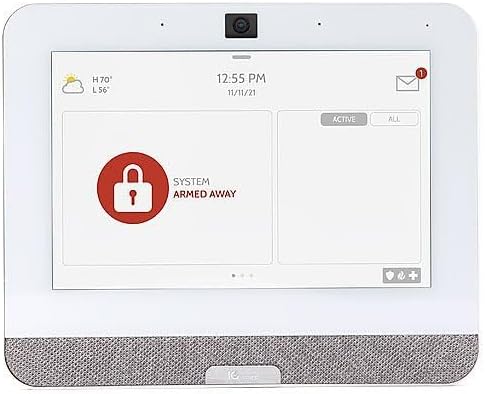
Figure 5.1: The IQ Panel 4 display when the system is armed in 'Away' mode, indicated by a red padlock icon and corresponding text.
5.1 Постановка та зняття з охорони
- Підставка для рук: Arms the perimeter sensors while allowing movement inside. Tap the "Arm Stay" icon and enter your code.
- Рука на відстані: Arms all sensors, including interior motion detectors. Tap the "Arm Away" icon and enter your code.
- Зняти з охорони: To disarm the system, tap the "Disarm" icon and enter your master code.
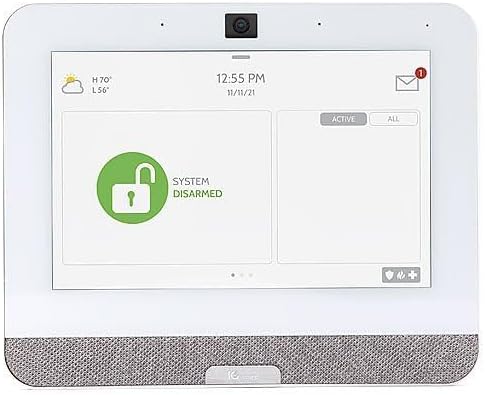
Figure 5.2: The IQ Panel 4 display when the system is disarmed, indicated by a green unlocked padlock icon and corresponding text.
5.2 Функції камери
The 8-megapixel panel camera supports various functions:
- Disarm Photos: The camera can capture an image when the system is disarmed.
- Peek-in: Allows remote viewing of the panel's camera feed.
- Alarm Videos: Records video clips during alarm events.
- Flex-Tilt: Відрегулюйте оптимальний кут камери viewінж.
5.3 Керування розумним будинком
The IQ Panel 4 integrates with Z-Wave devices, allowing control of lights, locks, thermostats, and more directly from the panel or a connected smartphone app.
5.4 Bluetooth Touchless Disarming
Enable Bluetooth Touchless Disarming in settings to automatically disarm your system when your paired smartphone is detected within range.
6. Технічне обслуговування
- Очищення екрану: Use a soft, lint-free cloth to clean the touchscreen. For stubborn smudges, slightly dampen the cloth with water. Do not spray cleaners directly onto the screen.
- Оновлення програмного забезпечення: The IQ Panel 4 receives over-the-air (OTA) software updates. Ensure your panel is connected to Wi-Fi to receive these updates, which provide new features and security enhancements.
- Резервний акумулятор: The panel includes a backup battery. Periodically check the battery status in the system settings. If the battery needs replacement, contact qualified service personnel.
7. Вирішення проблем
| проблема | Можлива причина | Рішення |
|---|---|---|
| Панель не вмикається | No power from outlet; power supply disconnected or faulty. | Check power outlet; ensure power supply is securely connected to panel and outlet. |
| Неможливо підключитися до Wi-Fi | Incorrect Wi-Fi password; out of range; router issue. | Verify password; move panel closer to router; restart router. |
| Система не вмикається | Open sensor (door/window); system error. | Check all sensors are closed; review system messages for errors. |
| Сенсорний екран не реагує | Тимчасовий збій програмного забезпечення. | Perform a soft reboot (refer to system settings for option) or power cycle the device. |
8. Технічні характеристики
- модель: IQP4004
- Розмір екрана: 7 Inches (HD, Capacitive glass multi-touch)
- Камера: 8 Megapixel Panel Camera with Flex-Tilt
- Зберігання: 16 Гб NAND Flash
- Аудіо: QuadSound 4x front-facing 4W speakers, 85-decibel siren
- Бездротове підключення: LTE, Wi-Fi, Z-Wave, Bluetooth, PowerG, 319.5MHz
- Розміри (упаковка): 12.32 x 7.24 x 2.13 дюймів
- Вага (товар): 1.72 фунта
- колір: Білий
- Сумісні пристрої: Смартфон (для керування застосунком)
9. Гарантія та підтримка
Qolsys products are covered by a limited warranty. For specific warranty terms and conditions, please refer to the warranty card included with your product or visit the official Qolsys webсайт.
For technical support, troubleshooting assistance, or service inquiries, please contact your authorized Qolsys dealer or installer. You may also find additional resources, FAQs, and support documentation on the Qolsys official webсайт.
Note: Unauthorized modifications or repairs to the device will void the warranty.


