1. Вступ
The Qolsys IQ Lock-PG Push Button Deadbolt provides enhanced security and convenient access to your property. This smart motorized deadbolt integrates PowerG wireless communication for reliable and stable connectivity, compatible with IQ Panel 4, IQ4 Hub, and IQ4 NS systems. It offers multiple access methods, including a pushbutton keypad, traditional key, thumb-turn, and remote control via the Alarm.com app.
Designed for durability, the IQ Lock-PG meets ANSI Grade 2 certifications and features an attractive oil-rubbed bronze finish to complement various door styles.
2. Ключові характеристики
- Motorized Deadbolt: Push button operation with an attractive finish.
- Методи множинного доступу: Lock/unlock via PowerG wireless communication (App and Panel), user code, thumb-turn, or physical key.
- Місткість коду користувача: Supports up to 250 user codes (4 to 8 digits) for family, friends, or temporary guests.
- Віддалене керування: Create or remove individual codes remotely via the Alarm.com app.
- Легка установка: Battery-powered (AA batteries, not included), requiring no complex wiring.
- Міцна конструкція: ANSI/BHMA Grade 2 certified for strong, reliable security.
3. Вміст упаковки
Перед початком встановлення переконайтеся, що всі елементи присутні в упаковці:
- Qolsys IQ Lock-PG Deadbolt Assembly
- (2) Під ключ
- Монтажне обладнання
- Інструкція з експлуатації (цей документ)
4. Налаштування та встановлення
The Qolsys IQ Lock-PG motorized deadbolt is designed for straightforward installation. All necessary hardware and detailed instructions are included. Please read these instructions carefully before proceeding.
4.1 Compatibility and Requirements
- Товщина дверей: Installs on standard doors measuring 1-3/8 inches to 2-1/4 inches (35-58mm) thick.
- Назад: Регульована засувка підходить для існуючих комплектів спинок розміром 2-3/8 дюйма або 2-3/4 дюйма (60/70 мм).
- Вручення дверей: Suitable for both right-handed and left-handed door operations.
- Системна інтеграція: Requires an IQ Panel 4, IQ4 Hub, or IQ4 NS (sold separately) and an active Internet connection for smart features.
- Потужність: Requires four (4) AA alkaline batteries (not included).
4.2 Кроки встановлення (див. вище)view)
While detailed steps are provided in the included physical manual, here is a general overview:
- Prepare the door: Ensure the door bore holes and backset are compatible with the lock.
- Встановіть засувку та запірну пластину.
- Встановіть зовнішній блок клавіатури.
- Встановіть внутрішню монтажну пластину.
- Під’єднайте кабель від зовнішнього вузла до внутрішнього блоку.
- Встановіть внутрішній вузол.
- Insert four (4) AA alkaline batteries into the battery compartment.
- Виконайте процес ручного відкриття дверей (автоматичне регулювання).
- Test the lock's functionality with the keypad and thumb-turn.
- Pair the lock with your IQ Panel system and Alarm.com app for smart features.

Малюнок 4.1: Спереду view of the Qolsys IQ Lock-PG Deadbolt, showcasing the keypad and keyhole.
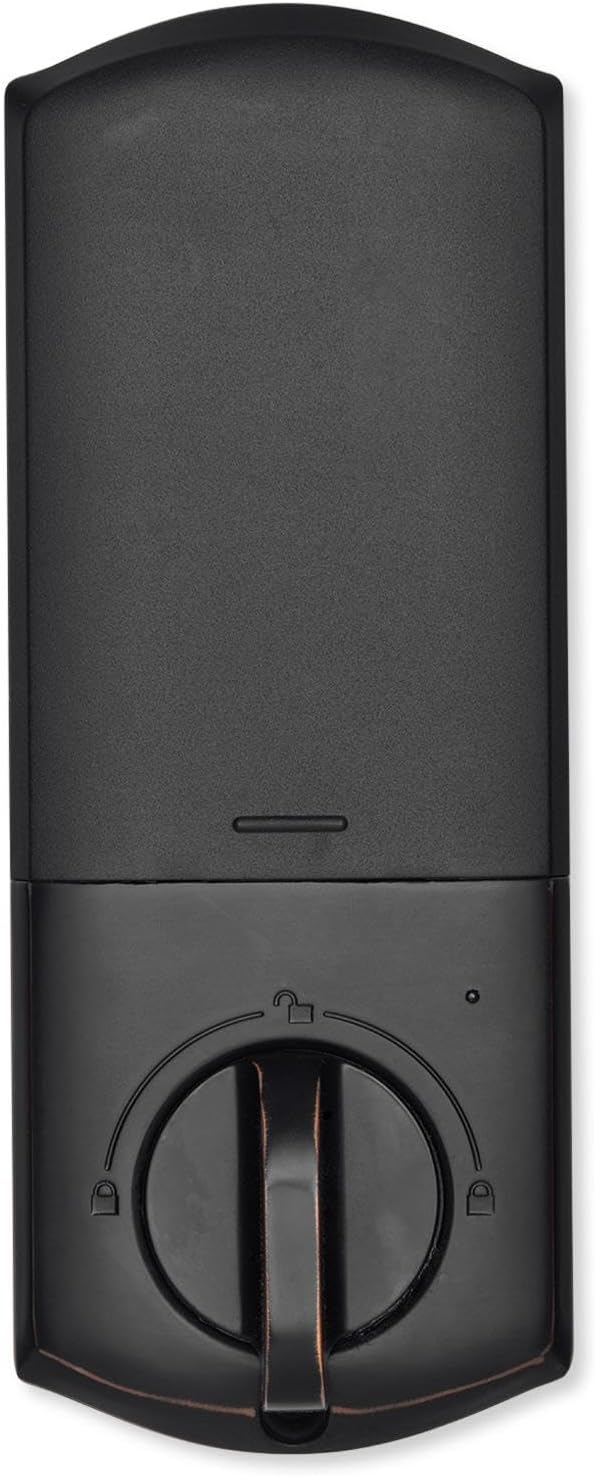
Рисунок 4.2: Інтер'єр view of the Qolsys IQ Lock-PG Deadbolt, highlighting the thumb-turn and battery cover.

Figure 4.3: Qolsys IQ Lock-PG Deadbolt installed on a door, illustrating its appearance in a real-world setting.
5. Інструкція з експлуатації
Замок Qolsys IQ Lock-PG пропонує кілька зручних способів блокування та відмикання дверей.
5.1 Методи доступу
- Кнопкова клавіатура: Enter a valid 4-to-8 digit user code on the exterior keypad to unlock the deadbolt. The lock will automatically engage when closed.
- Фізичний ключ: Use one of the provided turnkeys in the exterior key cylinder for manual unlocking and locking.
- Thumb-Turn: From the interior, rotate the thumb-turn to manually lock or unlock the deadbolt.
- PowerG Wireless Communication (Alarm.com App/Panel):
The Alarm.com mobile app allows for remote monitoring and control of your Qolsys devices. Once paired with your IQ Panel, you can:
- Lock or unlock your smart doors from anywhere.
- Create, modify, or delete up to 250 individual user codes. User codes are managed through the Alarm.com app and sent to the lock.
- Receive notifications regarding lock status and activity.
The Alarm.com app is available for Android, iOS, Windows, and Blackberry devices.
6. Технічне обслуговування
Regular maintenance ensures the longevity and optimal performance of your Qolsys IQ Lock-PG deadbolt.
6.1 Заміна батареї
The deadbolt is powered by four (4) AA alkaline batteries. Battery life is approximately 12 months, based on typical usage (6 user code unlock events and 10 locking/unlocking cycles per day). The lock features a low battery alarm to notify you when replacement is needed.
- When the low battery alarm sounds or is indicated, replace all four AA batteries simultaneously.
- Remove the interior cover to access the battery compartment.
- Вийміть старі батарейки та утилізуйте їх відповідно до місцевих правил.
- Insert new AA alkaline batteries, ensuring correct polarity.
- Replace the interior cover.
6.2 Очищення
Clean the exterior and interior surfaces of the lock with a soft, damp тканиною. Уникайте використання абразивних засобів для чищення або розчинників, оскільки вони можуть пошкодити покриття.
7. Вирішення проблем
This section addresses common issues you might encounter with your Qolsys IQ Lock-PG deadbolt.
7.1 Блокування клавіатури
If 10 consecutive invalid user codes are entered, the keypad will enter a lockout mode for 3 minutes. During this time, no codes can be entered. Wait for the lockout period to expire before attempting to enter a valid code again.
7.2 Замок не реагує
- Check the batteries: Ensure they are correctly installed and not depleted. Replace all four AA batteries if necessary.
- Verify connection to IQ Panel: Ensure the lock is properly paired with your IQ Panel 4, IQ4 Hub, or IQ4 NS. Check the panel's status for the lock.
- Check door alignment: Ensure the door and frame are properly aligned and there is no obstruction preventing the deadbolt from extending or retracting smoothly.
7.3 Issues with Alarm.com App Control
- Ensure your IQ Panel has an active Internet connection.
- Verify your smartphone or tablet has a stable internet connection.
- Log out and log back into the Alarm.com app.
- Ensure the lock is properly enrolled in your Alarm.com account.
8. Технічні характеристики
| Особливість | Специфікація |
|---|---|
| Номер виробника | IQ Lock-PGK-ORB |
| UPC | 7290109986104 |
| Закінчити | Натерта маслом бронза |
| Самообробка | Підтримується |
| Тип болта | Моторизований/стандартний засув |
| Назад | Регульований 2-3/8" / 2-3/4" (60/70 мм) |
| Підготовка дверей | 1-1/2" / 2-1/8" (38/54mm) |
| Товщина дверей | Автоматичне регулювання від 1-3/8 дюйма до 2-1/4 дюйма (35-58 мм) |
| Спосіб розблокування | PowerG wireless communication (App and Panel), Button keypad, key, thumb-turn |
| Ємність коду | Код користувача x 250 |
| Довжина коду | 4-8 цифр |
| Циліндр з ключа для перевизначення | так |
| Циліндр | Шпонковий паз KW1 |
| Робочий випtage | 6 В постійного струму |
| Акумулятор (не входить у комплект) | AA x 4 |
| Робоча температура Зовнішній вигляд | Від -31°F до 150°F (від -35°C до 65°C) |
| Робоча температура всередині | 32°F до 140°F (0°C до 60°C) |
| Клас захисту IP Зовнішнє складання | IP54 |
| Режим блокування (неправильне обмеження входу) | Блокування клавіатури на 3 хвилини після 10 введень невірного коду користувача |
| Сигналізація низького заряду батареї | так |
| Термін служби батареї | Мін. 12 місяців (6 подій розблокування кодом користувача та 10 циклів розблокування та блокування щодня) |
| Сертифікати | FCC, IC, ANSI BHMA A156.36 клас 2, UL10C (вогнестійкість 20 хв) |
| Підключення до Інтернету речей | PowerG |
| Вага продукту | 1.6KG (3.6 LB) |
| Робоча вологість Зовнішня | 100% конденсація |
| Робоча вологість всередині | 20% ~ 95% без конденсації |
9. Гарантія та підтримка
9.1 Інформація про гарантію
The Qolsys IQ Lock-PG Push Button Deadbolt comes with a warranty of Twelve months from the date of purchaseБудь ласка, збережіть чек про покупку для гарантійного обслуговування.
9.2 Підтримка клієнтів
For technical assistance, troubleshooting beyond this manual, or warranty inquiries, please contact Qolsys customer support. Refer to the Qolsys official webнайактуальнішу контактну інформацію див. на сайті або на упаковці вашого продукту.


