1. Вступ
Thank you for choosing the HBN Digital Programmable Timer Socket. This device is designed to automate the switching of electrical appliances, helping you save energy and enhance convenience. It features an LCD display, 8 configurable ON/OFF programs, and a random function for security. Please read this manual carefully before use to ensure proper operation and safety.
2. Техніка безпеки
- This timer socket is designed for indoor use only. Do not expose it to moisture, water, or extreme temperatures.
- Ensure the connected appliance's power consumption does not exceed the timer's maximum load capacity (16A / 3680W). Overloading can cause damage or fire.
- Не розбирайте та не намагайтеся ремонтувати пристрій. Звертайтеся до кваліфікованого персоналу для проведення будь-яких технічних робіт.
- Зберігати в недоступному для дітей місці.
- Always insert the plug fully into the socket.
- Unplug the timer from the wall socket before cleaning. Clean only with a dry, soft cloth.
3. Продукт закінчивсяview
Familiarize yourself with the components of your HBN Digital Programmable Timer Socket.

Малюнок 3.1: Спереду view of the timer socket, showing the LCD display, control buttons, and power outlet.

Малюнок 3.2: Задня частина view of the timer socket, displaying the model number BND-50/SG3-VC and electrical ratings.
Кнопки управління:

Малюнок 3.3: Детально view of the control buttons and LCD display.
- ГОДИННИК: Використовується для встановлення поточного часу та виходу з режиму програмування.
- ПРОГ: Enters and cycles through the 8 ON/OFF programming settings.
- R (Random): Activates or deactivates the random switching function.
- СКИДАТИ: Скидає всі налаштування та скидає таймер до заводських значень.
- ТИЖЕНЬ: Selects the day(s) of the week for time and program settings.
- ГОДИНА: Adjusts the hour for time and program settings.
- ХВ: Adjusts the minute for time and program settings.
- ON/AUTO/OFF: Manually switches the timer to ON, AUTO (programmed mode), or OFF.
РК-дисплей:
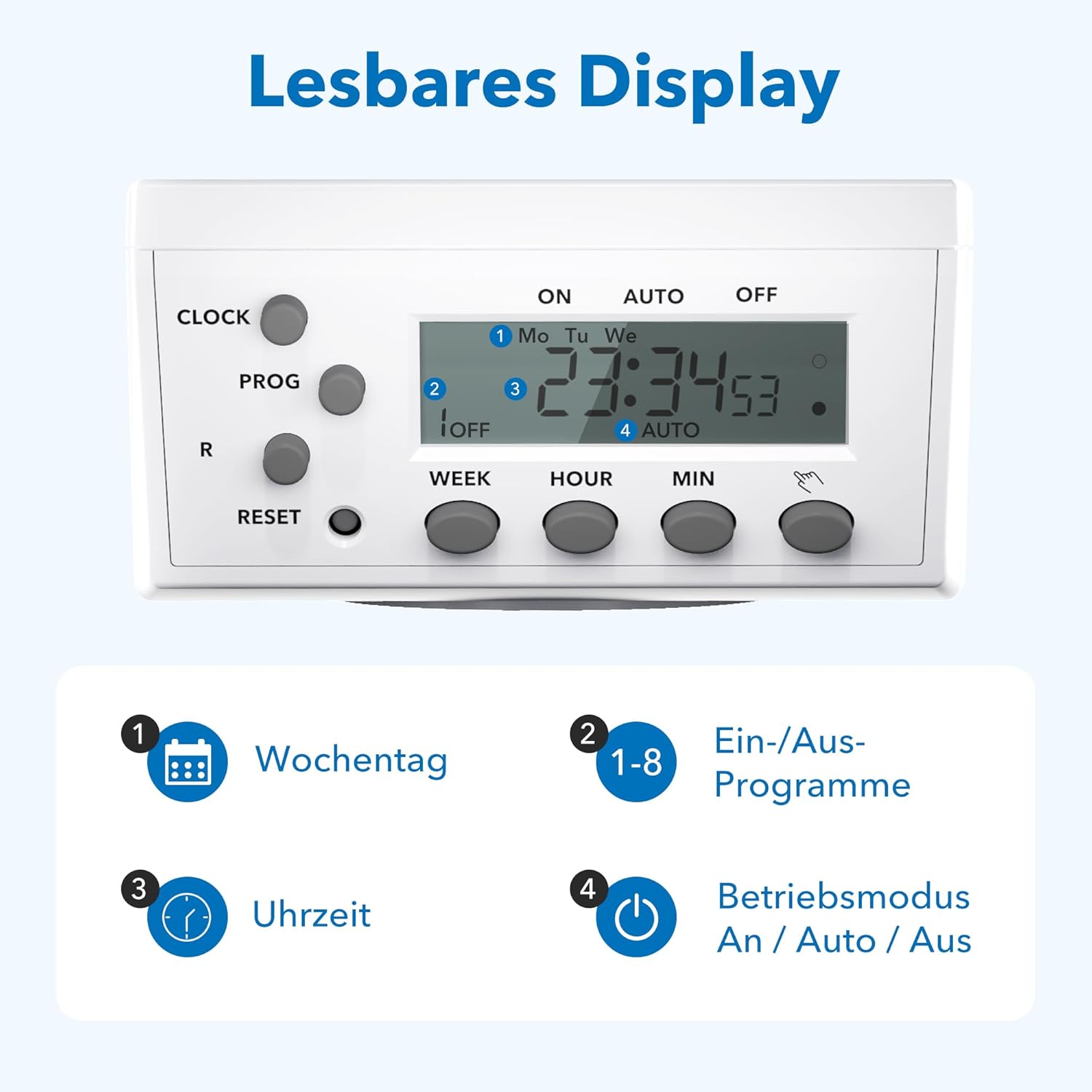
Figure 3.4: The LCD display shows current time, day, program status, and operating mode.
The LCD display provides clear information on the current time, day of the week, active program number, and the current operating mode (ON, AUTO, OFF).
4. Налаштування
4.1 Початкове заряджання та скидання налаштувань
- Plug the timer socket into a live wall outlet for at least 15-30 minutes to charge its internal battery. This battery retains settings during power outagес.
- After charging, use a pointed object (like a pen tip) to press the СКИДАННЯ button. This clears all previous settings and ensures a fresh start. The display will show '0:00'.
4.2 Встановлення поточного часу
- Натисніть і утримуйте ГОДИННИК кнопку.
- Поки тримає ГОДИННИК, натисніть ТИЖДЕНЬ button repeatedly to select the current day of the week (Mo, Tu, We, Th, Fr, Sa, Su).
- Поки тримає ГОДИННИК, натисніть ГОДИНА button repeatedly to set the current hour.
- Поки тримає ГОДИННИК, натисніть ХВ кілька разів натисніть кнопку , щоб встановити поточну хвилину.
- Відпустіть ГОДИННИК кнопка. Поточний час тепер встановлено.
5. Інструкція з експлуатації
5.1 Програмування часу ввімкнення/вимкнення
The timer allows for up to 8 distinct ON/OFF programs. Each program consists of an ON time and an OFF time.
- Натисніть ПРОГ button once. The display will show '1 ON'.
- Прес ТИЖДЕНЬ to select the desired day(s) for this program. Options include individual days, weekdays, weekends, or all days.
- Прес ГОДИНА щоб встановити потрібну годину увімкнення.
- Прес ХВ щоб встановити потрібну хвилину ввімкнення.
- Прес ПРОГ знову. На дисплеї з’явиться «1 ВИМК».
- Repeat steps 2-4 to set the desired OFF time for program 1.
- Прес ПРОГ again to move to '2 ON' and repeat the process for subsequent programs (up to 8).
- Після налаштування всіх потрібних програм натисніть кнопку ГОДИННИК кнопку, щоб вийти з режиму програмування та повернутися до відображення поточного часу.
5.2 Manual Override (ON/AUTO/OFF)
Натисніть УВІМК./АВТО/ВИМК кнопка для циклічного перемикання режимів роботи:
- ON: The connected appliance is continuously ON, overriding all programs.
- АВТО: The timer operates according to the programmed ON/OFF times. This is the standard operating mode for automated control.
- ВИМКНЕНО: The connected appliance is continuously OFF, overriding all programs.
5.3 Випадкова функція
The random function provides a security feature by switching the connected appliance ON and OFF at irregular intervals (2 to 30 minutes delay) around the programmed times. This can simulate presence when you are away.
- Щоб активувати, натисніть R button. An 'R' indicator will appear on the display.
- Щоб деактивувати, натисніть кнопку R знову натисніть кнопку. Індикатор «R» зникне.

Малюнок 5.1: Впрamples of versatile applications for the timer socket.
6. Технічне обслуговування
- Ensure the timer is unplugged from the power outlet before cleaning.
- Протріть зовнішню частину м’якою сухою тканиною. Не використовуйте рідкі засоби для чищення або абразивні матеріали.
- Зберігайте таймер у прохолодному сухому місці, коли він не використовується.
7. Вирішення проблем
- Дисплей порожній: Ensure the timer is plugged into a live outlet. If it has been unplugged for an extended period, the internal battery may be depleted. Plug it in for 15-30 minutes to recharge.
- Appliance does not switch ON/OFF as programmed:
- Перевірте, чи увімкнено таймер АВТО mode. If it's in ON or OFF mode, programs are overridden.
- Verify that the programmed ON/OFF times and days are correct.
- Переконайтеся, що поточний час встановлено правильно.
- Confirm the appliance itself is working and properly connected to the timer.
- Programs are lost after a power outage: The internal battery may not be fully charged or is at the end of its life. Ensure the timer is regularly plugged in to maintain battery charge.
- Timer is unresponsive: Натисніть СКИДАННЯ button with a pointed object to clear all settings and restart the device. Then, reprogram the time and desired schedules.
8. Технічні характеристики

Figure 8.1: Technical data and dimensions of the timer socket.
| Специфікація | Значення |
|---|---|
| Номер моделі | BND-50/SG3-VC |
| Номінальний випtage | 230 В |
| Номінальний струм | 16 А |
| Максимальне навантаження | 3680 Вт |
| Мінімальний час перемикання | 1 хвилина |
| Кількість програм | 8 програм увімкнення/вимкнення |
| Розміри продукту | 7.5 х 7.5 х 8 см |
| Вага товару | 150 грамів |
| матеріал | Kunststoff (пластик) |
| Колір | Білий |
| Виробник | ТОВ «Ерго І&Е» |
9. Гарантія та підтримка
HBN products are manufactured to high-quality standards. For warranty information or technical support, please refer to the documentation provided with your purchase or contact your retailer. Keep your proof of purchase for warranty claims.


