1. Вступ
This manual provides comprehensive instructions for the setup, operation, and maintenance of your GOBOULT Mustang Racer Smart Watch. Please read this manual thoroughly before using the device to ensure proper functionality and to maximize your user experience. Keep this manual for future reference.
2. Що в коробці
Перевірте наявність усіх елементів в упаковці:
- GOBOULT Mustang Racer Smart Watch
- Зарядний кабель
- Посібник користувача (цей документ)
- Гарантійний талон
3. Продукт закінчивсяview
Familiarize yourself with the key components of your GOBOULT Mustang Racer Smart Watch.
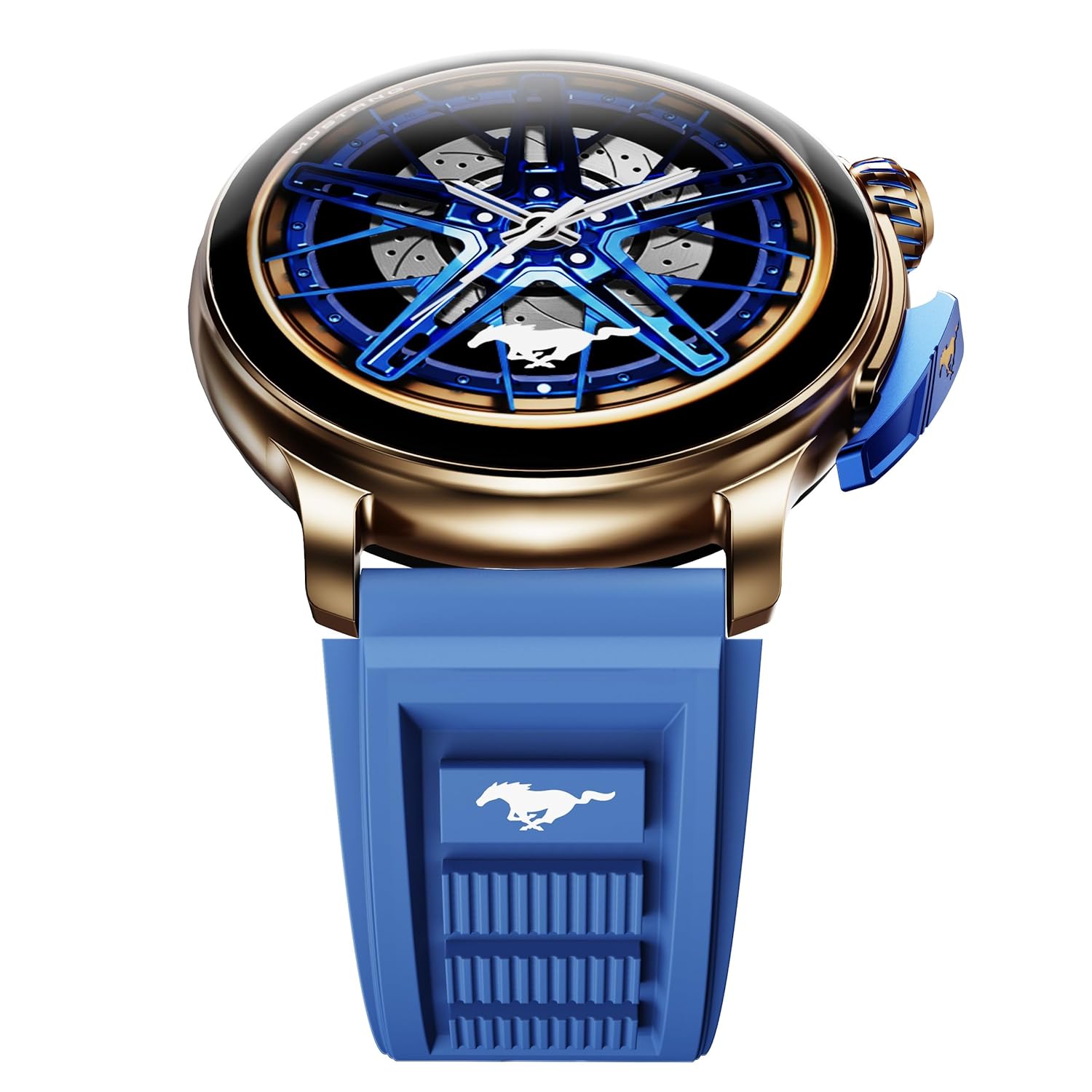
Image: The GOBOULT Mustang Racer Smart Watch, showcasing its 1.43-inch AMOLED display and overall design.
Display and Bezel
The watch features a 1.43-inch AMOLED display with 500 Nits brightness for clear visibility. The functional rotating bezel allows for intuitive navigation through menus and features.

Зображення: Детальний view of the smartwatch's 1.43-inch AMOLED display and the rotating bezel, highlighting its design and brightness.
Ґудзики та корона
The watch includes a rotating tyre-tread crown for navigation and selection, along with a functional paddle shifter button for quick access to features.

Image: The smartwatch featuring its functional paddle shifter and rotating crown, designed for enhanced control.
4. Налаштування
4.1. Заряджання смарт-годинника
Before initial use, fully charge your smartwatch. Connect the magnetic charging cable to the charging pins on the back of the watch and plug the USB end into a compatible power adapter (not included) or a computer's USB port. The watch will display a charging indicator. A full charge takes approximately 120 minutes.
4.2. Увімкнення/вимкнення живлення
- Увімкнення: Press and hold the main power button (crown) for a few seconds until the GOBOULT logo appears.
- Вимкнення живлення: From the watch face, swipe down to access quick settings, or navigate to the settings menu. Select "Power Off" and confirm. Alternatively, press and hold the main power button until the power-off option appears.
4.3. Сполучення зі смартфоном
To unlock all features, pair your GOBOULT Mustang Racer Smart Watch with the companion app on your smartphone via Bluetooth.
- Download the official GOBOULT app from your smartphone's app store (iOS App Store or Google Play Store).
- Переконайтеся, що Bluetooth увімкнено на вашому смартфоні.
- Відкрийте застосунок GOBOULT і дотримуйтесь інструкцій на екрані, щоб створити обліковий запис або увійти.
- У додатку виберіть «Додати пристрій» або подібну опцію.
- Select "GOBOULT Mustang Racer" from the list of available devices.
- Підтвердьте запит на сполучення як на смартфоні, так і на смарт-годиннику.
Після сполучення годинник синхронізує дані з вашим телефоном, і ви зможете налаштувати параметри через додаток.

Image: The smartwatch highlighting its Bluetooth V5.3 connectivity for quick syncing and IP67 water resistance.
5. Інструкція з експлуатації
5.1. Навігація
- Проведення пальцем вгору/вниз/вліво/вправо: Navigate through menus, notifications, and quick access panels.
- Торкніться: Виберіть елемент або підтвердіть дію.
- Rotating Bezel/Crown: Rotate to scroll through lists or adjust settings. Press to select or return to the home screen.
- Paddle Shifter Button: Customizable shortcut for frequently used functions (e.g., sports modes).
5.2. Виклики через Bluetooth
With integrated speaker and microphone, you can make and receive calls directly from your wrist after pairing with your smartphone.
- Переконайтеся, що ваш годинник підключено до телефону через Bluetooth.
- To make a call: Access the dialer or contacts list on your watch.
- To receive a call: An incoming call notification will appear on your watch. Tap to answer or decline.
5.3. Циферблати годинника
Customize your watch's appearance with over 150 watch faces, including exclusive Mustang designs. Long-press the watch face to change it, or use the companion app for more options.

Зображення: Виставка смарт-годинниківasing multiple watch face options, including exclusive Mustang designs.
5.4. Спортивні режими
The watch supports over 120 sports modes to track your physical activities. Access sports modes from the main menu or via the paddle shifter shortcut (if configured).
- Select your desired sport.
- Start the activity. The watch will record metrics such as duration, calories burned, and heart rate.
- End the activity to save data. Review your performance in the app.

Image: The smartwatch displaying a sports tracking interface, indicating its capability to monitor various physical activities.
5.5. Моніторинг здоров'я
The GOBOULT Mustang Racer Smart Watch provides comprehensive health tracking features:
- 24x7 Heart Rate Monitor: Постійно відстежує ваш пульс.
- Монітор насичення крові киснем SpO2: Вимірює рівень кисню в крові.
- Моніторинг сну: Analyzes sleep patterns (deep sleep, light sleep, awake time).
- Монітор стресу: Надає уявлення про ваш рівень стресу.
- Кров’яний тиск: (Note: Smartwatch blood pressure measurements are for reference only and should not be used for medical diagnosis.)
Access these features from the watch's health menu or view детальні звіти у супутньому додатку.

Зображення: Внутрішній view of the smartwatch highlighting its health tracking sensors, with text indicating features like heart rate, SpO2, sleep, and stress monitoring.
5.6. Голосовий помічник зі штучним інтелектом
Activate the AI Voice Assistant on your watch to perform tasks, set reminders, or get information using voice commands. Ensure your watch is connected to your phone for this feature to function.
5.7. Розумні сповіщення
Receive notifications for calls, messages, and app alerts directly on your watch. Manage notification settings through the GOBOULT app.
5.8. Always On Display
The Always On Display feature allows the time and essential information to remain visible on the screen without needing to raise your wrist or press a button. This feature can be enabled or disabled in the watch settings to manage battery consumption.

Image: The smartwatch displaying the time and a car image, illustrating the Always On Display functionality.
6. Характеристики та технічні характеристики
Ключові характеристики:
- 1.43" AMOLED Display with 500 Nits Brightness
- Bluetooth Calling (BT V5.3)
- Rotating Bezel for intuitive control
- 150+ Watch Faces, including exclusive Mustang designs
- Голосовий помічник AI
- Health Monitoring: SpO2, Heart Rate, Sleep, Stress, Blood Pressure
- 120+ спортивних режимів
- Водонепроникність IP67
- Up to 7-day battery runtime with fast charging
Технічні характеристики:
| Бренд | ГОБОУЛТ |
| Номер моделі | GOBOULT Mustang Racer |
| Розмір дисплея | 1.43 дюймів |
| Бездротовий тип | Bluetooth V5.3 |
| Час зарядки батареї | 120 хвилин |
| Вміст енергії батареї | 1.11 Вт годин |
| Водонепроникність | IP67 |
| Вага товару | 55 г |
| Країна походження | Китай |
7. Технічне обслуговування
7.1. Очищення смарт-годинника
Регулярне чищення допомагає підтримувати зовнішній вигляд та функціональність годинника:
- Протріть екран і корпус м’якою тканиною без ворсу.
- Для стійких плям злегкаampпромийте тканину водою. Уникайте використання агресивних хімікатів або абразивних матеріалів.
- Clean the charging contacts periodically with a dry cloth to ensure proper charging.
7.2. Водостійкість (IP67)
The GOBOULT Mustang Racer Smart Watch is IP67 water resistant, meaning it can withstand immersion in up to 1 meter of fresh water for up to 30 minutes. It is suitable for daily use and light splashes. However, it is not recommended for swimming, showering with hot water, or diving. Avoid exposure to saltwater or chemicals, as this may damage the device.
7.3. Догляд за акумулятором
- Уникайте частого повного розряджання акумулятора.
- Зберігайте годинник у прохолодному, сухому місці, якщо він не використовується протягом тривалого часу.
- Використовуйте лише наданий зарядний кабель.
8. Вирішення проблем
| проблема | Можливе рішення |
|---|---|
| Годинник не вмикається. | Переконайтеся, що годинник повністю заряджений. Підключіть його до зарядного пристрою щонайменше на 30 хвилин. |
| Не вдається з'єднати пристрій зі смартфоном. |
|
| Неточні дані про стан здоров'я. |
|
| Короткий час автономної роботи. |
|
9. Гарантія та підтримка
Your GOBOULT Mustang Racer Smart Watch comes with a warranty as specified on the included Warranty Card. Please refer to the card for details regarding warranty period, coverage, and terms and conditions.
For technical support, product inquiries, or warranty claims, please contact GOBOULT customer service through the contact information provided on your Warranty Card or visit the official GOBOULT webсайт.
Включені компоненти: Charging Cable, Mustang Racer Apex Blue Smart watch, User Manual, Warranty Card


