1. Вступ
This manual provides detailed instructions for the LAUNCH Creader Elite V3.0 OBD2 Scanner, a professional diagnostic tool designed specifically for Land Rover and Jaguar vehicles. It covers device setup, operational procedures for various diagnostic and service functions, software updates, and troubleshooting tips. Please read this manual thoroughly before operating the device to ensure correct usage and optimal performance.
2. Продукт закінчивсяview
2.1. Що в коробці
- 1 * LAUNCH Creader Elite V3.0 OBD2 Scanner for JLR
- 1 * діагностичний кабель OBD2
- 1 * Короткий посібник
- 1 * Посібник користувача
2.2. Ключові характеристики
The LAUNCH Creader Elite V3.0 offers a comprehensive suite of features for vehicle diagnostics and maintenance:
- Покращене обладнання: Features Android 8.1 operating system, 32GB ROM, 3000mAh battery, and 2.4&5GHz dual-band Wi-Fi for improved performance.
- DoIP Protocol Support: Supports the new DoIP protocol for Land Rover & Jaguar models manufactured after 2017 (requires an adapter).
- Full Systems Diagnostics: Provides in-depth scanning for all available vehicle modules, including engine, transmission, ABS, SRS, and more.
- Двонаправлене керування (активний тест): Allows control of vehicle components and systems for active testing, such as windows, mirrors, wipers, and horn.
- Comprehensive Service Functions: Includes Oil Reset, Electronic Parking Brake (EPB) Reset, Battery Management System (BMS) Reset, Steering Angle Sensor (SAS) Calibration, Injector Coding, Throttle Relearn, Height Calibration, Transmission Adaptation, Crankshaft/Camshaft Relearn, Sunroof Calibration, and more.
- 4-в-1 Потоковий потік даних у реальному часі: Displays real-time data from multiple sensors simultaneously in a graphical format, with recording and playback capabilities.
- Smart Diagnostic Functions: Features Auto VIN for automatic vehicle identification, DTC Lookup for code explanations, and the ability to generate and share diagnostic reports.
- Повні функції OBD2: Supports all 10 OBD2 test modes for universal vehicle compatibility (post-1996 models).
- Довічні безкоштовні оновлення: Provides lifetime free software updates specifically for Land Rover and Jaguar vehicle brands.
2.3. Device Comparison
The Creader Elite V3.0 offers significant upgrades over previous versions:

Image: Comparison of Creader Elite V3.0, V2.0, and V1.0, highlighting V3.0's superior features like DoIP, Android 8.1, 32GB memory, and 2.4&5GHz WiFi.
2.4. Фізичний опис
The device features a durable orange casing with a 4-inch touchscreen display. The back of the device includes product identification details such as the model number, FCC ID, and serial number.
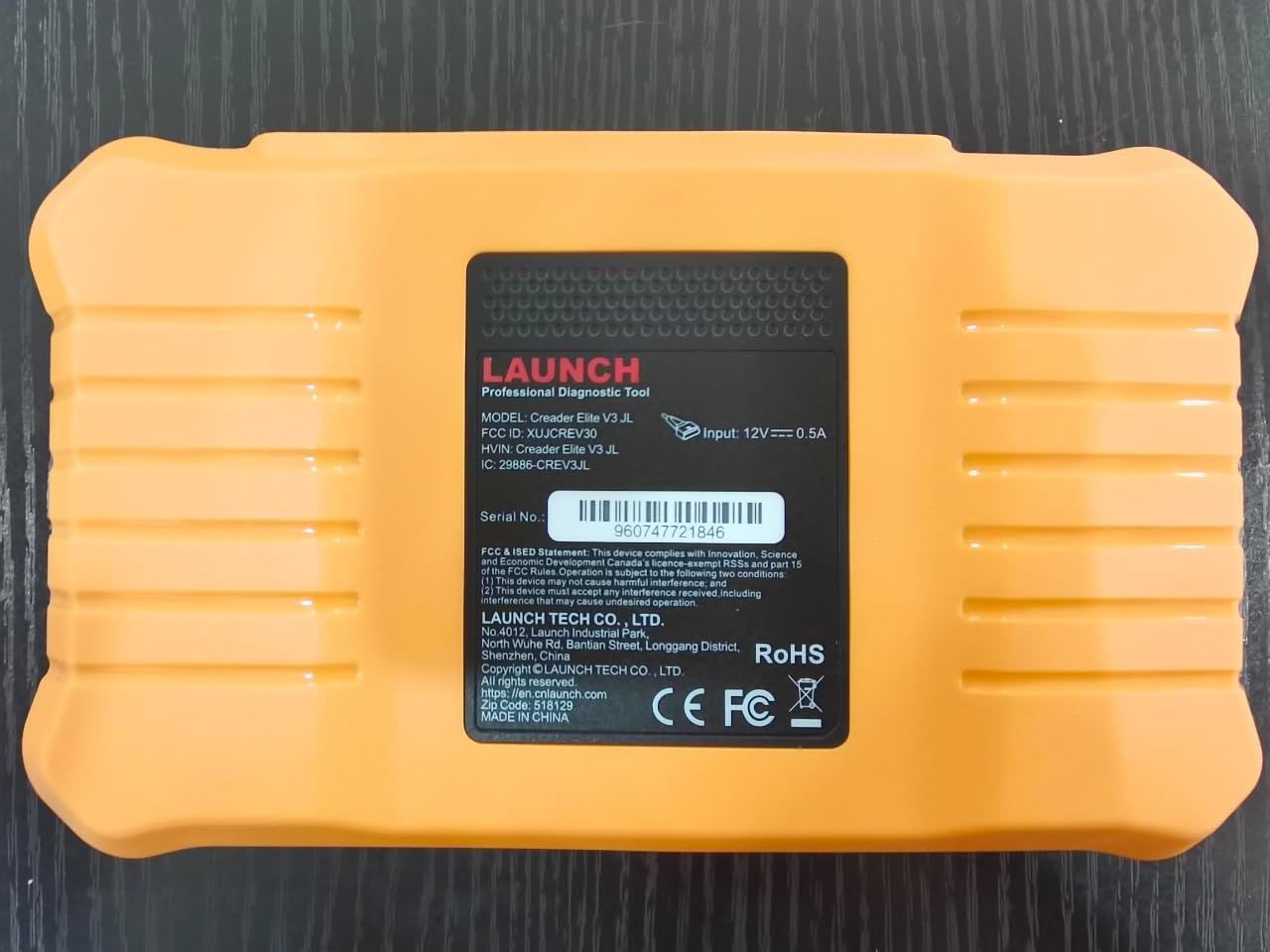
Зображення: Задня частина view of the LAUNCH Creader Elite V3.0, displaying the model number, FCC ID, and serial number (e.g., 960747721846).
3. Налаштування
3.1. Початкове увімкнення
- Переконайтеся, що пристрій повністю заряджено або підключено до джерела живлення.
- Натисніть і утримуйте кнопку живлення, доки екран не підсвітиться.
- Дотримуйтесь підказок на екрані, щоб вибрати потрібну мову та регіон.
3.2. Підключення Wi-Fi
- З головного меню перейдіть до Налаштування.
- Виберіть Wi-Fi і увімкніть його.
- Виберіть потрібну мережу Wi-Fi зі списку та введіть пароль, якщо буде запропоновано.
- Confirm the connection. A stable internet connection is required for software updates and online resources.
3.3. Реєстрація та активація
Upon first use or after a factory reset, you may be prompted to register your device. Follow the on-screen instructions to create an account or log in. This step is crucial for accessing software updates and technical support.
4. Інструкція з експлуатації
4.1. Підключення до транспортного засобу
- Знайдіть діагностичний порт OBD2 автомобіля, зазвичай під приладовою панеллю з боку водія.
- Переконайтеся, що запалювання автомобіля увімкнено ON position (engine off or running, depending on the test).
- Connect the OBD2 diagnostic cable to the vehicle's OBD2 port and to the LAUNCH Creader Elite V3.0 device.
- The device will automatically power on or prompt you to do so.
4.2. Full Systems Diagnostics
This function allows you to scan all available electronic control units (ECUs) in the vehicle.

Image: Display showing OE-level all system diagnostics, including Auto VIN, fault codes, 4-in-1 live data, and MIL reset.
- У головному меню виберіть Місцева діагностика.
- Виберіть марку автомобіля (Land Rover або Jaguar).
- Виберіть Автоматичний пошук or Ручний вибір. Auto Search (Auto VIN) will attempt to automatically identify the vehicle.
- Once the vehicle is identified, select Звіт про здоров'я or Сканування системи to perform a comprehensive scan of all modules.
- Review the diagnostic trouble codes (DTCs) and ECU information. You can then choose to clear codes if necessary.
4.3. Функції обслуговування
The Creader Elite V3.0 provides numerous maintenance and reset services. Access these functions via Діагностика > Бренд > Вибір системи > Спеціальна функція.

Зображення: Оверview of various service functions including Oil Reset, Brake Reset, SAS Calibration, Start-Stop Reset, TPMS Reset, Injector Coding, Battery Reset, ABS Bleeding, Seat Calibration, and Height Calibration.
Common services include:
- Скидання масла: Скидає систему терміну служби моторної оливи.
- Скидання EPB: Resets the electronic parking brake after replacement.
- Калібрування SAS: Калібрує датчик кута повороту керма.
- Кодування інжектора: Кодує нові номери форсунок в ЕБУ.
- Перенавчання дросельної заслінки: Перезавчає положення дросельної заслінки.
- Калібрування висоти: Calibrates the vehicle's suspension height.
- Скидання батареї: Registers a new battery replacement.
- Кровотеча з абсцесів м'язів нижнього шлуночка (ABS): Виконує процедури прокачування гальм ABS.
Note: The availability of specific service functions may vary depending on the vehicle model and year. Always check compatibility before performing a service.
4.4. Двонаправлене керування (активні тести)
Active tests allow you to send commands to vehicle systems and components to verify their functionality.

Image: Depicts bi-directional active tests, showing the device sending commands to vehicle actuators like wipers, windows, clutch, and injectors to check their status.
- Navigate to the desired vehicle system within the diagnostic menu.
- Виберіть Активний тест or Двонаправлене керування.
- Choose the specific component or system you wish to test (e.g., 'Wiper Test', 'Window Test', 'Horn Test').
- Дотримуйтесь інструкцій на екрані, щоб активувати компонент, і спостерігайте за його реакцією.
4.5. Повні функції OBD2
For universal vehicle diagnostics (all OBD2 compliant vehicles after 1996), use the OBD II опція меню.
- Прочитайте коди: Отримує загальні (P0, P2, P3, U0) та специфічні для виробника (P1, P3, U1) коди.
- Очистити коди: Clears diagnostic trouble codes and turns off the Malfunction Indicator Light (MIL).
- Живі дані: Відображає потік даних у режимі реального часу від датчиків автомобіля.
- Готовність I/M: Перевіряє готовність моніторів, пов'язаних з викидами.
- Стоп-кадр: Відображає знімок робочих умов на момент виникнення несправності, пов'язаної з викидами.
- Випробування датчика O2: Отримує результати тестування монітора датчика O2.
- Тестування бортового монітора (режим 6): Отримує результати для компонентів та систем силового агрегату, пов'язаних з викидами.
- Тестування системи EVAP (режим 8): Ініціює випробування системи контролю випарних викидів.
- Інформація про автомобіль: Отримує ідентифікаційний номер транспортного засобу (VIN), ідентифікатор калібрування (CALID) та номер перевірки калібрування (CVN).
4.6. Real-Time Monitoring and Data Stream
Monitor various vehicle parameters in real-time to diagnose intermittent issues or verify repairs.

Image: Real-time monitoring screen showing battery voltage, transmission oil temperature, coolant temperature, and vehicle speed, with a detailed 4-in-1 data stream graph below.
- From the diagnostic menu, select Дані в реальному часі.
- Виберіть параметри, які ви хочете контролювати.
- The device can display up to four data streams simultaneously in a graphical format.
- Використовуйте запис і Відтворення functions to capture and review data for later analysis.
4.7. Функції інтелектуальної діагностики
The device includes features to streamline the diagnostic process:
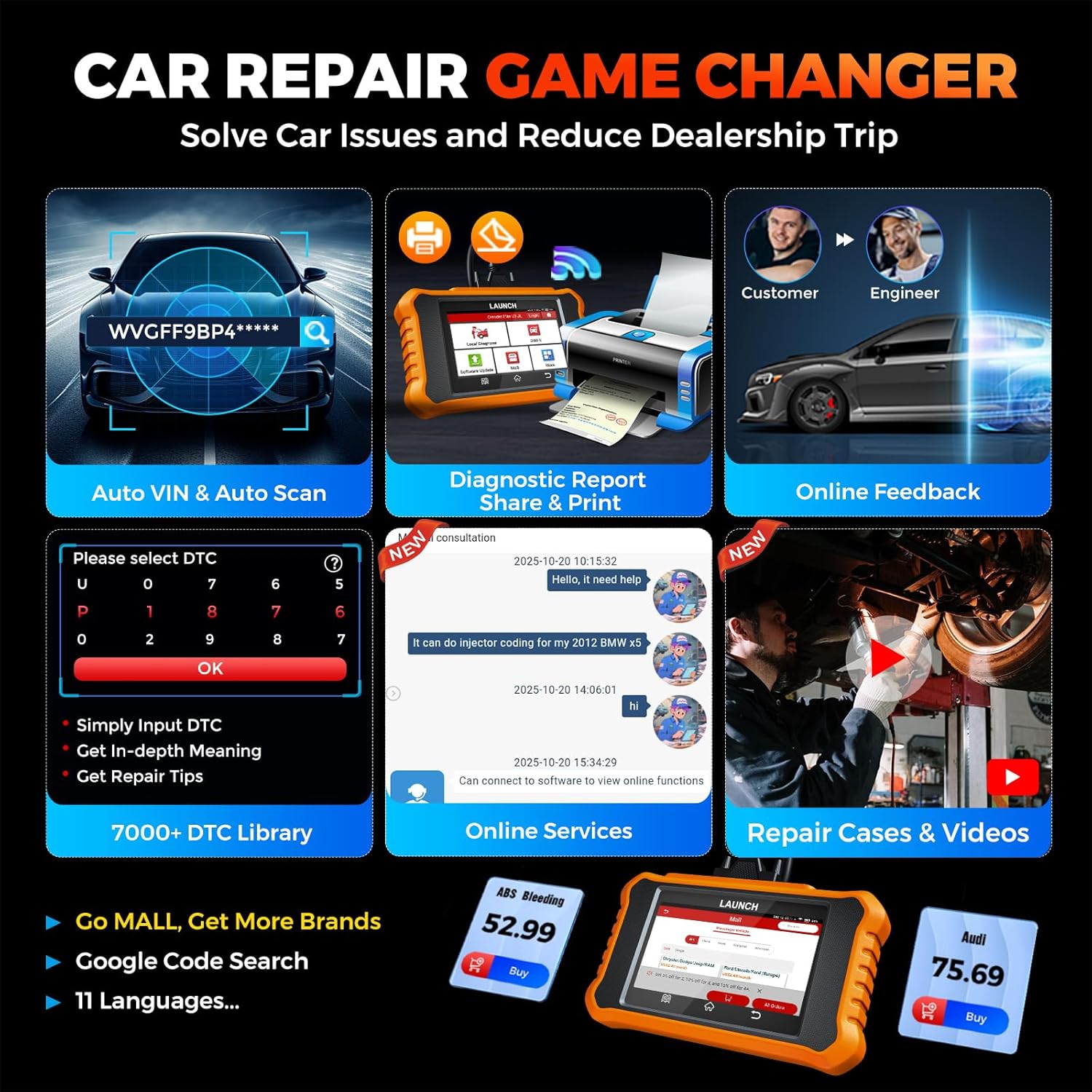
Image: Smart diagnostic features such as Auto VIN, diagnostic report generation and printing, online feedback, 7000+ DTC library, and access to online services.
- VIN-код автомобіля: Automatically identifies vehicle information (year, make, model) for quicker diagnostics.
- Пошук DTC: Provides detailed explanations for diagnostic trouble codes.
- Діагностичний звіт: Generates a professional diagnostic report that can be shared or printed.
- Онлайн-відгуки: Allows users to submit feedback or issues directly to technical support.
5. Maintenance & Updates
5.1. Оновлення програмного забезпечення
The LAUNCH Creader Elite V3.0 offers lifetime free software updates for Land Rover and Jaguar brands.
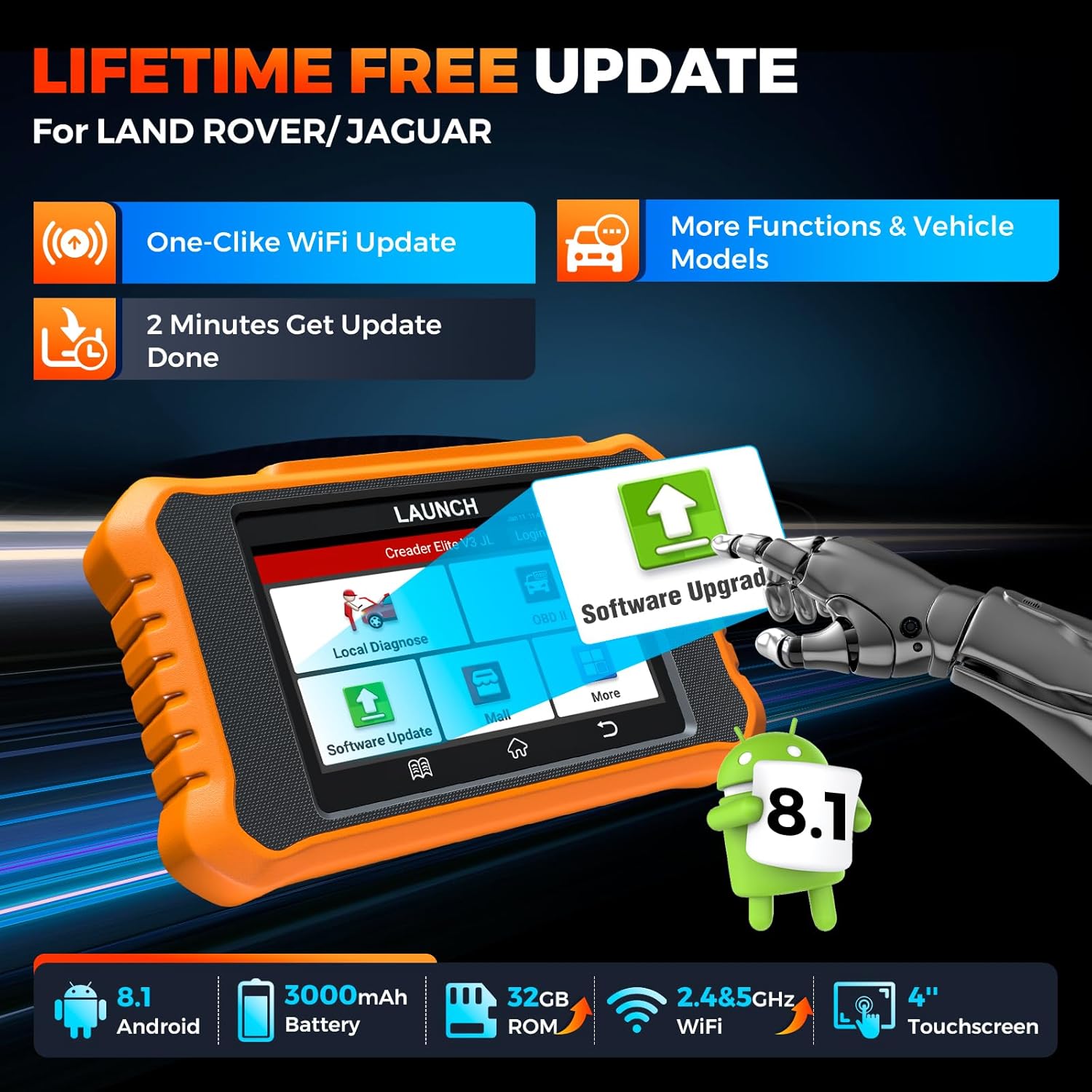
Image: Device screen illustrating the one-click Wi-Fi update process, emphasizing lifetime free updates for Land Rover/Jaguar and the ability to get more functions and vehicle models.
- Переконайтеся, що пристрій підключено до стабільної мережі Wi-Fi.
- У головному меню виберіть Оновлення програмного забезпечення.
- Пристрій перевірить наявність доступних оновлень.
- Select the updates you wish to install and follow the on-screen prompts. Updates typically take a few minutes.
5.2. Expanding Vehicle Coverage (Mall)
If you require diagnostic capabilities for other vehicle brands beyond Land Rover and Jaguar, you can purchase additional software packages from the Торговий центр application on the device. Please note that software purchased from the Mall is typically valid for one year and may require re-purchase after expiry.
5.3. Догляд за пристроєм
- Тримайте пристрій чистим та без пилу й вологи.
- Не кидайте пристрій і не піддавайте його сильним ударам.
- Зберігайте пристрій у прохолодному сухому місці, коли він не використовується.
- Використовуйте лише наданий зарядний кабель та аксесуари.
6. Сумісність
The LAUNCH Creader Elite V3.0 is primarily designed for:

Image: Device interface showing diagnostic options for Land Rover (Defender, Discovery, Range Rover, Evoque) and Jaguar (E-Pace, F-Pace, F-Type, S-Type, X-Type, XE, XF, XJ, XK) models, with a note on DoIP protocol for models after 2017.
- Land Rover: Compatible with models such as Defender, Discovery, Discovery Sport, Range Rover, Range Rover Evoque, etc.
- Ягуар: Compatible with models such as E-Pace, F-Pace, F-Type, S-Type, X-Type, XE, XF, XJ, XK, etc.
- Протокол DoIP: Supports Land Rover & Jaguar models after 2017, requiring a separate DoIP adapter.
- Універсальний OBD2: Fully compatible with all OBD2 compliant vehicles manufactured after 1996 for basic OBD2 functions.
For specific vehicle compatibility, it is recommended to contact technical support via obdbox21@163.com.
7. Технічні характеристики
| Модель | LAUNCH Creader Elite 3.0-JL |
| Операційна система | Android 8.1 |
| Розмір екрана | 4 дюймів |
| Внутрішня пам'ять (ROM) | 32 ГБ |
| Ємність акумулятора | 3000 мАг |
| Wi-Fi | 2.4 & 5GHz Dual-band |
| Джерело живлення | Працює від батареї |
| Вага товару | 1.49 фунта |
| Розміри упаковки | 8 x 7.5 x 1.5 дюймів |
| Автомобільний тип | Universal Fit (for OBD2 functions) |
8. Вирішення проблем
8.1. Пристрій не вмикається
- Check battery level. Connect the device to a charger and allow it to charge for at least 30 minutes.
- Ensure the power button is pressed and held correctly.
- If connected to the vehicle, ensure the vehicle's ignition is on and the OBD2 cable is securely connected.
8.2. Communication Error with Vehicle
- Verify the OBD2 cable is securely connected to both the device and the vehicle's port.
- Переконайтеся, що запалювання автомобіля увімкнено ON положення.
- Confirm that the vehicle is OBD2 compliant (generally 1996 and newer for US vehicles).
- Try a different OBD2 compliant vehicle to rule out a vehicle-specific issue.
- Ensure the correct vehicle brand software is installed and up to date.
8.3. Software Update Failure
- Check your Wi-Fi connection for stability and signal strength.
- Ensure the device has sufficient battery charge or is connected to power during the update process.
- Verify that there is enough free storage space on the device.
- Перезавантажте пристрій і спробуйте оновити ще раз.
8.4. Inaccurate Readings or Functions Not Working
- Ensure the vehicle's make, model, and year are correctly identified by the device.
- Verify that the specific function is supported for your vehicle model and year. Refer to the compatibility section or contact support.
- Переконайтеся, що програмне забезпечення пристрою повністю оновлено.
9. Гарантія та підтримка
9.1. Інформація про гарантію
The LAUNCH Creader Elite V3.0 comes with an Extended 60-Day Return & Replacement policy and a 5-Year Quality Backup. Please retain your proof of purchase for warranty claims.
9.2. Технічна підтримка
For any technical assistance, questions, or compatibility inquiries, please contact our support team:
- Електронна пошта: obdbox21@163.com
- Our support team is available 24/7/365.
Note: Please direct all support inquiries to the provided email address. Do not contact LAUNCH Tech USA for support related to this specific product.


