1. Вступ
The LYCEBELL LC-100-APP is a wireless Bluetooth anemometer designed for accurate measurement of wind speed, temperature, wind chill, and air flow velocity. This device connects to your smartphone or tablet via a mobile application, allowing for real-time data monitoring, recording, analysis, and processing. It is suitable for a wide range of applications including HVAC system checks, outdoor activities like sailing and climbing, drone operation, and general meteorological observations.
The anemometer features a large LCD with backlight for clear readability, multiple units for wind speed measurement, and functions for displaying current, average, maximum, and minimum wind speeds. It also includes an auto power-off feature and a low battery warning for convenience.
2. Вміст упаковки
Будь ласка, перевірте, чи всі перелічені нижче предмети входять до вашої упаковки:
- 1 x LYCEBELL LC-100-APP Handheld Anemometer
- 1 x Ремінець на руку
- 2 батарейки 1.5 В ААА
- 1 x Portable storage case
- 1 х Інструкція з експлуатації

Image: The package contents of the LYCEBELL LC-100-APP Anemometer, showing the device, two AAA batteries, a hand strap, a portable storage case, and the instruction manual.
3. Продукт закінчивсяview
The LC-100-APP anemometer features a compact design with an integrated fan for wind speed measurement and a clear LCD for displaying readings. The device includes several buttons for controlling its functions.
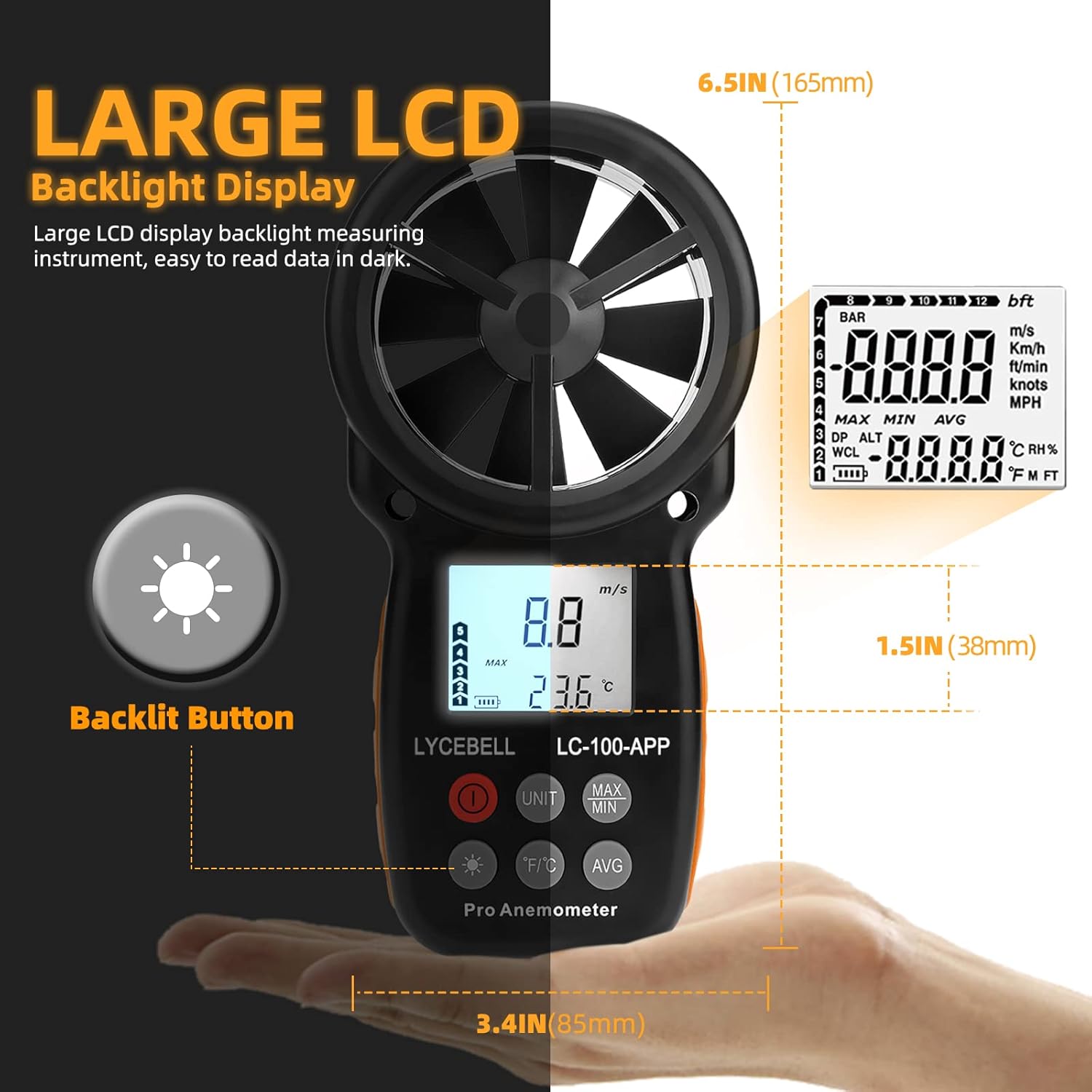
Зображення: Детальний view of the anemometer's large LCD backlight display, highlighting its readability in various lighting conditions. The image also indicates the device's dimensions: 6.5 inches (165mm) in height and 3.4 inches (85mm) in width.
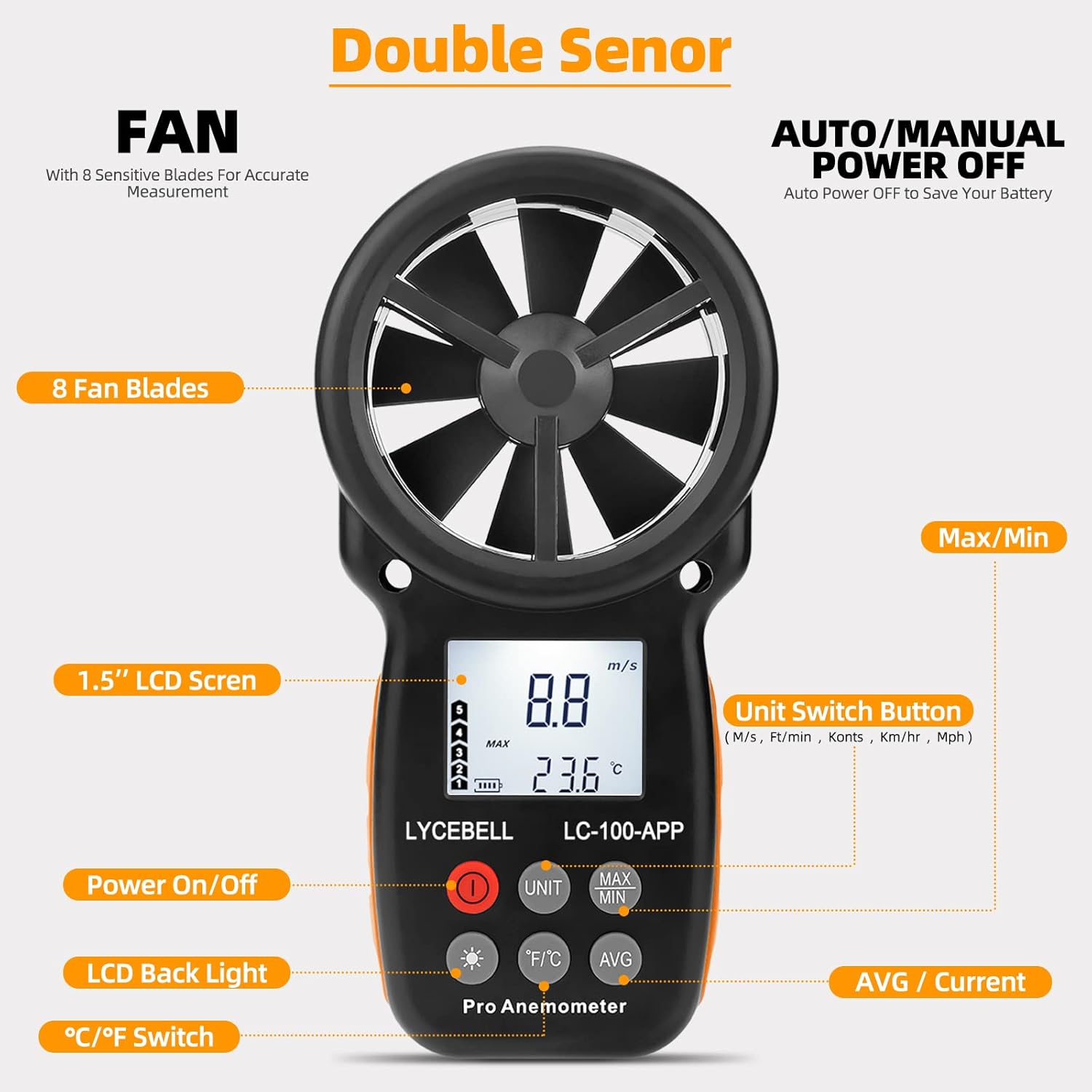
Image: This image illustrates the various buttons and components of the anemometer. It shows the 8-blade fan, the 1.5-inch LCD screen, and labeled buttons for Power On/Off, Unit Switch (m/s, ft/min, knots, km/hr, mph), LCD Back Light, °C/°F Temperature Unit Switch, MAX/MIN value display, and AVG/Current value display.
Опис кнопки:
- Кнопка живлення (O): Вмикає або вимикає пристрій.
- Кнопка UNIT: Cycles through wind speed units (m/s, km/h, ft/min, knots, mph).
- Кнопка MAX/MIN: Displays the maximum or minimum recorded wind speed.
- AVG Button: Displays the average wind speed.
- Кнопка °C/°F: Switches between Celsius and Fahrenheit for temperature display.
- Кнопка підсвічування (*): Активує або деактивує підсвічування РК-дисплея.
Video: This video demonstrates the functions of the LYCEBELL LC-100-APP Anemometer's buttons, including power on/off, unit switching, backlight activation, and viewing maximum, minimum, and average wind speed values. It also shows the device connecting to a mobile application.
4. Налаштування
4.1 Встановлення батареї
- Locate the battery compartment on the back of the anemometer.
- Use a small Phillips head screwdriver (often included) to unscrew the two screws securing the battery cover.
- Обережно зніміть кришку акумулятора.
- Вставте дві батарейки типу AAA 1.5 В, дотримуючись правильної полярності (+/-).
- Встановіть кришку батарейного відсіку та закріпіть її гвинтами.
Video: This video demonstrates the unboxing of the anemometer, installation of the AAA batteries into the device, and attachment of the hand strap. It also shows the initial power-on sequence.
4.2 Підключення до APP
The LC-100-APP anemometer can connect to your mobile device via Bluetooth for enhanced functionality.
- Завантажте додаток: шукати "Intelligent Anemometer" in your device's app store (iOS App Store or Google Play Store) or scan the QR code provided in the image below. You can also visit http://aicare.net.cn/app/iAnemometer/index.html for direct download links.
- Увімкнути Bluetooth: Увімкніть Bluetooth на своєму мобільному пристрої.
- Power On Anemometer: Turn on the LC-100-APP anemometer.
- Сполучення: Open the "Intelligent Anemometer" app. The app will automatically search for and pair with the device. A green light or indicator within the app will confirm successful pairing.

Image: This image displays the mobile application interface for the anemometer, showing real-time wind speed and temperature data, data logging capabilities, and options to download the app from the App Store or Google Play. A QR code for app download is also visible.
5. Інструкція з експлуатації
5.1 Увімкнення/вимкнення живлення
Натисніть червону кнопку живлення (O) to turn the anemometer on. Press and hold the Power button for a few seconds to turn it off. The device also features an auto power-off function to conserve battery life.
5.2 Measuring Wind Speed and Temperature
Once powered on, hold the anemometer so that the wind flows directly through the fan blades. The current wind speed and temperature will be displayed on the LCD screen.

Image: The anemometer in use, showing its precision in measuring wind speed and temperature. The image highlights the various unit selections available for wind speed: m/s (0.3-30 M/s), Knots (1-55 Knots), Km/h (2-90 Km/h), Mph (0.67-67.1 mph), and Ft/min (59-5905 Ft/min). Temperature range is also indicated as 14°F to 113°F.
5.3 Перемикання блоків
Натисніть ОДИНИЦЯ кнопку для перемикання між доступними одиницями вимірювання швидкості вітру: метри за секунду (м/с), кілометри за годину (км/год), фути за хвилину (фт/хв), вузли та милі за годину (миль/год).
Натисніть ° C / ° F для перемикання відображення температури між градусами Цельсія та Фаренгейта.
5.4 MAX/MIN/AVG Readings
Натисніть МАКС/МІН кнопку до view the maximum or minimum wind speed recorded since the device was powered on or reset. Press the СЕР button to display the average wind speed.
5.5 Підсвічування
Press the Backlight button (*) to turn the LCD backlight on or off. The backlight will automatically turn off after a short period to save battery.
5.6 Wind Chill Indication
The device provides a wind chill indication, which is calculated based on the measured wind speed and temperature, offering a more accurate perception of cold conditions.

Image: The anemometer is depicted in various practical applications, including general travel environments, surfing or sailing, storm chasing, and meteorological observations, demonstrating its versatility.
6. Технічне обслуговування
To ensure the longevity and accuracy of your LYCEBELL LC-100-APP Anemometer, follow these maintenance guidelines:
- Прибирання: Протирайте пристрій м’якою сухою тканиною. Не використовуйте абразивні засоби для чищення або розчинники.
- Зберігання: When not in use for extended periods, remove the batteries to prevent leakage. Store the device in its portable storage case in a cool, dry place, away from direct sunlight and extreme temperatures.
- Догляд за вентилятором: Keep the fan blades free from dust and debris. Avoid touching the blades directly to prevent damage.
7. Вирішення проблем
If you encounter issues with your anemometer, refer to the following common problems and solutions:
- Пристрій не вмикається:
- Перевірте, чи правильно встановлено батарейки з дотриманням полярності.
- Замініть батарейки новими, якщо вони розрядилися.
- Неточні показники:
- Ensure the fan blades are spinning freely and are not obstructed by debris.
- Make sure the device is held correctly, allowing wind to pass directly through the fan.
- Verify that the correct units are selected for measurement.
- Проблеми з підключенням до додатка:
- Переконайтеся, що Bluetooth увімкнено на вашому мобільному пристрої.
- Make sure the anemometer is powered on and within Bluetooth range.
- Restart both the anemometer and the mobile application.
- Перевірте, чи програму оновлено до останньої версії.
- Не працює підсвічування LCD:
- Press the Backlight button (*) to activate it.
- Check battery level; low batteries may affect backlight performance.
8. Технічні характеристики
| Особливість | Специфікація |
|---|---|
| Бренд | ЛІЦЕБЕЛ |
| Номер моделі | 100-APP |
| матеріал | Акрилонітрилбутадієнстирол (АБС) |
| Діапазон швидкості вітру | 0.3~30 M/s (0.67~67.1 mph) |
| Точність швидкості вітру | ±5% |
| Одиниці швидкості вітру | m/s, km/h, ft/min, knots, mph |
| Діапазон температур вітру | -10 ~ 45 ° C (14 ~ 113 ° F) |
| Точність вимірювання температури вітру | ±2°C (35.6°F) |
| роздільна здатність | 0.1 м/с |
| Дисплей | Великий LCD з підсвічуванням |
| Джерело живлення | 2 батарейки 1.5 В ААА |
| Розміри предмета (Д x Ш x В) | 3.54 x 1.57 x 6.69 дюймів |
| Вага товару | 153 грамів (5.4 унції) |
| особливості | Mobile APP, Auto Power Off, Low Battery Warning, Wind Chill Indication, MAX/MIN/Current/Average Wind Speed |
9. Гарантія та підтримка
LYCEBELL products are designed for reliability and performance. For warranty information, technical support, or service inquiries, please refer to the contact details provided with your purchase or visit the official LYCEBELL webсайт. Зберігайте чек про покупку як підтвердження покупки для гарантійних претензій.


