1. Вступ
The Aputure Amaran Ray 60C is a compact and portable LED video light designed for professional photography and videography. It features OmniColor technology for accurate color reproduction, a wide CCT range from 1,800K to 20,000K, and flexible power options. This manual provides detailed instructions for setting up, operating, and maintaining your Amaran Ray 60C.
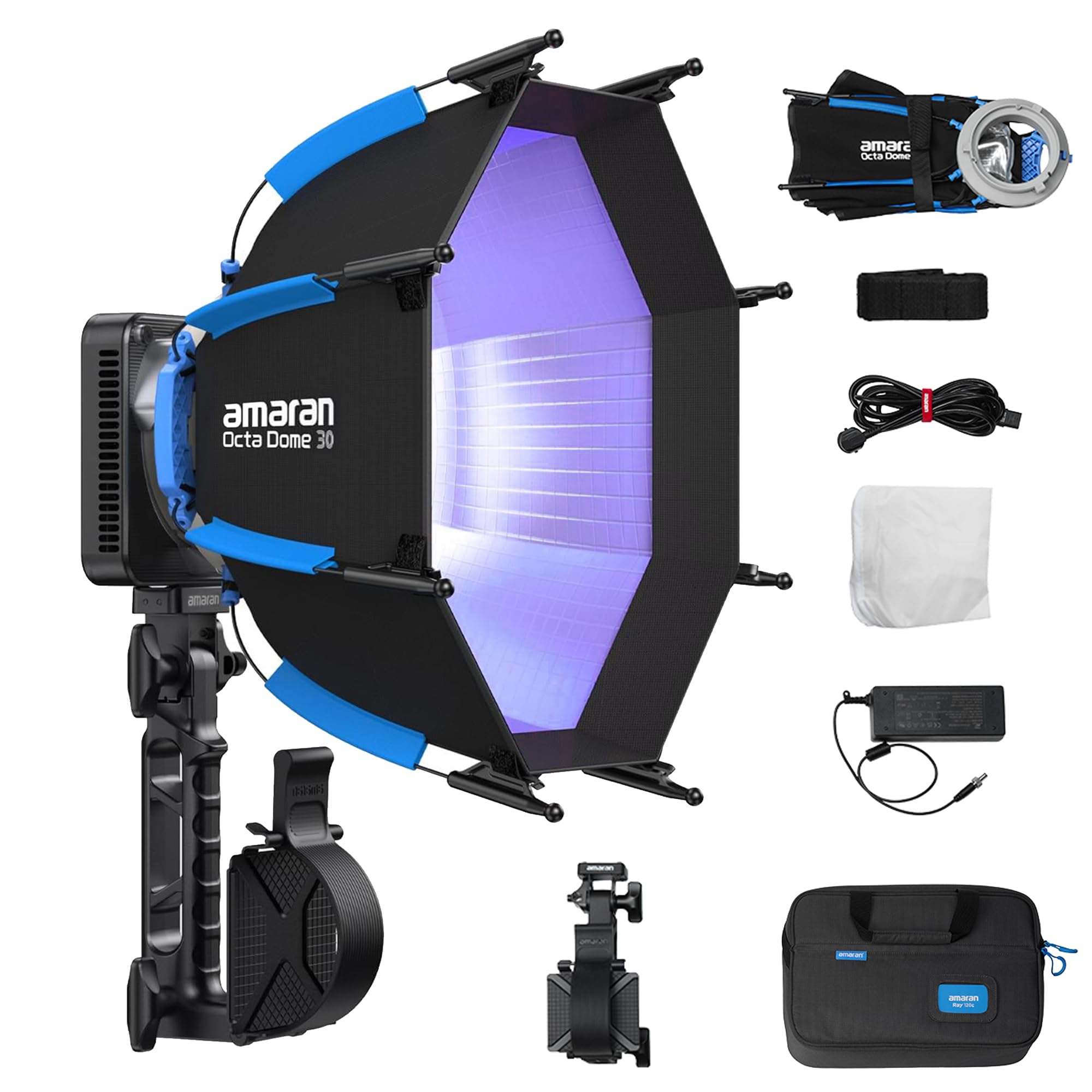
Image 1.1: Amaran Ray 60C LED Portable Video Light with included softbox and grip.
2. Особливості продукту
- Високий вихід: Delivers up to 3,910 lux at 1m without accessories, providing significant brightness for various lighting scenarios.
- OmniColor Technology: Reproduces true-to-life colors with expanded red and blue ranges, achieving high SSI scores (87 Tungsten, 80 D56) for accurate color rendition.
- Wide Color Temperature Range: Adjustable CCT from 1,800K to 20,000K, allowing for precise color matching and creative lighting effects.
- Гнучкі параметри живлення: Supports DC power adapter, amaran Ace E-Lock, and USB-C PD for versatile power solutions, suitable for both studio and on-location shoots.
- Інтуїтивно зрозуміле управління: Features a FlowTurn knob for precise adjustments and quick navigation through settings.
- Підключення програми: Seamless control via the amaran app with built-in NFC for quick pairing.
- Стійкість до погодних умов IP54: Designed to withstand dust and splashes, enabling reliable performance in various environmental conditions.
- Компактний і легкий дизайн: Weighing only 528.5g (1.17lb), the lamp head is ultra-portable for easy setup, storage, and travel.

Зображення 2.1: закінченоview of Amaran Ray 60C key features.

Image 2.2: OmniColor technology details and brightness comparison.

Image 2.3: Professional wide color gamut and CCT adjustment capabilities.
3. Що в коробці
Перевірте наявність усіх компонентів в упаковці:
- 1x amaran Ray 60c
- 1x amaran AC to DC 90W Power Adapter (0.5m cable)
- 1x amaran AC Power Cable (4m)
- 1x amaran Octa Dome 30 (Diffuser+Grid)
- 1x amaran Octa Dome 30 Diffusion Cloth
- 1x amaran Octa Dome 30 Light Control Grid
- 1x amaran Ace Lock to Baby Pin Adapter Grip
- 1x amaran Ray Carrying Bag

Image 3.1: All items included in the Amaran Ray 60C package.
4. Інструкції з налаштування
4.1 Розпакування та початковий огляд
- Carefully remove all components from the carrying bag.
- Inspect the light fixture and accessories for any signs of damage. If any damage is found, contact your dealer immediately.
4.2 Attaching the Octa Dome 30 Softbox
- Unfold the Octa Dome 30 softbox.
- Align the mounting points of the softbox with the light fixture.
- Secure the softbox to the light fixture using the one-snap setup mechanism. Ensure it is firmly attached.
- Attach the diffusion cloth and grid to the softbox as desired for light shaping.

Image 4.1: One-snap setup for the Octa Dome 30 softbox.
4.3 Підключення живлення
- Використання адаптера постійного струму: Connect the amaran AC to DC 90W Power Adapter to the light fixture's DC input, then plug the AC power cable into a wall outlet.
- Використання USB-C PD: Connect a compatible USB-C PD power bank or charger to the USB-C PD port on the light fixture.
- Using amaran Ace E-Lock: Attach a compatible amaran Ace E-Lock battery (sold separately) to the designated port on the light fixture.

Image 4.2: Flexible power options for the Amaran Ray 60C.
5. Інструкція з експлуатації
5.1 Увімкнення/вимкнення живлення
Press and hold the power button located on the light fixture to turn the unit on or off.
5.2 Adjusting Settings with FlowTurn Knob
The FlowTurn knob allows for precise control over various parameters:
- Режим CCT: Rotate the knob to adjust the color temperature from 1,800K to 20,000K.
- Режим HSI: Adjust Hue, Saturation, and Intensity.
- Режим RGB: Fine-tune Red, Green, and Blue values.
- Яскравість: Press the knob to select brightness adjustment, then rotate to change the intensity.
5.3 Using the amaran App
For advanced control and features, download the official amaran app from your device's app store.
- Увімкніть NFC на своєму смартфоні.
- Open the amaran app.
- Tap your smartphone near the NFC tag on the light fixture to pair the device.
- Once paired, you can control CCT, HSI, RGB, brightness, and access various lighting effects (FX) directly from the app.
5.4 Special Lighting Effects (FX)
The Amaran Ray 60C includes 12 built-in lighting effects such as Fireworks, Cop Car, Faulty Bulb, TV, Lightning, Party Lights, Pulsing, Strobe, Explosion, Fire, Paparazzi, and Welding. These can be accessed and adjusted via the amaran app or the on-board controls.
6. Технічне обслуговування
6.1 Очищення
- Перед чищенням переконайтеся, що пристрій вимкнено та від’єднано від усіх джерел живлення.
- Use a soft, dry cloth to wipe the exterior of the light fixture.
- Для стійкого бруду, злегкаamp cloth with mild detergent can be used, followed by a dry cloth. Avoid abrasive cleaners or solvents.
- Тримайте вентиляційні отвори чистими від пилу та сміття, щоб забезпечити належне охолодження.
6.2 Зберігання
- Store the Amaran Ray 60C in its original carrying bag or a suitable protective case when not in use.
- Зберігайте в прохолодному, сухому місці подалі від прямих сонячних променів і екстремальних температур.
7. Вирішення проблем
| проблема | Можлива причина | Рішення |
|---|---|---|
| Світло не вмикається | No power supply; Loose connection; Faulty power adapter/battery | Check power cable and adapter connection; Ensure battery is charged or replaced; Try a different power source. |
| Cannot connect to amaran app | NFC disabled; App not updated; Bluetooth issue | Ensure NFC is enabled on your phone; Update the amaran app; Restart the light and your phone. |
| Світловий потік непостійний | Overheating; Firmware issue | Ensure proper ventilation; Check for firmware updates and install if available. |
| Незвичайний шум під час роботи | Fan obstruction; Component issue | Ensure fan vents are clear; If noise persists, contact customer support. |

Image 7.1: Amaran Ray 60C weather resistance and cooling system details.
8. Технічні характеристики
| Особливість | Специфікація |
|---|---|
| Модель | Amaran Ray 60C |
| Wattage | 60 Вт |
| Діапазон CCT | 1,800 К - 20,000 К |
| Підключення | Bluetooth |
| Вхідна потужність | DC 100-240V, USB-C PD, amaran Ace E-Lock |
| Вага товару | 7.04 фунта (загальна вага упаковки) |
| Lamp Вага голови | 528.5 г / 1.17 фунта |
| Розміри упаковки | 16.4 x 10.4 x 4.4 дюймів |
| Стійкість до погодних умов | Оцінка IP54 |
| Виробник | Aputure |

Image 8.1: Compact dimensions and weight of the Amaran Ray 60C.
9. Гарантія та підтримка
Aputure products typically come with a standard manufacturer's warranty. For specific warranty details, please refer to the warranty card included with your product or visit the official Aputure website. For technical support, troubleshooting assistance, or service inquiries, please contact Aputure customer support or your authorized dealer.
Можливо, для придбання додаткових планів захисту буде доступно продовження гарантійного терміну після закінчення стандартного періоду. Будь ласка, зверніться до свого продавця, щоб дізнатися про доступні варіанти.


