вступ
Thank you for choosing the Fastrack StreetStyle 5.0 Quartz Analog Watch. This manual provides detailed instructions for setting up, operating, and maintaining your watch to ensure optimal performance and longevity. This watch combines a classic analog display with a modern digital interface, offering precise timekeeping and a range of useful functions for your daily activities.
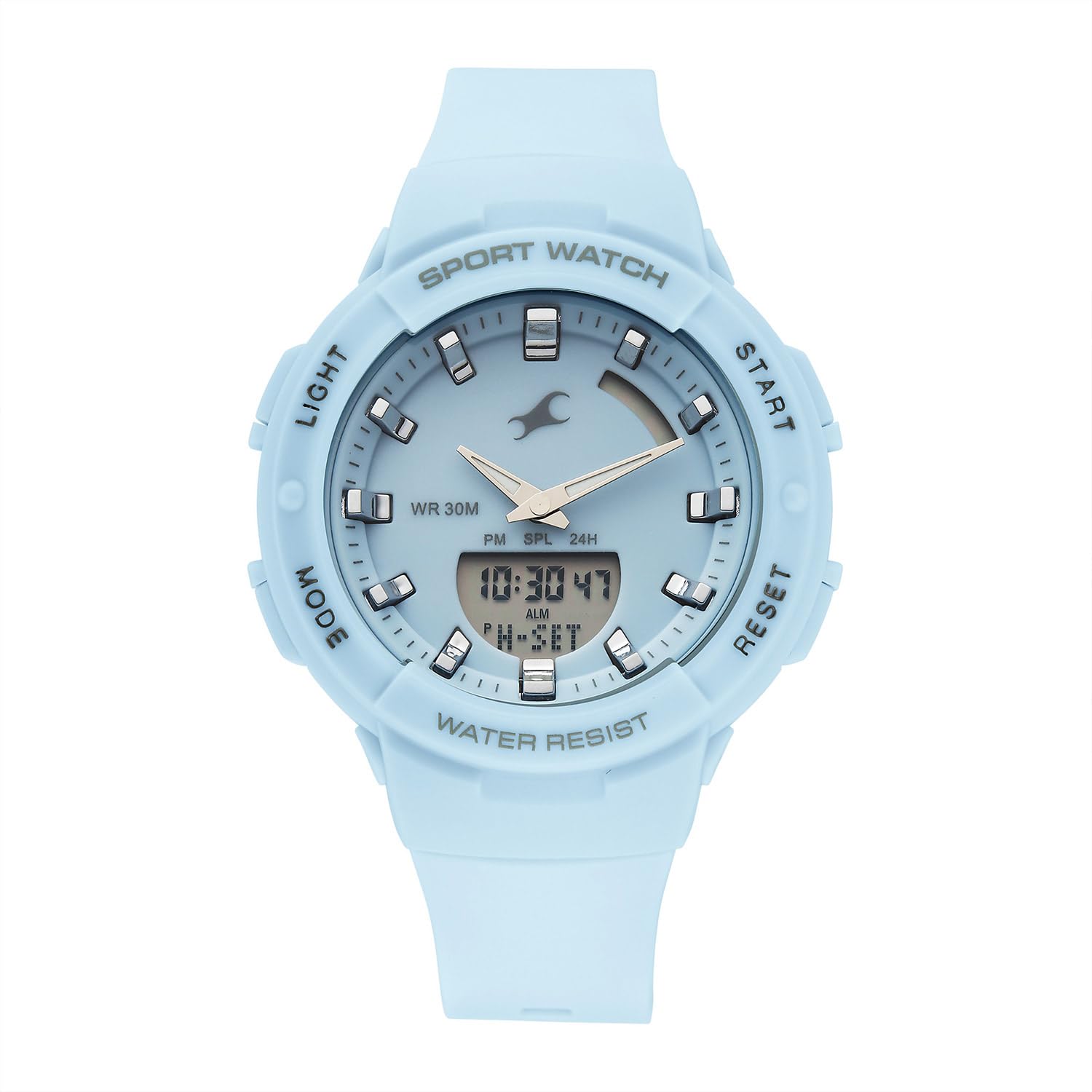
Фронт view of the Fastrack StreetStyle 5.0 watch, showcasing the blue dial, analog hands, and digital display. The four control buttons (LIGHT, MODE, START, RESET) are visible on the sides of the case.
Налаштування
Your Fastrack StreetStyle 5.0 watch comes with a pre-installed battery. Before first use, ensure any protective films are removed from the watch face and back case.
Початкове налаштування часу
- Визначення кнопок: Your watch features four buttons: СВІТЛО (угорі ліворуч), РЕЖИМ (внизу ліворуч), ПОЧАТОК (угорі праворуч), та СКИДАННЯ (внизу праворуч).
- Увійдіть у режим налаштування часу: Натисніть РЕЖИМ button repeatedly until the digital time display starts flashing, indicating you are in setting mode.
- Налаштувати час: Використовуйте ПОЧАТОК button to increase the flashing value (hours, minutes, seconds). Use the СКИДАННЯ button to cycle through the different values (hours, minutes, 12/24-hour format).
- Встановити дату та день: Продовжуйте натискати СКИДАННЯ button to move to date, month, and day settings. Adjust these values using the ПОЧАТОК кнопку.
- Вихід з режиму налаштування: Після того, як усі налаштування правильні, натисніть кнопку РЕЖИМ button to exit the setting mode. The digital display will stop flashing, and the analog hands will automatically synchronize with the set digital time.
Інструкція з експлуатації
Використання електронної підсвічування
To illuminate the digital display in low-light conditions, press the СВІТЛО button (top left). The backlight will remain active for a few seconds.
Функція сигналізації
- Режим тривоги доступу: Натисніть РЕЖИМ button repeatedly until 'ALM' or the alarm time is displayed.
- Встановити час будильника: У режимі будильника натисніть кнопку СКИДАННЯ button to select the hour or minute digit you wish to adjust. Use the ПОЧАТОК щоб змінити значення.
- Увімкнути/вимкнути будильник: Натисніть ПОЧАТОК button while in Alarm Mode to toggle the alarm ON/OFF. An alarm icon will appear when activated.
- Hourly Дзвоник: Some models allow setting an hourly chime. Refer to the display for an 'SIG' or chime icon and use the ПОЧАТОК button to toggle it.
- Вихід з режиму тривоги: Натисніть РЕЖИМ button to return to the regular time display.
Функція секундоміра
- Доступ до режиму секундоміра: Натисніть РЕЖИМ button repeatedly until 'STW' or '00:00:00' is displayed.
- Старт/Зупинка: Натисніть ПОЧАТОК button to begin timing. Press ПОЧАТОК знову зробити паузу.
- Час кола/проміжного часу: Поки секундомір працює, натисніть кнопку СКИДАННЯ button to record a lap or split time. The stopwatch will continue running in the background.
- Скинути: While the stopwatch is paused, press the СКИДАННЯ кнопку, щоб скинути секундомір до '00:00:00'.
- Вихід з режиму секундоміра: Натисніть РЕЖИМ button to return to the regular time display.
Функція світового часу
Your watch includes a World Time function for tracking time in different global cities.
- Доступ до режиму світового часу: Натисніть РЕЖИМ button repeatedly until 'WT' or a different city code is displayed.
- Select City: Використовуйте ПОЧАТОК button to cycle through available city codes/time zones.
- Exit World Time Mode: Натисніть РЕЖИМ button to return to the regular time display.
Технічне обслуговування
Чищення годинника
Щоб підтримувати зовнішній вигляд годинника, регулярно протирайте його м’якою сухою тканиною. Для видалення стійкого брудуamp Можна використовувати тканину, а потім суху тканину. Уникайте використання хімічних засобів для чищення, розчинників або абразивних матеріалів, оскільки вони можуть пошкодити покриття та ущільнення годинника.
Водонепроникність
Цей годинник розрахований на WR 30M (3 атм) water resistance. This means it is suitable for everyday use and can withstand splashes or brief immersion in water. It is ні suitable for swimming, showering, or diving. Avoid operating buttons when the watch is wet to prevent water ingress.

Задня view of the Fastrack StreetStyle 5.0 watch, showing the stainless steel back case with engraved brand logo, model number (68054PP02), and water resistance rating (WR 30M).
Заміна батареї
The watch is powered by a button-cell battery. When the display dims or the watch stops functioning, it's time for a battery replacement. It is recommended to have the battery replaced by an authorized service center to ensure proper sealing and maintain water resistance.
Зберігання
When not in use, store your watch in a cool, dry place away from direct sunlight, extreme temperatures, and strong magnetic fields. Keeping it in its original packaging or a watch box can help protect it from dust and scratches.
Усунення несправностей
- Watch Not Functioning: Check if the battery needs replacement. Ensure no buttons are stuck.
- Неправильне відображення часу: Знову увійдіть у режим налаштування часу та налаштуйте час згідно з інструкціями «Початкове налаштування часу».
- Analog Hands Not Synchronized: If analog hands do not match the digital time after setting, try resetting the watch (if a reset function is available, otherwise consult service).
- Digital Display Dim or Blank: This usually indicates a low battery. Replace the battery.
- Вода всередині. Спостереження: If you notice condensation or water droplets inside the watch, stop using it immediately and take it to an authorized service center.
For issues not covered here, please contact Fastrack customer support.
Технічні характеристики

Diagram illustrating the case size of the Fastrack StreetStyle 5.0 watch, indicating a 41 mm case diameter for reference.
| Особливість | Деталь |
|---|---|
| Бренд | Фастрек |
| Назва моделі | StreetStyle 5.0 |
| Номер моделі | 68054PP02W |
| Тип дисплея | Аналого-цифровий |
| Рух | Кварц |
| Водонепроникність | 30 метрів (3 атм) |
| Розміри корпусу (ДxШxВ) | 50 x 41 x 17 міліметри |
| Вага товару | 200 г |
| Батарейки в комплекті | так |
| Країна походження | Індія |
Гарантія та підтримка
Your Fastrack StreetStyle 5.0 watch is covered by a manufacturer's warranty against manufacturing defects. Please refer to the warranty card included with your purchase for specific terms, conditions, and duration. Keep your purchase receipt as proof of purchase for warranty claims.
For technical assistance, service, or warranty claims, please contact Fastrack customer support or visit an authorized Fastrack service center. You can find contact information and service center locations on the official Fastrack webсайт: www.fastrack.in


