1. Вступ
The ATTACK SHARK G800 is a versatile wireless RGB gaming headset designed for an immersive audio experience across multiple platforms. It features tri-mode connectivity (2.4Ghz wireless, Bluetooth, and wired), 7.1 virtual surround sound, 50mm drivers, and a detachable AI noise-canceling microphone. This manual provides instructions for setup, operation, and maintenance to ensure optimal performance.
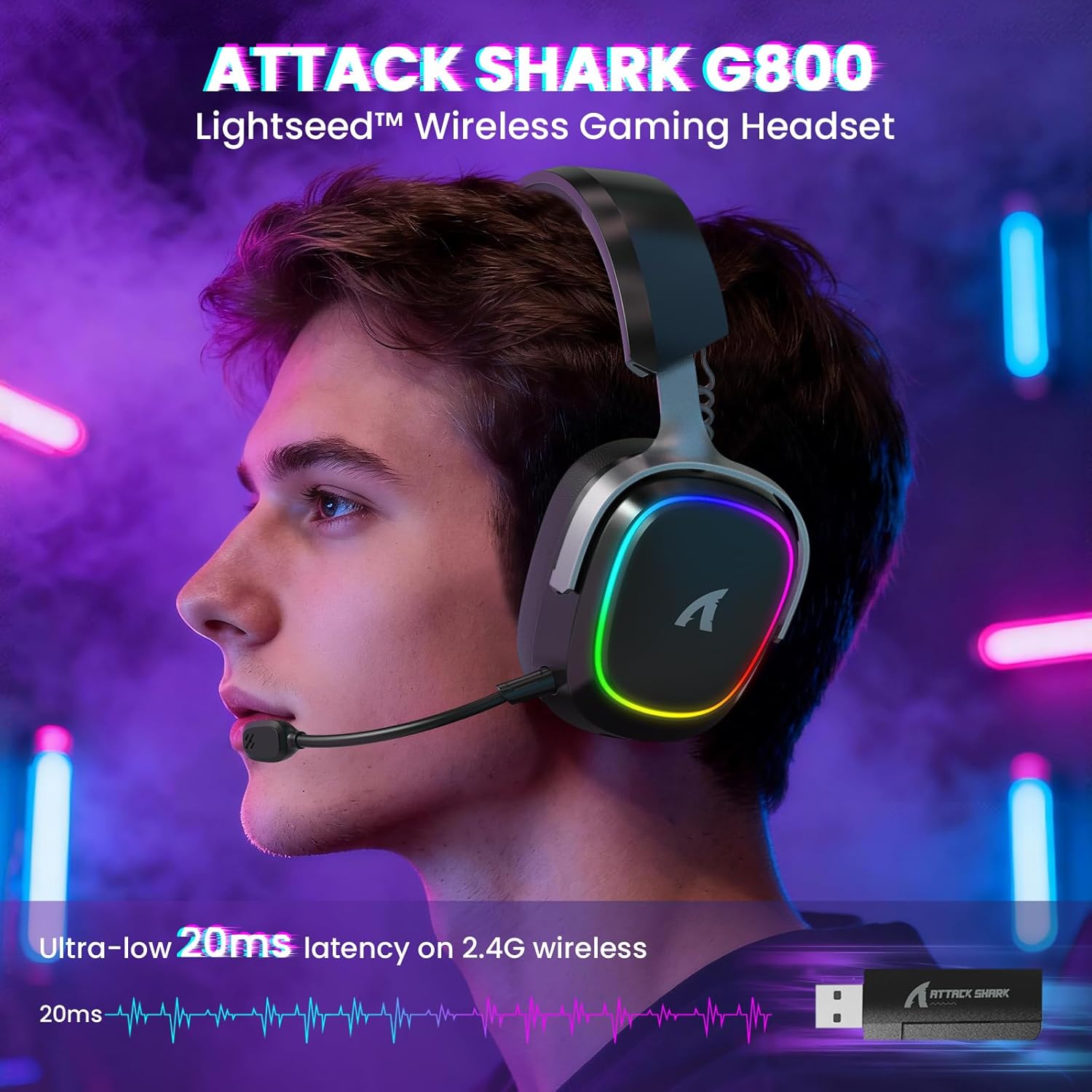
Image: The G800 headset in use, highlighting its RGB lighting and comfortable fit.
2. Що в коробці
- ATTACK SHARK G800 Wireless RGB Gaming Headset
- Detachable AI Noise-Canceling Microphone
- 2.4Ghz Wireless USB-A + Type-C Dual-Head Receiver
- Зарядний кабель USB-A – USB-C
- USB-C to USB-C Audio Cable
- Посібник користувача (цей документ)
3. Продукт закінчивсяviewЕлементи керування та порти
Familiarize yourself with the various controls and ports on your G800 headset for seamless operation.
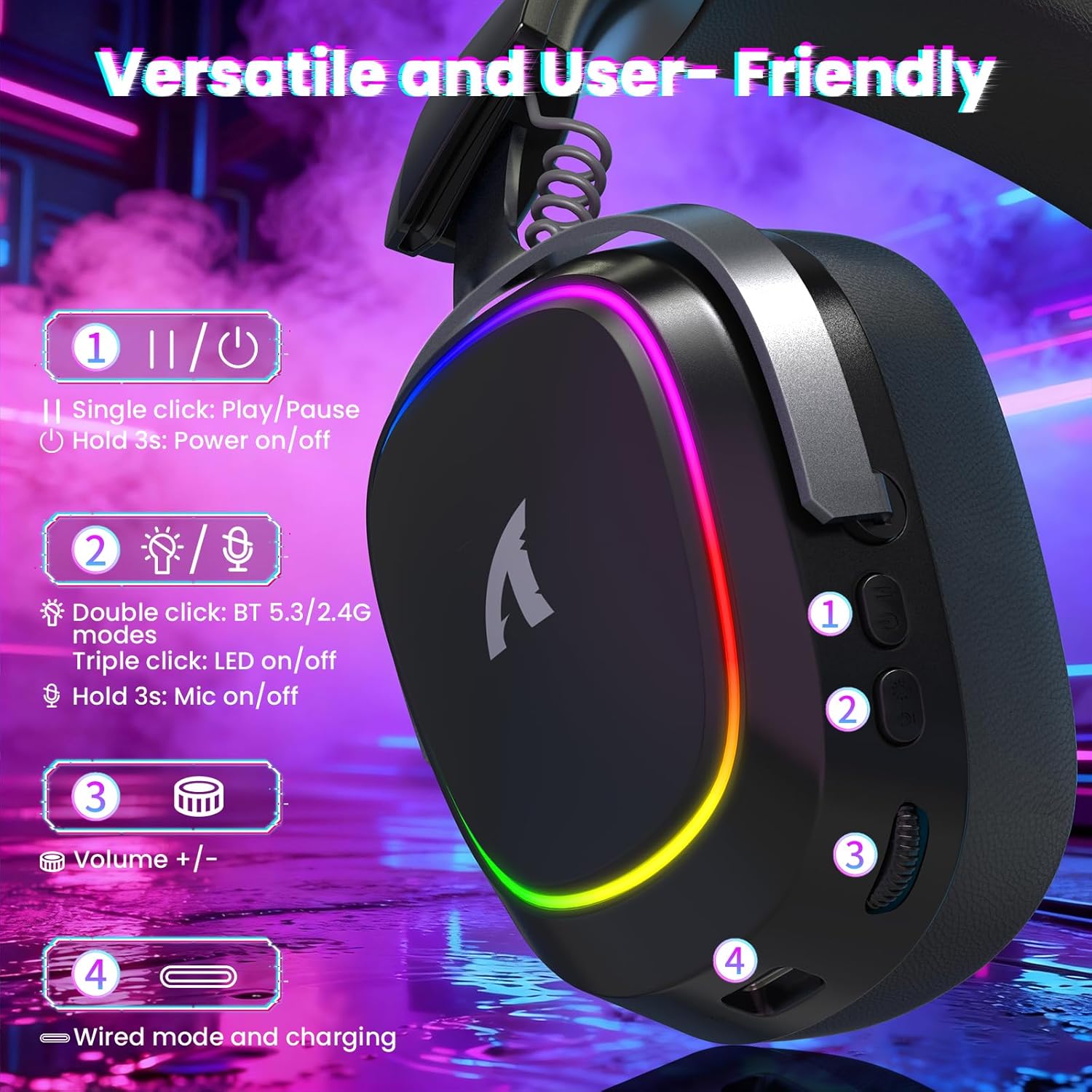
Зображення: Детальне view of the headset's left earcup with numbered controls and their functions.
- Play/Pause & Power Button: Single click for play/pause. Hold for 3 seconds to power on/off.
- Mode Switch & LED/Mic Control: Double click to switch between Bluetooth (BT 5.3) and 2.4Ghz wireless modes. Triple click to toggle RGB LED on/off. Hold for 3 seconds to toggle microphone on/off.
- Колесо гучності: Rotate to adjust audio volume up or down.
- Wired Mode & Charging Port: USB-C port for wired connection and charging.
- Роз'єм для мікрофона: Порт для підключення знімного мікрофона.
4. Налаштування та підключення
The G800 headset offers three connection methods: 2.4Ghz wireless, Bluetooth, and wired.
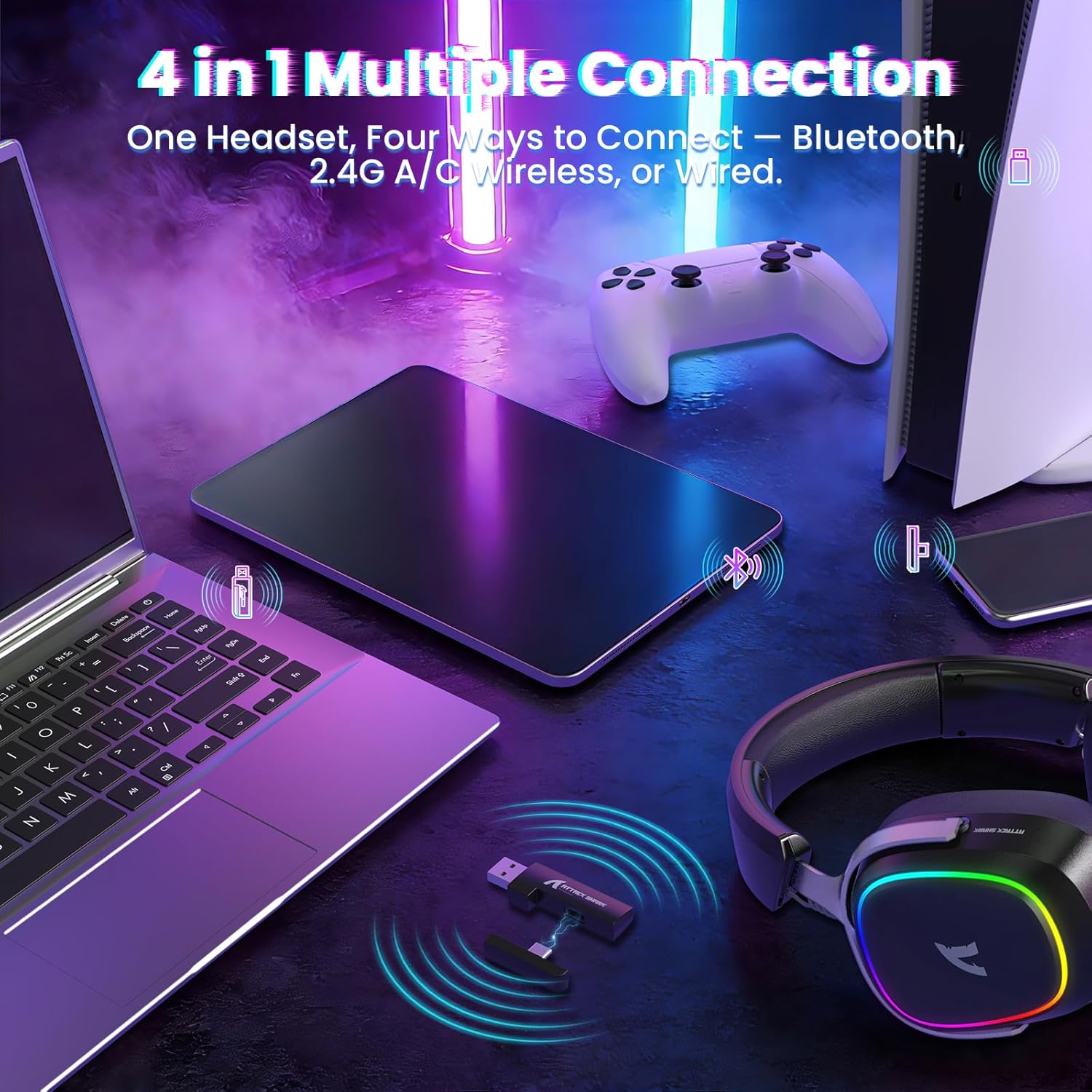
Image: The headset demonstrating its multi-platform connectivity options.
4.1. Бездротове з'єднання 2.4 ГГц
- Insert the 2.4Ghz USB-A or Type-C dual-head receiver into an available USB port on your PC, laptop, or PS5.
- Power on the G800 headset by holding the Power Button (1) for 3 seconds.
- Double click the Mode Switch (2) until the headset indicates 2.4Ghz mode (usually via an LED indicator or voice prompt).
- The headset should automatically connect to the receiver. If not, ensure the receiver is properly inserted and the headset is in 2.4Ghz mode.
4.2. Підключення Bluetooth
- Power on the G800 headset by holding the Power Button (1) for 3 seconds.
- Double click the Mode Switch (2) until the headset indicates Bluetooth mode (usually via an LED indicator or voice prompt). The headset will enter pairing mode.
- On your device (e.g., mobile phone, tablet, PC), go to Bluetooth settings and search for available devices.
- Select "ATTACK SHARK G800" from the list to pair.
4.3. Провідне підключення
- Connect one end of the USB-C audio cable to the Wired Mode & Charging Port (4) on the headset.
- Connect the other end of the USB-C audio cable to your device's compatible port.
- Гарнітура автоматично перейде в дротовий режим.
4.4. Заряджання гарнітури
The G800 headset is equipped with a 1000mAh battery for extended use.

Image: Visual representation of the headset's 1000mAh battery capacity.
- Connect the USB-A to USB-C charging cable to the Wired Mode & Charging Port (4) on the headset and to a USB power source (e.g., computer USB port, wall adapter).
- Світлодіодний індикатор на гарнітурі показуватиме стан заряджання.
- The headset includes charging over-voltage protection for safety.
- An auto-shutdown function activates after 5 minutes of inactivity to conserve power.
5. Інструкція з експлуатації
5.1. Аудіодосвід
The G800 features 50mm large-aperture biological diaphragm drivers and virtual 7.1 surround sound for an immersive audio experience.

Image: The 50mm audio drivers, responsible for high-fidelity sound.

Image: Demonstrating the 7.1 surround sound capability for precise audio positioning.
5.2. Використання мікрофона
The detachable 360° AI Noise-Canceling Microphone ensures clear voice communication by filtering out background noise.
- Insert the detachable microphone into the dedicated microphone jack on the headset.
- Hold the Mode Switch (2) for 3 seconds to toggle the microphone on or off.
5.3. Керування RGB-підсвічуванням
The headset features customizable RGB lighting.
- Triple click the Mode Switch (2) to toggle the RGB LED lighting on or off.
5.4. Налаштування програмного забезпечення
Enhance your audio experience with the dedicated driver software.
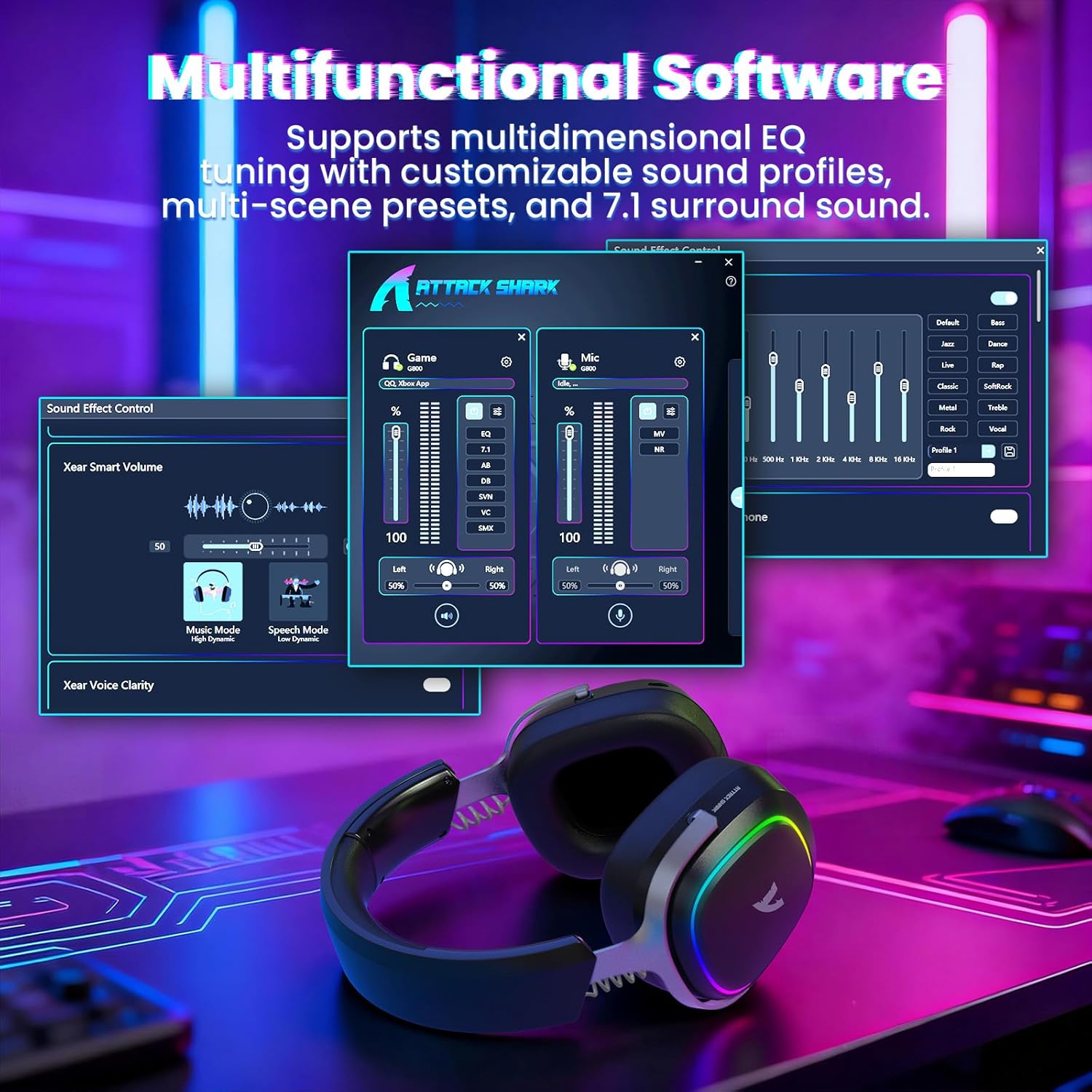
Image: The software interface for customizing audio settings.
- Download the official ATTACK SHARK G800 driver software from the manufacturer's webсайт.
- The software allows you to create custom EQ sound profiles and fine-tune 7.1 surround sound settings to match your preferences and game types.
6. Технічне обслуговування
Proper maintenance ensures the longevity and performance of your G800 headset.
- Прибирання: Використовуйте м’яку суху тканину для очищення гарнітури. Уникайте рідких засобів для чищення або абразивних матеріалів.
- Зберігання: Зберігайте гарнітуру в прохолодному, сухому місці, подалі від прямих сонячних променів та екстремальних температур.
- Амбушюри: The ear cushions are replaceable. Refer to the manufacturer's webсайт для запасних частин та інструкцій.

Image: Components of the headset, including replaceable ear cushions.
7. Вирішення проблем
- Немає звуку:
- Перевірте рівні гучності як на гарнітурі, так і на підключеному пристрої.
- Ensure the correct audio output device is selected in your device's sound settings.
- Verify the headset is properly connected (2.4Ghz receiver, Bluetooth paired, or wired cable).
- Reboot the headset and your device.
- Мікрофон не працює:
- Переконайтеся, що мікрофон надійно прикріплений до гарнітури.
- Check if the microphone is muted (hold Mode Switch (2) for 3 seconds to toggle).
- Перевірте, чи в налаштуваннях звуку вашого пристрою вибрано правильний пристрій введення мікрофона.
- Якщо можливо, перевірте мікрофон на іншому пристрої.
- Проблеми з підключенням:
- For 2.4Ghz, ensure the receiver is fully inserted and the headset is in 2.4Ghz mode.
- For Bluetooth, ensure the headset is in pairing mode and within range of your device. Try unpairing and re-pairing.
- For wired, ensure the cable is securely connected to both the headset and your device.
- Avoid sources of interference (e.g., other wireless devices, microwaves).
- Світильники RGB не працюють:
- Triple click the Mode Switch (2) to toggle the RGB LED on/off.
- Переконайтеся, що гарнітура має достатній заряд акумулятора.
8. Технічні характеристики
| Особливість | Специфікація |
|---|---|
| Назва моделі | G800 |
| Технологія підключення | Wired, Bluetooth (BT 5.3), 2.4Ghz Wireless |
| Тип аудіо драйвера | Динамічний драйвер (50 мм) |
| Об'ємний звук | Virtual 7.1 Spatial Audio |
| мікрофон | Detachable 360° AI Noise-Canceling |
| Wireless Latency (2.4Ghz) | 20ms (Lightseed Wireless Technology) |
| Wireless Range (2.4Ghz) | До 10 м / 32.8 футів |
| Діапазон Bluetooth | До 30 м / 98.4 футів |
| Ємність акумулятора | 1000 мАг |
| Розташування вуха | Над вухом |
| матеріал | Aluminum Alloy, Protein Leather, Memory Foam |
| вага | 1.1 фунта (приблизно) |
| Сумісні пристрої | PC, Laptops, PS5, Mobile Devices |
9. Інформація про безпеку
- Уникайте тривалого прослуховування на високій гучності, щоб запобігти пошкодженню слуху.
- Не піддавайте гарнітуру впливу екстремальних температур, вологості або рідин.
- Зберігати в недоступному для дітей місці.
- Не намагайтеся розбирати або модифікувати гарнітуру. Це призведе до анулювання гарантії.
- Утилізуйте виріб відповідально відповідно до місцевих правил.
10. Офіційне відео продукту
Відео: Офіційна відеопрезентація продуктуasing the ATTACK SHARK G800 Wireless Tri Mode RGB Gaming Headset's features and design. This video is provided by the seller, UrWorthLtd US.
11. Гарантія та підтримка
For warranty information, technical support, or customer service, please refer to the documentation included with your purchase or visit the official ATTACK SHARK webсайт. Зберігайте чек про покупку для гарантійних претензій.


