1. Вступ
The GEEKOM A7 MAX is a compact and powerful mini PC designed for a wide range of tasks, from office productivity and creative work to gaming and 4K video editing. It features an AMD Ryzen 9 7940HS processor, 16GB DDR5 RAM, and a 1TB PCIe Gen4 x4 SSD, along with AMD Radeon 780M Graphics. This manual provides essential information for setting up, operating, maintaining, and troubleshooting your device.
Video: GEEKOM A7 Max Product Overview. This video provides a visual introduction to the GEEKOM A7 Max Mini PC, highlighting its compact design and key features.
2. Що в коробці
- 1 x A7 MAX Mini PC
- 1 кабель HDMI
- 1 кріплення VESA
- 1 x адаптер живлення
- 1 x Посібник користувача
3. Продукт закінчивсяview
The GEEKOM A7 MAX Mini PC is housed in an all-aluminum chassis, offering a sleek and durable design. It integrates high-performance components within a compact form factor.
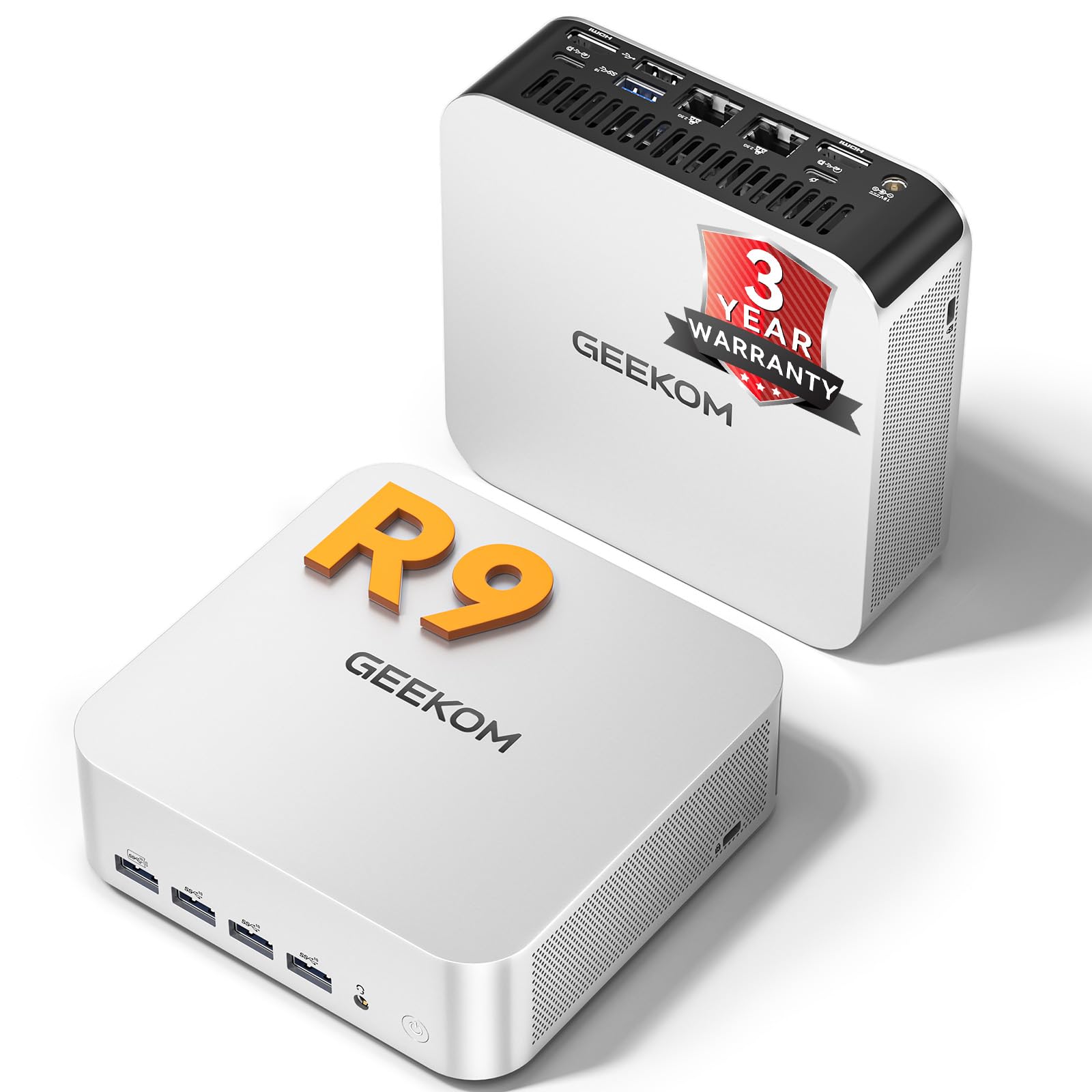
Image: The GEEKOM A7 MAX Mini PC, showcasinйого компактні розміри та елегантний дизайн.
3.1 Основні характеристики
- Процесор: AMD Ryzen 9 7940HS (8-core/16-thread, up to 5.2GHz)
- Графіка: AMD Radeon 780M (integrated, with ray tracing support)
- Пам'ять: 16 ГБ оперативної пам'яті DDR5 (з можливістю розширення до 128 ГБ)
- Зберігання: 1TB M.2 PCIe Gen4 x4 SSD (expandable up to 4TB)
- Операційна система: Попередньо встановлена Windows 11 Pro
- Підключення: Dual 40Gbps USB4 ports, 5x USB 3.2, Dual Type-C, Dual HDMI, Dual 2.5G LAN, Wi-Fi 6E, Bluetooth 5.2, UHS-II SD card slot
- Охолодження: Enhanced IceBlast 2.0 Cooling System

Зображення: Оверview of the GEEKOM A7 MAX's main features, including processor, graphics, storage, memory, and connectivity options.
3.2 Розташування портів
Familiarize yourself with the available ports on the front and rear of the GEEKOM A7 MAX for proper connectivity.

Image: A diagram illustrating the front and rear port configurations of the GEEKOM A7 MAX Mini PC, detailing USB, HDMI, LAN, and other connections.
- Передні порти: 4x USB 3.2 Gen 2 Type-A, 1x SD Card Reader, 1x 3.5mm Audio Jack, 1x Power Button
- Задні порти: 1x DC In, 2x 2.5G RJ45 LAN, 2x USB4 (40Gbps, PD input/output), 1x USB 3.2 Gen 2 Type-A, 1x USB 2.0 Type-A, 2x HDMI 2.0, 1x Kensington Lock
4. Посібник із налаштування
- Підключення периферійних пристроїв: Connect your keyboard, mouse, and monitor(s) to the appropriate USB and HDMI/USB4 ports.
- Підключення живлення: Connect the power adapter to the DC In port on the rear of the mini PC, then plug the adapter into a power outlet.
- Увімкнення: Натисніть кнопку живлення на передній панелі пристрою. Індикатор живлення засвітиться.
- Початкове налаштування: Follow the on-screen instructions to complete the Windows 11 Pro setup. Your device comes pre-installed with Windows 11 Pro.
- Підключення до мережі: Connect an Ethernet cable to one of the 2.5G LAN ports or connect to a Wi-Fi network during the Windows setup process.
5. Інструкція з експлуатації
5.1 Режими продуктивності
The GEEKOM A7 MAX offers four performance modes to optimize power consumption and performance based on your needs:
- Тихий режим (35 Вт): Ideal for light tasks, browsing, and media consumption, minimizing fan noise.
- Збалансований режим (45 Вт): Default mode for everyday use, balancing performance and efficiency.
- Режим продуктивності (54 Вт): Suitable for more demanding applications and moderate gaming.
- High-Speed Mode (70W): Automatically activates under high load for peak performance in intensive tasks like gaming or video editing.

Image: Visual representation of the four intelligent performance modes (Quiet, Balanced, Performance, High-Speed) available on the GEEKOM A7 MAX.
5.2 Налаштування кількох дисплеїв
The GEEKOM A7 MAX supports up to four displays simultaneously, allowing for a highly efficient workstation. Connect displays using the 2x HDMI 2.0 ports and 2x USB4 ports.

Image: A setup showing the GEEKOM A7 MAX connected to four monitors, demonstrating its quad-display capability for enhanced productivity and entertainment.
5.3 Зберігання та пам'ять
The device features 16GB of DDR5 memory and a 1TB NVMe SSD, providing a balanced configuration for most users. The memory is expandable up to 128GB, and the SSD can be upgraded to 4TB if needed.
Video: Explanation of optimal RAM and SSD configurations. This video discusses why the 16GB RAM + 1TB SSD setup is often the ideal choice for mini PCs, balancing performance and cost-effectiveness.
6. Технічне обслуговування
6.1 Система охолодження
The GEEKOM A7 MAX features an Enhanced IceBlast 2.0 Cooling System with dual copper heat pipes and an enlarged silent fan. This system is designed for efficient heat dissipation and quiet operation (under 36dB). A built-in dust-cleaning mechanism helps maintain long-term stability.

Зображення: Вибух view of the GEEKOM A7 MAX's cooling system, highlighting the copper heat pipes, silent fan, and optimized airflow for efficient heat management.
Video: GEEKOM IceBlast Improved Cooling System. This video demonstrates the advanced cooling technology used in GEEKOM mini PCs to maintain optimal temperatures and quiet operation.
6.2 Загальний догляд
- Тримайте пристрій у добре провітрюваному місці, щоб запобігти перегріванню.
- Avoid exposing the mini PC to direct sunlight, high humidity, or extreme temperatures.
- Протирайте зовнішню частину м’якою сухою тканиною. Не використовуйте рідкі засоби для чищення або абразивні матеріали.
- Ensure all cables are securely connected to prevent accidental disconnections.
7. Вирішення проблем
7.1 Немає живлення
- Перевірте, чи адаптер живлення надійно підключено як до міні-ПК, так і до розетки.
- Перевірте справність розетки, підключивши інший пристрій.
- Переконайтеся, що кнопку живлення натиснуто міцно.
7.2 Немає дисплея
- Confirm that the HDMI or USB4 cable is properly connected to both the mini PC and the monitor.
- Перевірте, чи монітор увімкнено та чи налаштовано на правильне джерело вхідного сигналу.
- Якщо можливо, спробуйте інший кабель або монітор.
7.3 Уповільнення або зависання системи
- Закрийте непотрібні програми, що працюють у фоновому режимі.
- Ensure the device has adequate ventilation and is not overheating.
- Перевірте наявність доступних оновлень Windows та оновлень драйверів.
- Запустіть сканування системи на наявність шкідливих програм або вірусів.
7.4 Інші питання
For persistent issues or problems not listed here, please refer to the Warranty and Support section for assistance.
8. Технічні характеристики
| Особливість | Деталь |
|---|---|
| Процесор | AMD Ryzen 9 7940HS (8 ядер, 16 потоків, до 5.2 ГГц) |
| Графіка | AMD Radeon 780M (інтегрована) |
| ОЗУ | 16GB DDR5 RAM (Expandable up to 128GB) |
| Зберігання | 1TB M.2 PCIe Gen4 x4 SSD (Expandable up to 4TB) |
| Операційна система | Windows 11 Pro |
| Максимальна роздільна здатність екрана | 7680 x 4320 пікселів (8K) |
| USB порти | 2x USB4 (40Gbps), 5x USB 3.2, 1x USB 2.0 |
| Відеовихід | 2x HDMI 2.0, 2x USB4 (supports up to 4 displays) |
| Мережа | Dual 2.5G RJ45 LAN, Wi-Fi 6E, Bluetooth 5.2 |
| Зчитувач карток | UHS-II SD Card Slot (up to 2TB) |
| Розміри | 7.8 x 7.44 x 4.76 дюймів |
| вага | 3.56 фунта |
9. Гарантія та підтримка
The GEEKOM A7 MAX Mini PC comes with a 3-year warranty, reflecting the manufacturer's confidence in its quality and reliability. This includes 1 year of free replacement and 2 years of free repair.

Image: A graphic detailing GEEKOM's 3-year warranty policy, including free replacement and repair periods, and 24/7 assistance.
9.1 Звернення до служби підтримки
- Підтримка продавців Amazon: Log into your Amazon buyer's account, find your order, and click 'Get help' to contact the seller for product assistance.
- GEEKOM After-sales Team: Ви також можете надіслати електронний лист на адресу shirley.li@geekom.tw для прямої підтримки.
9.2 Забезпечення якості
The GEEKOM A7 MAX has obtained CE, FCC, CB, and CCC certifications, ensuring quality and safety. The product undergoes rigorous testing, including drop tests, humidity tests, vibration tests, and temperature tests, to ensure durability and reliability.
Video: GEEKOM's Rigorous Quality Validation Process. This video showcases the extensive testing and quality control measures GEEKOM products undergo to ensure durability and performance.


