1. Вступ
The Zebra ZQ220 Plus is a versatile mobile thermal printer designed for on-the-go professionals. This portable device offers reliable, high-quality receipt and label printing capabilities, making it suitable for various applications including retail, hospitality, and field services. Featuring Bluetooth 5.0 connectivity and a durable design, the ZQ220 Plus ensures efficient operation in diverse working environments. Its thermal printing technology eliminates the need for ink or toner, simplifying maintenance.
2. Інформація про безпеку
- Read all instructions before operating the printer.
- Не піддавайте принтер впливу екстремальних температур, прямих сонячних променів або високої вологості.
- Use only Zebra-approved accessories and power sources.
- Avoid dropping the printer or subjecting it to severe impacts.
- Тримайте принтер подалі від води та інших рідин.
- Не намагайтеся розбирати або ремонтувати принтер самостійно. Зверніться до кваліфікованого сервісного персоналу.
3. Вміст упаковки
Перевірте наявність усіх елементів в упаковці:
- Zebra ZQ220 Plus Mobile Thermal Printer
- Акумуляторна батарея
- USB-кабель для зарядки
- Короткий посібник
- Sample Thermal Paper Roll
4. Продукт закінчивсяview
Familiarize yourself with the components of your ZQ220 Plus printer.

Малюнок 4.1: Спереду View of the ZQ220 Plus Printer
This image displays the front of the ZQ220 Plus printer, highlighting its compact design. The top panel features an LCD display and three control buttons: Power, Settings, and Connectivity. The paper output slot is visible below the control panel.
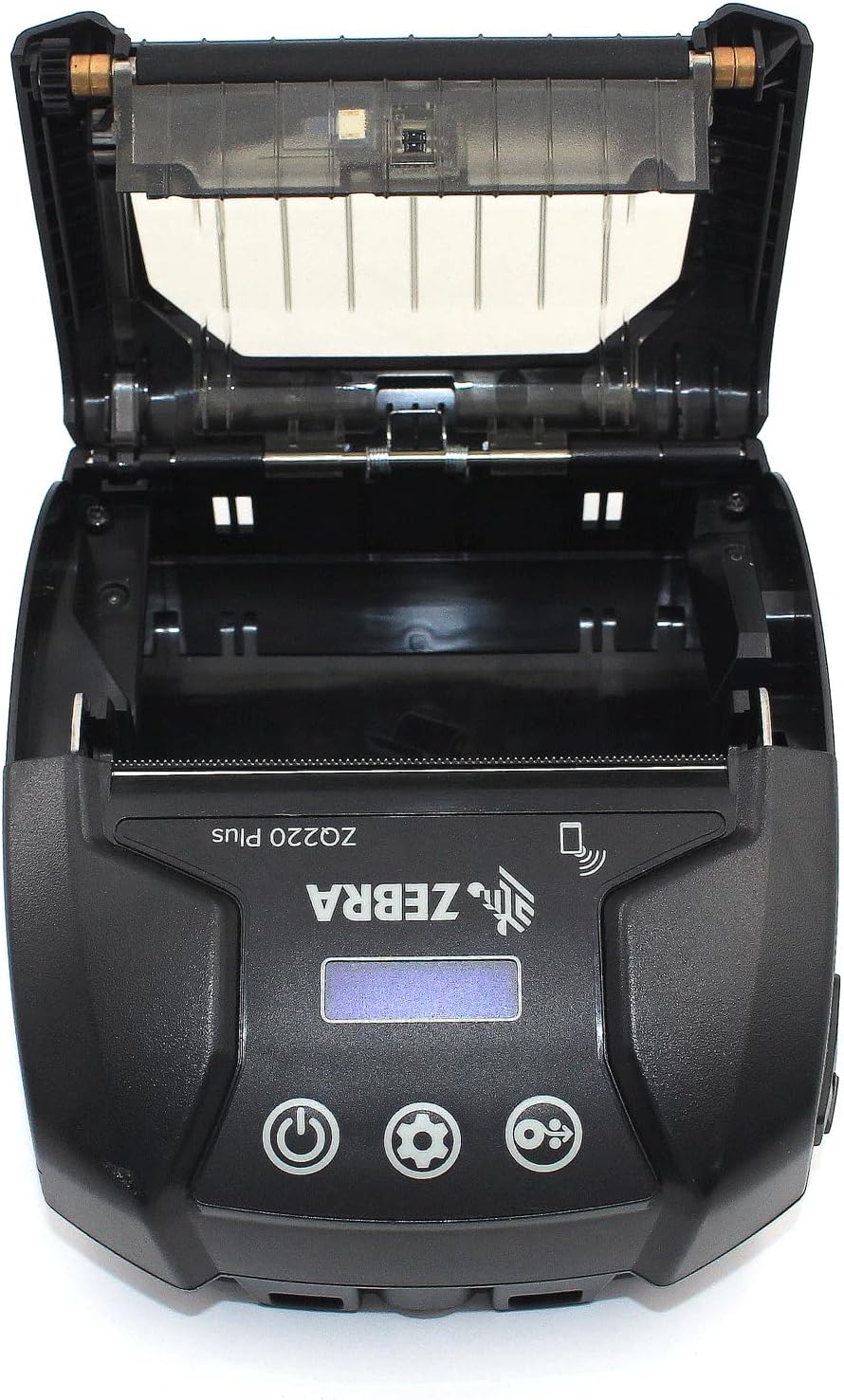
Figure 4.2: Media Compartment Open
This image shows the printer with its top cover open, providing access to the media compartment. The thermal printhead is visible, along with the spindle for loading paper rolls. This view is essential for understanding how to load printing media.

Figure 4.3: Media Roll Insertion
This image demonstrates the media loading process. The side view with the cover open clearly shows how a roll of thermal paper is placed into the printer's media bay, ensuring correct alignment for printing.
5. Налаштування
5.1. Встановлення батареї
- Переконайтеся, що принтер вимкнено.
- Locate the battery compartment cover on the back or bottom of the printer.
- Open the cover and insert the rechargeable battery, ensuring the contacts align correctly.
- Надійно закрийте кришку батарейного відсіку.
5.2. Loading Print Media
- Open the media compartment cover (refer to Figure 4.2).
- Place the thermal paper roll into the compartment with the leading edge feeding from the bottom of the roll.
- Pull a small amount of paper past the printhead.
- Close the media compartment cover firmly until it latches.
5.3. Початкове увімкнення та заряджання
- Connect the USB charging cable to the printer and a power source (e.g., USB wall adapter, vehicle USB port).
- Allow the battery to fully charge before first use. The charging indicator light will show the status.
- Press and hold the Power button until the printer powers on. The LCD display will illuminate.
6. Експлуатація принтера
6.1. Підключення Bluetooth
- Ensure the printer is powered on and within range of your host device (smartphone, tablet, etc.).
- On your host device, navigate to the Bluetooth settings and enable Bluetooth.
- шукати available devices. The printer will appear as 'ZQ220 Plus' or a similar identifier.
- Select the printer from the list to initiate pairing. If prompted, enter the default PIN (usually '0000' or '1234').
- Once paired, the Bluetooth icon on the printer's display will indicate a successful connection.
6.2. Друк
- Ensure the printer is paired with your host device and has sufficient media loaded.
- Open your printing application (e.g., ZLabel Designer Mobile App for Android or iOS, or other compatible software).
- Select the ZQ220 Plus as your target printer within the application.
- Initiate the print command from your application. The printer will begin printing the document or label.
6.3. Зарядка через USB
The ZQ220 Plus supports simple USB charging. Connect the printer to any standard USB power source using the provided USB cable. This allows for convenient charging in vehicles or from portable power banks.
7. Технічне обслуговування
7.1. Очищення принтера
- Зовні: Протріть зовнішню частину принтера м’якою,amp тканина. Не використовуйте агресивні хімікати або абразивні засоби для чищення.
- Друкована головка: Periodically clean the thermal printhead using a printhead cleaning pen or a cotton swab lightly dampened with isopropyl alcohol. Ensure the printer is off and cool before cleaning. Allow to dry completely before use.
- Плитий ролик: Clean the platen roller with a lint-free cloth dampened with isopropyl alcohol to remove paper dust or adhesive residue.
7.2. Зберігання
When not in use for extended periods, store the printer in a cool, dry place, away from direct sunlight and extreme temperatures. Remove the battery if storing for several months to prevent discharge or damage.
8. Вирішення проблем
| проблема | Можлива причина | Рішення |
|---|---|---|
| Принтер не вмикається | Низький або розряджений акумулятор Improperly installed battery | Зарядіть батарею Правильно встановіть акумулятор |
| Немає виводу на друк | No paper loaded Папір завантажено неправильно Printhead dirty or damaged | Load thermal paper Reload paper correctly Очищення друкуючої головки |
| Погана якість друку | Dirty printhead Низький заряд батареї Неправильний тип носія | Очищення друкуючої головки Зарядіть батарею Ensure correct thermal media is used |
| Не вдається підключитися через Bluetooth | На пристрої не ввімкнено Bluetooth Printer not in pairing mode Поза діапазоном | Enable Bluetooth on host device Ensure printer is discoverable Move device closer to printer |
| Printer stops during operation | Низький заряд батареї Зминання паперу Перегрів | Зарядіть батарею Clear any paper jam Allow printer to cool down |
9. Технічні характеристики
| Особливість | Специфікація |
|---|---|
| Назва моделі | ZQ220 PLUS |
| Технологія друку | Прямий термічний |
| Роздільна здатність друку | 203 DPI (точок на дюйм) |
| Максимальна швидкість друку (монохромний) | 20 ppm |
| Supported Media Widths | 80 мм (3.14 дюйм), 76.2 мм (3 дюйма), 58 мм (2.28 дюйма) |
| Підключення | Bluetooth 5.0, USB |
| Ємність акумулятора | 2500 мАг |
| Пам'ять | 8 Мб |
| Рейтинг довговічності | IP54 (resistance to dust and liquids) |
| Розміри продукту (Д x Ш x В) | 3.15 см x 2.25 см x 3 см |
| Вага товару | 4 унції (0.25 фунта) |
| Включені компоненти | Printer, Battery, USB Cable |
10. Гарантія та підтримка
10.1. Інформація про гарантію
The Zebra ZQ220 Plus Mobile Thermal Printer comes with a Обмежена гарантія виробника. Please refer to the warranty card included with your product or visit the official Zebra webсайт для отримання детальних умов щодо покриття, тривалості та процедур подання претензій.
10.2. Технічна підтримка
For technical assistance, troubleshooting beyond this manual, or service inquiries, please contact Zebra customer support. Contact information can typically be found on the official Zebra webсайті або в документації до вашого продукту.


