1. Вступ
The Hantek DSO2D50 is a high-performance digital storage oscilloscope designed for precise signal analysis and measurement. It features a 500MHz bandwidth, 2GSa/s real-time sampling rate, and an 80K memory depth. This instrument also integrates a 25MHz arbitrary waveform generator, making it a versatile tool for various electronic testing and development applications.
This manual provides essential information for the safe and effective operation of your DSO2D50 oscilloscope. Please read it thoroughly before use and retain it for future reference.
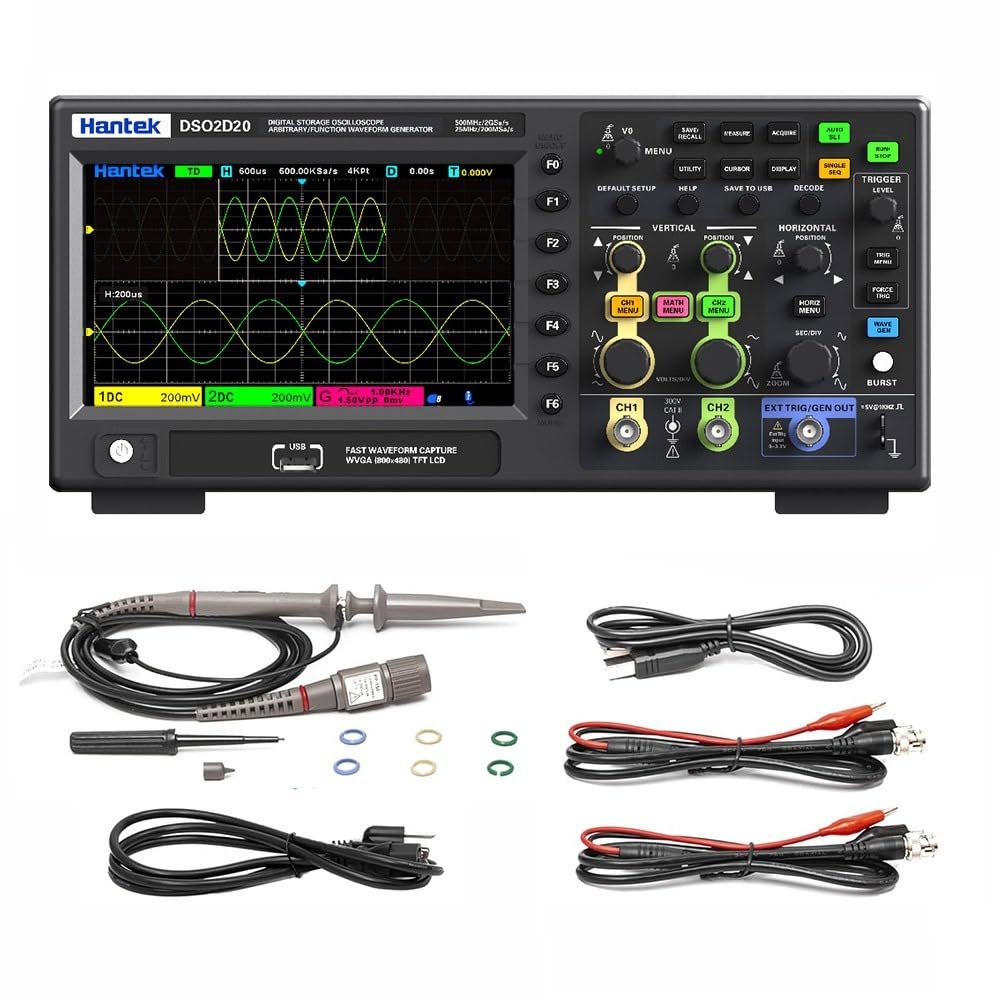
Малюнок 1.1: Спереду view of the Hantek DSO2D50 Digital Storage Oscilloscope.
Ключові характеристики:
- 2 Analog Channels + 1 External Trigger Channel
- Смуга пропускання 500 МГц
- 2 GSa/s Real-time Sampлінг -курс
- 80K Memory Depth
- Built-in 25MHz Arbitrary Waveform Generator
- 32 Automatic Measurement Functions
- 9 Режими запуску
- Supports 1MΩ/50Ω Impedance Switching
- Multiple Data Storage Options (CSV, images, waveforms)
- 7-дюймовий РК-дисплей
2. Інформація про безпеку
УВАГА:
- To prevent electric shock, do not open the instrument casing. Звертайтеся до кваліфікованого персоналу з усіх питань технічного обслуговування.
- Не використовуйте осцилограф у вологих абоamp умови.
- Переконайтеся, що блок живлення обtage matches the instrument's requirements.
- Використовуйте лише шнур живлення та аксесуари, зазначені виробником.
- Before making any connections, ensure the instrument is powered off.
- Always connect the ground lead of the probe to the circuit ground before connecting the probe tip to the test point.
- Observe all terminal ratings to prevent fire or electric shock.

Figure 2.1: Rear panel showing power input and safety warning.
Небезпечний випtage inside, do not remove the cover unless by specified personnel.
3. Вміст упаковки
Переконайтеся, що ваш пакет містить такі елементи:
- 1 x Hantek DSO2D50 Bench Digital Storage Oscilloscope
- 2 x Passive Probes (typically 1:1/10:1 switchable)
- 1 x шнур живлення
- 1 x USB кабель
- 1 x Посібник користувача (цей документ)
- 1 x Calibration Certificate (may vary)
If any items are missing or damaged, please contact your dealer or Hantek customer support immediately.
4. Продукт закінчивсяview
4.1 Елементи керування та роз'єми на передній панелі
The front panel of the DSO2D50 features the display, control buttons, knobs, and input connectors for channels and the arbitrary waveform generator output.

Малюнок 4.1: Детально view of the control panel and input connectors.
Ключові напрямки включають:
- Область відображення: 7-inch TFT LCD for waveform display and menu navigation.
- Функціональні кнопки (F0-F6): Context-sensitive buttons along the right side of the display.
- Кнопки меню: Buttons like DEFAULT SETUP, UTILITY, CURSOR, DISPLAY, SAVE TO USB, DECODE, HELP.
- Вертикальні елементи керування: VOLTS/DIV knobs and CH1 MENU, CH2 MENU, MATH MENU buttons for adjusting vertical scale and channel settings.
- Горизонтальні елементи керування: SEC/DIV knob and HORIZ MENU, ZOOM buttons for adjusting horizontal scale and time base.
- Елементи керування тригерами: TRIGGER LEVEL knob and TRIG MENU, FORCE TRIG buttons for setting trigger conditions.
- Arbitrary Waveform Generator (AWG) Controls: WAVE GEN button and EXT TRIG/GEN OUT connector.
- Входи каналів: Роз'єми BNC для каналів CH1 та CH2.
- External Trigger/AWG Output: EXT TRIG/GEN OUT BNC connector.
- Хост-порт USB: Для підключення USB-накопичувачів.
4.2 роз’ємів на задній панелі
The rear panel includes the power input and ventilation.
- Вхід живлення змінного струму: Для підключення шнура живлення.
- Вентилятор: For cooling the instrument.
5. Налаштування
5.1 Підключення живлення
- Переконайтеся, що вимикач живлення осцилографа знаходиться в положенні ВИМКНЕНО.
- Підключіть наданий шнур живлення до входу змінного струму на задній панелі осцилографа.
- Підключіть інший кінець шнура живлення до заземленої розетки змінного струму.
5.2 Підключення зонда та компенсація
- Connect a passive probe to one of the CH1 or CH2 BNC input connectors.
- Set the probe attenuation switch (if applicable) to 10X.
- Connect the probe ground clip to the oscilloscope's ground terminal (usually a dedicated terminal or the ground ring of the BNC connector).
- Connect the probe tip to the probe compensation output (usually a square wave test signal output on the front panel).
- Увімкніть живлення осцилографа.
- Натисніть АВТОМАТИЧНА НАСТРОЙКА button. The oscilloscope will automatically adjust settings to display the compensation signal.
- Регулюйте компенсаційний гвинт на зонді, доки на екрані не з'явиться прямокутна хвиля з плоскою вершиною. Це забезпечить точні вимірювання.
6. Інструкція з експлуатації
6.1 Базове відображення форми хвилі
- Увімкніть живлення осцилографа.
- Connect a compensated probe to CH1.
- Connect the probe tip to the signal source you wish to measure.
- Натисніть АВТОМАТИЧНА НАСТРОЙКА кнопка. Осцилограф автоматично налаштує вертикальні, горизонтальні та параметри запуску для відображення стабільної форми сигналу.
- Використовуйте вольт/діл knob to adjust the vertical scale (ampосвіта).
- Використовуйте SEC/DIV knob to adjust the horizontal scale (time base).
- Використовуйте ПОЗИЦІЯ ручки для переміщення форми хвилі по вертикалі або горизонталі.
6.2 1MΩ/50Ω Impedance Switching
The DSO2D50 supports switching between 1MΩ (high impedance) and 50Ω (low impedance) input impedance. This is crucial for adapting to different measurement scenarios and ensuring signal integrity, especially for high-frequency signals or when matching transmission lines.

Figure 6.1: Menu for selecting input impedance.
To switch impedance:
- Натисніть CH1 MENU or CH2 MENU button for the desired channel.
- Navigate through the menu options using the function buttons (F0-F6) until you find the "Impedance" setting.
- Виберіть будь-яке 1 МОм or 50 Ом as required for your measurement.
- Примітка: When using 50Ω impedance, ensure your signal source is also 50Ω terminated to prevent reflections.
6.3 Measurement and Statistical Functions
The oscilloscope provides 32 automatic measurement functions and threshold measurement functions. These tools support statistical analysis, allowing you to display five measurement values: current value, average value, maximum value, minimum value, and standard deviation.

Малюнок 6.2: Впрample of automatic measurement display.
To access measurement functions:
- Натисніть ВИМІРЮЙТЕ кнопку.
- Use the function buttons to select the desired measurement type (e.g., Frequency, Period, Vpp, Vmax, Vmin, Rise Time, Fall Time).
- The selected measurements will appear on the screen.
- до view statistical values, navigate to the statistical menu within the MEASURE options.
6.4 Built-in Arbitrary Waveform Generator (AWG)
The DSO2D50 includes a 25MHz arbitrary waveform generator capable of outputting five standard waveforms: sine wave, square wave, triangle wave, exponential wave, noise, and DC. It also supports custom arbitrary waveform output.

Figure 6.3: Arbitrary Waveform Generator settings interface.
To use the AWG:
- Підключіть кабель BNC від ЗОВНІШНІЙ ВИХІД ТРИМКИ/ГЕНЕРАЦІЇ connector to the input of the device under test or an oscilloscope channel.
- Натисніть WAVE GEN кнопку.
- Use the function buttons to select the desired waveform type (Sine, Square, Triangle, etc.).
- Adjust parameters such as Frequency, Amplitude, and Offset using the corresponding menu options and knobs.
- Ensure the AWG output is enabled within the menu.
6.5 Режими запуску
The oscilloscope offers 9 triggering modes to stabilize and capture specific events in your waveform. Common modes include Edge, Pulse, Video, Slope, and more advanced options for serial bus decoding.
To set up a trigger:
- Натисніть МЕНЮ ТРИГ кнопку.
- Select the desired trigger type (e.g., Edge, Pulse).
- Adjust the trigger source (CH1, CH2, EXT), slope (rising/falling edge), and level using the РІВЕНЬ ТРИГЕРА knob and menu options.
- The trigger level is indicated by a horizontal line on the display.
6.6 Зберігання та відтворення даних
The DSO2D50 allows you to save and recall various data types, including CSV files, images, reference waveforms, and waveform data, to a USB storage device.
To save data:
- Insert a USB flash drive into the USB Host port on the front panel.
- Натисніть SAVE TO USB кнопку.
- Select the desired save type (e.g., Image, Waveform, CSV) and file format from the menu.
- Підтвердьте операцію збереження.
6.7 Розширені функції
- Математичні функції: Perform waveform arithmetic operations (e.g., A+B, A-B, A*B, A/B, FFT) and support cursor measurements for detailed analysis.
- FFT Scale Display: Provides a clear display for frequency domain analysis, making it easier to read results.
- Режим XY: Use XY mode to analyze the phase relationship between two signals. This is useful for Lissajous figures.
- Serial Protocol Triggering and Decoding: Supports protocols such as UART, LIN, CAN, SPI, and IIC, enabling easy analysis of serial bus data.
- SCPI Remote Control: Standard SCPI commands are supported for easy system setup and remote control via USB.
7. Технічне обслуговування
7.1 Очищення
- Clean the instrument's exterior with a soft cloth dampм’яким миючим засобом і водою.
- Do not use abrasive cleaners or solvents that may damage the casing або дисплей.
- Переконайтеся, що рідина не потрапила всередину інструменту.
7.2 Зберігання
- Якщо осцилограф не використовується протягом тривалого часу, зберігайте його в сухому, захищеному від пилу місці.
- Уникайте екстремальних температур і вологості.
- Disconnect all probes and the power cord before storage.
7.3 Калібрування
The DSO2D50 is factory calibrated. For continued accuracy, periodic calibration by qualified service personnel is recommended, typically every 1-2 years depending on usage.
8. Вирішення проблем
| проблема | Можлива причина | Рішення |
|---|---|---|
| Немає дисплея після ввімкнення. | Power cord not connected, power switch off, or power supply issue. | Check power cord connection. Ensure power switch is ON. Verify power outlet functionality. |
| Форма хвилі не відображається. | Probe not connected, signal source off, vertical/horizontal scale incorrect, or trigger not set. | Check probe connection. Ensure signal source is active. Press АВТОМАТИЧНА НАСТРОЙКА. Adjust VOLTS/DIV and SEC/DIV. Check trigger settings. |
| Нестабільна форма хвилі. | Неправильні налаштування тригера. | Adjust trigger level. Change trigger type (e.g., from Auto to Normal). Check trigger source. |
| Вимірювання неточні. | Probe compensation incorrect, probe attenuation setting mismatch, or incorrect impedance. | Perform probe compensation. Ensure probe attenuation (1X/10X) matches oscilloscope setting. Verify input impedance (1MΩ/50Ω). |
| USB storage not recognized. | Incompatible USB drive, drive not formatted correctly, or drive issue. | Try a different USB drive. Ensure drive is formatted to FAT32. |
9. Технічні характеристики
The following table outlines the key specifications for the Hantek DSO2D50 Digital Storage Oscilloscope.
| Параметр | Специфікація |
|---|---|
| Модель | DSO2D50 |
| Канали | 2 Analog Channels + 1 External Trigger Channel |
| Пропускна здатність | 500 МГц |
| Sampлінг -курс | 2 GSa/s (Real-time) |
| Глибина пам'яті | 80 кілометрів |
| Генератор сигналів довільної форми | 25 MHz (Sine, Square, Triangle, Exponential, Noise, DC) |
| Вертикальна чутливість | 500 µV/div - 10 V/div |
| Вхідний опір | 1 MΩ ±2% || 15 pF ±5 pF; 50 Ω ±2% |
| Макс. Вхідний об'ємtage | 300 V CAT II (1MΩ) |
| Дисплей | 7-дюймовий TFT-РК-дисплей |
| Режими тригера | Edge, Pulse, Video, Slope, Overtime, Window, Pattern, Interval, UART, LIN, CAN, SPI, IIC |
| Автоматичні вимірювання | 32 types, with statistical analysis |
| Інтерфейс | USB-хост, USB-пристрій |
| Джерело живлення | 100-240 В змінного струму, 50/60 Гц |
| Споживана потужність | < 50 Вт |
| Розміри | (Refer to package dimensions, typically 5.91 x 3.94 x 0.79 inches for package, actual unit size will be larger) |
| вага | 12.1 фунта (вага товару) |
Примітка: Specifications are subject to change without notice. For the most current specifications, please refer to the manufacturer's official webсайт.
9.1 Порівняння моделі
The Hantek DSO2D50 is part of a series of oscilloscopes. The following table provides a comparison with other models in the series, highlighting key differences.

Figure 9.1: Model comparison table for Hantek oscilloscopes.
This table helps to understand the DSO2D50's position within the product line, specifically noting its 500MHz bandwidth, 2GSa/s sampling rate, 80K storage depth, and integrated arbitrary function generator (AFG).
10. Гарантія та підтримка
10.1 Інформація про гарантію
Hantek products are typically covered by a limited warranty against defects in materials and workmanship. The specific warranty period and terms may vary by region and product. Please refer to the warranty card included with your product or visit the official Hantek webдля отримання детальної інформації про гарантію.
Зберігайте чек про покупку як підтвердження покупки для гарантійних претензій.
10.2 Підтримка клієнтів
For technical assistance, troubleshooting, or service inquiries, please contact Hantek customer support:
- Виробник: Qingdao Hantek Electronic Co., Ltd
- Адреса: #35 Building, No. 780 Baoyuan Road, High-tech Zone, Qingdao, Shandong, China 266114
- Webсайт: (Please refer to the official Hantek website for contact forms or email addresses)
When contacting support, please have your product model (DSO2D50) and serial number ready.


