вступ
Thank you for choosing the OUKITEL Smartwatch. This device is designed to enhance your daily life with smart features, comprehensive health monitoring, and various sports modes. This manual provides detailed instructions to help you set up, operate, and maintain your smartwatch effectively. Please read this manual thoroughly before use to ensure optimal performance and longevity of your device.
Що в коробці
- OUKITEL Smartwatch
- Зарядний кабель
- Посібник користувача
Посібник із налаштування
1. Заряджання смарт-годинника
Before first use, fully charge your smartwatch. Connect the magnetic charging cable to the charging contacts on the back of the watch and plug the USB end into a power adapter (not included) or a computer's USB port. A full charge typically takes about 2.5 hours.

Image: The OUKITEL Smartwatch connected to its magnetic charging cable, displaying a charging icon on its screen.
A full charge provides approximately 5-10 days of normal usage and up to 30 days in standby mode.
2. Встановлення та сполучення програм
To unlock all features, download the companion app (e.g., "GloryFit" as mentioned in reviews) on your smartphone. The app is compatible with iOS 9.0+ and Android 6.0+ devices.
- Scan the QR code in the user manual or search for the app name in your phone's app store (Apple App Store for iOS, Google Play Store for Android).
- Встановіть і відкрийте додаток.
- Дотримуйтесь інструкцій на екрані, щоб створити обліковий запис і налаштувати свій професійнийfile.
- Увімкніть Bluetooth на своєму смартфоні.
- In the app, search for your OUKITEL Smartwatch and select it to pair. Confirm the pairing request on both your phone and the smartwatch.
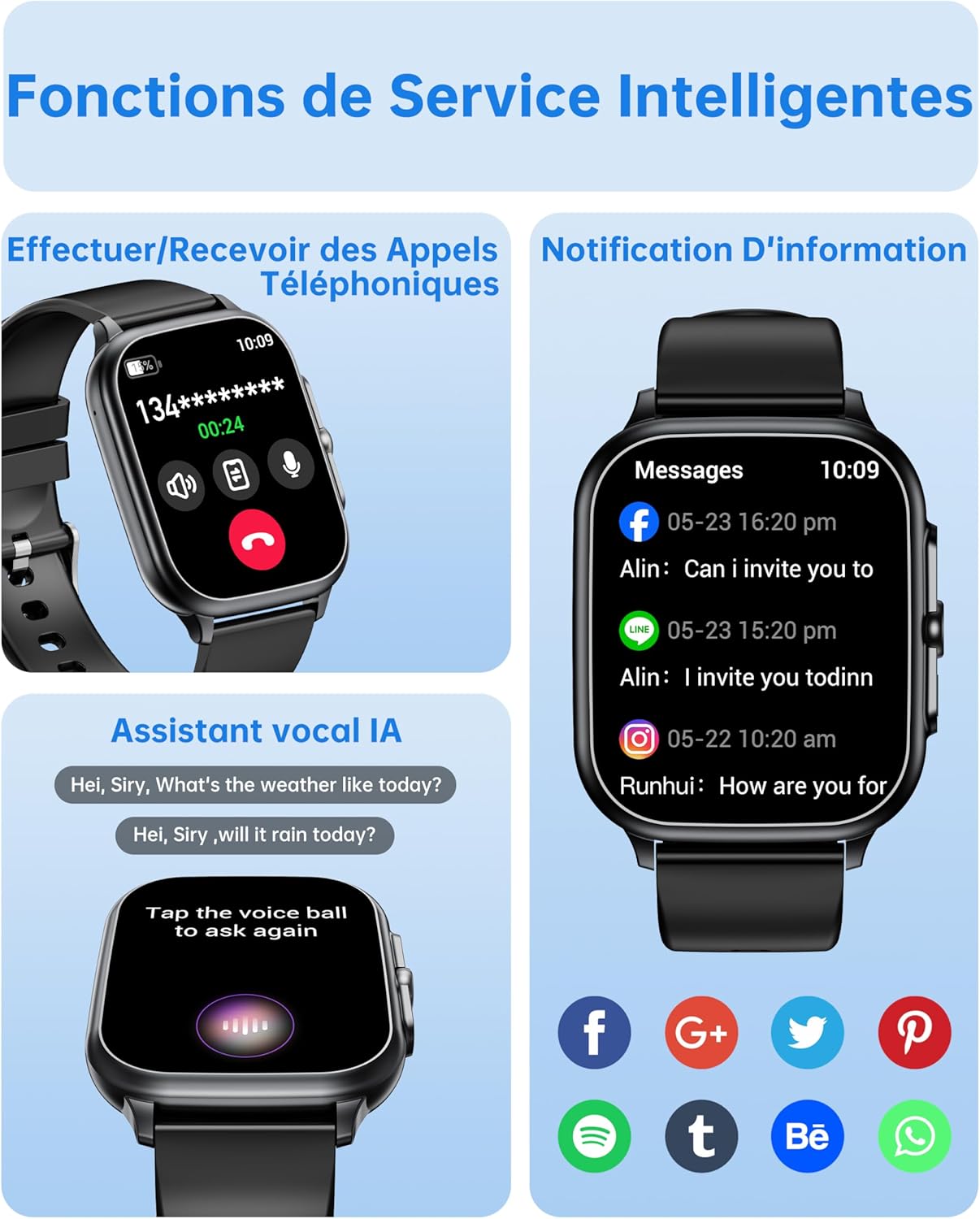
Image: The OUKITEL Smartwatch screen showing an incoming call interface, illustrating its Bluetooth call functionality and readiness for connection.
Інструкція з експлуатації
Основна навігація
The OUKITEL Smartwatch features a 1.91-inch HD touchscreen for intuitive control. Swipe left, right, up, or down to navigate through menus and functions. Press the side button to return to the home screen or access the app list.
Розумні функції
- Виклики Bluetooth: Once paired with your phone, you can make and receive calls directly from your smartwatch. Access the dial pad, call history, or contacts on your watch.
- Голосовий помічник AI: Utilize the integrated AI voice assistant (e.g., Alexa) to perform voice commands such as asking questions, checking the weather, or initiating calls.
- Сповіщення: Receive real-time notifications for calls, SMS, and various social media apps (WhatsApp, Facebook, etc.) directly on your wrist.
- Керування музикою: Control music playback on your smartphone (play, pause, skip tracks) directly from your smartwatch.
- Інші функції: Includes weather forecasts, stopwatch, timer, alarm clock, remote camera control, and a "Find My Phone" feature.

Image: A composite image showing the smartwatch interface for making/receiving calls, displaying app notifications, and interacting with the AI voice assistant.
Моніторинг здоров'я
The smartwatch provides 24/7 health tracking to help you monitor your well-being.
- Монітор серцевого ритму: Безперервно відстежує ваш пульс протягом дня. View дані в режимі реального часу та історичні тенденції в додатку.
- Моніторинг кисню в крові (SpO2): Вимірює рівень насичення крові киснем.
- Відстеження сну: Аналізує ваші режими сну, включаючи глибокий сон, легкий сон і час неспання, щоб допомогти покращити якість сну.
- Моніторинг стресу: Відстежує ваш рівень стресу.

Image: A composite image showing the smartwatch displaying heart rate, blood oxygen levels, and sleep duration data, alongside a person running outdoors.
Спортивні режими та відстеження активності
The smartwatch offers over 100 indoor and outdoor sports modes, including walking, running, cycling, hiking, basketball, and football. It records exercise data such as steps, heart rate, and calories burned.

Image: A person on a bicycle, with the smartwatch displaying various sports modes and an activity analysis screen showing duration, heart rate, calories, and steps.
Налаштування
Personalize your smartwatch with over 100 built-in watch faces. You can also upload your favorite photos to create unique custom dials through the companion app. The watch supports 6 different menu styles.

Image: The OUKITEL Smartwatch showcasing different menu styles and customizable watch faces, including options to use personal photos.
Технічне обслуговування
Водостійкість (IP68)
The OUKITEL Smartwatch is IP68 waterproof, meaning it is resistant to splashes, rain, and sweat. It can withstand daily water exposure like hand washing. However, it is не підходить for hot baths, saunas, diving, or exposure to corrosive liquids like seawater.

Image: The OUKITEL Smartwatch highlighting its IP68 water resistance with icons representing protection against rain, hand washing, and perspiration.
Очищення та догляд
- Регулярно протирайте годинник і ремінець м’якою сухою тканиною.
- Уникайте використання агресивних хімікатів або абразивних матеріалів.
- Перед заряджанням переконайтеся, що зарядні контакти чисті та сухі.
Усунення несправностей
| проблема | Можливе рішення |
|---|---|
| Smartwatch won't turn on. | Переконайтеся, що годинник повністю заряджений. Підключіть його до зарядного пристрою щонайменше на 30 хвилин. |
| Не вдається з'єднати пристрій зі смартфоном. |
|
| Неточні показники даних про стан здоров'я. |
|
| Screen turns on too frequently (as noted in reviews). | Check the watch settings for "Raise to Wake" or "Wrist Sense" features. You may be able to adjust sensitivity or disable it if it's causing unwanted screen activation. |
| Сповіщення не відображаються. |
|
Технічні характеристики
| Бренд | OUKITEL |
| Номер моделі | B0FXGFXMT5 |
| Операційна система | iOS, Android |
| Розмір екрана | 1.91 дюймів |
| Технологія підключення | Bluetooth |
| Особливості | AI Voice Assistant & Notifications, 100+ Sports Modes, 1.91 Inch HD Screen |
| Сумісні пристрої | Смартфон |
| Водонепроникність | IP68 |
| GPS | Немає GPS |
| Форма | Прямокутний |
| Цільова аудиторія | Жінки, Чоловіки |
Гарантія та підтримка
The OUKITEL Smartwatch comes with a 1-річна гарантія виробника. Ця гарантія поширюється на дефекти матеріалів і виготовлення за нормального використання.
For technical support, troubleshooting assistance, or warranty claims, please contact OUKITEL customer service through their official website or the contact information provided with your purchase. Please have your model number (B0FXGFXMT5) and proof of purchase ready when contacting support.


