1. Вступ
Thank you for choosing the KAIWEETS KC200D Digital Clamp Meter. This device is a compact, high-precision instrument designed for electrical measurements in various settings, including home, commercial, and industrial environments. It features True RMS technology for accurate readings of complex waveforms, Non-Contact Voltage (NCV) detection for enhanced safety, and a clear backlit LCD for easy readability. This manual provides essential information for safe and effective use of your clamp метр.
2. Інформація про безпеку
To ensure safe operation, please read and understand all safety warnings and operating instructions before using this instrument. Failure to observe these warnings can result in serious injury or death.
- Завжди дотримуйтесь місцевих і національних правил безпеки.
- Не використовуйте вимірювальний прилад, якщо він виглядає пошкодженим або якщо ізоляція вимірювальних дротів пошкоджена.
- Не застосовуйте більше номінального об’ємуtage, as marked on the meter, between terminals or between any terminal and ground. The maximum operating voltage дорівнює 600В.
- Будьте особливо обережні при роботі з обtages above 60V DC or 30V AC RMS. These voltagце небезпека ураження електричним струмом.
- Keep your fingers behind the finger guards on the test leads during use.
- Не використовуйте лічильник у вибухонебезпечному середовищі з газами, парами або пилом.
- Remove the test leads from the circuit before changing functions.
- Always turn off the power to the circuit under test before connecting or disconnecting the test leads.
- Ensure the battery cover is securely closed before operating the meter.
3. Вміст упаковки
Verify that all items listed below are present and undamaged:
- 1 x KAIWEETS KC200D Digital Clamp Метр
- 1 х посібник користувача
- 1 х сумка для зберігання
- 2 вимірювальних дроти (червоний та чорний)
- 2 батареї AAA 1.5 В
4. Продукт закінчивсяview
The KAIWEETS KC200D is designed for ease of use and durability. Familiarize yourself with the main components:
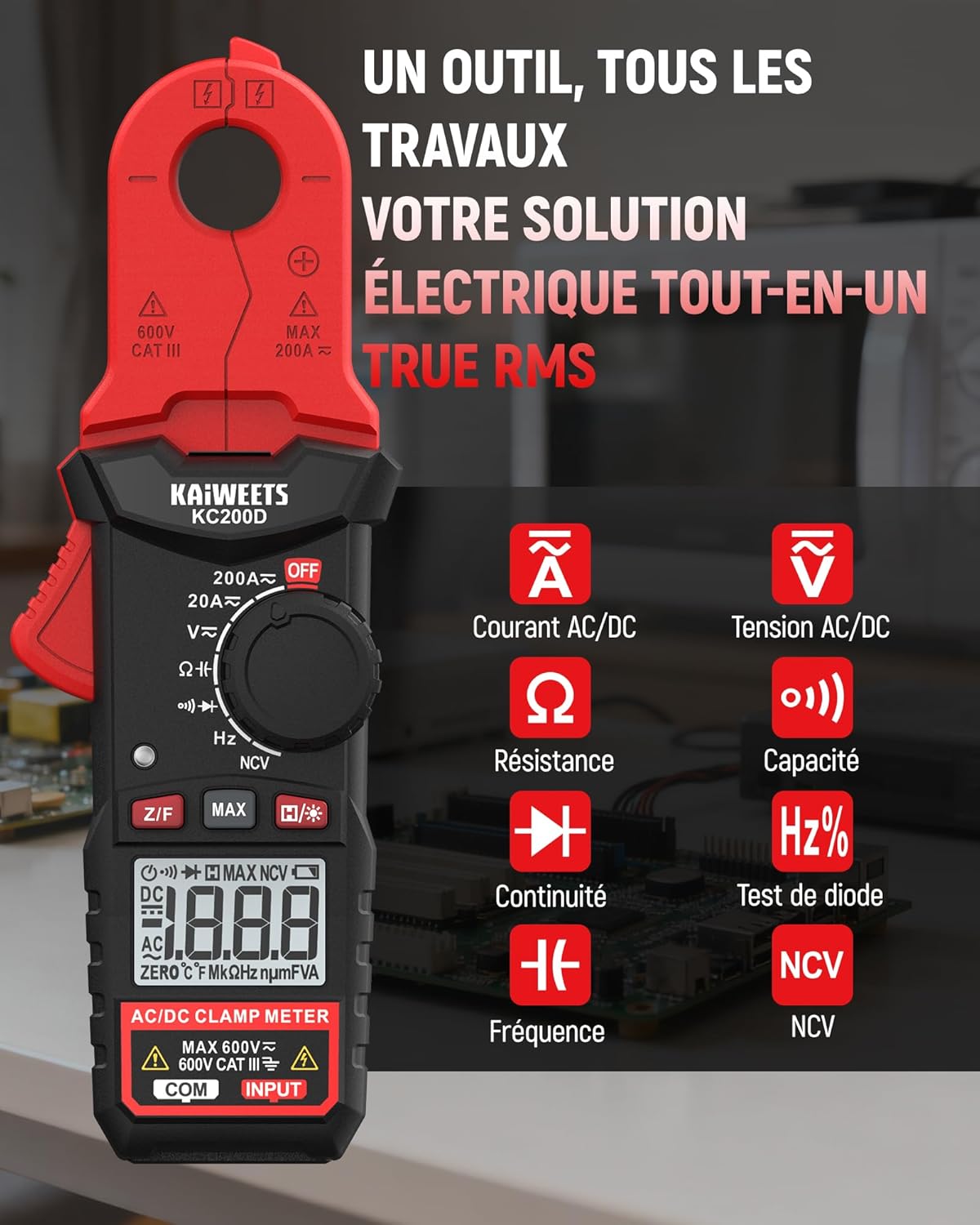
малюнок 4.1: KAIWEETS KC200D Clamp Meter with its various measurement functions highlighted, including AC/DC Current, AC/DC Voltage, Resistance, Capacitance, Frequency, Diode Test, Continuity, and NCV.
4.1 Ключові компоненти
- Clamp щелепа: Використовується для безконтактного вимірювання змінного/постійного струму.
- Диск функцій: Поворотний перемикач для вибору режимів вимірювання.
- РК-дисплей: Відображає показники вимірювань, одиниці вимірювання та індикатори.
- кнопки: For special functions like Data Hold, MAX/MIN, DC Zero, Backlight, and NCV.
- Вхідні клеми: Для підключення вимірювальних щупів для об'ємуtagе., вимірювання опору, ємності, частоти, діодів та проціління кола.
5. Налаштування
5.1 Встановлення батареї
The KC200D requires two AAA 1.5V batteries (included).
- Переконайтеся, що лічильник ВИМКНЕНО.
- Знайдіть відсік для батарейок на задній панелі глюкометра.
- За допомогою викрутки відкрийте кришку батарейного відсіку.
- Вставте дві батарейки типу AAA, дотримуючись правильної полярності (+ та -).
- Встановіть на місце кришку батарейного відсіку та закріпіть її гвинтом.
5.2 Підключення вимірювальних щупів
Для вимірювань, що потребують вимірювальних щупів (об'ємtage, resistance, capacitance, frequency, diode, continuity):
- Insert the red test lead into the "INPUT" terminal.
- Insert the black test lead into the "COM" (Common) terminal.
6. Інструкція з експлуатації
Always select the appropriate function before making any measurement. Turn the function dial to the desired measurement mode.
6.1 Вимірювання змінного/постійного струму (Clamp)
Використовуйте клamp jaw for non-contact current measurement. This method is ideal for safely measuring current without breaking the circuit.

малюнок 6.1: Клamp jaw of the KC200D measuring current on a single electrical wire, demonstrating its compact design and precision.
- Поверніть перемикач функцій у положення 20A ~ or 200A ~ position for AC current, or 20А= or 200А= for DC current.
- Натисніть клamp спусковий гачок, щоб відкрити щелепу.
- Encircle only один conductor with the clamp jaw. Do not clamp around multiple wires, as this will result in an inaccurate reading.
- For DC current measurement, press the Z/F button to zero the display before clampінж.
- Прочитайте поточне значення на РК-дисплеї.
6.2 AC/DC Voltage Вимірювання
Щоб виміряти обtage, use the test leads.
- Поверніть перемикач функцій у положення V~ (Обсяг змінного струмуtagд) або V= (DC Voltagд) посада.
- Connect the red test lead to the positive side of the circuit and the black test lead to the negative side (or ground).
- Прочитайте томtagзначення e на РК-дисплеї.
6.3 Вимірювання опору
Перед вимірюванням опору переконайтеся, що коло знеструмлене.
- Поверніть перемикач функцій у положення Ω положення.
- Підключіть вимірювальні щупи до компонента, який потрібно виміряти.
- Зчитайте значення опору на РК-дисплеї.
6.4 Вимірювання ємності
Discharge capacitors completely before measurement to avoid damage to the meter or injury.
- Поверніть перемикач функцій у положення Ємність position (often shared with Diode/Continuity, press FUNC to cycle).
- Підключіть вимірювальні щупи до конденсатора.
- Зчитайте значення ємності на РК-дисплеї.
6.5 Вимірювання частоти
Щоб виміряти частоту:
- Поверніть перемикач функцій у положення Гц% положення.
- Connect the test leads across the circuit where frequency is to be measured.
- Прочитайте значення частоти на РК-дисплеї.
6.6 Діодне випробування
Переконайтеся, що діод відключено від кола.
- Поверніть перемикач функцій у положення діод position (often shared with Capacitance/Continuity, press FUNC to cycle).
- Connect the red test lead to the anode and the black test lead to the cathode.
- Прямий томtage drop will be displayed for a good diode. Reverse the leads; the display should show OL (Open Loop).
6.7 Тест безперервності
Переконайтеся, що ланцюг знеструмлений.
- Поверніть перемикач функцій у положення Безперервність position (often shared with Diode/Capacitance, press FUNC to cycle).
- Підключіть вимірювальні щупи до компонента або дроту.
- If there is continuity (low resistance), the meter will emit an audible beep.
6.8 Безконтактний Voltage (NCV) Виявлення
The NCV function allows for quick and safe detection of live AC voltage без прямого контакту.

малюнок 6.2: The KC200D performing Non-Contact Voltage (NCV) detection near an electrical outlet, showing visual indicators for low and high voltage присутність.
- Поверніть перемикач функцій у положення NCV положення.
- Bring the top end of the meter near the conductor or outlet.
- The meter will emit an audible beep and illuminate LED indicators, with frequency increasing as voltagсила зростає.
6.9 Спеціальні функції

малюнок 6.3: The KC200D highlighting its user-friendly functions: MAX for peak value, Z/F for DC current zeroing, H for data hold, backlight for low-light conditions, and auto-off for battery saving.
- Data Hold (H/* button): Натисніть, щоб зафіксувати поточне значення на дисплеї. Натисніть ще раз, щоб відпустити.
- MAX/MIN (MAX button): Press to display the maximum or minimum measured value. Press again to cycle.
- DC Current Zero (Z/F button): For DC current measurements, press this button before clamping to zero out any residual readings.
- Backlight (H/* long press): Long press the H/* button to turn the display backlight ON or OFF for improved visibility in low-light conditions.
- Автовимкнення: The meter automatically powers off after approximately 15 minutes of inactivity to conserve battery life. Press any button or rotate the function dial to wake it up.
7. Технічне обслуговування
7.1 Очищення
Протріть глюкометр сухою м’якою тканиною. Не використовуйте абразивні засоби або розчинники.
7.2 Заміна батареї
When the battery indicator appears on the LCD, replace the batteries as described in the Setup section (5.1 Battery Installation).
7.3 Зберігання
If the meter is not used for an extended period, remove the batteries to prevent leakage and damage. Store the meter in its carrying bag in a cool, dry place.
8. Вирішення проблем
| проблема | Можлива причина | Рішення |
|---|---|---|
| Лічильник не вмикається | Розряджені батарейки; неправильне встановлення батарейок | Замініть батарейки; перевірте полярність батарейок |
| Неточні показники струму | Кілька провідників у clamp jaw; DC current not zeroed | Переконайтеся, що замкнений лише один провідникamped; Press Z/F button for DC current |
| "OL" displayed (Overload) | Measurement exceeds range; Open circuit (for continuity/resistance) | Select a higher range (if available); Check circuit connections |
| Немає виявлення NCV | Немає AC voltage present; Meter not close enough to source | Перевірте гучність кондиціонераtage presence; Move meter closer to the live conductor |
9. Технічні характеристики
Technical specifications for the KAIWEETS KC200D Digital Clamp Лічильник:
| Особливість | Специфікація |
|---|---|
| Номер моделі | KC200D |
| Дисплей | 2000 відліків, підсвічений РК-дисплей |
| Змінного струму | 20A/200A (±(2.5% + 5 digits)) |
| Постійний струм | 20A/200A (±(2.5% + 5 digits)) |
| AC Voltage | 2V/20V/200V/600V (±(1.0% + 5 digits)) |
| DC Voltage | 200mV/2V/20V/200V/600V (±(0.5% + 5 digits)) |
| опір | 200Ω/2kΩ/20kΩ/200kΩ/2MΩ/20MΩ (±(1.0% + 5 digits)) |
| Ємність | 2nF/20nF/200nF/2µF/20µF/200µF/2mF/20mF (±(4.0% + 5 digits)) |
| Частота | 2Hz/20Hz/200Hz/2kHz/20kHz/200kHz/2MHz/20MHz (±(1.0% + 3 digits)) |
| Діодний тест | так |
| Тест безперервності | так |
| Виявлення NCV | так |
| Джерело живлення | 2 батареї AAA 1.5 В |
| Рейтинг безпеки | CAT III 600V, Pollution Level: 2 |
| Розміри | 20.7 x 11.3 x 4.7 см (упаковка) |
| вага | 308 грамів (упаковка) |
10. Гарантія та підтримка
KAIWEETS products are designed for reliability and performance. For warranty information, technical support, or service inquiries, please refer to the contact information provided on the KAIWEETS official website or contact your local distributor. Please retain your purchase receipt as proof of purchase for warranty claims.


