1. Продукт закінчивсяview
The Oilsky HiFi MP3 Player M308 is a portable digital audio player designed for high-fidelity music playback. It features Bluetooth and Wi-Fi connectivity, a touch screen interface, and support for various lossless audio and video formats. This manual provides essential information for setting up, operating, and maintaining your device.

Зображення: Лицьова та зворотна сторони view of the Oilsky HiFi MP3 Player M308, showcasing its sleek design and touch screen.
2. Що в коробці
Перевірте наявність усіх елементів в упаковці:
- 1x Oilsky HiFi MP3 Player M308
- 1x USB Cable (for charging and data transfer)
- 1x захисний футляр
- 1x Посібник користувача
- 1x 64GB TF Card (pre-installed or included separately)

Image: All included accessories laid out, including the player, USB cable, protective case, user manual, and 64GB TF card.
3. Налаштування
3.1. Зарядка пристрою
Before first use, fully charge the player. Connect the provided USB cable to the player's charging port and to a USB power adapter (not included) or a computer's USB port. The battery indicator on the screen will show charging status. A full charge typically takes approximately 3 hours.

Image: Visual representation of the player's 1450mAh battery, indicating 3 hours for full charge and 15 hours of music playback.
3.2. Увімкнення/вимкнення живлення
- Щоб увімкнути: Натисніть і утримуйте кнопку живлення (зазвичай збоку), доки екран не підсвітиться.
- Щоб вимкнути: Натисніть і утримуйте кнопку живлення, потім виберіть «Вимкнути живлення» з опцій на екрані.
- Для сну/пробудження: Коротко натисніть кнопку живлення, щоб перевести пристрій у режим сну або розбудити його.
3.3. Початкове налаштування
Upon first power-on, follow the on-screen prompts to configure basic settings:
- Вибір мови: Виберіть бажану мову.
- Wi-Fi підключення: Connect to a Wi-Fi network to enable online features and app downloads. Go to Settings > Network & Internet > Wi-Fi.
- Дата і час: Встановіть правильну дату та час або увімкніть автоматичну синхронізацію через мережу.
4. Інструкція з експлуатації
4.1. Основна навігація
The player features a 2.8-inch full touch screen for navigation. Swipe, tap, and pinch gestures are used to interact with the interface. A retro mechanical knob is available for precise volume adjustment.

Image: A hand interacting with the touch screen and adjusting the mechanical volume knob on the Oilsky M308 player.
4.2. Відтворення музики
The player supports a wide range of audio formats, including MP3, WAV, APE, FLAC, AAC, ALAC, DSF, DFF, ISO, and DTS. Video formats such as AVI, MKV, RMVB, MP4, MPG, and MOV are also supported.
- Додавання музики: Передача музики files from your computer to the player's internal storage or the inserted TF card via USB.
- Відтворення музики: Open the music player application. Browse your library by album, artist, genre, or folder. Tap a song to begin playback.
- Елементи керування відтворенням: Use the on-screen controls for play/pause, skip tracks, repeat, and shuffle.

Image: Icons representing various supported audio (MP3, WAV, APE, FLAC, AAC, ALAC, DSF, DFF, ISO, DTS) and video formats (AVI, MKV, RMVB, MOV, MP4, MPG).
4.3. Підключення Bluetooth
The player features Bluetooth V4.1 for wireless audio transmission. It supports high-quality lossless transmission codecs such as LDAC, SBC, and AAC.
- Сполучення: Go to Settings > Connected devices > Bluetooth. Turn on Bluetooth and scan for available devices. Select your Bluetooth headphones or speaker from the list to pair.
- Двосторонній Bluetooth: The player can act as a Bluetooth audio source (transmitting to headphones/speakers) or a Bluetooth decoding amplifier (receiving audio from another device).

Image: The player connected wirelessly to earbuds via Bluetooth and also showing a wired headphone jack, illustrating dual connection options.
4.4. Wi-Fi Connectivity and Online Streaming
Connect to Wi-Fi to access online music streaming services and download applications. The player supports 2.4G and 5G dual-band Wi-Fi for improved speed and reduced network delays.
- Підключення до Wi-Fi: Navigate to Settings > Network & Internet > Wi-Fi. Select your network and enter the password.
- Online Music: Once connected, you can download and use various music streaming applications (e.g., Spotify, Amazon Music) directly on the device.

Image: The player displaying various app icons like Spotify and a web browser, indicating its Wi-Fi streaming capabilities.
4.5. Custom Playlists
Organize your music by creating custom playlists. Songs can be sorted by adding time, file name, first letter, year, album, style, folder, year, sampling rate, and format.
- Creating a Playlist: Within the music player app, select the songs you wish to add and choose the option to create a new playlist.
- Managing Playlists: Edit, rename, or delete playlists as needed through the music player interface.

Зображення: Кілька екранів views of the player demonstrating different ways to categorize and sort music for playlist creation.
4.6. Управління зберіганням
The player comes with 16GB of built-in memory and includes an additional 64GB TF card. The storage capacity can be expanded up to 1TB using a compatible microSD card.
- Checking Storage: View available storage space in Settings > Storage.
- Вставлення/виймання TF-карти: Carefully insert the TF card into the designated slot until it clicks. To remove, gently push the card in until it springs out.

Image: A close-up of the player showing a 64GB TF card being inserted into the expansion slot, highlighting the 1TB support.
5. Ключові характеристики
5.1. Відтворення аудіо високої роздільної здатності
The Oilsky M308 supports native hard DSD512 playback, delivering high-resolution audio that aims to reproduce the original sound scene accurately. It is compatible with various lossless audio formats, ensuring a detailed listening experience.
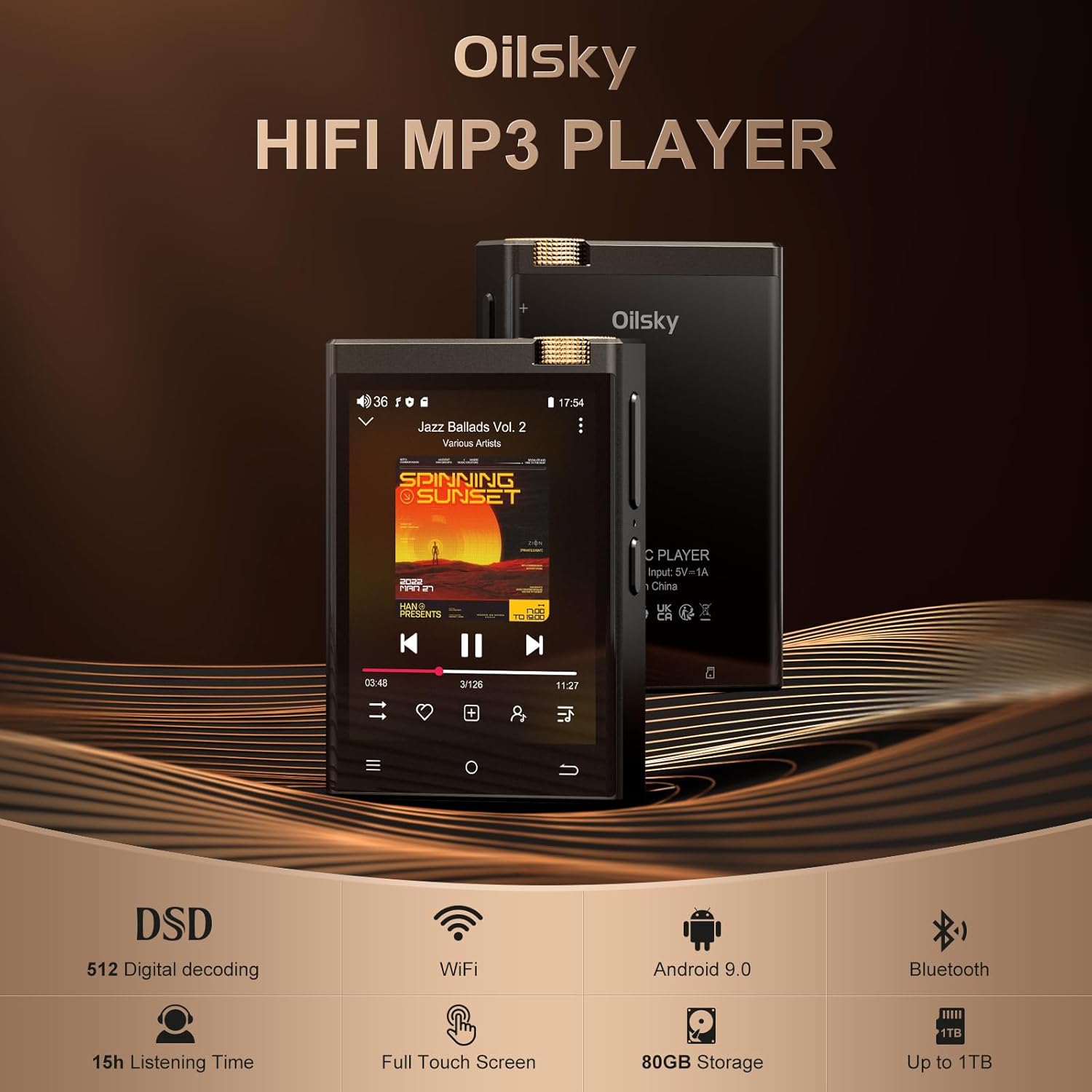
Image: The Oilsky M308 player with key features highlighted: DSD 512 Digital decoding, WiFi, Android 9.0, 15h Listening Time, Full Touch Screen, 80GB Storage, and Up to 1TB expansion.
5.2. Advanced DAC and AMP технології
Equipped with a high-performance ESS9018Q2M DAC (Digital-to-Analog Converter) and a MAX97720 AMP (Amplifier) chip, the player is designed to deliver clear and powerful audio output.

Image: Diagram illustrating the integration of the ESS9018Q2M DAC and MAX97720 AMP chips within the player's architecture.
5.3. Дисплей та інтерфейс користувача
The 2.8-inch display with a resolution of 480*640 offers high color saturation, providing a clear view of music information, album art, and lyrics. The full touch LCD display ensures intuitive operation.
5.4. Тривалий термін служби батареї
The integrated 1450mAh high-capacity battery provides up to 15 hours of continuous high-resolution audio playback via headphones or Bluetooth, suitable for extended listening sessions.
6. Технічне обслуговування
- Прибирання: Use a soft, dry cloth to clean the device. For the screen, use a microfiber cloth. Avoid abrasive cleaners or solvents.
- Зберігання: Зберігайте програвач у прохолодному, сухому місці, подалі від прямих сонячних променів та екстремальних температур.
- Догляд за акумулятором: To prolong battery life, avoid fully discharging the battery frequently. If storing for an extended period, charge the battery to about 50% before storage.
- захист: Використовуйте захисний чохол, що постачається в комплекті, для захисту від подряпин та незначних ударів.
7. Вирішення проблем
| Випуск | Можливе рішення |
|---|---|
| Пристрій не включається | Переконайтеся, що акумулятор заряджений. Підключіть його до джерела живлення та спробуйте ще раз. Якщо пристрій не реагує, натисніть і утримуйте кнопку живлення протягом 10-15 секунд для примусового перезавантаження. |
| Немає звуку | Check volume level. Ensure headphones/speakers are properly connected or Bluetooth is paired correctly. Test with different audio files. |
| Неможливо підключитися до Wi-Fi | Verify Wi-Fi password. Ensure the player is within range of the Wi-Fi router. Restart the player and the router. |
| Проблеми зі створенням пари Bluetooth | Ensure the Bluetooth device is in pairing mode. Delete previous pairings on both devices and try again. Ensure devices are within close proximity. |
| SD -карта не розпізнана | Ensure the TF card is inserted correctly. Try reinserting the card. Format the card (this will erase all data) if issues persist, or try a different TF card. |
| Збої в роботі програм або їхня низька продуктивність | Close background applications. Clear app cache (Settings > Apps > [App Name] > Storage > Clear cache). Restart the device. Ensure sufficient free storage space. |
8. Технічні характеристики
| Особливість | Деталь |
|---|---|
| Назва моделі | M308 |
| Розміри продукту | 0.55 x 2.17 x 3.15 дюймів |
| Вага товару | 10.6 унції |
| Розмір екрана | 2.8 дюймів |
| Технологія підключення | Bluetooth, USB, Wi-Fi |
| Ємність пам'яті | 16GB (internal) + 64GB (TF Card included), expandable up to 1TB |
| Акумулятор | Літій-іонний акумулятор 1450 мАг (в комплекті) |
| Час відтворення музики | До 15 годин |
| Підтримувані аудіоформати | MP3, WAV, APE, FLAC, AAC, ALAC, DSF, DFF, ISO, DTS |
| Підтримувані формати відео | AVI, MKV, RMVB, MP4, MPG, MOV |
| Особливості | Equalizer, Touch Screen, DSD512 Playback, DAC ESS9018Q2M, AMP MAX97720 |
| Сумісні пристрої | Навушники, колонки |
9. Офіційне відео продукту
Відео: Офіційна відеопрезентація продуктуasing the features and design of the Oilsky HiFi MP3 Player M308.
10. Гарантія та підтримка
For warranty information and customer support, please refer to the warranty card included in your product packaging or visit the official Oilsky webсайт. Зберігайте чек про покупку як підтвердження покупки для гарантійних претензій.


