1. Продукт закінчивсяview
The KLIM Cassette Player Boombox is a versatile audio device combining classic cassette playback with modern features like AM/FM radio, Bluetooth connectivity, and USB playback/recording. Its portable design allows for use at home or on the go.
Ключові характеристики:
- Касетний програвач і магнітофон
- AM/FM Radio Tuner
- Bluetooth Connectivity for wireless streaming
- USB Port for MP3 playback and recording
- Integrated Microphone for direct recording
- Headphone Jack for private listening
- Dual Power: AC power cord or 4 x C-type batteries (not included)
- Portable design with a carrying handle
Що в коробці:
- KLIM Cassette Player Boombox
- Шнур живлення змінного струму
- Посібник користувача

Малюнок 1: Спереду view of the KLIM Cassette Player Boombox, showcasing its controls and cassette compartment.
2. Налаштування
Живлення пристрою:
The KLIM Cassette Player Boombox can be powered in two ways:
- Живлення змінного струму: Connect the included AC power cord to the device's power input and then to a standard wall outlet.
- Потужність батареї: For portable use, insert 4 x C-type batteries (not included) into the battery compartment located on the underside of the device. Ensure correct polarity.

Малюнок 2: Нижня сторона view showing the battery compartment for portable power.
3. Інструкція з експлуатації
3.1. Cassette Player/Recorder
- Slide the function selector to 'TAPE'.
- Press the 'OPEN' button to open the cassette compartment.
- Insert a cassette tape with the open side facing up.
- Закрийте відсік для касети.
- Use the 'PLAY', 'STOP/EJECT', 'FFWD' (Fast Forward), and 'REW' (Rewind) buttons to control playback.
- To record, ensure a blank tape is inserted. Press the 'REC' button to start recording from the built-in microphone, radio, or USB.

Малюнок 3: Верх view of the boombox with a cassette tape inserted into the compartment.
3.2. AM/FM-радіо
- Slide the function selector to 'RADIO'.
- Розкладіть телескопічну антену для оптимального прийому.
- Use the 'BAND' switch to select between AM and FM frequencies.
- Rotate the 'TUNING' knob to find your desired radio station.
3.3. Підключення Bluetooth
- Slide the function selector to 'BT' (Bluetooth).
- The device will enter pairing mode, indicated by a flashing light or audible prompt.
- На смартфоні або планшеті увімкніть Bluetooth і знайдіть доступні пристрої.
- Select 'KLIM Cassette Player' (or similar name) from the list to pair.
- Once paired, you can stream audio wirelessly from your device.
3.4. Відтворення та запис через USB
- Slide the function selector to 'USB'.
- Вставте флеш-накопичувач USB, що містить аудіофайли у форматі MP3 files в порт USB.
- The device will automatically begin playing the audio files. Use the playback controls (play/pause, skip) to navigate.
- To record to USB, ensure a USB drive is inserted. Press the 'REC' button while in radio or cassette mode to record the audio source directly to the USB drive.
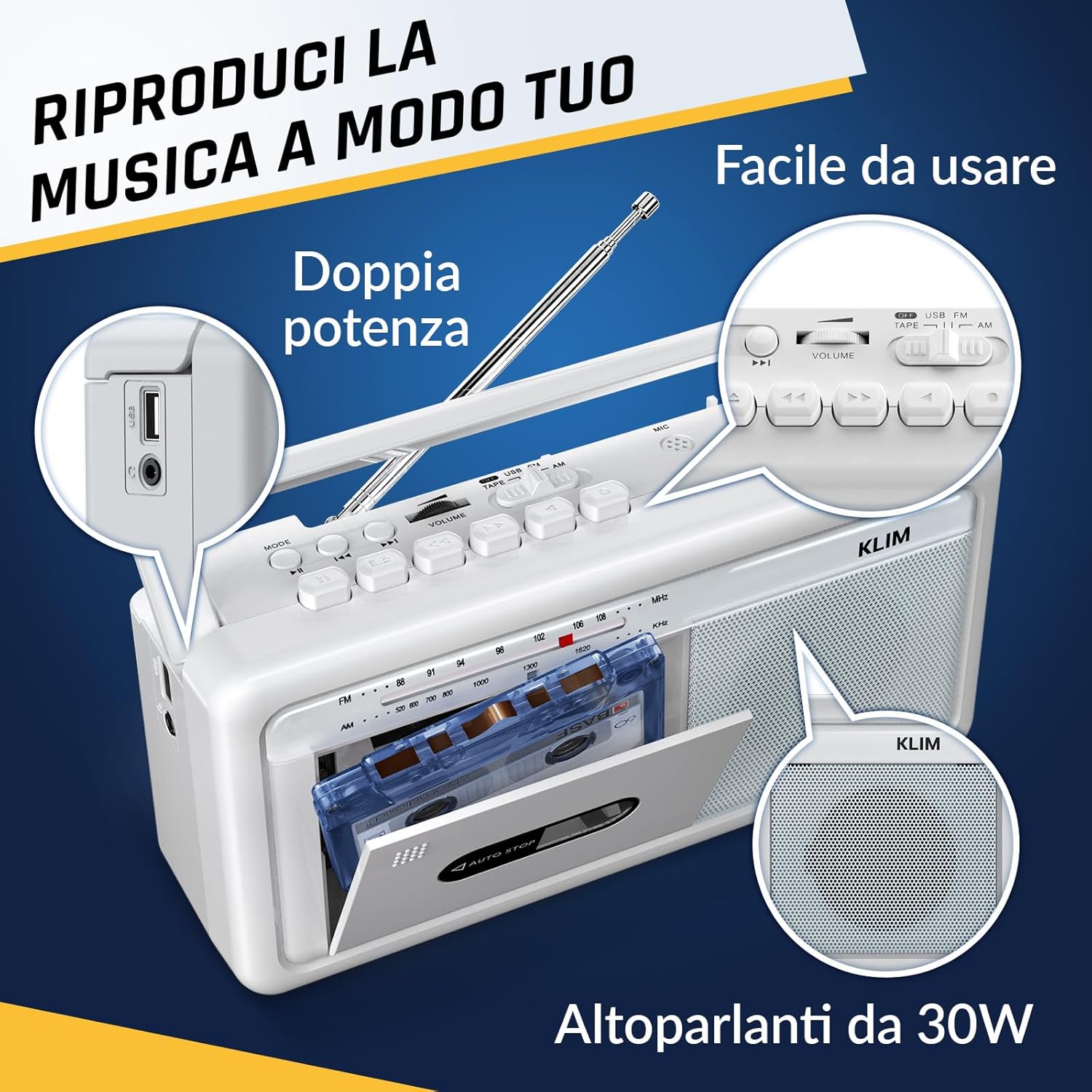
Малюнок 4: Сторона view highlighting the USB port for media playback and recording.
3.5. Використання навушників
Connect standard 3.5mm headphones to the headphone jack for private listening. The internal speakers will automatically mute when headphones are connected.
Video 1: Instructions on how to record a tape to USB using the WTB-795 model. This video demonstrates the USB recording functionality.
Відео 2: Кінецьview of a retro cassette player with USB, Bluetooth, and AM/FM radio features, similar to the KLIM Cassette Player Boombox.
4. Технічне обслуговування
- Підтримуйте чистоту пристрою, протираючи його м’якою сухою тканиною. Уникайте використання рідких засобів для чищення або розчинників.
- Regularly clean the cassette head and pinch rollers with a cotton swab lightly dampзмочений ізопропіловим спиртом для забезпечення оптимальної якості звуку та запобігання пошкодженню стрічки.
- Keep the device away from direct sunlight, heat sources, and excessive dust or moisture.
- Якщо пристрій не використовується протягом тривалого часу, виймайте батарейки, щоб запобігти витіканню.
5. Вирішення проблем
| проблема | Можливе рішення |
|---|---|
| Немає живлення | Check if the AC power cord is securely connected. If using batteries, ensure they are inserted correctly and are not depleted. |
| Немає звуку з динаміків | Increase the volume. Ensure headphones are not connected. Check the function selector is in the correct mode (TAPE, RADIO, BT, USB). |
| Поганий радіоприйом | Extend the telescopic antenna fully. Adjust the antenna direction. Try moving the unit to a different location. |
| Касета не відтворюється/не записується | Ensure the tape is inserted correctly. Check if the tape is damaged. Clean the cassette head and pinch rollers. |
| Bluetooth не підключається | Ensure the unit is in Bluetooth mode. Make sure your device's Bluetooth is enabled and within range. Try unpairing and re-pairing the device. |
| Проблеми з відтворенням USB | Ensure the USB drive is formatted correctly (FAT32) and contains compatible audio files (MP3, WAV, WMA, AAC, FLAC). Try a different USB drive. |
6. Технічні характеристики
- Бренд: КЛІМ
- модель: Касетний плеєр
- Розміри продукту: 25 х 13.1 х 7.6 см
- Вага товару: 1 кг
- Сумісні пристрої: MP3-плеєр, смартфон, планшет
- Режим аудіовиходу: Стерео
- Підтримувані аудіоформати: Cassette, Analog Radio, MP3, WAV, WMA, AAC, FLAC, Bluetooth
- Джерело живлення: Corded Electric (AC) / 4 x C-type Batteries (not included)
- Технологія підключення: USB, Bluetooth
- колір: Мороз білий
- Номер позиції: KLSIN4825
7. Гарантія та підтримка
The KLIM Cassette Player Boombox comes with a Гарантія 5 рік. For any questions, technical assistance, or warranty claims, please contact KLIM customer support. Our team is available 24/7 to assist you.
Please refer to the contact information provided in your product packaging or visit the official KLIM webдля отримання додаткової інформації.


