1. Продукт закінчивсяview
The Mars Gaming MC-3TCORELCD is an ATX gaming case designed for PC enthusiasts. It features an integrated 7.2-inch IPS screen, triple removable tempered glass panels, and a dual-chamber structure for efficient cable management and optimized airflow. This manual provides instructions for assembly, operation, and maintenance of the MC-3TCORELCD case.

Figure 1: Mars Gaming MC-3TCORELCD ATX Gaming Case.
2. Налаштування та встановлення
This section details the steps for installing your components into the MC-3TCORELCD case.
2.1 Підготовка справи
- Зняти бічні панелі: The MC-3TCORELCD features triple tempered glass panels that are removable without screws. Carefully detach the front, side, and central panels to access the interior.
- Комплект аксесуарів: Locate the accessory kit containing screws, cable ties, and other mounting hardware.

Рисунок 2: Панорамний знімок view with removable triple tempered glass for easy access.
2.2 Встановлення материнської плати
The case supports ATX, MicroATX, and Mini-ITX motherboards, including those with inverted connectors.
- Встановити Standoffs: Ensure the correct standoffs are installed for your motherboard form factor.
- Кріплення материнської плати: Carefully place the motherboard onto the standoffs and secure it with the provided screws.
2.3 Встановлення приводу
The case provides internal bays for storage devices.
- 3.5-дюймовий жорсткий диск: Up to 2x 3.5" HDDs can be installed.
- 2.5-дюймовий твердотільний накопичувач: Up to 3x 2.5" SSDs can be installed.
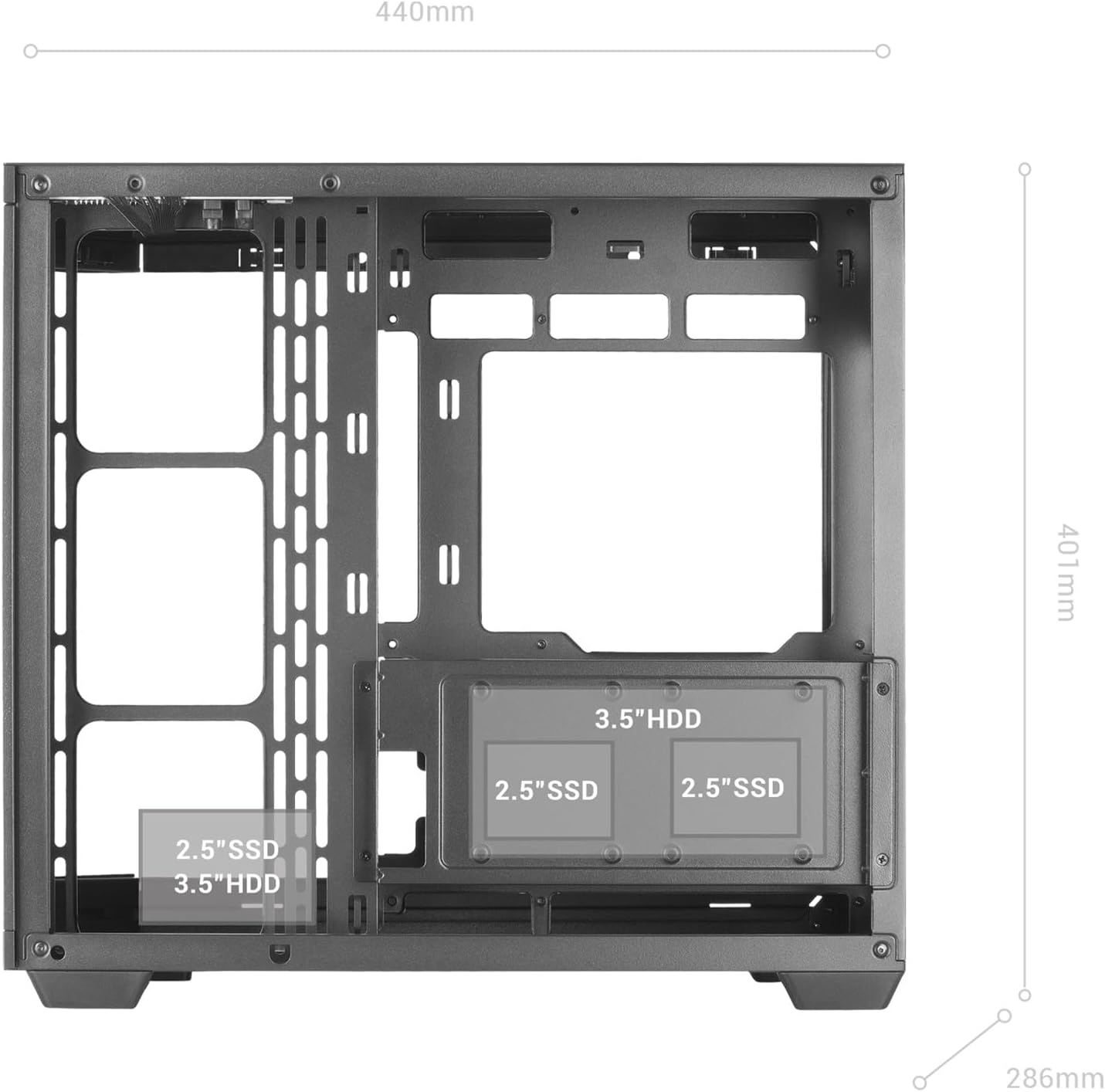
Figure 3: Internal layout indicating drive bay positions.
2.4 Блок живлення та управління кабелями
The dual-chamber design facilitates clean cable routing.
- Встановити блок живлення: Mount your ATX power supply in the designated bottom-mount area.
- Прокладка кабелів: Utilize the dual-chamber structure to route cables behind the motherboard tray, minimizing clutter and improving airflow.

Figure 4: Double side chamber for efficient cable management.
2.5 Встановлення системи охолодження
The case supports extensive air and liquid cooling solutions.
- Фанати: Install up to 10x 120mm fans or a combination of 7x 120mm and 2x 140mm fans.
- Рідинне охолодження: Supports liquid cooling radiators up to 360mm.

Figure 5: Liquid cooling and fan installation options.
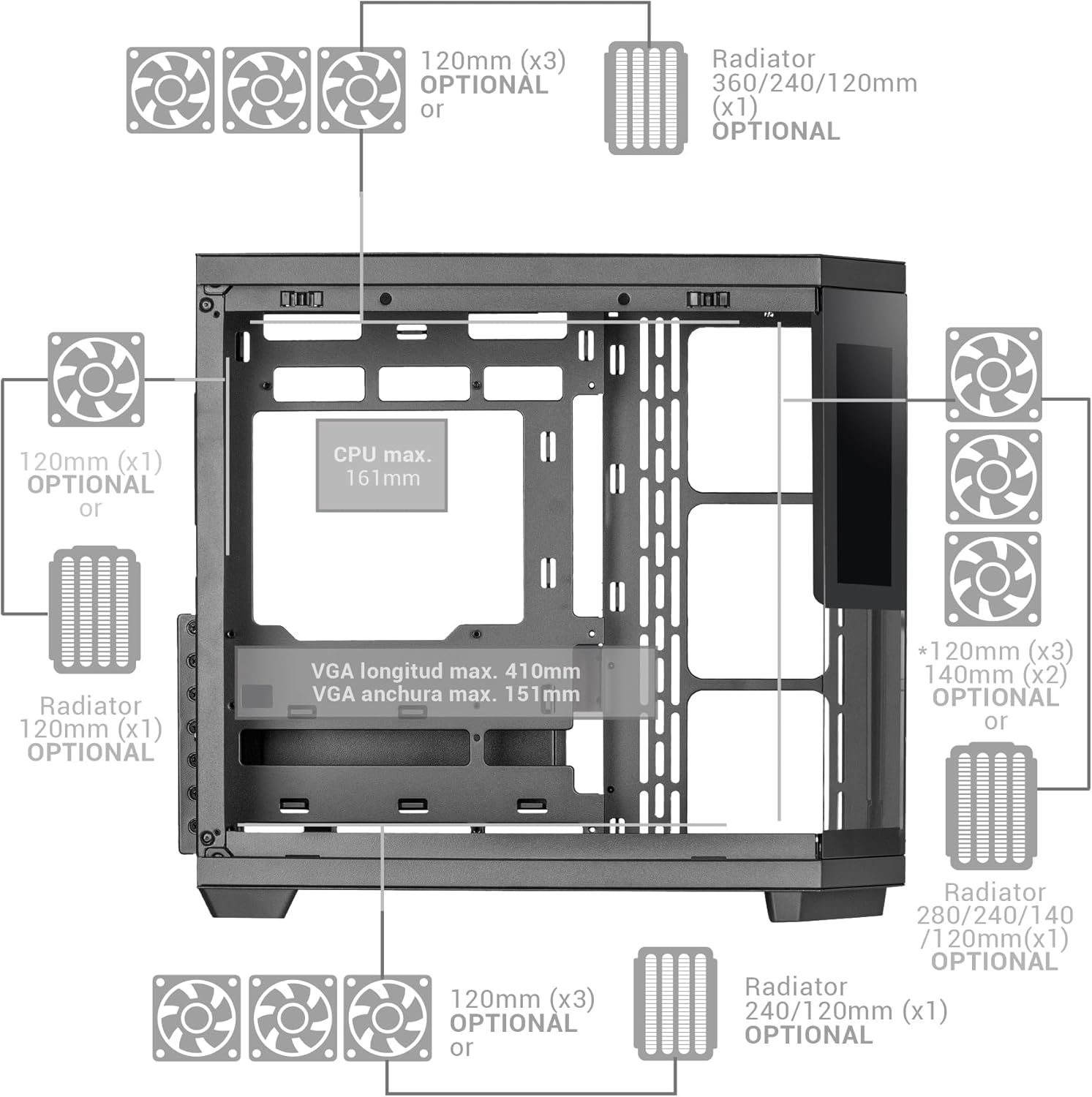
Figure 6: Detailed fan and radiator compatibility diagram.
2.6 Top Panel Connectivity
Connect the front panel headers from your motherboard to the corresponding ports on the case's top panel.
- USB-C порт
- Порт USB 3.0
- Порт USB 2.0
- HD Audio + Microphone Jacks

Figure 7: Top panel connectivity ports.
3. Operating the IPS Screen
The integrated 7.2-inch IPS screen allows for real-time system monitoring and custom visual displays.
- Встановлення програмного забезпечення: Install the dedicated control software for the IPS screen (refer to the manufacturer's website for download).
- Підключення: Ensure the screen is properly connected to your motherboard or graphics card as per the installation guide.
- Налаштування: Use the software to display system telemetry (temperatures, usage), custom images, animations, or videos.

Figure 8: Customizable 7.2-inch IPS screen in operation.
4. Технічне обслуговування
Регулярне технічне обслуговування забезпечує оптимальну продуктивність та довговічність корпусу вашого ПК.
- Пилові фільтри: The case includes two magnetic dust filters. Regularly remove and clean these filters to prevent dust buildup and maintain efficient airflow.
- Прибирання салону: With the removable tempered glass panels, the interior is easily accessible for cleaning. Use compressed air to remove dust from components and a soft, dry cloth for surfaces.
- Скляні панелі: Clean tempered glass panels with a microfiber cloth and a glass cleaner suitable for electronics.
5. Вирішення проблем
У цьому розділі розглядаються поширені проблеми, з якими ви можете зіткнутися.
- Поганий потік повітря: Ensure all fan positions are utilized effectively and dust filters are clean. Verify that cables are managed to not obstruct airflow.
- IPS Screen Not Displaying: Check all cable connections to the motherboard/graphics card. Ensure the control software is installed and running correctly. Consult the software's troubleshooting guide.
- Проблеми з підгонкою компонентів: Refer to the specifications for maximum component dimensions (GPU length, CPU cooler height). Ensure components are correctly seated and secured.
6. Технічні характеристики
| Особливість | Деталь |
|---|---|
| Бренд | Марс Геймінг |
| Назва моделі | MC3TCORELCD |
| Колір | чорний |
| Тип корпусу | Середній вежі |
| матеріал | Загартоване скло |
| Сумісність материнської плати | ATX, мікро ATX, міні ITX |
| Внутрішні відсіки для дисків | 2x 3.5" HDD / 3x 2.5" SSD |
| Максимальна довжина GPU | 410 мм |
| Максимальна ширина графічного процесора | 151 мм |
| Максимальна висота процесорного кулера | 161 мм |
| Потужність вентилятора | Up to 10x 120mm or 7x 120mm + 2x 140mm |
| Підтримка рідкого охолодження | Up to 360mm radiators |
| Тип кріплення блоку живлення | Bottom Mount (ATX) |
| Спосіб охолодження | повітря |
| Особливості | Dust filter, 7.2" IPS Customizable Screen, Triple Removable Tempered Glass, Dual Chamber Structure |
| Top Panel Connectivity | USB-C, USB 3.0, USB 2.0, HD Audio + Mic |
| Вага товару | 6.58 кілограма |
7. Інформація про гарантію
Цей продукт поставляється з a 3-річна гарантія виробника. Please retain your proof of purchase for warranty claims. For detailed terms and conditions, refer to the official Mars Gaming webсайту або зв’яжіться зі службою підтримки клієнтів.
8. Підтримка
For further assistance, technical support, or to download the latest drivers and software for the IPS screen, please visit the official Mars Gaming webсайт:
You may also contact Mars Gaming customer service through the contact information provided on their webсайт.