вступ
This manual provides instructions for the NTQinParts Voice TV Remote Control, designed as a replacement for select TCL QM5K Series QD-Mini LED QLED 4K UHD Smart TVs. This remote control is compatible with TCL 50QM5K 50", 55QM5K 55", and 65QM5K 65" models. Please read this manual carefully before using your new remote control.
Продукт закінченийview

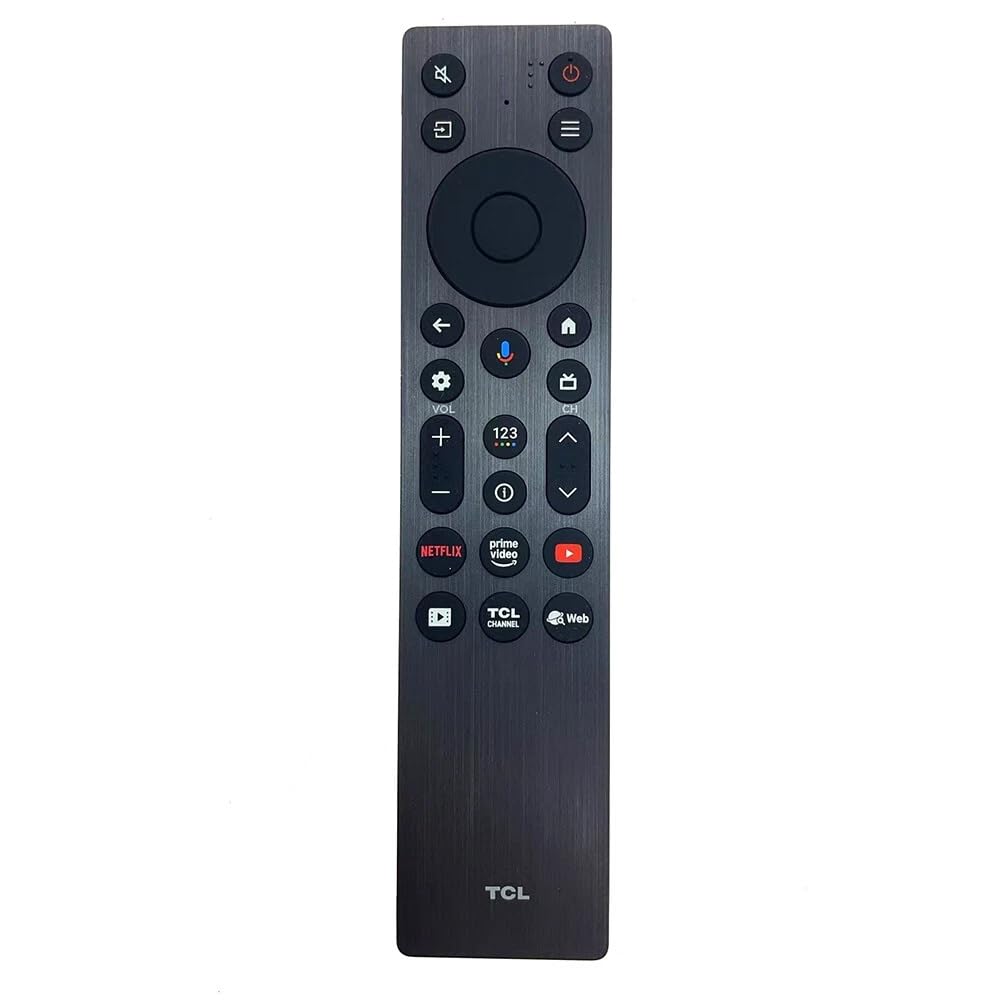
Малюнок 1: Спереду view of the NTQinParts Voice TV Remote Control, showing the array of buttons including navigation, volume, channel, and voice control.
The NTQinParts Voice TV Remote Control is a wireless device used to operate compatible TCL televisions. It features dedicated buttons for common functions and supports voice commands for enhanced control.
Налаштування
1. Встановлення батареї
Для пульта дистанційного керування потрібні дві (2) лужні батарейки типу AAA 1.5 В (не входять до комплекту). Щоб встановити батарейки, виконайте такі дії:
- Знайдіть кришку батарейного відсіку на задній панелі пульта дистанційного керування.
- Посуньте кришку вниз або натисніть на засувку та підніміть, щоб відкрити відсік.
- Вставте дві батарейки типу AAA, переконавшись, що позитивний (+) та негативний (-) полюси правильно збігаються з позначками всередині відсіку.
- Встановіть кришку відсіку для батарейок, зсунувши її на місце до клацання.
Малюнок 2: Задня частина view of the remote control with the battery compartment open, illustrating the correct orientation for AAA battery insertion.
2. Початкове використання
In most cases, the NTQinParts Voice TV Remote Control does not require programming or pairing. After installing the batteries, it should function immediately with your compatible TCL QM5K Series TV.
3. Pairing Instructions (If Needed)
If the remote control does not respond after battery installation, it may require pairing with your TV. Follow these steps:
- Переконайтеся, що ваш телевізор увімкнено.
- Hold the remote control within 3 feet (approximately 1 meter) of your television.
- Одночасно натисніть і утримуйте ДІМ кнопку та OK кнопку на пульті дистанційного керування.
- Continue holding both buttons until a pairing confirmation message appears on your TV screen (this may vary by TV model).
- Release the buttons once pairing is successful.
Керування пультом дистанційного керування
Once paired or recognized by your TV, the remote control functions similarly to your original TCL remote. Use the directional pad for navigation, the volume buttons to adjust audio, and the channel buttons to change channels. The voice control feature can be activated via its dedicated button (if present and supported by your TV model) for hands-free commands.

Малюнок 3: Задня частина view of the NTQinParts Voice TV Remote Control with the battery compartment securely closed.
Технічне обслуговування
Заміна батареї
When the remote control's performance degrades or it stops responding, it is likely time to replace the batteries. Follow the battery installation steps outlined in the 'Setup' section. Always replace both batteries at the same time with new 1.5V AAA alkaline batteries. Do not mix old and new batteries or different types of batteries.
прибирання
Щоб очистити пульт дистанційного керування, обережно протріть його м’якою сухою тканиною. Не використовуйте рідкі засоби для чищення, спреї або абразивні матеріали, оскільки вони можуть пошкодити поверхню пульта дистанційного керування або внутрішні компоненти.
Усунення несправностей
- Пульт не відповідає: Ensure batteries are correctly installed and not depleted. Try replacing them with new AAA alkaline batteries.
- Remote not controlling TV: If the remote does not work immediately after battery installation, attempt the pairing process described in the 'Setup' section. Ensure there are no obstructions between the remote and the TV's infrared receiver.
- Голосове керування не працює: Verify that your specific TCL QM5K Series TV model supports voice control and that the remote is properly paired. Ensure there are no software updates pending for your TV that might affect remote functionality.
Технічні характеристики
| Особливість | Деталь |
|---|---|
| Номер моделі | RC813A FMB1 |
| Сумісність | TCL 50QM5K, 55QM5K, 65QM5K QM5K Series QD-Mini LED QLED 4K UHD Smart TV |
| Джерело живлення | 2 лужні батарейки типу AAA 1.5 В |
| Технологія підключення | Бездротовий |
| Максимальна кількість підтримуваних пристроїв | 1 (Телебачення) |
| Розміри продукту | 5.31 x 0.2 x 11.02 дюймів |
| Особливість | No Programming Required (initial setup) |
Гарантія та підтримка
Information regarding product warranty and customer support for this NTQinParts remote control is not provided in this manual. Please refer to the product packaging or contact the retailer for details on warranty coverage and support options.


