1. Вступ
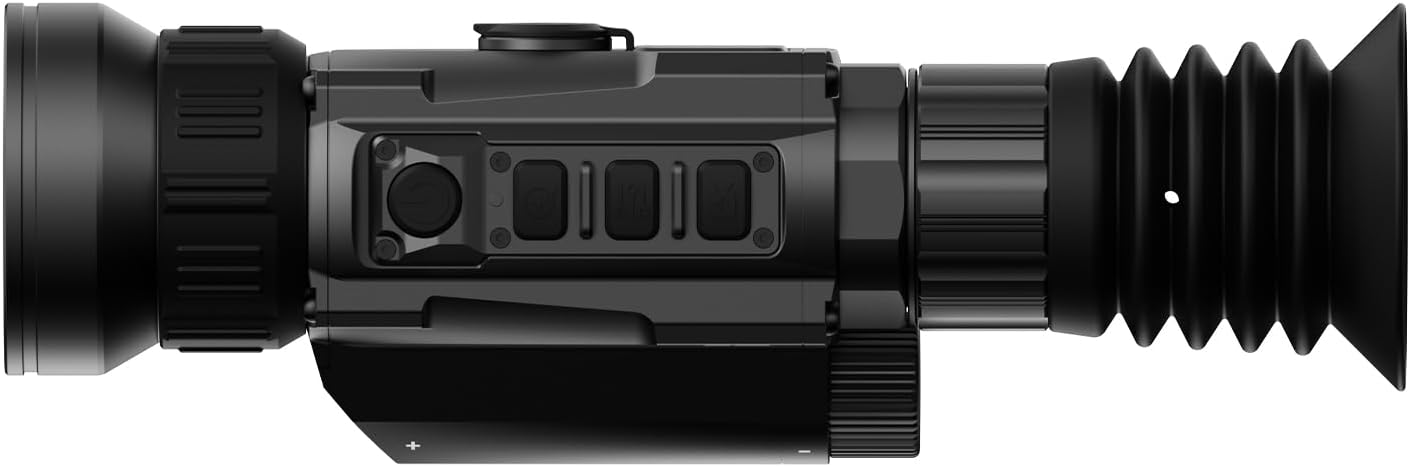
The DNT Optics HS650 Hydra is a versatile multi-function thermal device designed for various applications. It can operate as a standalone thermal scope, a clip-on thermal attachment for existing optics, or a handheld thermal monocular. This manual provides essential information for the proper setup, operation, and maintenance of your HS650 Hydra device.
2. Продукт закінчивсяview
2.1 Основні характеристики
- Універсальність 3-в-1: Functions as a standalone scope, clip-on attachment, and handheld monocular.
- Elite Thermal Imaging: Features a 12 µm, ≤18 mK uncooled infrared sensor with a 640×512 resolution and 50mm objective lens.
- AI-Powered Image Super Resolution (ISR): Enhances image clarity and detail, especially at higher digital zoom levels.
- Міцна конструкція: IP67-rated for waterproof and dustproof protection, shock-resistant housing handles recoil up to .50BMG.
- DNT App Connectivity: Connects to your smartphone for live feed viewing, management, editing, and sharing of content.
2.2 Вміст упаковки
Переконайтеся, що всі предмети присутні у вашій упаковці:
- HS650 Thermal Scope ×1
- PMS (Picatinny 0 MOA Short) Mount ×1
- Eye Cup ×1
- Flip Up Cover ×1
- 18650 Flat Top Battery ×2
- Battery Charger ×1
- USB -кабель × 2
- Посібник користувача ×1
- Lens Cleaning Cloth ×1
2.3 Візуальний оверлейview




3. Налаштування
3.1 Встановлення батареї
- Знайдіть батарейний відсік на пристрої.
- Insert two 18650 Flat Top Batteries, ensuring correct polarity.
- Надійно закрийте батарейний відсік.
3.2 Варіанти монтажу
The HS650 Hydra can be used in several configurations:
- Standalone Scope: Attach the provided PMS (Picatinny 0 MOA Short) mount to a compatible rail system. Ensure all screws are tightened to the recommended torque.
- Clip-On: Utilize an appropriate quick-detach mount (e.g., DNT QDM150 or QDS150, sold separately) to attach the device in front of your primary optic.
- Handheld Monocular: Use the device without any mounting for portable observation.
3.3 Initial Power-On and App Connection
- Натисніть і утримуйте кнопку живлення, щоб увімкнути пристрій.
- Download the DNT App on your smartphone.
- Follow the in-app instructions to connect your HS650 Hydra to your smartphone for live viewing and feature control.
4. Інструкція з експлуатації
4.1 Основні елементи керування
Refer to the device's physical buttons for power, menu navigation, zoom, and recording functions. Detailed button assignments are available in the full user manual.
4.2 Thermal Imaging Modes
The HS650 Hydra offers various thermal imaging modes to optimize viewing for different environments and preferences. These typically include:
- Природні: Provides a balanced thermal view.
- Enhanced: Increases contrast for better detail recognition.
- Виділіть: Emphasizes hot spots for quick target identification.
4.3 Image Super Resolution (ISR)
The AI-Powered Image Super Resolution (ISR) feature enhances image detail, especially when using digital zoom. This feature can be toggled on or off via the device menu or connected app.
4.4 Цифровий зум
The HS650 Hydra features a 2.5x base magnification with digital zoom capabilities up to 10x. Use the designated zoom buttons to adjust magnification levels.
4.5 Відео, активоване віддачею
The device supports Recoil Activated Video recording, which automatically captures footage when recoil is detected. This ensures important moments are recorded without manual intervention.
5. Технічне обслуговування
5.1 Очищення
- Use the provided lens cleaning cloth to gently wipe the objective and eyepiece lenses. Avoid abrasive materials.
- Для корпусу пристрою використовуйте м'який,amp тканиною для видалення бруду та сміття.
5.2 Охорона навколишнього середовища
The HS650 Hydra is IP67-rated, meaning it is protected against dust ingress and can withstand immersion in water up to 1 meter for 30 minutes. While robust, avoid unnecessary exposure to extreme conditions.
5.3 Зберігання
Зберігайте пристрій у прохолодному, сухому місці, подалі від прямих сонячних променів та екстремальних температур. Виймайте батарейки, якщо зберігатимете його протягом тривалого часу.
6. Вирішення проблем
If you encounter issues with your DNT Optics HS650 Hydra, consider the following:
- Пристрій не вмикається: Check battery charge and ensure batteries are inserted with correct polarity.
- Погана якість зображення: Ensure lenses are clean. Adjust focus and brightness settings. Verify ISR is enabled if desired.
- Проблеми з підключенням до додатків: Ensure Bluetooth/Wi-Fi is enabled on your smartphone and the device. Restart both the device and the app.
- Mounting stability: Re-check all mounting screws for proper tightness.
For further assistance, please contact DNT Optics customer support.
7. Технічні характеристики
| Бренд | DNT Optics |
| Назва моделі | HS650 |
| Стиль | 640-50 |
| Колір | чорний |
| Розміри продукту | 8.4 см (Д) x 2.7 см (Ш) x 2.2 см (В) |
| Вага товару | 1.02 фунтів (16.3 унцій) |
| матеріал | Метал або високоякісний пластик |
| Діаметр лінзи об'єктива | 68.58 міліметрів |
| Мінімальне збільшення | 2.5 х |
| Сумісні пристрої | Rifle, Shotgun, Handgun |
| Тип монтажу | PMS - Picatinny 0 MOA Short |
| Нічне бачення | No (Thermal Imaging) |
| Тип візирної сітки | цифровий |
8. Гарантія та підтримка
For information regarding product warranty, returns, or technical support, please refer to the official DNT Optics website or contact their customer service directly. Contact details can typically be found on the manufacturer's packaging or webсайт.
You can visit the DNT Optics Store for more information: Магазин оптики DNT


