1. Вступ
This manual provides detailed instructions for the safe and efficient operation of your Bigme B6 Color Ebook Reader. Please read this manual thoroughly before using the device and retain it for future reference.
Вміст упаковки
- Електронна книга Bigme B6
- Захисний футляр
- Посібник користувача (цей документ)
- Зарядний кабель

Image 1.1: Bigme B6 Color Ebook Reader and included protective case.
2. Продукт закінчивсяview
Familiarize yourself with the components and features of your Bigme B6 device.
Ключові характеристики
- Дисплей: 6-inch Color E-paper display, 300 PPI resolution.
- Процесор: Octa-core CPU for responsive performance.
- Пам'ять і зберігання: 4GB RAM and 64GB internal storage, expandable via Micro-SD card (up to 1TB).
- Операційна система: Android 14, providing access to various applications.
- Підключення: Bluetooth and Wi-Fi for wireless communication.
- Аудіо: Integrated Hi-Fi Speakers.
- Дизайн: Ультратонкий профіfile at 6.98mm.
- Комфорт для очей: Features Zero Blue Light and Flicker-Free technology, TUV Rheinland certified for reduced eye strain.

Зображення 2.1: закінченоview of the Bigme B6 Ebook Reader's main features.
3. Налаштування
3.1 Початкове заряджання
Before first use, fully charge your Bigme B6. Connect the device to a power source using the provided charging cable. The charging indicator will show the charging status.
3.2 Увімкнення/вимкнення живлення
- To power on: Press and hold the power button until the screen illuminates.
- To power off: Press and hold the power button, then select "Power Off" from the options.
- To sleep/wake: Briefly press the power button.
3.3 Мережеве підключення (Wi-Fi)
- На головному екрані перейдіть до Налаштування.
- Виберіть Мережа та Інтернет.
- Перемикач Wi-Fi на ON.
- Виберіть потрібну мережу Wi-Fi зі списку.
- Введіть пароль, якщо буде запропоновано, і натисніть Підключитися.
3.4 Початкова конфігурація системи
Upon first power-on or after a factory reset, follow the on-screen prompts to select your language, connect to Wi-Fi, and set up your Google account (optional, for app store access).
4. Інструкція з експлуатації
4.1 Основна навігація
- Сенсорний екран: Tap to select items, swipe to scroll, pinch to zoom.
- Головний екран: Displays installed applications and widgets.
- Панель сповіщень: Проведіть пальцем униз від верхньої частини екрана, щоб отримати доступ до швидких налаштувань та сповіщень.
- Центр управління: Access system settings like Wi-Fi, Bluetooth, brightness, and refresh modes.
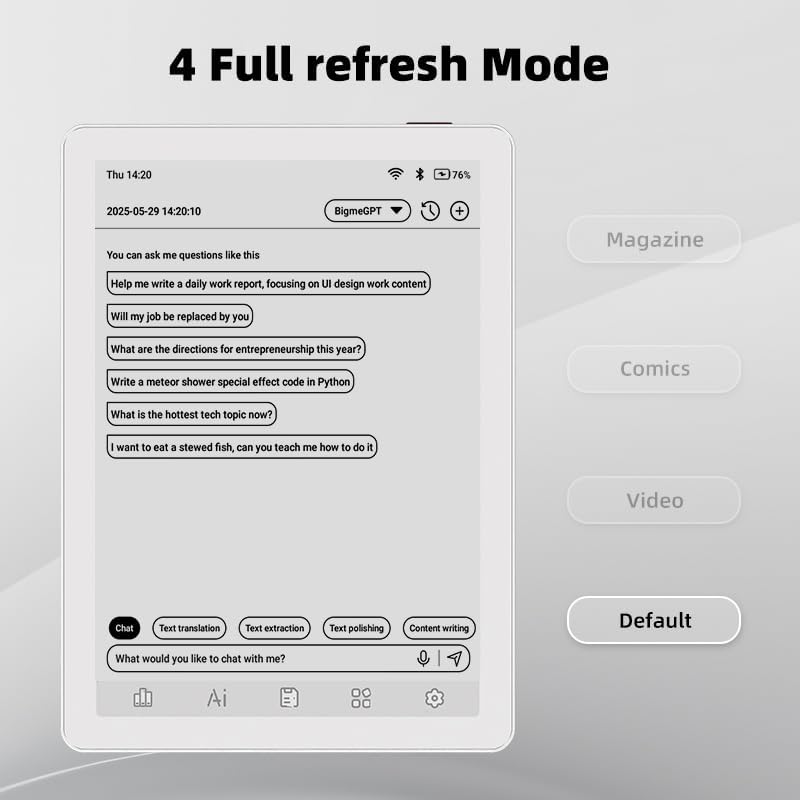
Image 4.1: The Bigme B6 home screen displaying various application icons.

Image 4.2: Accessing the Control Center for quick adjustments to device settings.
4.2 Reading eBooks
The Bigme B6 supports over 19 eBook formats, including PDF, TXT, EPUB, MOBI, and more. You can load books via USB or download them directly through reading applications.
- Open a reading application (e.g., the default reader or a downloaded app like Kindle or Libby).
- Select the book you wish to read from your library.
- Tap the left or right side of the screen to turn pages.
- Tap the center of the screen to access reading options (font size, line spacing, contrast, etc.).
- To highlight text: Press and hold on a word, then drag the selection handles to cover the desired text. Options for highlighting or notes will appear.

Image 4.3: Reading an eBook and highlighting text with color on the Bigme B6.
4.3 Керування програмами
As an Android 14 device, you can install applications from the Google Play Store or other compatible sources.
- Встановлення програм: Відкрийте App Store icon (Google Play Store) on your home screen, search for the desired app, and follow the installation prompts.
- Видалення програм: Перейти до Налаштування > Програми, виберіть програму та натисніть Видалити.
4.4 Audiobooks and Media Playback
The device supports audiobook playback through its built-in Hi-Fi speakers or connected Bluetooth headphones.
- Playing Audiobooks: Use a compatible audiobook application.
- Connecting Bluetooth Headphones: Перейти до Налаштування > Підключені пристрої > Bluetooth, enable Bluetooth, and pair with your headphones.

Image 4.4: The Bigme B6 supports audiobooks, allowing for hands-free listening.
4.5 Display Refresh Modes
The Bigme B6 offers multiple refresh modes to optimize display performance for different content types.
- Access refresh modes from the Control Center or Display Settings.
- Звичайні режими включають:
- За замовчуванням: Standard reading mode.
- Журнал: Optimized for images and text in magazines.
- Comics: Enhanced for comic book viewінж.
- Відео: Provides a smoother refresh rate for video content (note: e-paper displays have limitations for video).

Image 4.5: Selecting from various refresh modes to suit different content types.
5. Технічне обслуговування
5.1 Очищення пристрою
- Використовуйте м’яку тканину без ворсу, щоб обережно протерти екран і корпус пристрою.
- Для стійких плям злегкаampпротріть тканину водою або засобом для чищення екранів, спеціально призначеним для електроніки.
- Уникайте використання агресивних хімікатів, абразивних матеріалів або надмірної вологості.
5.2 Догляд за акумулятором
- Регулярно заряджайте пристрій, але не залишайте його повністю розрядженим протягом тривалого часу.
- Не піддавайте пристрій впливу екстремальних температур, оскільки це може вплинути на термін служби батареї.
- Use only the provided or a certified charging cable and adapter.
5.3 Зберігання
When not in use for extended periods, store the device in a cool, dry place, away from direct sunlight and extreme temperatures. It is recommended to charge the device to about 50% before long-term storage.
6. Вирішення проблем
| проблема | Можлива причина | Рішення |
|---|---|---|
| Пристрій не включається. | Низький заряд батареї; пристрій завис. | Заряджайте пристрій щонайменше 30 хвилин. Виконайте примусовий перезапуск, утримуючи кнопку живлення протягом 10-15 секунд. |
| Screen is unresponsive or slow. | Temporary software glitch; too many apps running. | Restart the device. Close unnecessary background applications. Check for system updates. |
| Неможливо підключитися до Wi-Fi. | Неправильний пароль; проблема з маршрутизатором; Wi-Fi вимкнено. | Ensure Wi-Fi is enabled and the password is correct. Restart your Wi-Fi router. Try connecting to a different network. |
| Акумулятор швидко розряджається. | High screen brightness; many background apps; frequent Wi-Fi/Bluetooth use. | Reduce screen brightness. Close unused applications. Disable Wi-Fi and Bluetooth when not needed. Adjust refresh mode settings. |
| Applications crash or freeze. | App incompatibility; insufficient memory. | Update the application. Clear the app's cache (Settings > Apps > [App Name] > Storage & cache). If issues persist, uninstall and reinstall the app. |
7. Технічні характеристики
| Назва моделі | US-B6 |
| Дисплей | 6-inch Color E-paper, Electronic Ink, 300 PPI |
| Операційна система | Android 14 |
| ОЗУ | 4 ГБ |
| Внутрішня пам'ять | 64 ГБ |
| Розширюване сховище | Micro-SD card (up to 1TB support) |
| Підключення | Bluetooth, WiFi |
| Акумулятор | 1 нестандартна батарея (в комплекті) |
| Розміри (Д х Ш х Г) | 5.88 дюйма x 4.25 дюйма x 0.28 дюйма (14.94 см x 10.8 см x 0.71 см) |
| Вага товару | 6.2 унцій (175.77 грам) |
| Підтримувані формати електронних книг | PDF, TXT, EPUB, EPUB3, HTML, HTM, AZW3, FB2, DOC, DOCX, MOBI, OEB, CBR, RPC, RTF, DJVU, ZIP |
8. Гарантія та підтримка
8.1 Інформація про гарантію
Please refer to the warranty card included with your product for specific warranty terms and conditions. The warranty typically covers manufacturing defects for a specified period from the date of purchase.
8.2 Підтримка клієнтів
For technical assistance, troubleshooting not covered in this manual, or warranty claims, please contact Bigme customer support. Contact details can usually be found on the Bigme official webсайті або на упаковці продукту.
Ви також можете відвідати Bigme Store on Amazon для отримання додаткової інформації про продукт та ресурсів підтримки.


