1. Вступ
Thank you for choosing the Grundig 50 GKU 700 50-inch 4K Ultra HD Smart Google TV. This manual provides essential information for the safe and efficient use of your new television. Please read these instructions thoroughly before operating the device and retain them for future reference.
2. Важлива інформація з безпеки
Щоб зменшити ризик ураження електричним струмом, пожежі або травмування, завжди дотримуйтесь цих основних запобіжних заходів безпеки:
- Джерело живлення: Підключайте телевізор лише до розетки змінного струму зазначеної напруги.tage.
- Вентиляція: Забезпечте належну вентиляцію. Не блокуйте вентиляційні отвори.
- Вода і вологість: Не піддавайте телевізор впливу дощу або вологи. Не ставте на телевізор предмети, наповнені рідинами, такі як вази.
- Прибирання: Від’єднайте телевізор від розетки перед чищенням. Використовуйте м’яку суху тканину. Не використовуйте рідкі чи аерозольні засоби для чищення.
- Розміщення: Розмістіть телевізор на стійкій рівній поверхні. Уникайте розміщення його під прямими сонячними променями або поблизу джерел тепла.
- Обслуговування: Не намагайтеся самостійно обслуговувати цей виріб. Зверніть усі послуги до кваліфікованого обслуговуючого персоналу.
- Шнур живлення: Захищайте шнур живлення від наступання або защемлення, особливо біля вилок, розеток і в місці виходу з пристрою.
3. Вміст упаковки
Будь ласка, перевірте, чи всі предмети присутні у вашій упаковці:
- Grundig 50 GKU 700 50-inch 4K Ultra HD Smart Google TV
- Пульт дистанційного керування
- Кабель живлення
- Тумба під телевізор (2 шт.)
- Гвинти для підставки під телевізор
- Посібник користувача (цей документ)
- Короткий посібник

Зображення 1: Фронт view of the Grundig 50 GKU 700 TV with its stand. The screen displays a scenic landscape with mountains and a lake. The TV features a slim bezel and the Grundig logo at the bottom center.
4. Налаштування
4.1 Кріплення підставки для телевізора
- Обережно покладіть телевізор екраном вниз на м’яку, рівну поверхню (наприклад, ковдру або пінопласт), щоб запобігти пошкодженню.
- Визначте ліву та праву частини стійки.
- Вирівняйте кожну частину підставки з відповідними пазами на нижній панелі телевізора.
- Закріпіть підставки за допомогою наданих гвинтів. Переконайтеся, що вони міцно затягнуті.
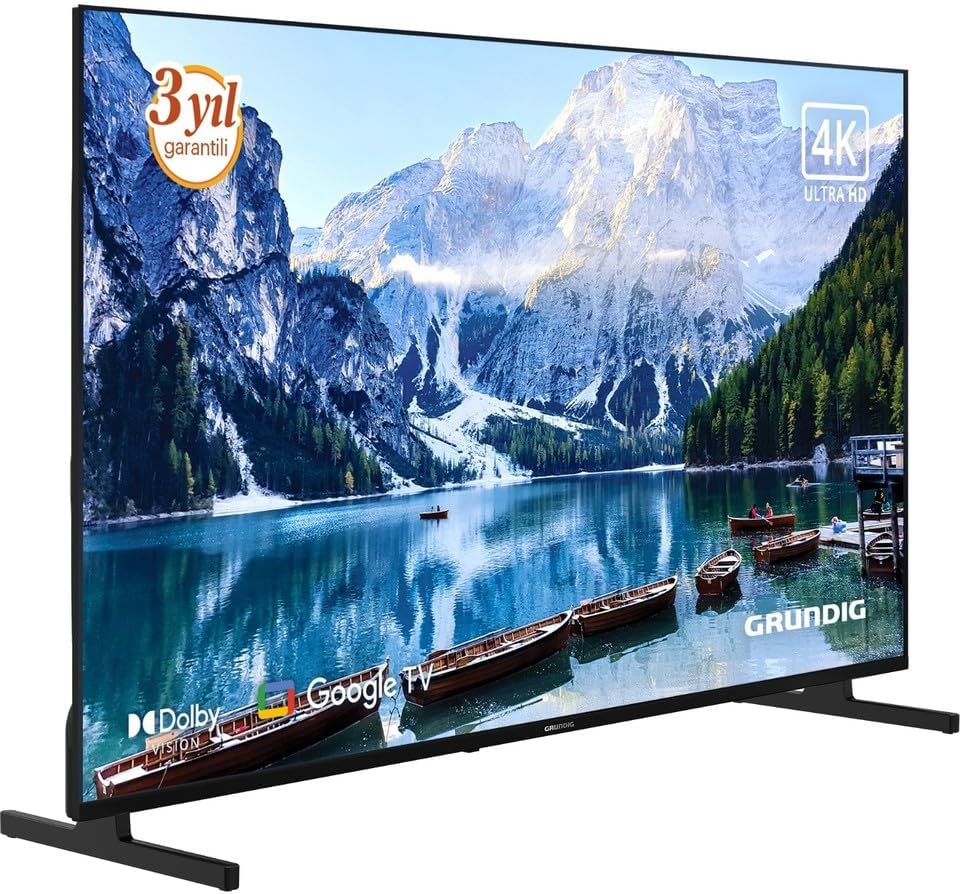
Зображення 2: Кутова передня частина view of the Grundig 50 GKU 700 TV, showcasing its slim design and the attached stand. The screen displays a vibrant image, highlighting the 4K Ultra HD capability.
4.2 Підключення живлення
- Locate the power input port on the back of the TV.
- Connect the power cable securely to the TV.
- Підключіть інший кінець кабелю живлення до розетки.

Зображення 3: Крупним планом view of the power input port located on the back of the Grundig TV, labeled "AC IN". A caution label regarding electric shock is visible nearby.
4.3 Підключення зовнішніх пристроїв
Your Grundig TV offers various connection options:
- HDMI: For connecting Blu-ray players, game consoles, set-top boxes, etc. (HDMI 1, HDMI 2, HDMI 3 ports available).
- USB: Для підключення USB-накопичувачів для відтворення медіафайлів files. (USB 1, USB 2 ports available).
- Satellite/Antenna: For connecting a satellite dish or terrestrial antenna.
- Ethernet (LAN): Для дротового підключення до Інтернету.

Зображення 4: Детальний view of the connectivity panel on the back of the Grundig TV, showing multiple ports including USB, HDMI (HDMI 1/ARC, HDMI 2, HDMI 3), satellite/antenna input, and an Ethernet (LAN) port.

Зображення 5: Повний задній view of the Grundig 50 GKU 700 TV, showing the overall design of the back panel and the central area where the power and input ports are located.
4.4 Майстер початкового налаштування
After connecting power and turning on the TV for the first time, a setup wizard will guide you through:
- Вибір мови.
- Мережеве підключення (Wi-Fi або Ethernet).
- Вхід в обліковий запис Google (для функцій Google TV).
- Channel scanning (for satellite or terrestrial broadcasts).
5. Керування телевізором
5.1 Дистанційне керуванняview
The remote control allows you to access all functions of your TV. Insert two AAA batteries (not included) into the remote control, ensuring correct polarity.

Зображення 6: Фронт view of the Grundig TV remote control. Key buttons include Power, Google Assistant (microphone), Settings, Input, Navigation Pad with OK button, Volume, Channel, Home, Mute, Netflix, YouTube, Prime Video, and Apps buttons, along with numeric keys.

Зображення 7: Під кутом view of the Grundig TV remote control, showing its ergonomic design and the layout of its buttons.
- Кнопка живлення: Вмикає або вимикає телевізор.
- Кнопка Google Асистента: Activates voice control for searching content or controlling the TV.
- Navigation Pad (Up/Down/Left/Right) and OK: Для навігації та вибору в меню.
- Гучність (+/-): Регулює рівень гучності.
- Канал (Вгору/Вниз): Змінює телеканали.
- Кнопка "Додому: Повернення на головний екран Google TV.
- Кнопка введення: Selects input sources (HDMI, USB, Satellite, etc.).
- Netflix, YouTube, Prime Video, Apps Buttons: Direct access to streaming services and the app menu.
5.2 Інтерфейс Google TV
Your TV runs on Google TV, providing a personalized experience with content recommendations, access to a vast library of apps from the Google Play Store, and integrated Google Assistant functionality.
- Головний екран: Відображає рекомендований контент, встановлені програми та швидкий доступ до налаштувань.
- програми: Download and manage your favorite streaming services and applications.
- Голосове керування: Use the Google Assistant button on your remote to search for movies, check the weather, or control smart home devices.
6. Технічне обслуговування
6.1 Очищення телевізора
- Завжди відключайте телевізор від мережі перед чищенням.
- Використовуйте м’яку, суху тканину без ворсу, щоб протерти екран і корпус.
- Для стійких плям на екрані злегка протрітьampПромокніть тканину водою або спеціалізованим засобом для чищення екранів (переконайтеся, що він безпечний для світлодіодних екранів) та обережно протріть. Не розпилюйте рідину безпосередньо на екран.
- Уникайте використання абразивних засобів для чищення, воску або розчинників.
6.2 Оновлення програмного забезпечення
Your TV may receive software updates periodically to improve performance and add new features. Ensure your TV is connected to the internet to receive these updates. You can usually check for updates in the TV's settings menu under "System" or "About".
7. Вирішення проблем
Якщо у вас виникли проблеми з телевізором, зверніться до наступних поширених проблем та способів їх вирішення:
7.1 Немає живлення
- Перевірте, чи кабель живлення надійно підключено як до телевізора, так і до розетки.
- Перевірте справність розетки, підключивши інший пристрій.
- Натисніть кнопку живлення на пульті дистанційного керування або на самому телевізорі.
7.2 Немає зображення, але звук є
- Ensure the correct input source is selected (e.g., HDMI 1, Satellite).
- Check the connections of external devices.
- Спробуйте перезавантажити телевізор та всі підключені пристрої.
7.3 No Sound, But Picture is Present
- Перевірте рівень гучності та переконайтеся, що звук телевізора не вимкнено.
- Якщо ви використовуєте зовнішні аудіопристрої (саундбар, ресивер), переконайтеся, що вони правильно підключені та ввімкнені.
- Перевірте налаштування звуку в меню телевізора.
7.4 Пульт дистанційного керування не працює
- Замініть батареї на нові, дотримуючись правильної полярності.
- Переконайтеся, що між пультом дистанційного керування та ІЧ-датчиком телевізора немає перешкод.
- If it's a Bluetooth remote, try re-pairing it with the TV (refer to TV settings for pairing instructions).
7.5 Проблеми з мережевим підключенням
- For Wi-Fi, ensure the router is on and within range. Try restarting the router.
- Для дротового підключення переконайтеся, що кабель Ethernet надійно підключено як до телевізора, так і до маршрутизатора.
- Check network settings in the TV menu.
8. Технічні характеристики
| Особливість | Специфікація |
|---|---|
| Бренд | Grundig |
| Назва моделі | GE5T00 |
| Рік моделі | 2025 |
| Розмір екрана | 50 дюймів |
| Технологія дисплея | LCD LED |
| роздільна здатність | 4K (3840 x 2160 пікселів) |
| Співвідношення сторін | 16:9 |
| Частота оновлення | 60 Гц |
| Операційна система | Google TV |
| Технологія підключення | USB, HDMI, Ethernet, Satellite/Antenna |
| Включені компоненти | Кабель живлення |
| Розміри продукту | 190.5 х 5.08 х 480.06 см |
| Вага продукту | 500 грамів |
| ASIN | B0FSG93693 |
9. Гарантія та підтримка
Your Grundig 50 GKU 700 TV comes with a manufacturer's warranty. Please refer to the warranty card included in your package for specific terms and conditions. For technical support, service inquiries, or to register your product, please visit the official Grundig website or contact their customer service department. Contact information can typically be found on the Grundig webсайті або в документації, що додається до вашого телевізора.
Інтернет-підтримка: www.grundig.com


