1. Вступ
Thank you for choosing the Eureka N6 Plus Robot Vacuum Cleaner. This manual provides essential information for the safe operation, maintenance, and troubleshooting of your device. Please read it thoroughly before use and keep it for future reference. The Eureka N6 Plus combines powerful suction, intelligent navigation, and convenient app control to deliver an efficient and effortless cleaning experience for modern homes.
2. Техніка безпеки
To reduce the risk of injury or damage, read and follow all safety precautions.
- Цим пристроєм можуть користуватися діти віком від 8 років і особи з обмеженими фізичними, сенсорними чи розумовими здібностями або з недостатнім досвідом і знаннями, якщо вони перебувають під наглядом або отримали інструкції щодо безпечного користування пристроєм і розуміють небезпеку, пов’язану з цим. .
- Do not allow children to play with the appliance. Cleaning and user maintenance shall not be made by children without supervision.
- Використовуйте лише оригінальний адаптер живлення та зарядну базу, надані виробником.
- Do not use the robot to pick up large objects, sharp debris, liquids, or burning/smoking materials.
- Ensure the robot operates on stable, level surfaces. Avoid operating near stairs or elevated areas without proper barriers.
- Тримайте волосся, вільний одяг, пальці та всі частини тіла подалі від отворів і рухомих частин.
- Do not immerse the robot or its charging base in water or other liquids.
- Перед чищенням або технічним обслуговуванням переконайтеся, що робот вимкнено та від’єднано від джерела живлення.
- Store the robot in a dry, cool place when not in use.
3. Вміст упаковки
Переконайтеся, що всі компоненти є в наявності та знаходяться у належному стані після розпакування.
- Eureka N6 Plus Robot Vacuum Cleaner
- Self-emptying Charging Base
- Адаптер живлення
- Інструкція з експлуатації
4. Продукт закінчивсяview
Familiarize yourself with the main components of your Eureka N6 Plus robot vacuum cleaner and its self-emptying base.
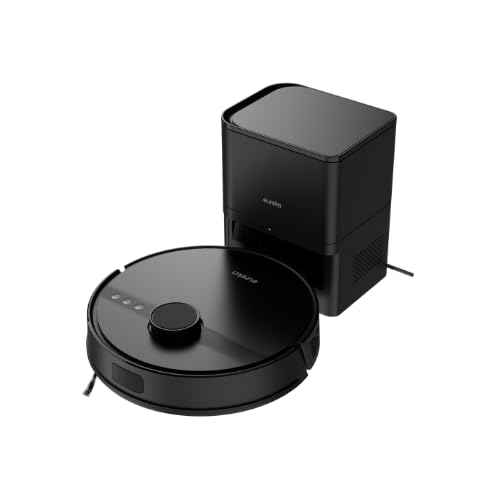
Image 4.1: Eureka N6 Plus Robot Vacuum Cleaner with its self-emptying base and a smartphone displaying the control app interface. The robot is dark grey with a central button, and the base is a matching dark grey tower.

Зображення 4.2: Зверху вниз view of the Eureka N6 Plus Robot Vacuum Cleaner, highlighting the integrated water tank for mopping functionality. The robot is black with a central LiDAR sensor and control buttons.
Компоненти робота:
- LiDAR Sensor: Для точної навігації та картографування.
- Кнопки управління: Power/Start, Home/Recharge.
- Сміттєвий бак/резервуар для води: Integrated for vacuuming and mopping.
- Бічні щітки: Щоб змітати сміття з країв та кутів.
- Основна щітка: Anti-tangle design for effective cleaning.
- Датчики обриву: To prevent falls from stairs.
- Контакти для зарядки: For connection to the charging base.
Self-Emptying Charging Base:
- Відсік для пилозбірника: Houses the 2.5-liter disposable dust bag.
- Док-станція для зарядки: Where the robot returns to charge and empty its dustbin.
- Індикатор живлення: Показує стан заряджання.
5. Налаштування
5.1 Розміщення зарядної бази
- Place the self-emptying charging base against a wall in an open area.
- Ensure there is at least 0.5 meters (1.6 feet) of clear space on both sides and 1.5 meters (4.9 feet) in front of the base.
- Підключіть адаптер живлення до зарядної бази та вставте його в розетку.
- Ensure the power cable is neatly arranged to prevent the robot from tangling.
5.2 Початкове заряджання
- Помістіть робота на зарядну базу. Переконайтеся, що зарядні контакти на роботі збігаються з контактами на базі.
- The robot will automatically begin charging. Allow it to fully charge before its first use (approximately 4-6 hours). The indicator light on the robot will change to indicate a full charge.
5.3 Підключення програми
- Download the "Eureka Robot" app from your smartphone's app store (available for iOS and Android).
- Відкрийте програму та створіть обліковий запис.
- Follow the in-app instructions to add your Eureka N6 Plus robot. This typically involves connecting to the robot's Wi-Fi hotspot temporarily and then connecting it to your home Wi-Fi network.
- Once connected, you can control the robot, schedule cleanings, adjust settings, and view cleaning maps from your smartphone.
6. Інструкція з експлуатації
6.1 Запуск циклу очищення
- Ручний запуск: Press the Power/Start button on the robot once. The robot will begin cleaning in Auto mode.
- Запуск програми: Open the "Eureka Robot" app, select your device, and tap the 'Start' or 'Clean' button. You can also select specific cleaning modes or areas.
6.2 Зупинка/призупинення циклу очищення
- Press the Power/Start button on the robot once to pause. Press again to resume.
- Use the 'Pause' or 'Stop' button in the app.
6.3 Повернення до зарядної бази
- Press the Home/Recharge button on the robot.
- Use the 'Recharge' or 'Dock' button in the app. The robot will automatically return to its charging base.
6.4 Функція миття
The Eureka N6 Plus features a simultaneous vacuuming and mopping function.
- Fill the integrated water tank with clean water. Do not use detergents or cleaning solutions not approved for robot vacuums.
- Attach the mopping pad securely.
- In the app, you can select the desired water flow level (three adjustable levels) suitable for different hard floor types.
- The robot will vacuum and mop simultaneously.
6.5 Керування голосовим помічником
The Eureka N6 Plus supports voice control via Alexa and Google Assistant.
- Enable the "Eureka Robot" skill/action in your Alexa or Google Home app.
- Link your Eureka Robot account.
- Use commands such as "Alexa, tell Eureka Robot to start cleaning" or "Hey Google, ask Eureka Robot to go home."
7. Технічне обслуговування
Регулярне технічне обслуговування забезпечує оптимальну продуктивність та подовжує термін служби вашого робота-пилососа.
7.1 Self-Emptying Dust Bag (Base)
- The 2.5-liter dust bag in the self-emptying base should be replaced when full. The app will notify you.
- Open the top cover of the charging base, remove the full bag, and insert a new one.
7.2 Робот-пилозбірник та фільтр
- Even with the self-emptying feature, it is recommended to periodically check and manually empty the robot's internal dustbin.
- Clean the HEPA filter regularly by tapping it to remove dust. Replace the filter every 3-6 months, depending on usage. Do not wash the HEPA filter with water.
7.3 Основна щітка та бічні щітки
- Основна щітка: Зніміть кришку головної щітки та вийміть щітку. Використовуйте інструмент для чищення, щоб видалити волосся та сміття, що заплуталися навколо щітки.
- Бічні щітки: Check side brushes for wear or damage. Remove any tangled hair. Replace if bristles are bent or missing.
7.4 Датчики та зарядні контакти
- Wipe all sensors (cliff sensors, wall sensors, LiDAR sensor window) and charging contacts on both the robot and the base with a clean, dry cloth.
7.5 Резервуар для води та мочалка
- Після кожного сеансу миття підлоги зливайте залишки води з резервуара.
- Clean the mopping pad thoroughly and allow it to air dry before storing.
8. Вирішення проблем
If you encounter issues with your Eureka N6 Plus, refer to the following common problems and solutions.
| проблема | Можлива причина | Рішення |
|---|---|---|
| Робот не включається | Низький заряд батареї; Кнопка живлення не натиснута; Робот застряг. | Зарядіть робота; Натисніть і утримуйте кнопку живлення; Усуньте будь-які перешкоди. |
| Робот не може знайти зарядну базу | Base obstructed; Base not powered; Robot too far. | Ensure clear space around base; Check power connection; Manually place robot near base. |
| Погана ефективність очищення | Повний пилозбірник/пилозбірник; засмічений фільтр; заплутані щітки. | Empty dustbin/replace dust bag; Clean/replace filter; Clean main and side brushes. |
| Проблеми з підключенням програми | Неправильний пароль Wi-Fi; маршрутизатор занадто далеко; робот не в мережі. | Verify Wi-Fi credentials; Move robot closer to router; Restart robot and router. |
| Робот часто застрягає | Obstacles on floor; Dark surfaces triggering cliff sensors. | Clear cables, toys, and small objects; Use no-go zones in app for problematic areas. |
9. Технічні характеристики
Detailed technical specifications for the Eureka N6 Plus Robot Vacuum Cleaner.
| Особливість | Специфікація |
|---|---|
| Бренд | ЕВРИКА |
| Назва моделі | N6 Plus Black |
| Розміри (Д x Ш x В) | 35 Д x 35 Ш x 41.1 В см |
| Вага товару | 5.5 кілограма |
| Тип батареї | Літій-іонний |
| томtage | 14.4 вольт |
| Термін служби батареї | Up to 120 minutes (continuous cleaning) |
| Потужність всмоктування | Approximately 5000 Pa |
| Місткість пилозбірника (основа) | 2.5 літра |
| Тип фільтра | HEPA |
| Тип навігації | Датчик LiDAR |
| Спосіб контролю | Керування додатками, голосове керування (Alexa, Google Assistant) |
| Особливості | Self-emptying base, Simultaneous vacuuming and mopping, Anti-tangle brush, Three adjustable water levels |
| Рекомендовані поверхні | Всі типи підлог |
10. Гарантія та підтримка
10.1 Інформація про гарантію
The Eureka N6 Plus Robot Vacuum Cleaner comes with a manufacturer's warranty. Please refer to the warranty card included in your package for specific terms and conditions. Spare parts availability in the EU is guaranteed for 3 years.
10.2 Підтримка клієнтів
For technical assistance, warranty claims, or general inquiries, please contact Eureka customer support through the following channels:
- Webсайт: Відвідайте офіційну сторінку Eureka webсайт із поширеними запитаннями та ресурсами підтримки.
- Електронна пошта: Refer to your warranty card or the Eureka webсайт для отримання відповідної адреси електронної пошти служби підтримки.
- телефон: Contact numbers for your region can be found on the Eureka webсайт.
Please have your model number (N6 Plus Black) and purchase information ready when contacting support.


