1. Вступ
This manual provides essential information for the VIMIN 10-Port 10G/2.5G Unmanaged Ethernet Switch. This device is designed to expand your network capacity with high-speed connectivity, featuring 8x 2.5 Gigabit Ethernet ports and 2x 10 Gigabit Ethernet ports. It offers a non-blocking 80Gbps switching capacity, ensuring efficient data transfer for demanding applications like 4K streaming, gaming, and NAS connections. The switch operates on a plug-and-play principle, requiring no complex configuration for immediate use.
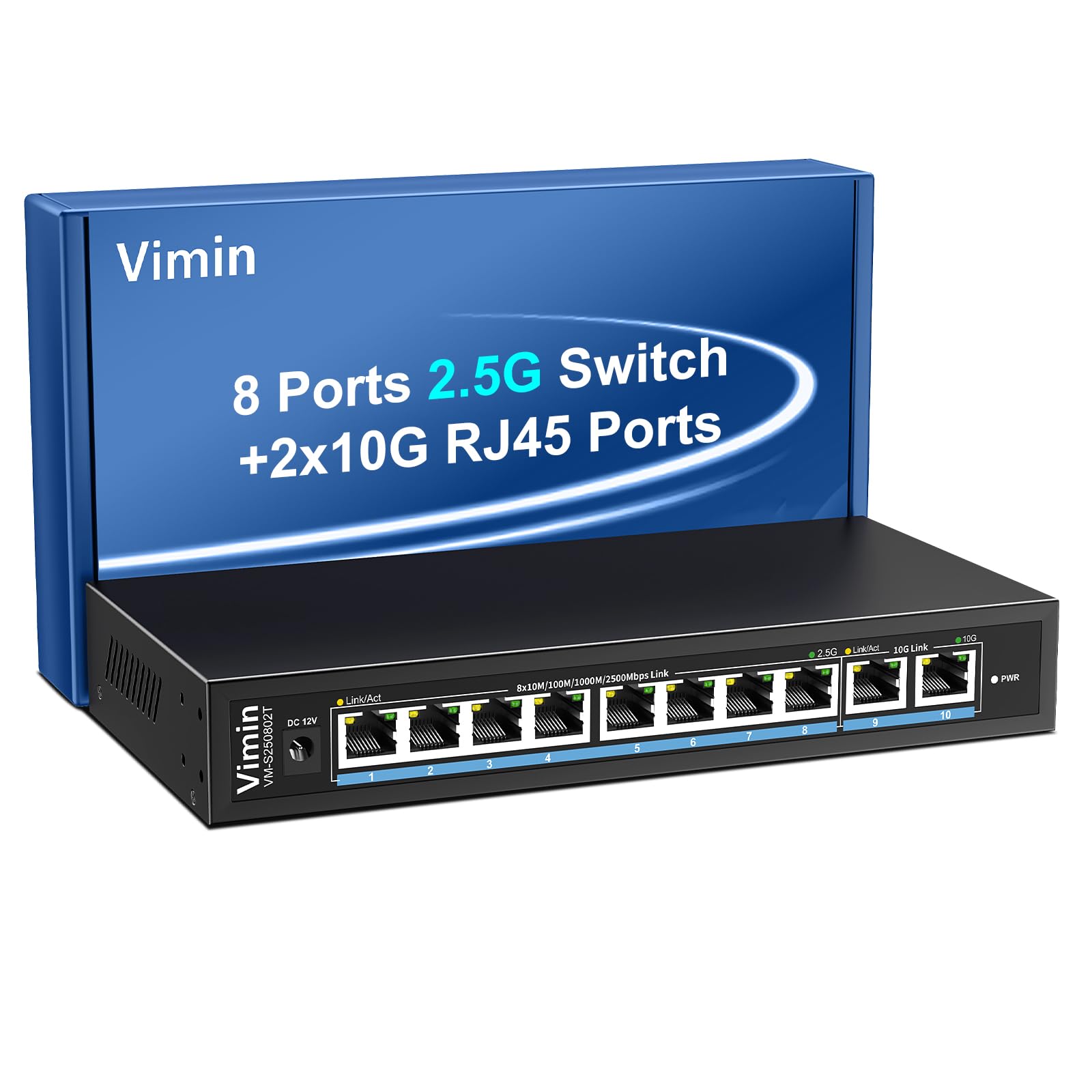
Figure 1: VIMIN 10-Port 2.5Gb Unmanaged Ethernet Switch in a typical setup.
2. Вміст упаковки
Будь ласка, перевірте наявність усіх предметів та їх належний стан після відкриття упаковки. Якщо будь-які предмети відсутні або пошкоджені, зверніться до служби підтримки клієнтів.
- 1x VIMIN 10-Port 2.5G Unmanaged Ethernet Switch
- 1x Посібник користувача
- 1x кабель живлення

Figure 2: Package contents of the VIMIN 10-Port 2.5G Ethernet Switch.
3. Продукт закінчивсяview
3.1 Передня панель
The front panel of the switch features ten RJ45 Ethernet ports and LED indicators for status monitoring.
- Порти 1-8: 2.5 Gigabit Ethernet ports (10/100/1000/2500Mbps auto-negotiation).
- Порти 9-10: 10 Gigabit Ethernet ports (10/100/1000/2500/5000/10000Mbps auto-negotiation).
- Link/Act LED (Yellow/Green): Indicates link status and data activity.
- 2.5G Link LED (Green, for ports 1-8): Indicates a 2.5Gbps connection.
- 10G Link LED (Green, for ports 9-10): Indicates a 10Gbps connection.
- Світлодіод PWR: Вказує на стан живлення.

Figure 3: Front and rear panel of the VIMIN 10-Port 2.5G Ethernet Switch.

Малюнок 4: Детально view of the RJ45 ports and LED indicators.
3.2 Задня панель
The rear panel includes the DC 12V 1A power input port.
4. Налаштування
The VIMIN 10-Port Ethernet Switch is designed for simple plug-and-play operation, requiring no software configuration.
4.1 Підключення живлення
- Connect the provided power adapter to the DC 12V 1A power input port on the rear panel of the switch.
- Plug the power adapter into a standard electrical outlet. The PWR LED on the front panel will illuminate, indicating the switch is powered on.
4.2 Підключення пристрою
- Connect your network devices (e.g., NAS, PC, Wireless AP, WiFi 7 Routers, 10G Adapter/NIC, Gaming PC, 4K/8K Video devices) to any of the RJ45 ports (1-10) using appropriate Ethernet cables.
- The switch automatically detects the speed and duplex mode of the connected device. The Link/Act LED for the respective port will light up when a valid connection is established and flash during data transmission.

Figure 5: Plug and Play connectivity with various network devices.

Малюнок 6: Впрample applications for the 10-Port 2.5G Ethernet Switch.
4.3 Cable Type Recommendations
For optimal performance, especially for 2.5G and 10G connections, use appropriate Ethernet cable types:
| Тип кабелю | 10M | 100M | 1G | 2.5G | 5G | 10G |
|---|---|---|---|---|---|---|
| КІШКА 3/4 | ✓ | ✗ | ✗ | ✗ | ✗ | ✗ |
| КІТ 5 | ✓ | ✓ | ✗ | ✗ | ✗ | ✗ |
| CAT 5e | ✓ | ✓ | ✓ | ✗ | ✗ | ✗ |
| КІТ 6 | ✓ | ✓ | ✓ | ✓ | ✓ | (<55m) |
| CAT 6A/7 | ✓ | ✓ | ✓ | ✓ | ✓ | ✓ |
Figure 7: Ethernet cable type compatibility and performance.
4.4 Варіанти монтажу
The compact design of the switch allows for both desktop placement and wall mounting to save space.

Рисунок 8: Варіанти встановлення на робочому столі та на стіні.
5. Інструкція з експлуатації
The VIMIN 10-Port Unmanaged Ethernet Switch operates automatically once connected, requiring no user intervention for basic network functions.
Автоматичне узгодження 5.1
Each port on the switch supports auto-negotiation, automatically adjusting the transmission method and speed (10/100/1000/2500Mbps for ports 1-8, and up to 10Gbps for ports 9-10) to match the connected device. This ensures optimal performance without manual configuration.

Figure 9: Self-Negotiation Functionality.
5.2 Керування потоком
The switch supports IEEE 802.3x flow control for full-duplex mode and backpressure for half-duplex mode. These mechanisms prevent data packet loss during periods of high network traffic by temporarily pausing data transmission from congested devices, ensuring stable and reliable connections.
6. Технічне обслуговування
To ensure the longevity and optimal performance of your VIMIN Ethernet Switch, follow these maintenance guidelines:
- Прибирання: Використовуйте м’яку суху тканину для очищення зовнішньої частини вимикача. Не використовуйте рідкі або аерозольні засоби для чищення.
- Вентиляція: Ensure proper airflow around the switch. Do not block ventilation openings. The fanless design relies on natural convection for cooling.
- Середовище: Place the switch in a cool, dry location away from direct sunlight, heat sources, and excessive moisture.
- Потужність: Use only the provided power adapter. Disconnect power during electrical storms or when unused for long periods.
7. Вирішення проблем
If you encounter issues with your VIMIN Ethernet Switch, refer to the following common troubleshooting steps:
- Немає живлення:
- Переконайтеся, що адаптер живлення надійно підключено як до комутатора, так і до справної електричної розетки.
- Перевірте справність розетки, підключивши інший пристрій.
- Check if the PWR LED on the switch is illuminated.
- Немає з'єднання/активності на порту:
- Перевірте, чи кабель Ethernet надійно підключено як до порту комутатора, так і до підключеного пристрою.
- Переконайтеся, що підключений пристрій увімкнено та працює належним чином.
- Спробуйте інший кабель Ethernet, щоб виключити його несправність.
- Test with a different port on the switch.
- Низька швидкість мережі:
- Ensure you are using appropriate cable types (e.g., CAT6 or CAT6A/7 for 2.5G/10G connections) as indicated in Section 4.3.
- Check the network adapter settings on your connected device to ensure it supports the desired speed.
- Verify that the Link/Act LED indicates the expected speed (e.g., green for 2.5G/10G).
- Зменште перевантаження мережі, обмежуючи одночасну роботу з високою пропускною здатністю.
- Переривчасте підключення:
- Перевірте, чи не закріплені кабелі.
- Ensure the switch is placed in a stable environment, free from excessive vibrations or temperature fluctuations.
- Consider potential electromagnetic interference from other electronic devices.
8. Технічні характеристики
| Особливість | опис |
|---|---|
| Бренд | ВІМІН |
| Номер моделі | 8x2.5G Ethernet (Unmanaged) |
| Кількість портів | 10 (8x 2.5G RJ45, 2x 10G RJ45) |
| Тип інтерфейсу | RJ45 |
| Швидкість передачі даних | 10 Gigabits Per Second (Max) |
| Комутаційна здатність | 80 Гбіт/с |
| Контроль потоку | IEEE 802.3x (Full-Duplex), Backpressure (Half-Duplex) |
| Стандарти | IEEE 802.3bz, IEEE 802.3u, IEEE 802.3ab, IEEE 802.3z |
| Вхідна потужність | DC 12V 1A (AC 100-240V adapter) |
| Вага товару | 1.83 фунта (приблизно 0.83 кг) |
| Розміри упаковки | 9.53 x 6.5 x 2.99 дюймів (приблизно 24.2 x 16.5 x 7.6 см) |
| Колір | чорний |
| Сумісні пристрої | Desktop, Gaming Console, Laptop, NAS, Wireless AP |
9. Гарантія та підтримка
VIMIN products are designed for reliability and performance. For warranty information, technical support, or any product-related inquiries, please refer to the warranty card included with your product or visit the official VIMIN website. You may also contact VIMIN customer service through the retailer where the product was purchased.
Для отримання додаткової допомоги, будь ласка, відвідайте VIMIN Store on Amazon.


