1. Вступ
Дякуємо за покупкуasing the Mersoco B500 Vinyl Record Player. This manual provides essential information for the safe and efficient operation of your new turntable. Please read it thoroughly before use and retain it for future reference.
Важливі інструкції з безпеки
- Не піддавайте цей прилад впливу крапель або бризок.
- Забезпечте належну вентиляцію; не блокуйте вентиляційні отвори.
- Не розміщуйте пристрій поблизу джерел тепла або під прямими сонячними променями.
- Unplug the unit from the power outlet during lightning storms or when unused for long periods.
- Clean only with a dry cloth. Avoid harsh chemicals or solvents.
2. Вміст упаковки
Будь ласка, перевірте наявність усіх предметів та їх належний стан:
- Mersoco B500 Vinyl Record Player Turntable
- Силовий кабель
- RCA-кабель
- Auxiliary cable (3.5mm)
- 45 об / хв адаптер
- Посібник користувача
3. Продукт закінчивсяview
Familiarize yourself with the components of your Mersoco B500 turntable:
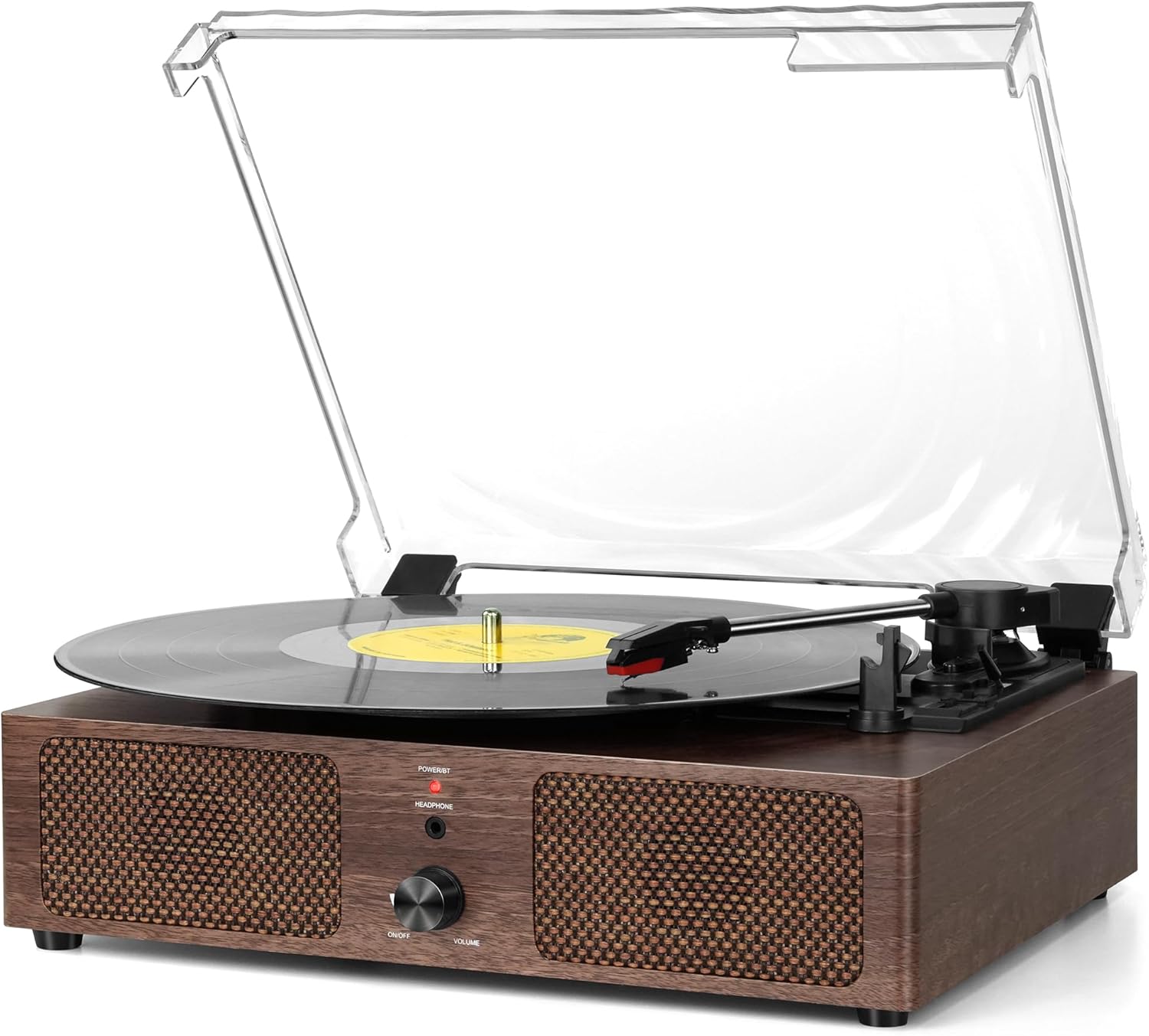
Малюнок 1: Спереду view of the Mersoco B500 Vinyl Record Player.
Ключові компоненти:
- Поворотний стіл: Де розміщені записи.
- Тонеарм: Утримує стилус та відстежує канавки платівки.
- Стилус (голка): Reads the audio from the record.
- Перемикач швидкості: Adjusts playback speed (33, 45, 78 RPM).
- Ручка живлення/гучності: Turns the unit on/off and controls volume.
- Вбудовані стереодинаміки: For direct audio output.
- Пилозахисний чохол: Protects the turntable from dust.

Figure 2: Rear panel connections including USB, AUX-in, and RCA Line Out.
- Порт USB: For playing music from USB drives and recording vinyl to USB.
- Гніздо AUX-IN: Connect external audio devices via 3.5mm cable.
- Лінійний вихід RCA: Підключіть до зовнішнього ampпідсилювачі або потужні динаміки.
- Роз'єм для навушників: Для приватного прослуховування.
4. Налаштування
- Розпакування: Carefully remove the turntable from its packaging. Retain packaging for future transport or storage.
- Розміщення: Place the unit on a stable, level surface away from direct sunlight, heat sources, and excessive dust or moisture.
- Підключення живлення: Connect the power adapter to the DC IN port on the product and then plug it into a 100-240V/50/60Hz AC power outlet.
- Пилозахисний чохол: The clear dust cover can be opened or closed. Ensure it is properly seated on its hinges.
- Stylus Guard: Remove the stylus guard from the cartridge before playing a record.
5. Інструкція з експлуатації
5.1 Playing Vinyl Records
- Увімкнення: Rotate the Power/Volume knob clockwise to turn on the unit. The power indicator will light up (red).
- Запис місця: Place a vinyl record on the turntable platter. For 7-inch records, use the included 45 RPM adapter.
- Виберіть швидкість: Adjust the speed selector to match the record's RPM (33 1/3, 45, or 78 RPM).

Figure 3: Speed selector for 33, 45, and 78 RPM records.
- Положення тонарма: Gently lift the tonearm using the lift lever and move it over the desired track on the record. Lower the tonearm slowly onto the record.

Figure 4: Tonearm with stylus positioned over a record.
- Регулювання гучності: Rotate the Power/Volume knob to adjust the sound level.
- Функція автоматичної зупинки: The turntable will automatically stop playing when the record reaches the end. To disable this, set the auto-stop switch to OFF.
- After Playback: Gently lift the tonearm and return it to its rest. Secure it with the tonearm rest and security latch.
5.2 Відтворення через Bluetooth
The Mersoco B500 can receive audio wirelessly from Bluetooth-enabled devices.
- Активуйте режим Bluetooth: Turn on the turntable. The power indicator will flash blue, indicating Bluetooth pairing mode.
- Підключити пристрій: On your smartphone, tablet, or other Bluetooth device, search for "BR" in the Bluetooth settings and connect. The indicator light will turn solid blue once connected.
- Відтворення музики: Start playing music from your connected device. Adjust volume using the turntable's volume knob or your device's volume controls.

Figure 5: Bluetooth connection in progress.
5.3 AUX-IN Playback
Connect external audio sources using the 3.5mm auxiliary cable.
- Підключити кабель: Plug one end of the 3.5mm AUX cable into the AUX-IN jack on the turntable and the other end into the headphone or AUX output of your external device (e.g., CD player, smartphone).
- Виберіть режим AUX: The turntable should automatically switch to AUX mode.
- Відтворення музики: Start playback from your external device. Adjust volume using the turntable's volume knob.
5.4 RCA Line Out
For enhanced audio, connect the turntable to external powered speakers or an ampліфірник.
- Підключення кабелю RCA: Plug the RCA cable (red and white connectors) into the corresponding RCA Line Out ports on the turntable.
- Connect to External Audio System: Connect the other end of the RCA cable to the input jacks of your external amplifier або активні колонки.
- Регулювання гучності: Керуйте гучністю за допомогою зовнішньої аудіосистеми.
5.5 Відтворення та запис через USB
The turntable supports playing MP3 files from a USB drive and converting vinyl records to MP3 format directly to a USB drive.
Відтворення через USB:
- Вставте USB-накопичувач: Plug a USB flash drive containing MP3 files в порт USB.
- Select USB Mode: The unit should automatically detect the USB drive and switch to USB playback mode.
- Керування відтворенням: Use the control buttons (if available on the unit, otherwise through connected device) to play, pause, skip tracks.
Vinyl to USB Recording:
- Вставте USB-накопичувач: Переконайтеся, що флеш-накопичувач USB вставлено в порт USB.
- Start Vinyl Playback: Begin playing your vinyl record as described in Section 5.1.
- Розпочати запис: (Specific button for recording is not detailed in provided data, assume a general "Record" function or refer to manual for exact steps). The unit will convert the playing vinyl audio into MP3 files and save them to the USB drive.
- Зупинити запис: (Assume a "Stop Record" function).
6. Технічне обслуговування
6.1 Очищення стилуса
- Use a soft brush, moving from back to front, to gently remove dust from the stylus.
- Уникайте дотику до стилуса пальцями.
6.2 Очищення пристрою
- Wipe the dust cover and turntable housing with a soft, slightly damp тканина.
- Не використовуйте абразивні засоби для чищення, віск або поліролі.
7. Вирішення проблем
| проблема | Можлива причина | Рішення |
|---|---|---|
| Немає живлення | Адаптер живлення не підключений або розетка не працює. | Переконайтеся, що адаптер живлення надійно підключений, а розетка справна. |
| Немає звуку з динаміків | Volume too low; incorrect input mode; external speakers not connected properly (if using RCA out). | Increase volume; ensure correct mode (Vinyl, Bluetooth, AUX, USB); check RCA connections. |
| Пропуск запису | Dirty or damaged record; dirty or worn stylus; turntable not level. | Clean record; clean or replace stylus; ensure turntable is on a level surface. |
| Bluetooth не підключається | Turntable not in pairing mode; device too far; interference. | Ensure turntable is flashing blue; move device closer; restart both devices. |
8. Технічні характеристики
| Бренд | Мерсоко |
| Назва моделі | B500 (Vintage Vinyl Record Player Wooden) |
| Розміри продукту | 12.58 x 10.67 x 5.71 дюймів |
| Вага товару | 4.76 фунта |
| матеріал | Деревина |
| Швидкості обертання | 33 1/3, 45, 78 об/хв |
| Підключення | Bluetooth, AUX-IN, RCA Line Out, USB |
| Особливості | Built-in stereo speakers, USB playback and recording, 45 RPM adapter included. |
9. Гарантія та підтримка
Mersoco products are designed for reliability and performance. For specific warranty details, please refer to the warranty card included with your product or contact the retailer where you purchased the item.
For technical support or inquiries, please contact Mersoco customer service or the authorized retailer. Keep your purchase receipt as proof of purchase for warranty claims.


