вступ
This manual provides comprehensive instructions for the installation, operation, and maintenance of your Imou Cell 3C AIO 5MP Solar Surveillance Camera. Please read this manual thoroughly before use and retain it for future reference.
The Imou Cell 3C AIO is a wireless, rechargeable surveillance camera featuring an integrated 2.2W solar panel for continuous power. It offers 5MP (3K) resolution, IP66 weather resistance, smart color night vision, and advanced human detection with smart tracking. Key features include a built-in siren and spotlight for deterrence, flexible storage options via microSD card or Imou Cloud, and a privacy mode for enhanced security.
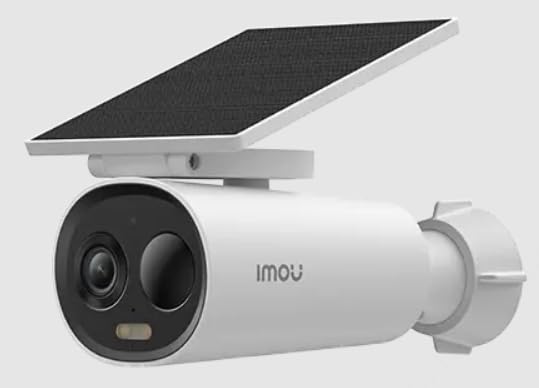
Image of the Imou Cell 3C AIO 5MP Solar Surveillance Camera, showcasinзавдяки компактному дизайну та вбудованій сонячній панелі.
Налаштування
Follow these steps for initial setup of your Imou Cell 3C AIO camera:
- Розпакуйте та перевірте: Carefully remove all components from the packaging and ensure everything is present and undamaged.
- Початкова оплата: Although solar-powered, it is recommended to fully charge the camera using a 5V USB adapter (not included) before the first use to ensure optimal performance.
- Завантажте додаток Imou Life: Завантажте та встановіть додаток «Imou Life» з магазину додатків вашого смартфона (доступний на iOS та Android).
- Створення облікового запису: Відкрийте застосунок Imou Life та створіть новий обліковий запис або увійдіть до існуючого.
- Додати пристрій: Follow the in-app instructions to add your camera. This typically involves scanning a QR code on the camera or its packaging.
- Місце монтажу: Select a suitable outdoor location for mounting. Ensure the solar panel receives direct sunlight for several hours daily to maintain battery charge. The camera is IP66 weather-resistant, suitable for various outdoor conditions.
- Надійне кріплення: Use the provided mounting hardware to securely attach the camera to the chosen surface. Adjust the camera angle for optimal surveillance coverage.
Інструкція з експлуатації
Utilize the Imou Life app to access and control your camera's features:
- Жити View: Відкрийте застосунок Imou Life та виберіть свою камеру зі списку пристроїв. view відеотрансляція в режимі реального часу.
- Виявлення руху та відстеження: The camera features advanced human detection and smart tracking. Configure detection sensitivity, activity zones, and alert preferences within the app settings.
- Нічне бачення: The camera supports smart color night vision, which automatically activates in low-light conditions to provide clear, full-color images.
- Siren and Spotlight: The integrated spotlight and siren can be configured to activate automatically upon detection of an intruder, or they can be manually triggered through the Imou Life app to deter potential threats.
- Зберігання відео:
- Картка MicroSD: Insert a microSD card (up to 256GB, not included) into the designated slot for local video storage.
- Хмара Іму: Subscribe to Imou Cloud for secure cloud storage of your video recordings. Refer to the app for subscription details and free trial availability.
- Режим конфіденційності: Activate the privacy mode within the Imou Life app. This feature physically covers the camera lens, ensuring your privacy when desired.
Технічне обслуговування
Правильне обслуговування забезпечує довговічність та оптимальну роботу вашої камери:
- Прибирання: Regularly clean the camera lens and the surface of the solar panel with a soft, damp cloth. Avoid using abrasive cleaners or harsh chemicals, as these can damage the components.
- Оновлення прошивки: Periodically check for and install firmware updates through the Imou Life app. Updates often include performance improvements, new features, and security enhancements.
- Турбота про навколишнє середовище: While IP66 rated, extreme environmental conditions (e.g., prolonged exposure to direct salt spray, very high humidity, or temperatures outside the specified operating range) should be minimized to prevent potential damage.
- Здоров'я акумулятора: Ensure the solar panel receives adequate sunlight daily to maintain the internal battery's charge. If the camera is in a shaded area, occasional manual charging via USB may be required.
Усунення несправностей
Зверніться до цього розділу, щоб знайти рішення поширених проблем:
- Камера не вмикається:
- Check if the solar panel is obstructed or receiving insufficient sunlight.
- Ensure the internal battery has sufficient charge. If necessary, manually charge the camera via USB.
- Не вдається підключитися до Wi-Fi:
- Verify that the camera is within range of your Wi-Fi router.
- Double-check the Wi-Fi password entered in the Imou Life app.
- Перезавантажте камеру та Wi-Fi роутер.
- Погана якість зображення:
- Очистіть об’єктив камери, щоб видалити будь-який бруд або плями.
- Ensure there is adequate lighting in the surveillance area, especially for optimal color night vision.
- Check your network connection stability, as a weak signal can affect video streaming quality.
- Виявлення руху не працює:
- Verify that motion detection is enabled and configured correctly in the Imou Life app settings.
- Adjust the detection sensitivity and ensure activity zones are properly defined.
- Переконайтеся, що немає фізичних перешкод, що блокують камеру view в зоні виявлення.
Технічні характеристики
| Особливість | Деталь |
|---|---|
| Номер моделі | IPC-K9DC-5M0WEH-V2 |
| Бренд | Імоу |
| роздільна здатність | 5 мегапікселі (3K) |
| Інтегрована сонячна панель | 2.2 Вт |
| Стійкість до погодних умов | Сертифіковано IP66 |
| Розміри (Д x Ш x В) | 16.8 х 7.2 х 6 см |
| вага | 650 грами |
| Споживана потужність | 3.5 Вт |
| томtage | 5 вольт |
| Параметри зберігання | MicroSD card (up to 256GB), Imou Cloud |
| особливості | Human Detection, Smart Tracking, Smart Color Night Vision, Siren, Spotlight, Privacy Mode |
Гарантія та підтримка
For detailed warranty information, technical assistance, or customer support, please visit the official Imou website or contact their authorized service centers. Retain your proof of purchase for any warranty claims.


