1. Вступ
The Trevi RDA 70 BR is a compact and versatile portable radio designed to provide a comprehensive listening experience. It combines traditional radio functionality with modern digital features, making it suitable for listening to music or news anywhere. This manual provides instructions for the proper setup, operation, and maintenance of your device.
2. Інформація про безпеку
- Перед використанням пристрою уважно прочитайте всі інструкції.
- Не піддавайте радіоприймач впливу дощу, вологи або екстремальних температур.
- Уникайте розміщення пристрою поблизу джерел тепла або під прямими сонячними променями.
- Не розбирайте та не намагайтеся ремонтувати пристрій самостійно. Звертайтеся до кваліфікованого персоналу для проведення будь-яких робіт з обслуговування.
- Тримайте пристрій подалі від сильних магнітних полів.
- Use only the specified charging cable (USB Type-C) for recharging the battery.
3. Вміст упаковки
Переконайтеся, що всі предмети присутні в упаковці:
- Trevi RDA 70 BR Portable Radio
- Зарядний кабель USB Type-C
- Посібник користувача (цей документ)
4. Продукт закінчивсяview
Familiarize yourself with the various parts and controls of your Trevi RDA 70 BR radio.

Рисунок 1: Кутова передня частина view of the Trevi RDA 70 BR Portable Radio, showing the speaker grille, display, and main controls.
Елементи керування передньої панелі
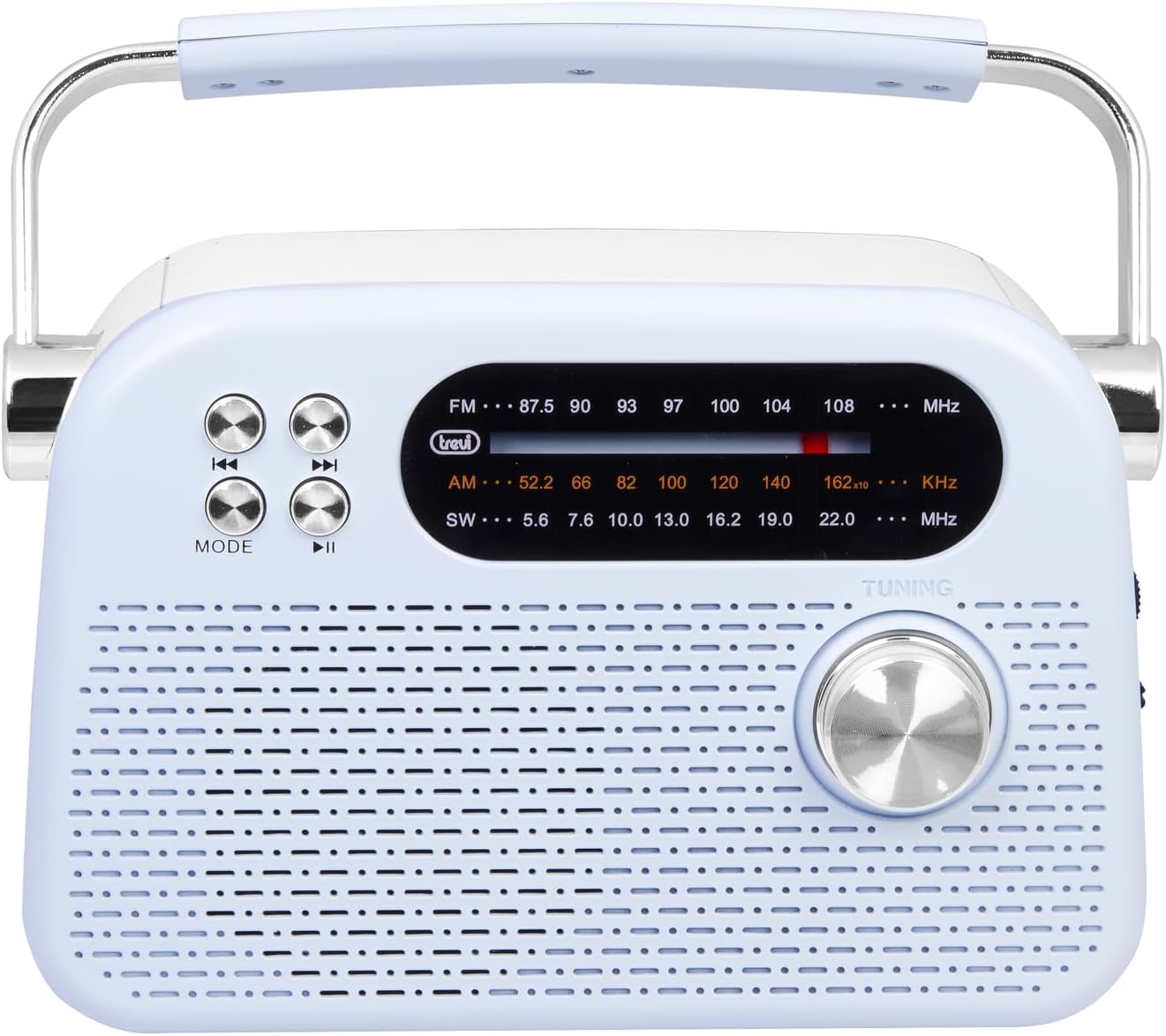
Рисунок 2: Детальний фронт view highlighting the display, mode button, playback controls, and tuning knob.
- Дисплей: Shows frequency, mode, and other information.
- Кнопка MODE: Switches between radio bands (FM/AM/SW) and media playback modes (USB/Micro SD/Wireless).
- Playback Controls (◀◀ / ▶▶ / ▶▶): Used for skipping tracks in media mode or fine-tuning in radio mode.
- Ручка налаштування: For manual station tuning.
Елементи керування та порти на бічній панелі

Малюнок 3: Сторона view showing the power switch, volume control, USB port, Micro SD slot, and USB Type-C charging port.
- OFF/ON/Volume Knob: Вмикає/вимикає радіо та регулює рівень гучності.
- DC 5V IN (USB Type-C): Порт зарядки для внутрішнього акумулятора.
- Порт USB: Для підключення USB-флеш-накопичувачів для відтворення MP3.
- Micro SD Slot (TF): Для вставки карт Micro SD для відтворення MP3.
- Перемикач діапазону: Selects between FM, AM, and SW radio bands, and MEDIA mode for USB/Micro SD/Wireless.
Задня панель

Малюнок 4: Задня частина view showing the telescopic antenna and battery compartment.
- Телескопічна антена: Extend for improved radio reception, especially for FM and SW bands.
- Батарейний відсік: Houses the rechargeable lithium battery.
5. Налаштування
5.1 Заряджання батареї
- Locate the USB Type-C charging port on the side of the radio.
- Connect the provided USB Type-C cable to the radio's charging port.
- Підключіть інший кінець USB-кабелю до стандартного USB-адаптера живлення (не входить до комплекту) або USB-порту комп’ютера.
- The charging indicator light will illuminate (if present) to show charging status.
- Once fully charged, disconnect the cable. A full charge ensures maximum portability and uninterrupted use.
5.2 Регулювання антени
For optimal radio reception, extend the telescopic antenna fully. Adjust its direction and angle to achieve the clearest signal, especially for FM and Shortwave (SW) broadcasts.
6. Інструкція з експлуатації
6.1 Увімкнення/вимкнення живлення та регулювання гучності
- Щоб увімкнути радіо ON, rotate the OFF/ON/Volume knob clockwise.
- Continue rotating the knob clockwise to збільшити гучність.
- Rotate the knob counter-clockwise to зменшити гучність.
- Щоб увімкнути радіо ВИМКНЕНО, rotate the knob counter-clockwise until it clicks into the OFF position.
6.2 Вибір режиму
Використовуйте Перемикач діапазону on the side panel to choose your desired mode:
- FM: For Frequency Modulation radio stations.
- AM: для Amplitude Modulation radio stations.
- SW: For Shortwave radio stations.
- ЗМІ: For playing audio from USB, Micro SD, or Wireless (Bluetooth) sources.
6.3 Налаштування радіо
- Select the desired radio band (FM, AM, or SW) using the Band Selector Switch.
- Розсуньте телескопічну антену для кращого прийому.
- Повільно обертайте Ручка налаштування on the front panel to scan for stations.
- The frequency will be displayed on the screen. Stop tuning when you find a clear station.
6.4 USB/Micro SD Playback (MP3)
- Insert a USB flash drive or a Micro SD card (with MP3 files) into the corresponding port/slot on the side panel.
- Switch the Band Selector Switch to ЗМІ mode. The radio should automatically detect and begin playing MP3 files.
- Використовуйте Елементи керування відтворенням (◀◀ / ▶▶) to skip to the previous or next track.
- Використовуйте Play/Pause (▶▶) кнопку, щоб призупинити або продовжити відтворення.
6.5 Бездротове (Bluetooth) з’єднання
The radio supports wireless audio streaming from compatible devices.
- Switch the Band Selector Switch to ЗМІ mode. The radio will enter Bluetooth pairing mode (indicated by an audible prompt or flashing indicator).
- На смартфоні, планшеті або іншому пристрої з підтримкою Bluetooth увімкніть Bluetooth і знайдіть доступні пристрої.
- Виберіть "Trevi RDA 70 BR" (or similar name) from the list of devices to pair.
- Після сполучення ви можете передавати аудіо зі свого пристрою на радіо.
- Use the playback controls on your connected device or the radio's playback controls to manage audio.
7. Технічне обслуговування
- Прибирання: Використовуйте м’яку суху тканину для очищення зовнішньої частини радіоприймача. Не використовуйте абразивні засоби для чищення або розчинники.
- Зберігання: Якщо радіоприймач не використовується протягом тривалого часу, зберігайте його в прохолодному, сухому місці, подалі від прямих сонячних променів та екстремальних температур.
- Догляд за акумулятором: Щоб продовжити термін служби акумулятора, уникайте частого повного розряджання. Регулярно заряджайте його, навіть якщо він не використовується постійно.
8. Вирішення проблем
| проблема | Можлива причина | Рішення |
|---|---|---|
| Немає живлення | Battery is discharged; Power knob is OFF. | Charge the battery; Rotate the power knob to ON. |
| Поганий радіоприйом | Антена не висунута; Слабкий сигнал; Перешкоди. | Extend and adjust the telescopic antenna; Move the radio to a different location; Tune carefully. |
| USB/Micro SD not playing | Неправильний режим; Не підтримується file формат; пошкоджено files. | Ensure Band Selector Switch is on MEDIA; Check if files are MP3 format; Try a different USB/Micro SD card. |
| Cannot connect via Wireless (Bluetooth) | Radio not in pairing mode; Bluetooth off on device; Device already connected to another unit. | Ensure radio is in MEDIA mode; Enable Bluetooth on your device; Disconnect from other devices and try again. |
9. Технічні характеристики
| Особливість | Деталь |
|---|---|
| Бренд | Треві |
| Модель | RDA 70 BR |
| Розміри (Д x Ш x В) | 18.5 х 7 х 12.5 см |
| вага | 600 грами |
| Джерело живлення | Літієва акумуляторна батарея |
| Порт зарядки | USB типу C (5 В постійного струму) |
| Підтримувані радіодіапазони | FM, AM, Пд-Зх |
| Відтворення медіа | USB, Micro SD (MP3 format) |
| Бездротове підключення | Так (сумісний з Bluetooth) |
| Особливості | Портативний, перезаряджається |
10. Гарантія та підтримка
For warranty information and customer support, please refer to the documentation provided at the time of purchase or visit the official Trevi website. Standard return policies apply for products purchased through retailers. For specific details regarding returns or defective products, consult your purchase platform's help pages.


