1. Продукт закінчивсяview
The LEFANT M2 Pro is an advanced robot vacuum and mop designed to provide efficient and comprehensive floor cleaning. It features dToF laser navigation for precise mapping, powerful 6000Pa suction, and a smart 2-in-1 sweeping and mopping function. The device also includes an automatic dust collection station for hands-free maintenance and can be controlled via a dedicated app or voice commands.
Ключові характеристики:
- dToF Laser Navigation & PSD Obstacle Avoidance: Maps your home with high precision and detects obstacles in real-time.
- Потужність всмоктування 6000 Па: Effectively removes dust, pet hair, debris, and crumbs from various surfaces.
- 2-in-1 Sweeping and Mopping: Cleans and mops simultaneously with an electronic water tank for adjustable flow.
- Customized Cleaning & Multi-Floor Mapping: Create up to 3 floor maps, set no-go zones, and customize cleaning schedules via the app.
- 2.5L Automatic Dust Emptying Station: Забезпечує до 90 днів без використання рук для збору пилу.
- Розумний додаток та голосове керування: Compatible with Alexa, Google Home, and the Lefant app for convenient control.
2. Вміст упаковки
Перед налаштуванням переконайтеся, що всі елементи присутні в упаковці:
- Robot Vacuum Cleaner x 1
- Automatic Emptying Station x 1
- Тримач для швабри x 1
- Кабель живлення x 1
- Посібник користувача x 1
- Мішки для пилу x 2
- Washable Mop Cloth x 1
- Фільтр HEPA x 4
- Dry Mop Cloth x 1
- Інструмент для чищення x 1
- Бічна щітка x 2
- Filter Sponge for Dustbin x 2

3. Посібник із налаштування
3.1 Початкове розміщення та стягнення плати
- Place the automatic emptying station against a wall in an open area, ensuring there are no obstacles within 1 meter to either side and 1.5 meters in front.
- Connect the power cable to the station and plug it into a power outlet.
- Place the robot onto the charging contacts of the station to begin initial charging. Ensure the robot is fully charged before its first use.
3.2 Підключення до застосунку Lefant
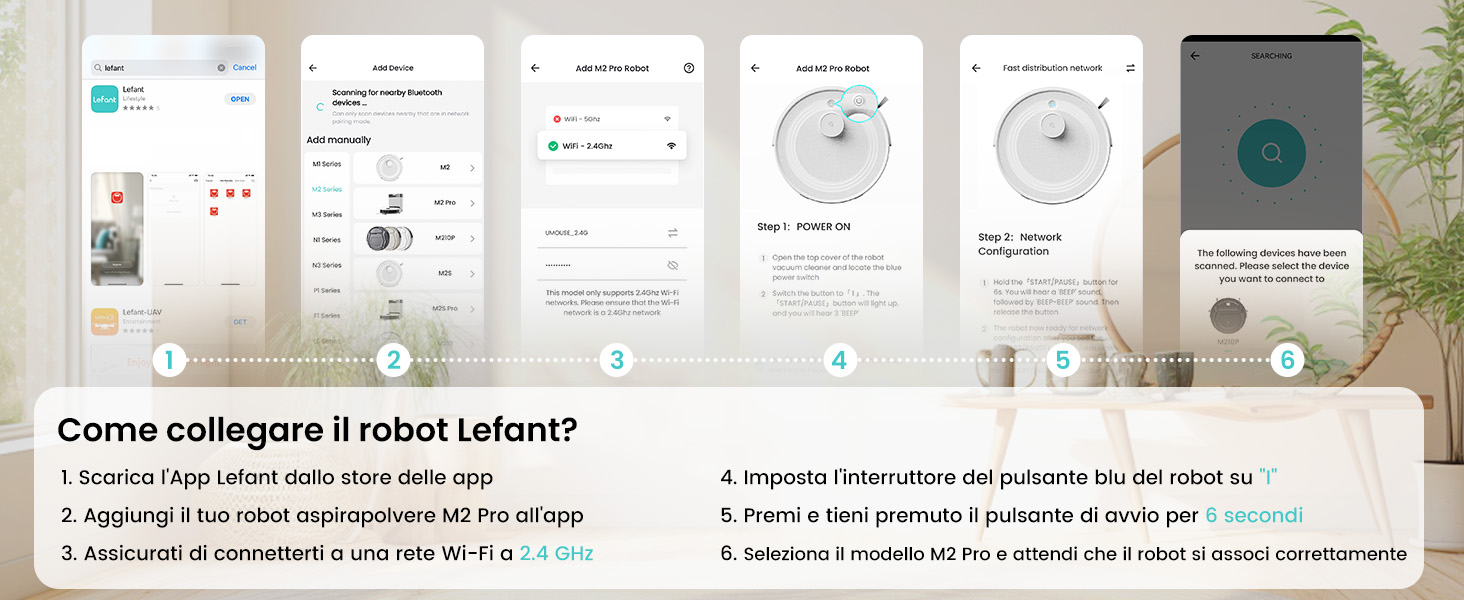
The Lefant app allows for full control and customization of your robot vacuum. Follow these steps to connect:
- Download the 'Lefant' app from your mobile device's app store (App Store for iOS or Google Play Store for Android).
- Відкрийте програму та зареєструйтеся або увійдіть у свій обліковий запис.
- Add your M2 Pro robot vacuum to the app by following the on-screen instructions.
- Ensure your mobile device is connected to a 2.4 GHz Wi-Fi network. The robot only supports 2.4 GHz Wi-Fi.
- Turn on the robot by setting the blue power button to 'I'.
- Press and hold the start button on the robot for 6 seconds until you hear a voice prompt indicating network configuration mode.
- Select the M2 Pro model in the app and wait for the robot to pair successfully.

3.3 Connecting to Voice Assistants (Alexa/Google Home)
For hands-free control, integrate your M2 Pro with Amazon Alexa or Google Home:
- Open the Lefant App. Navigate to Profile > Third-party assistance for voice commands.
- Register your voice account and password within the Lefant app.
- Open the Alexa App (or Google Home App). Go to 'More' > 'Skills & Games' (or 'Works with Google').
- шукати «Розумне життя».
- Click 'Enable to Use'.
- Виберіть свій регіон і введіть голосовий обліковий запис і пароль з кроку 2.
- Wait for the connection to complete. You can now use voice commands like "Alexa, ask robot to clean."
4. Інструкція з експлуатації
4.1 Режими очищення
M2 Pro пропонує різні режими прибирання, щоб задовольнити ваші потреби:
- Автоматичне очищення: Робот розумно орієнтується та прибирає весь ваш будинок.
- Точкове прибирання: Зосереджується на певній забрудненій ділянці для інтенсивного очищення.
- Очищення краю: Прибирає вздовж стін та країв меблів.
- Планове прибирання: Встановіть певний час для автоматичного прибирання робота.
- Очищення зони: Define specific rooms or areas to be cleaned.

4.2 Керування програмами
The Lefant app provides comprehensive control over your M2 Pro:
- Start/Pause Cleaning: Initiate or stop cleaning cycles.
- Регулювання потужності всмоктування: Choose from multiple suction levels (Low, Medium, High).
- Регулювання потоку води: Control the water output for mopping (Low, Medium, High).
- Встановити заборонені зони: Визначте області, яких робот повинен уникати.
- View Cleaning Map: Monitor the robot's progress and cleaned areas in real-time.
- Розклад прибирання: Program daily or weekly cleaning tasks.
- Багатоповерхове картографування: Store maps for up to 3 different floors.

4.3 Голосове керування
Once connected to Alexa or Google Home, use simple voice commands:
- "Alexa, ask robot to clean."
- "Alexa, ask robot to recharge."
- "Alexa, ask robot to stop cleaning."

5. Технічне обслуговування
5.1 Автоматичне спорожнення пилозбірника
The M2 Pro's automatic emptying station collects dust for up to 90 days, minimizing manual intervention. The station uses 2.5L dust bags for hygienic disposal.

5.2 Очищення пилозбірника та фільтра
While the automatic station handles most dust, regular inspection and cleaning of the robot's internal dustbin and filters are recommended to maintain optimal performance. The M2 Pro's improved dustbin design ensures 98% debris removal during emptying.

5.3 Mop Cloth and Side Brush Maintenance
- Remove and clean the washable mop cloth after each mopping session.
- Regularly check the side brushes for tangled hair or debris and clean or replace them as needed.
6. Вирішення проблем
If you encounter issues with your LEFANT M2 Pro, refer to the following common problems and solutions:
| проблема | Можлива причина | Рішення |
|---|---|---|
| Робот не запускається та не реагує. | Низький заряд батареї; Вимкнено живлення; Робот застряг. | Ensure robot is charged; Check power switch; Clear any obstructions. |
| Погана ефективність очищення. | Повний пилозбірник; засмічені фільтри; зношені щітки. | Empty dustbin; Clean/replace filters; Clean/replace brushes. |
| Робот часто застрягає. | Obstacles (cables, small items); Uneven surfaces. | Clear floor of obstacles; Use no-go zones for problematic areas. |
| Не вдається підключитися до Wi-Fi/додатку. | Incorrect Wi-Fi band (not 2.4GHz); Incorrect password; Robot not in pairing mode. | Ensure 2.4GHz Wi-Fi; Verify password; Re-enter pairing mode (hold start button for 6s). |
| Automatic emptying not working. | Dust bag full; Obstruction in emptying duct. | Replace dust bag; Check and clear emptying duct. |
Для отримання детальнішої інформації про усунення несправностей зверніться до повного посібника користувача або зверніться до служби підтримки клієнтів.
7. Технічні характеристики
| Особливість | Деталь |
|---|---|
| Бренд | ЛЕФАНТ |
| Назва моделі | M2 Pro |
| Колір | M2 Pro-black |
| Розміри продукту | 32 х 32 х 9.4 см |
| Вага товару | 6.24 кілограма |
| Ємність смітника | 2.5 Liters (Auto-empty station) |
| томtage | 19 вольт |
| матеріал | пластик |
| Особливості | Smart Mapping, dToF Laser Navigation, PSD Obstacle Avoidance, Carpet Boost, App/Voice Control |
| Сумісні пристрої | Smartphone (2.4GHz Wi-Fi), Alexa, Google Home |
| Рекомендовані поверхні | Hard floor, Carpet, Parquet, Tiles |
| Максимальний час виконання | 140 хвилин |
8. Гарантія та підтримка
LEFANT products are designed for reliability and performance. For warranty information, please refer to the documentation included with your product or visit the official LEFANT website. If you require technical assistance, have questions about your product, or need to report an issue, please contact LEFANT customer support through the following channels:
- Lefant App: Access support features directly within the application.
- Офіційний Webсайт: Відвідайте www.lefant.com щоб отримати поширені запитання, посібники з усунення несправностей та контактну інформацію.
- Підтримка електронною поштою: Зверніться до упаковки вашого продукту або до офіційного webсайт для отримання спеціальної адреси електронної пошти служби підтримки.
Please have your product model number (M2 Pro) and purchase details ready when contacting support to ensure efficient service.