1. Вступ
This manual provides instructions for the safe and efficient operation of your vretti Bluetooth Thermal Label Printer, model B0FNW9FCS5. Please read this manual thoroughly before using the device and retain it for future reference.
2. Інформація про безпеку
- Ensure the printer is connected to a power source with the correct voltage.
- Не піддавайте принтер впливу води або надмірної вологості.
- Уникайте розміщення принтера під прямими сонячними променями або поблизу джерел тепла.
- Не намагайтеся розбирати або ремонтувати принтер самостійно. Зверніться до кваліфікованого сервісного персоналу.
- Зберігати в недоступному для дітей місці.
- Use only vretti approved accessories and power adapters.
3. Вміст упаковки
Перевірте наявність усіх елементів в упаковці:
- vretti Bluetooth Thermal Label Printer (Model B0FNW9FCS5)
- Адаптер живлення
- USB кабель
- Короткий посібник
- Sample Labels (50 premium labels)
4. Налаштування
4.1 Фізичне підключення
- Підключіть адаптер живлення до принтера, а потім до розетки.
- Connect the USB cable from the printer to your computer (if using USB connection).
- Увімкніть принтер за допомогою вимикача живлення.
4.2 Завантаження етикеток
The printer features an integrated paper bin designed for easy label loading.
- Відкрийте верхню кришку принтера.
- Place the roll of thermal labels into the integrated paper bin. Ensure the labels feed from the bottom of the roll and the printable side faces upwards.
- Adjust the guide rails to fit the width of your labels snugly, without creasing them. The printer supports label widths from 0.78 inches (19mm) to 4.6 inches (116mm).
- Feed the first label through the print mechanism until it is positioned correctly.
- Закрийте верхню кришку.

малюнок 4.2.1: Label loading into the integrated paper bin. The visualization window allows monitoring label supply. Adjustable guide rails ensure proper label alignment for various sizes like 2"x3", 3"x3", and 4"x6".
4.3 Встановлення драйверів та програмного забезпечення
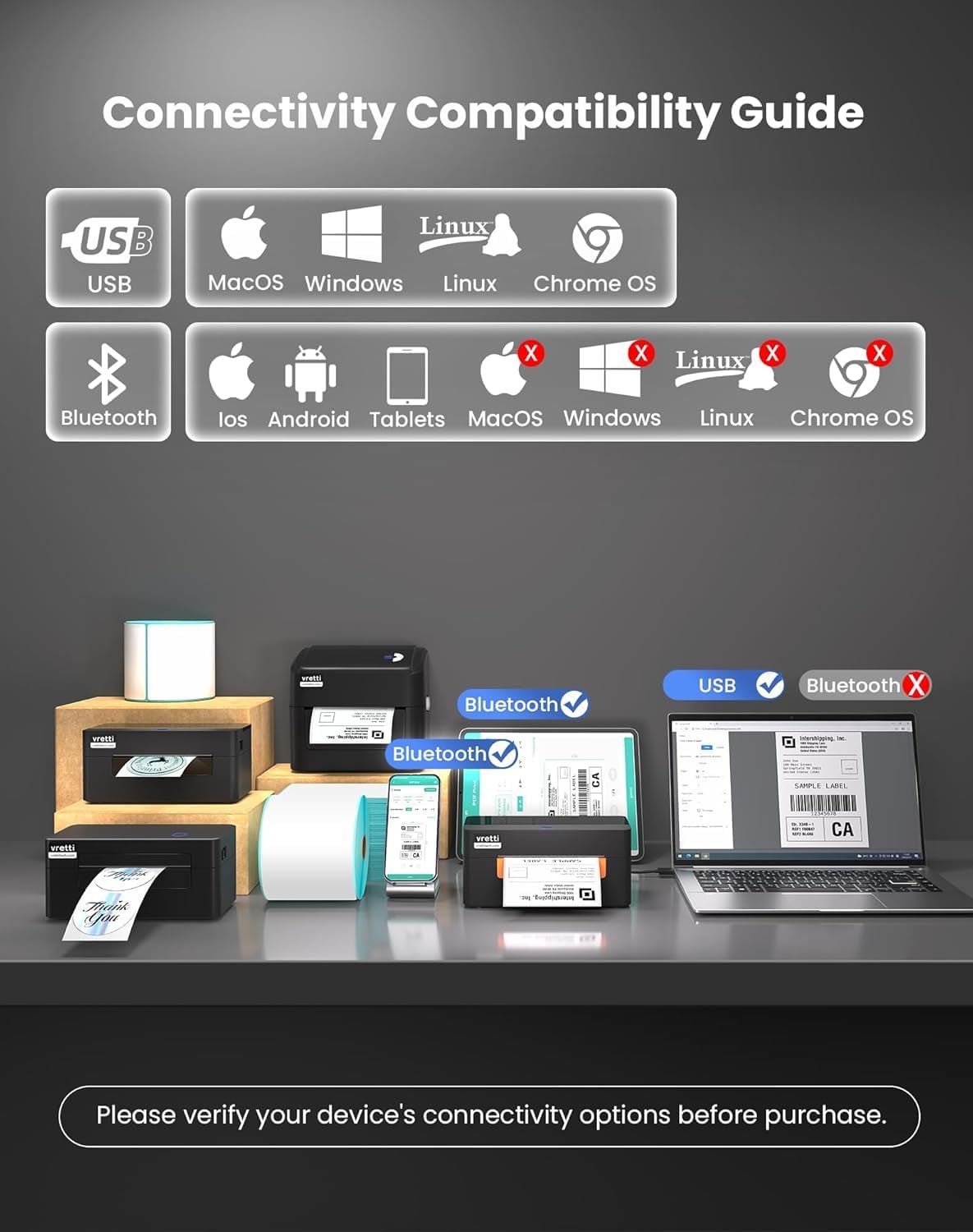
The vretti printer offers dual connectivity options: USB and Bluetooth.

малюнок 4.3.1: Connectivity Compatibility Guide. USB connection is compatible with MacOS, Windows, Linux, and Chrome OS. Bluetooth connection is compatible with iOS, Android, and Tablets. Bluetooth is not supported for MacOS, Windows, Linux, or Chrome OS.
4.3.1 USB Connection (Windows/Mac/Linux/ChromeOS)
For most operating systems, the printer is designed for "Plug & Play" functionality. Connect the USB cable, and your system should automatically detect and install the necessary drivers within approximately 60 seconds. If drivers do not install automatically, refer to the included Quick Start Guide or the manufacturer's website for manual driver installation instructions.
малюнок 4.3.2: The vretti label printer is designed for quick deployment, allowing users to master its operation rapidly, often within 2 minutes for basic setup.
4.3.2 Bluetooth Connection (iOS/Android/Tablets)
- Ensure Bluetooth is enabled on your mobile device or tablet.
- Turn on the vretti printer.
- On your device, search for available Bluetooth devices and select the vretti printer (e.g., "vretti Printer" or similar).
- Дотримуйтеся будь-яких підказок на екрані, щоб завершити процес створення пари.
- Install the vretti printing application from your device's app store (e.g., Apple App Store, Google Play Store) to manage print jobs.
5. Інструкція з експлуатації
5.1 Друк етикеток
The vretti thermal label printer uses direct thermal printing technology, eliminating the need for toner or ink. It is optimized for 4x6 inch shipping labels and barcodes.
- Ensure labels are properly loaded (refer to Section 4.2).
- Відкрийте документ або програму, з якої потрібно друкувати.
- Виберіть «Друк» у меню програми.
- Choose the vretti printer from the list of available printers.
- Adjust print settings as needed, such as label size (e.g., 4x6 inches) and orientation.
- Розпочніть завдання друку.

малюнок 5.1.1: The printer delivers 203 dpi resolution, ensuring clear and scannable barcodes with a 99.99% recognition rate for labels such as DHL 4x6 shipping labels and QR codes.

малюнок 5.1.2: The vretti printer offers a print speed of 152 mm/s, capable of producing 72 labels per minute. Its direct thermal technology eliminates ink/toner, leading to significant cost savings and a print head lifespan three times longer than standard printers.
6. Технічне обслуговування
6.1 Очищення друкуючої головки
The printer features automatic cleaning functionality. However, if print quality degrades, manual cleaning may be necessary.
- Вимкніть принтер і від'єднайте його від джерела живлення.
- Відкрийте верхню кришку.
- Обережно протріть друкувальну головку тканиною без ворсу, злегкаampзмішаний ізопропіловим спиртом.
- Дайте друкуючій голівці повністю висохнути, перш ніж закривати кришку та вмикати принтер.
6.2 Генеральне прибирання
Протріть зовнішню частину принтера м’якою сухою тканиною. Не використовуйте абразивні засоби для чищення або розчинники.
7. Вирішення проблем
| проблема | Можлива причина | Рішення |
|---|---|---|
| Принтер не вмикається | No power, faulty power adapter | Перевірте підключення живлення, спробуйте іншу розетку. |
| Погана якість друку | Dirty print head, incorrect label type, low-quality labels | Clean the print head (Section 6.1). Ensure you are using thermal labels. Try new labels. |
| Етикетки не подаються належним чином | Labels improperly loaded, guide rails not adjusted | Reload labels, adjust guide rails (Section 4.2). |
| Не вдається підключитися через Bluetooth | Bluetooth not enabled, incorrect pairing, device incompatibility | Ensure Bluetooth is on. Re-pair the device. Confirm your device is compatible (iOS/Android/Tablets only). |
| Printer not recognized by computer (USB) | Driver issue, faulty USB cable, incorrect port | Try a different USB port or cable. Reinstall drivers if necessary. |
8. Технічні характеристики
| Особливість | Деталь |
|---|---|
| Бренд | vretti |
| Номер моделі | B0FNW9FCS5 |
| Технологія друку | Прямий термічний |
| Роздільна здатність друку | 203 dpi |
| Швидкість друку | Up to 152 mm/s (72 labels/min) |
| Ширина етикетки | 0.78 дюйма - 4.6 дюйма (19 мм - 116 мм) |
| Підключення | USB (Windows/Mac/Linux/ChromeOS), Bluetooth 5.0 (iOS/Android/Tablets) |
| Максимальна місткість аркушів | 500 labels (integrated bin) |
| Розміри (Д x Ш x В) | 29.5 x 20.5 x 18.8 см (приблизно) |
| Джерело живлення | Зовнішній адаптер живлення |
9. Гарантія та підтримка
vretti products are manufactured to high-quality standards. For warranty information and technical support, please refer to the warranty card included with your product or visit the official vretti website. Please have your model number (B0FNW9FCS5) and purchase date available when contacting support.


