1. Вступ
Thank you for choosing the Proscenic P11 Ultra Cordless Vacuum Cleaner. This manual provides essential information for the safe and efficient use, maintenance, and troubleshooting of your new appliance. Please read it thoroughly before first use and retain it for future reference.
The Proscenic P11 Ultra is designed for versatile cleaning across various surfaces, offering powerful suction and convenient features for a cleaner home environment.
2. Важливі інструкції з техніки безпеки
Завжди дотримуйтесь основних запобіжних заходів під час використання електроприладів, щоб зменшити ризик пожежі, ураження електричним струмом або травмування.
- Перед використанням приладу прочитайте всі інструкції.
- Не використовуйте на вулиці або на вологих поверхнях.
- Не дозволяйте використовувати як іграшку. Необхідна пильна увага при використанні дітьми або поблизу них.
- Використовуйте лише так, як описано в цьому посібнику. Використовуйте лише рекомендовані виробником насадки.
- Не використовуйте з пошкодженим шнуром або вилкою. Якщо прилад не працює належним чином, його впустили, пошкодили, залишили на відкритому повітрі або впустили у воду, поверніть його до сервісного центру.
- Не тягніть і не носіть за шнур, не використовуйте шнур як ручку, не зачиняйте двері за шнур і не тягніть шнур навколо гострих країв або кутів. Не проводьте прилад через шнур. Тримайте шнур подалі від нагрітих поверхонь.
- Не від’єднуйте вилку, тягнучи за шнур. Щоб відключити, візьміться за вилку, а не за шнур.
- Не беріть вилку або прилад мокрими руками.
- Не кладіть предмети в отвори. Не використовуйте із заблокованими отворами; бережіть від пилу, ворсинок, волосся та всього, що може перешкоджати потоку повітря.
- Тримайте волосся, вільний одяг, пальці та всі частини тіла подалі від отворів і рухомих частин.
- Не беріть нічого, що горить або димить, наприклад сигарети, сірники чи гарячий попіл.
- Будьте особливо обережні під час чищення сходів.
- Не використовуйте для збирання легкозаймистих або горючих рідин, таких як бензин, і не використовуйте в місцях, де вони можуть бути присутніми.
- Не збирайте токсичні матеріали (наприклад, хлорний відбілювач, аміачний засіб для чищення, засіб для чищення каналізації).
- Не використовуйте в закритому приміщенні, де присутні пари фарби на масляній основі, розчинника для фарби, деяких речовин для захисту від молі, легкозаймистого пилу або інших вибухонебезпечних чи токсичних парів.
- Do not vacuum hard or sharp objects such as glass, nails, screws, or coins.
- Завжди вимикайте цей прилад перед підключенням або від’єднанням моторизованої насадки.
- Зберігайте прилад у приміщенні. Після використання прибирайте його, щоб запобігти нещасним випадкам.
- Для зарядки використовуйте лише зарядний пристрій, наданий виробником.
- Не спалюйте прилад, навіть якщо він серйозно пошкоджений. Батареї можуть вибухнути під час пожежі.
- The battery should be fully charged and stored separately if the device is not used for a long time.
3. Вміст упаковки
Carefully unpack your Proscenic P11 Ultra and check that all items are present and in good condition. If any items are missing or damaged, please contact customer support.
- Головний вакуумний блок
- Adjustable Telescopic Rod
- Motorized Floor Brush (Anti-Tangle with Green Light)
- Знімний акумулятор
- Accessory Kit (includes Crevice Tool, Dusting Brush)
- Адаптер (зарядний пристрій)
- Charging Dock / Wall Mount
- Посібник користувача (цей документ)
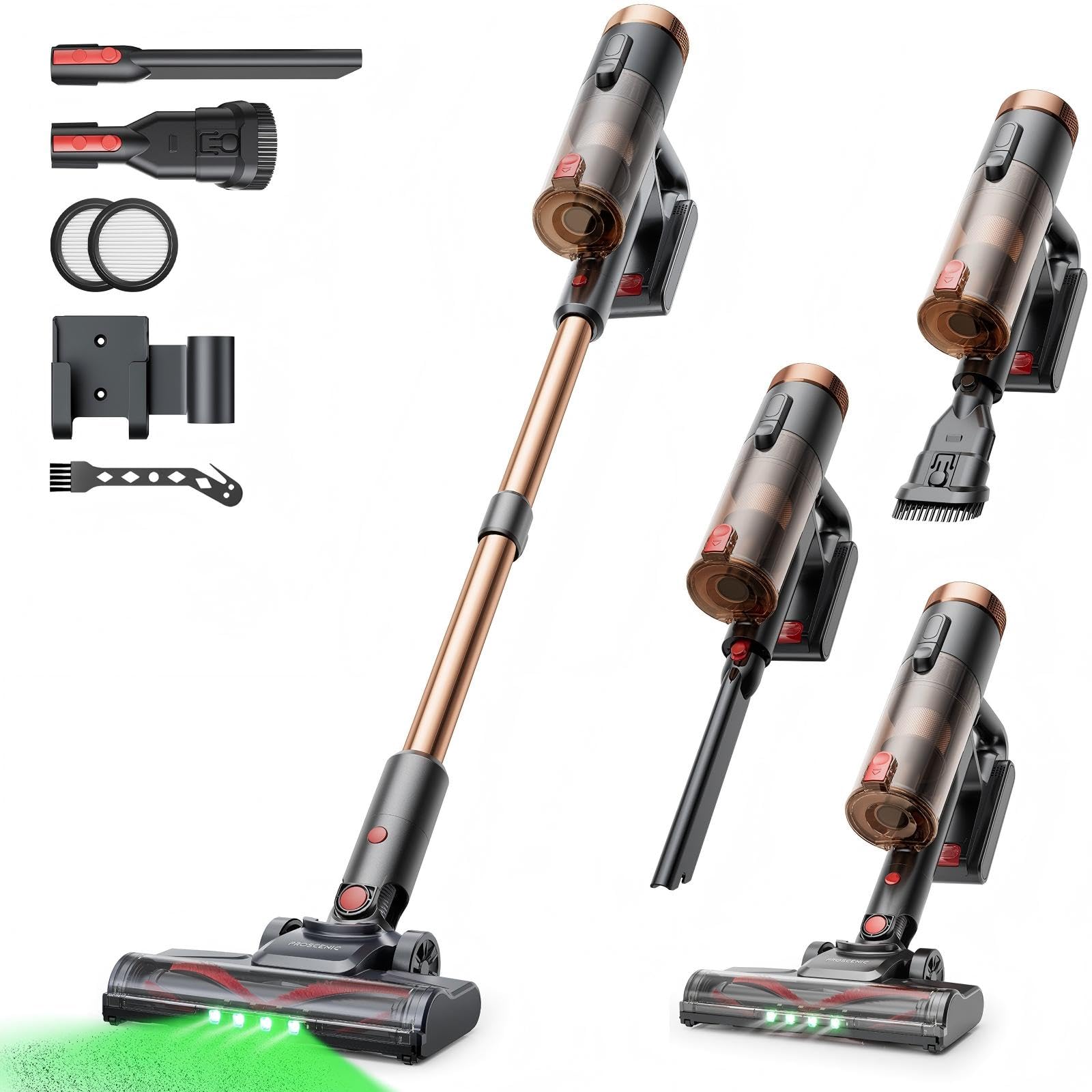
Image 1: Proscenic P11 Ultra main unit and included accessories. This image displays the vacuum cleaner's primary components, including the handheld unit, extension wand, floor brush, and various attachments.
4. Продукт закінчивсяview
Familiarize yourself with the key components and features of your Proscenic P11 Ultra.
Ключові характеристики:
- Окремо стоячий дизайн: Allows the vacuum to stand upright independently for convenient storage and breaks during cleaning.
- 180° Rotating Floor Brush: Enhances maneuverability, allowing easy access to tight corners and under furniture.
- Adjustable Telescopic Rod: Customize the height for comfortable use by various users.
- Anti-Tangle Brush with Green Detection Light: Prevents hair tangles and illuminates hidden dust particles for thorough cleaning.
- 50 kPa Super Strong Suction Power: Provides powerful cleaning performance for stubborn dirt and debris.
- Intelligent Touchscreen: Displays real-time information on battery life, maintenance status, and suction modes.
- Two Suction Power Modes: Offers versatile cleaning options for different floor types and cleaning needs.
- Знімний акумулятор: Allows for extended cleaning time with an optional spare battery and convenient charging.
Image 2: Close-up of the Proscenic P11 Ultra's intelligent touchscreen. The screen provides visual feedback on the vacuum's status.
5. Налаштування та складання
Follow these steps to assemble your Proscenic P11 Ultra and prepare it for first use.
5.1 Збірка основного блоку
- Insert the adjustable telescopic rod into the main handheld vacuum unit until it clicks securely into place.
- Attach the motorized floor brush to the bottom end of the telescopic rod, ensuring it locks firmly.
- Insert the removable battery into the designated slot on the main unit until it clicks.
Image 3: Illustration of assembling the main vacuum unit, showing the connection points for the telescopic rod and floor brush.
5.2 Заряджання батареї
Перед першим використанням повністю зарядіть акумулятор. Акумулятор можна заряджати, підключений до основного пристрою або окремо.
- Connect the adapter to the charging port on the battery or the charging dock.
- Підключіть адаптер до розетки.
- The touchscreen display will indicate charging status. A full charge typically takes approximately 4-5 hours.
Image 4: The vacuum cleaner connected to its charger, illustrating the charging process. The battery can be charged while installed or removed.
5.3 Приєднання аксесуарів
To use the crevice tool or dusting brush, detach the telescopic rod and floor brush from the main unit. Insert the desired accessory directly into the main unit's nozzle until it clicks.
6. Операція
Learn how to effectively use your Proscenic P11 Ultra for various cleaning tasks.
6.1 Увімкнення/вимкнення живлення та режими всмоктування
- Press the power button on the main unit to turn the vacuum cleaner on. It will start in the default suction mode.
- Use the mode selection button on the touchscreen to switch between the two available suction power modes: Standard and Max.
- Знову натисніть кнопку живлення, щоб вимкнути пилосос.
6.2 Очищення поверхонь
- Hard Floors & Carpets: Use the motorized floor brush for general cleaning. The green detection light will help identify fine dust.
- Tight Spaces & Corners: Utilize the crevice tool for narrow gaps, edges, and hard-to-reach areas.
- Upholstery & Delicate Surfaces: Attach the dusting brush for cleaning sofas, curtains, and other sensitive items.
- Шерсть домашніх тварин: The anti-tangle brush is specifically designed to effectively pick up pet hair without tangling.
Image 5: The Proscenic P11 Ultra in use, demonstrating its maneuverability on a hard floor surface. The green light on the brush head is visible.
6.3 Freestanding Function
The P11 Ultra features a freestanding design. When you need to pause cleaning or store the vacuum temporarily, simply ensure it is balanced and stands upright on its own. This allows for convenient breaks without needing to lean the vacuum against a wall or lay it down.
7. Технічне обслуговування
Регулярне технічне обслуговування забезпечує оптимальну продуктивність та подовжує термін служби вашого пилососа.
7.1 Спорожнення пилозбірника
Спорожняйте пилозбірник після кожного використання або коли буде досягнуто позначки MAX.
- Переконайтеся, що пилосос вимкнено.
- Locate the dustbin release button, usually near the handle.
- Press the button to open the dustbin flap and empty contents into a waste bin.
- Щільно закривайте клапан пилозбірника до клацання.
Image 6: A user demonstrating how to empty the transparent dustbin of the Proscenic P11 Ultra into a trash receptacle.
7.2 Очищення фільтра HEPA
Clean the HEPA filter regularly (e.g., monthly, depending on usage) to maintain suction power.
- Вийміть пилозбірник з основного блоку.
- Twist and pull out the HEPA filter assembly.
- Обережно постукайте фільтром по сміттєвому баку, щоб видалити пил.
- If necessary, rinse the filter under cold running water. Ensure it is completely dry (for at least 24 hours) before reinserting. Do not use detergents.
- Знову зберіть фільтр і пилозбірник.
7.3 Очищення щіткового валика
Періодично перевіряйте щітковий валик на наявність заплутаного волосся або сміття.
- Turn off the vacuum and detach the motorized floor brush.
- Locate the brush roll release mechanism (refer to the floor brush diagram).
- Remove the brush roll. Use scissors or a cleaning tool to cut and remove any tangled hair or fibers.
- Знову вставте щітковий валик і закріпіть механізм вивільнення.
8. Вирішення проблем
If you encounter issues with your Proscenic P11 Ultra, refer to the following common problems and solutions.
| проблема | Можлива причина | Рішення |
|---|---|---|
| Вакуум не включається | Акумулятор не заряджений або неправильно встановлений. | Переконайтеся, що акумулятор повністю заряджений та надійно вставлений. |
| Низька потужність всмоктування | Dustbin is full; Filter is clogged; Brush roll is blocked. | Empty dustbin. Clean or replace HEPA filter. Remove blockages from brush roll. |
| Щітка-валик не обертається | Brush roll is tangled with hair/debris; Floor brush is not properly attached. | Clean brush roll. Reattach floor brush securely. |
| Короткий час автономної роботи | Battery not fully charged; Using Max suction mode frequently; Battery degradation. | Ensure full charge. Use Standard mode for longer runtime. Consider replacing battery if significantly degraded. |
| Незвичайний шум | Blockage in nozzle or hose; Damaged brush roll. | Check for and remove any blockages. Inspect brush roll for damage. |
If the problem persists after attempting these solutions, please contact Proscenic customer support.
9. Технічні характеристики
Technical specifications for the Proscenic P11 Ultra Cordless Vacuum Cleaner.
- модель: P11 Ultra
- Джерело живлення: Працює від батареї
- томtage: 22.5 вольт
- Потужність всмоктування: До 50 кПа
- Вага товару: 2.68 кілограма
- Ємність смітника: Approximately 1.0 Liter (1000 Microliters as per data, interpreted as 1.0L)
- Тип фільтра: Фільтр HEPA
- Форм-фактор: Upright (Stick Vacuum)
- Бездротовий: так
- Рекомендовані поверхні: Carpet, Solid Wood, Upholstery
- Особливості: Freestanding Design, Touchscreen, Green Detection Light, Anti-Tangle Brush, Adjustable Telescopic Rod, Removable Battery
10. Гарантія та підтримка клієнтів
Proscenic provides a Гарантія 2 рік for the P11 Ultra Cordless Vacuum Cleaner, covering manufacturing defects from the date of purchase.
З будь-якими питаннями, технічною допомогою або гарантійними претензіями звертайтеся до нашої служби підтримки клієнтів. Ми пропонуємо 7x24 hours customer support щоб допомогти вам.
Електронна пошта: service-de@proscenic.com
Please have your model number (P11 Ultra) and purchase information ready when contacting support.


