1. Вступ
This manual provides essential instructions for the assembly, operation, and maintenance of your Arcade1Up Ms. Pac-Man Classic SE Arcade Machine. Please read this manual thoroughly before use to ensure proper function and safety.

Image 1: The Arcade1Up Ms. Pac-Man Classic SE Arcade Machine, featuring vibrant blue and pink artwork with Ms. Pac-Man characters.
2. Інформація про безпеку
Дотримуйтесь наступних заходів безпеки:
- Keep the arcade machine away from water or excessive moisture.
- Переконайтеся, що шнур живлення не пошкоджений і не потертий.
- Do not attempt to open or modify the machine. Refer all servicing to qualified personnel.
- Встановіть машину на стійкій, рівній поверхні, щоб запобігти перекиданню.
- Наглядайте за дітьми під час використання.
3. Вміст упаковки
Your Arcade1Up Ms. Pac-Man Classic SE Arcade Machine package includes:
- Arcade Machine Cabinet
- Адаптер живлення
- Інструкція з експлуатації (цей документ)
Note: An optional riser may be sold separately.
4. Налаштування
4.1 Збірка
The Arcade1Up Ms. Pac-Man Classic SE Arcade Machine requires some assembly. Follow the detailed instructions provided in the separate assembly guide included with your product. Ensure all screws and fasteners are securely tightened before use.

Image 2: Dimensions of the Arcade1Up Ms. Pac-Man Classic SE Arcade Machine, showing its height of 45.4 inches without a riser and indicating an optional riser is sold separately.
4.2 Підключення живлення
- Locate the power input port on the back of the arcade machine.
- Connect the provided power adapter to the machine.
- Підключіть адаптер живлення до стандартної електричної розетки.
- Перед підключенням переконайтеся, що вимикач живлення (якщо є) знаходиться в положенні «ВИМК.».
Відео 1: Оверview of the Arcade1Up Ms. Pac-Man Classic SE Arcade Machine, demonstrating its features and setup in a home environment. This video is provided by the seller.
5. Інструкція з експлуатації
5.1 Увімкнення/вимкнення
Locate the power switch on the control panel. Flip the switch to 'ON' to power on the machine. Flip to 'OFF' to power off.
5.2 Вибір гри
Upon powering on, you will see a game selection menu. Use the joystick to navigate through the available games. Press the 'Start Game' button to select and launch your desired game.
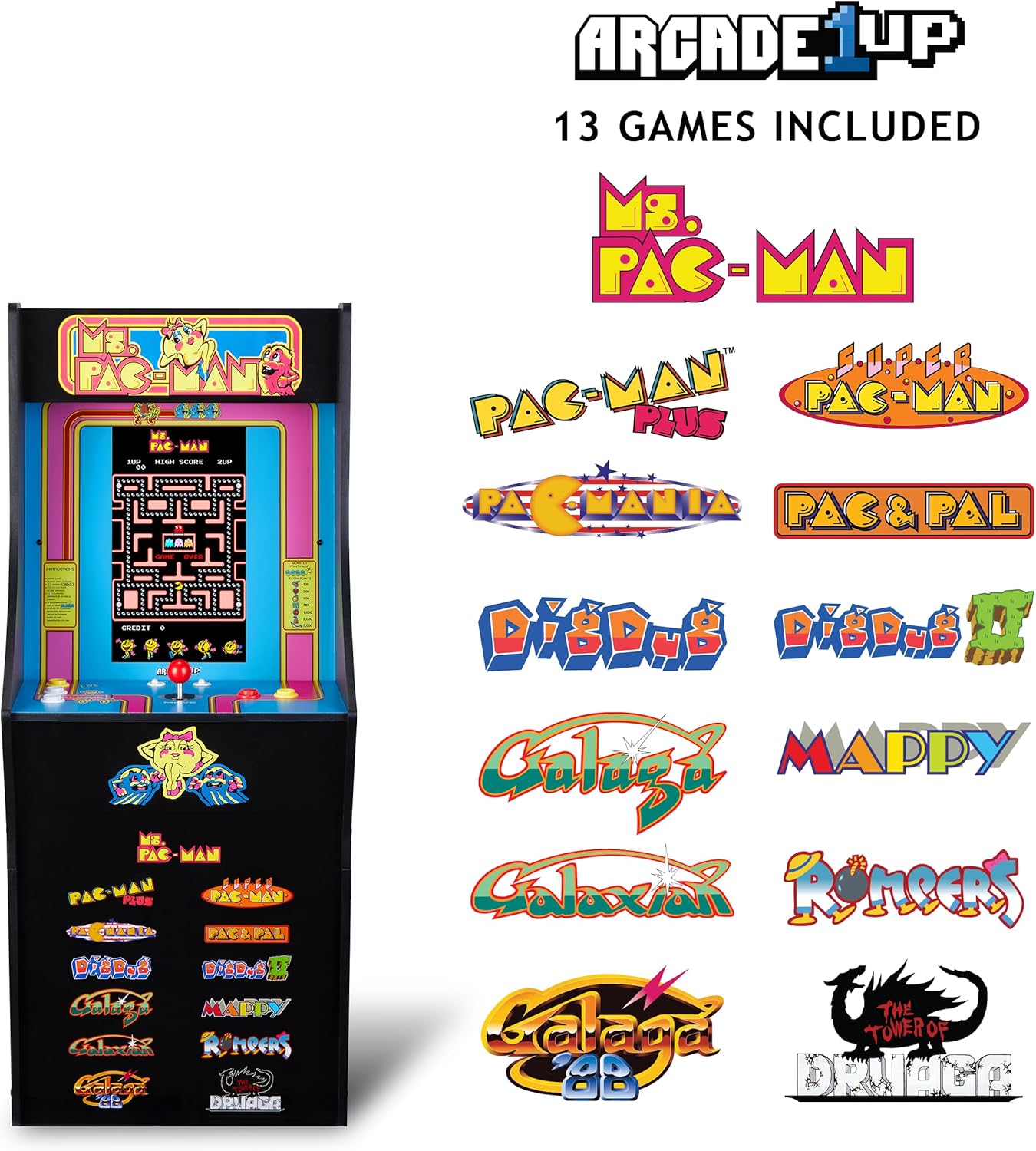
Image 3: The Arcade1Up Ms. Pac-Man Classic SE Arcade Machine displaying the list of 13 included games, such as Ms. Pac-Man, Dig Dug, and Galaga.
5.3 Елементи керування
- джойстик: Used for character movement in games.
- Start Game Button: Initiates a game or confirms selection.
- Кнопки дій: Used for specific in-game actions (e.g., firing, jumping).
- Регулювання гучності: Adjust the game sound level using the dedicated volume buttons.
- To return to the game selection menu or save a high score, hold the 'Start Game' button for 5 seconds.
- To reset a game, hold the 'Start Game' button for 5 seconds.

Зображення 4: Детальний view of the control panel, highlighting the joystick, start game button, and other action buttons for gameplay.
5.4 Included Games
Your Arcade1Up Ms. Pac-Man Classic SE Arcade Machine includes 13 classic games:
- Ms. PAC-MAN
- PAC-MAN PLUS
- SUPER PAC-MAN
- PAC & PAL
- PACMANIA
- DIG DUG
- DIG DUG 2
- GALAGA
- GALAXIAN
- GALAGA 88
- MAPPY
- ROMPERS
- THE TOWER OF DRUAGA
5.5 WiFi Leaderboards
Connect your arcade machine to WiFi to access online leaderboards and compete for high scores globally. Refer to the on-screen prompts for WiFi setup and leaderboard access.
Video 2: Gameplay footage of the Arcade1Up Ms. Pac-Man Classic SE Arcade Machine, showcasing the classic arcade experience and the online leaderboard feature. This video is provided by the seller.
6. Технічне обслуговування
- Прибирання: Use a soft, dry cloth to wipe down the cabinet and screen. Avoid abrasive cleaners or excessive moisture.
- Зберігання: Зберігайте машину в прохолодному, сухому місці, подалі від прямих сонячних променів та екстремальних температур.
- Шнур живлення: Регулярно перевіряйте шнур живлення на наявність ознак пошкодження.
7. Вирішення проблем
| проблема | Можлива причина | Рішення |
|---|---|---|
| Машина не вмикається. | Шнур живлення не підключений; розетка не працює. | Переконайтеся, що шнур живлення надійно підключений. Перевірте розетку за допомогою іншого пристрою. |
| Ні звуку. | Volume turned down; speaker issue. | Check volume settings on the control panel. If problem persists, contact support. |
| Гра зависає або вилітає. | Програмний збій; тимчасова помилка. | Power off the machine, wait 10 seconds, then power back on. |
8. Технічні характеристики
| Особливість | Деталь |
|---|---|
| Номер моделі | MSP-A-405629 |
| Розміри (В x Ш x Г) | 45.4" x 17.35" x 45.4" (without riser) |
| Розмір екрана | 15.6 Inches IPS Color Monitor |
| Кількість ігор | 13 |
| Тип контролера | Джойстик |
| Джерело живлення | Провідний електричний |
| матеріал | Пластик, акрилонітрил-бутадієн-стирол (АБС) |
| Вага товару | 47 фунта |
| Рекомендований виробником вік | 10 років і старше |
| Підключення | WiFi Leaderboards |
9. Гарантія та підтримка
For warranty information, technical support, or service inquiries, please refer to the official Arcade1Up webсайт або зверніться до їхнього відділу обслуговування клієнтів. Зберігайте чек про покупку для гарантійних випадків.
Інтернет-підтримка: www.arcade1up.com


