вступ
This manual provides detailed instructions for the EasySMX S10 Wireless Controller. It covers setup, operation, maintenance, and troubleshooting to ensure optimal performance and user experience across various platforms including Nintendo Switch, PC, iOS, and Android devices.
Особливості продукту
- One-Tap Wake Up: Seamlessly wake up your Nintendo Switch console with a single button press.
- TMR Anti-Drift Joysticks: Combines Hall Effect durability with carbon-film precision for zero-drift and ultra-smooth analog input.
- Full Mechanical Buttons: Micro-switch buttons with 0.3mm actuation and a lifespan of over 5 million clicks, providing tactile feedback.
- HD Vibration: Equipped with ALPS Linear HD Rumble motors for multi-layered haptic feedback.
- Довговічний акумулятор: Built-in 1200mAh battery offers up to 17 hours of playtime with lights and vibration, or up to 26 hours without.
- Interchangeable D-pad & Custom Faceplate: Allows swapping between disc and cross-style D-pads and magnetic removable faceplates for personalization.
- Додаткові функції: Customizable RGB lighting, 2 programmable back buttons, 6-axis gyroscope for motion sensing, and NFC function.
Налаштування
Вміст упаковки
- Бездротовий контролер EasySMX S10
- Зарядний кабель USB-C
- Interchangeable D-pads (if included)
- Customizable Faceplates (if included)
- Посібник користувача
Макет контролера
The EasySMX S10 controller features standard gaming buttons, including A/B/X/Y buttons, directional pad, left and right analog sticks, shoulder buttons (L/R), and triggers (ZL/ZR). Additionally, it includes a HOME button, a Capture button, and two programmable back buttons (GR/GL).
Зарядка контролера
Connect the provided USB-C cable to the controller's charging port and the other end to a USB power source (e.g., a computer, wall adapter). The LED indicators on the controller will show charging status and turn off when fully charged. A full charge typically takes approximately 3 hours.
Інструкція з експлуатації
Connecting to Nintendo Switch / Switch 2
- Set the mode toggle switch on the back of the controller to the "S" mode.
- Натисніть і утримуйте кнопку HOME на контролері протягом 3 секунд, доки світлодіодні індикатори не почнуть швидко блимати.
- На консолі Nintendo Switch перейдіть до Контролери > Змінити захоплення/порядок.
- When the LED on the controller becomes solid and you feel a short vibration, pairing is complete.
- (First-time connection only) Within 20 seconds after pairing, remove and reattach the Joy-Con controllers from the console. This action activates the wireless wake-up function for future use.
- For future reconnections, simply short-press the HOME button to automatically reconnect and wake the console.
Video: Instructions on how to connect the EasySMX S10 controller to a Nintendo Switch or Switch 2 console for the first time and for subsequent reconnections.
Підключення до ПК
- Set the mode toggle switch on the back of the controller to the "X" mode.
- Connect the controller to your PC via the provided Type-C cable. The controller will be recognized as an Xbox Wireless Controller.
- For wireless connection, ensure Bluetooth is enabled on your PC. шукати "Xbox Wireless Controller" in your Bluetooth settings and select it to pair.
Video: Tutorial on connecting the EasySMX S10 controller to a PC, including both wired and wireless (Bluetooth) methods.
Connecting to Mobile (iOS & Android)
- Set the mode toggle switch on the back of the controller to the "X" mode.
- Увімкніть Bluetooth на своєму мобільному телефоні.
- шукати "Xbox Wireless Controller" in your phone's Bluetooth settings and select it to pair.
- When the LED on the controller becomes steady with a short vibration, pairing is confirmed.
Video: Guide on how to connect the EasySMX S10 controller to both iOS and Android mobile devices via Bluetooth.
Налаштування освітлення RGB
The controller features customizable RGB lighting. Refer to the quick start guide included in the packaging for specific button combinations to change lighting modes, colors, or to turn the lighting off.
Programming Back Buttons
The two back buttons (GR and GL) can be programmed to perform specific actions or combos. Consult the quick start guide for detailed instructions on how to map functions to these buttons.
Swapping D-Pads and Faceplates
The S10 controller allows for easy customization. The D-pad can be swapped between a classic cross-style and a smooth circular control. The magnetic faceplates can also be removed and replaced to personalize the controller's appearance.

Image: The EasySMX S10 controller highlighting the swappable D-pads, allowing users to choose between a classic cross-style or a smooth circular control.
Технічне обслуговування
- Тримайте контролер у чистоті, протираючи його м’якою сухою тканиною.
- Уникайте впливу екстремальних температур, вологості або прямих сонячних променів на контролер.
- Не намагайтеся розбирати контролер, оскільки це може призвести до анулювання гарантії.
- Зберігайте контролер у безпечному місці, коли він не використовується, щоб запобігти пошкодженню.
Усунення несправностей
Контролер не підключається/не сполучається
- Переконайтеся, що контролер достатньо заряджений.
- Verify the mode toggle switch on the back is set to the correct platform (S for Switch, X for PC/Mobile).
- Restart the console/device and the controller, then attempt the pairing process again.
- If connecting to Switch for the first time and wake-up function doesn't activate, repeat the pairing process and ensure Joy-Cons are removed and reattached within 20 seconds after initial pairing.
Video: A guide explaining why the S10 controller might not wake up the Switch 2 and how to fix it.
NFC Function Not Working
- Ensure the NFC function is enabled on your console/device settings.
- Place the Amiibo or NFC tag directly over the NFC sensor area on the controller.
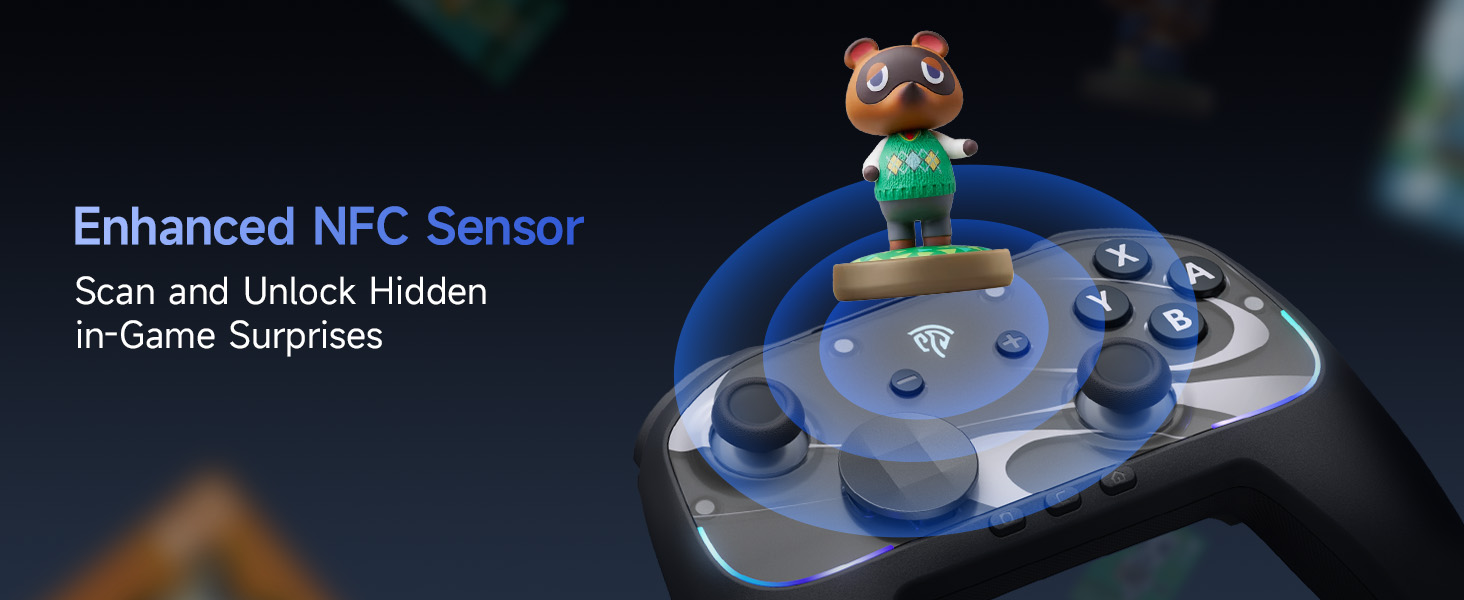
Image: The EasySMX S10 controller demonstrating its NFC function, allowing for scanning and unlocking in-game surprises.
Технічні характеристики
| Модель | EasySMX S10 |
| Підключення | Bluetooth, USB-C (дротовий) |
| Сумісність | Nintendo Switch / Switch 2, PC (Windows), iOS (13.0 and above), Android (8.0 and above) |
| Тип джойстика | TMR Anti-Drift Joysticks |
| Тип кнопки | Full Mechanical Micro-Switch Buttons |
| вібрація | HD Rumble (ALPS Linear HD Rumble Motors) |
| Розпізнавання руху | 6-осьовий гіроскоп |
| Ємність акумулятора | 1200 мАг |
| Час відтворення | Up to 17 hours (with lights/vibration), up to 26 hours (without) |
| Час зарядки | прибл. 3 години |
| вага | 1.17 фунта |
| Розміри | 7.32 x 5.79 x 2.91 дюймів |
Гарантія та підтримка
EasySMX products typically come with a manufacturer's warranty. Please refer to the warranty card included in your product packaging or visit the official EasySMX webсайт для детальної інформації про гарантію та умови.
For technical support, troubleshooting assistance, or any product-related inquiries, please contact EasySMX customer service through their official webсайт або контактну інформацію, надану в документації до вашого продукту. Ви також можете відвідати Магазин EasySMX на Amazon для отримання додаткової інформації та ресурсів підтримки.


