1. Вступ
This manual provides detailed instructions for the setup, operation, maintenance, and troubleshooting of the RGBlink NDI PTZ Camera Controller (RGBBKT). This device is designed for professional video production environments, offering comprehensive control over various PTZ cameras using multiple protocols.
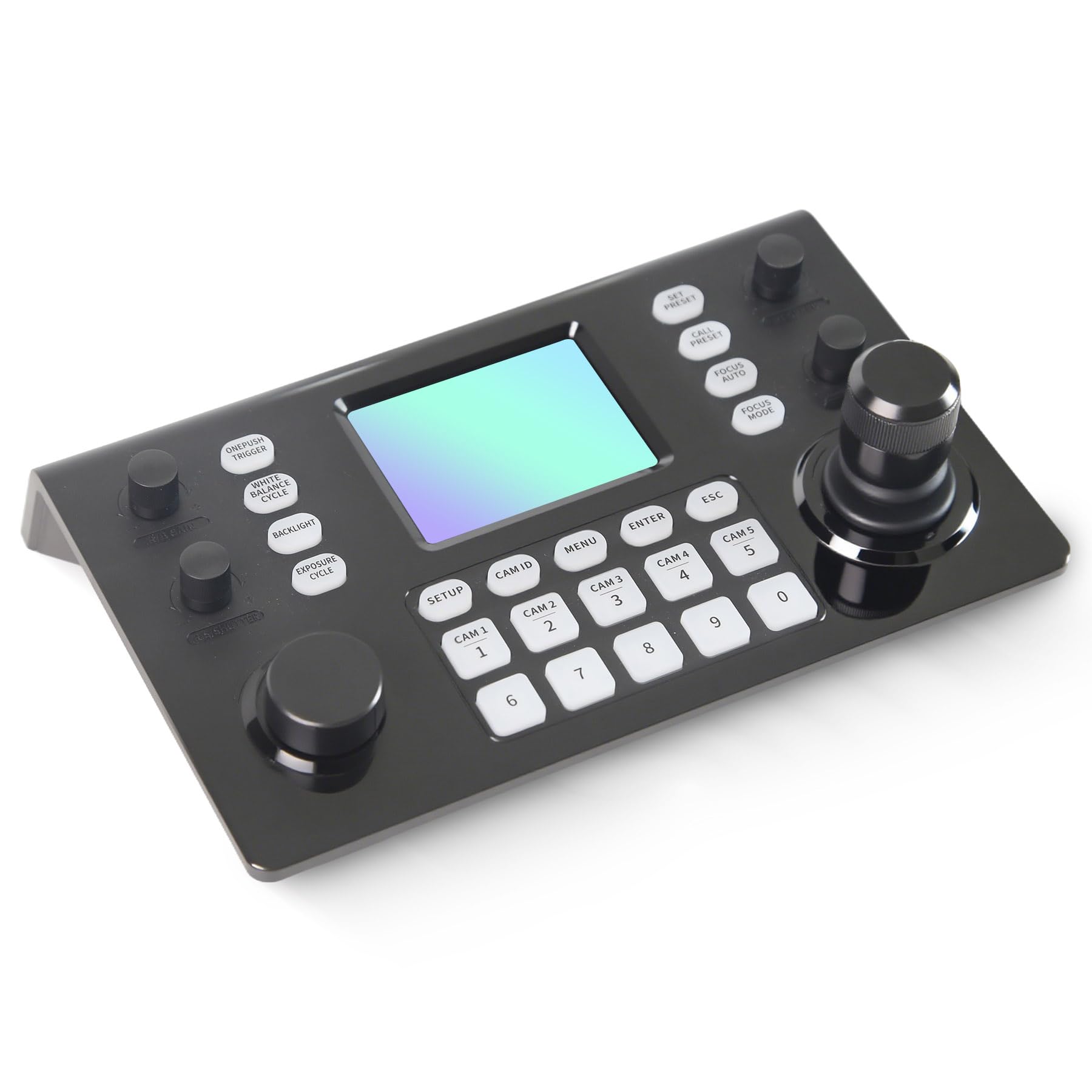
Image 1.1: RGBlink NDI PTZ Camera Controller (RGBBKT).
2. Налаштування
Follow these steps to set up your RGBlink NDI PTZ Camera Controller.
2.1 Розпакування та початковий огляд
- Акуратно вийміть усі компоненти з упаковки.
- Перевірте наявність усіх предметів, перелічених у пакувальному листі.
- Inspect the controller for any signs of physical damage. If damage is found, contact your dealer immediately.
2.2 Підключення контролера
The RGBlink NDI PTZ Camera Controller supports various connection methods for power and camera control.
- Живлення через Ethernet (PoE): Connect a single RJ45 Ethernet cable from a PoE-enabled network switch to the controller's LAN port. This provides both power and network connectivity.
- Зовнішній адаптер живлення: If PoE is not available, connect the provided power adapter to the DC 12V input port and to a power outlet.
- Підключення камери:
- Ethernet (IP Control): Connect PTZ cameras to the same network as the controller via RJ45 Ethernet cables. The controller supports VISCA over IP, ONVIF v2.42, and NDI v5.5 protocols.
- Serial Control: For cameras supporting serial communication, use RS232, RS422, or RS485 interfaces. Connect the appropriate cables from the controller's serial ports to the cameras.

Image 2.1: Rear panel connections including RS-232, RS-422, LAN (PoE), and Power Input.

Зображення 2.2: Наприкладample connection diagram showing PTZ Controller, PoE Switch, PTZ Cameras, Audio Mixer, and Computer.

Image 2.3: Diagram illustrating IP camera connections via a network switch.
2.3 Конфігурація мережі
For IP-based camera control, ensure the controller and cameras are on the same network segment. The controller supports automatic detection of NDI-enabled PTZ cameras.
- Доступ до контролера web інтерфейсу, ввівши його IP-адресу в a web browser. (Refer to the device's display or network tools to find the IP address).
- The default login credentials are typically 'admin' with a blank password. It is recommended to set a strong password immediately.
- В межах web interface, configure camera protocols (e.g., ONVIF, VISCA over IP) and enter camera-specific user credentials if required.

Image 2.4: NDI|HX camera search and control interface on the controller.
3. Операція
This section details the operational functions of the RGBlink NDI PTZ Camera Controller.
3.1 Завершеноview елементів керування
The controller features a 3.49" LCD display, a 3D joystick, various knobs, and a numeric keypad for intuitive control.

Image 3.1: The controller's 3.49-inch LCD display.

Зображення 3.2: Детальний опис view of the 3D joystick and multi-function knobs.

Image 3.3: Layout of the controller's buttons and numeric keypad area.
3.2 Вибір камери
- Кнопки швидкого вибору: Use the dedicated CAM 1-5 buttons for quick selection of up to 5 cameras.
- Цифрова клавіатура: For cameras beyond the quick select buttons (up to 255), press the Ідентифікатор CAM button, then enter the camera number using the numeric keypad, and press ENTER.

Image 3.4: The controller's ability to manage multiple cameras.
3.3 Керування PTZ
- джойстик: The 3D joystick controls pan (left/right), tilt (up/down), and zoom (rotate the joystick).
- Ручка швидкості PT: Adjusts the gimbal movement speed for pan and tilt.
- Ручка масштабування: Provides precise zoom control, especially useful in preview режим.
3.4 Image Parameter Adjustment
- IRIS/SHUTTER Knob: Rotate to adjust aperture and shutter speed. Press to switch control modes.
- R/B GAIN Knob: Rotate to adjust red and blue gain. Press to switch control modes.
- FOCUS Button: Натисніть АВТО ФОКУС button to switch the camera to auto focus mode.
- EXPOSURE Button: Cycles through exposure modes (Aperture Priority, Shutter Priority, Gain Priority, Manual Exposure, Auto Exposure).
- Кнопка ПІДСВІТЛЕННЯ: Toggles the camera's backlight mode.
- WHITE BALANCE CYCLE Button: Cycles through white balance modes (Indoor, Outdoor, Manual, Auto).
- ONE PUSH TRIGGER Button: When white balance is set to "One-Push White Balance", press this button to initiate a one-push white balance calibration.

Image 3.5: Functions of buttons and knobs on the left side of the controller.

Image 3.6: Functions of buttons and knobs on the right side of the controller, including preset controls.
3.5 пресетів
- SET PRESET Button: Press to enter preset position mode. Use the numeric keys to enter the preset number (0-9) and press ENTER зберегти. Прес ESC щоб вийти.
- CALL PRESET Button: Press to enter preset recall mode. Use the numeric keys to enter the preset number (0-9) and press ENTER to recall. Press ESC щоб вийти.
- The controller supports saving and recalling up to 255 presets per camera.
3.6 Навігація по меню
- Кнопка МЕНЮ: Press to open or close the camera settings menu. In menu control mode, the joystick controls navigation (up, down, left, right), ENTER confirms selections, and ESC acts as a back button.
4. Технічне обслуговування
Proper maintenance ensures the longevity and optimal performance of your RGBlink NDI PTZ Camera Controller.
4.1 Очищення
- Використовуйте м’яку суху тканину для очищення зовнішньої частини контролера.
- Для стійкого бруду злегкаampпротріть тканину водою або м’яким, неабразивним миючим розчином.
- Avoid using harsh chemicals, solvents, or abrasive materials, as these can damage the surface and display.
- Ensure no liquids enter the device through openings or ports.
4.2 Зберігання
- Якщо контролер не використовується протягом тривалого часу, зберігайте його в прохолодному, сухому місці, подалі від прямих сонячних променів та екстремальних температур.
- Захищайте пристрій від пилу та вологи.
5. Вирішення проблем
У цьому розділі наведено рішення поширених проблем, з якими ви можете зіткнутися.
5.1 Немає живлення
- Перевірте джерело живлення: Ensure the power adapter is securely connected to both the controller and a working power outlet.
- Перевірка PoE: If using PoE, verify that the Ethernet cable is connected to a PoE-enabled port on your network switch and that the switch is powered on.
- Цілісність кабелю: Inspect the power cable and Ethernet cable for any damage.
5.2 Cannot Control Camera
- Підключення до мережі: For IP cameras, ensure the controller and cameras are on the same network and can communicate. Check network cables and IP addresses.
- Невідповідність протоколу: Verify that the correct control protocol (e.g., VISCA over IP, ONVIF, NDI, Pelco-D/P) is selected on both the controller and the camera.
- Ідентифікатор камери: Ensure the correct camera ID is selected on the controller.
- Облікові дані для входу: If the camera requires authentication, confirm that the correct username and password are configured in the controller's web інтерфейс.
- Послідовне підключення: For serial control, check RS232/RS422/RS485 cable connections and ensure baud rates and addresses match between the controller and camera.
- Прошивка: Ensure both the controller and cameras have the latest firmware installed. Visit the RGBlink support webсайт для оновлень.
5.3 Проблеми з РК-дисплеєм
- Немає дисплея: Переконайтеся, що контролер увімкнено.
- Тьмяний дисплей: Check if there are any brightness settings on the controller that can be adjusted.
6. Технічні характеристики
| Особливість | Деталь |
|---|---|
| Модель | RGBBKT |
| Розміри (Д x Ш x В) | 11.4 x 7.8 x 5.9 дюйма (приблизно 290 x 200 x 150 мм) |
| вага | 2.2 фунта (приблизно 1 кг) |
| Дисплей | 3.49-дюймовий РК-дисплей |
| Протоколи контролю | VISCA over IP, ONVIF v2.42, NDI v5.5, Pelco-D/P |
| Інтерфейси | RS232, RS422, RS485, RJ45 Ethernet (PoE) |
| Camera Capacity | Up to 255 PTZ cameras |
| Вхідна потужність | PoE or DC 12V (external adapter) |
| Джойстик | High-precision Hall sensor 3D joystick |

Image 6.1: Controller dimensions and typical usage environments.

Image 6.2: Visual representation of supported protocols including RJ45, RS485, RS422, RS232, ONVIF, NDI, Pelco-D, Pelco-P, and Visca.
7. Відеодемонстрація продукту
Watch the official product video for a visual demonstration of the RGBlink NDI PTZ Camera Controller's features and operation.
Video 7.1: Official demonstration of the RGBlink PTZ Camera Controller Joystick, showcasing multi-camera control and key features.
8. Гарантія та підтримка
For warranty information, technical support, or service inquiries, please contact RGBlink customer service or visit their official webсайт.
- Виробник: Xiamen RGBlink Science & Technology Co.,Ltd.
- Офіційний Webсайт: www.rgblink.com (Примітка: Це тимчасовий фрагмент URL, будь ласка, зверніться до упаковки продукту або офіційної документації для отримання належної підтримки webсайт.)
- Контактна інформація: Refer to the RGBlink official website for the most current contact details for technical support and warranty claims.