вступ
Thank you for choosing the Bigben Karaoke Microphone. This all-in-one portable karaoke system combines a stereo microphone with a powerful 15W Bluetooth speaker and dynamic light effects, designed to enhance your singing and music listening experience. This manual provides essential information for safe and optimal use of your device.
Інформація про безпеку
- Перед використанням пристрою прочитайте всі інструкції.
- Тримайте пристрій подалі від води та вологи.
- Не піддавайте впливу екстремальних температур або прямих сонячних променів.
- Не намагайтеся розбирати або ремонтувати пристрій самостійно. Зверніться до кваліфікованого сервісного персоналу.
- Використовуйте лише зазначені зарядні аксесуари.
- Зберігати в недоступному для дітей місці.
Вміст упаковки
Будь ласка, перевірте наявність усіх предметів у упаковці:
- Bigben Karaoke Microphone (Model PARTYBTMIC2WH)
- Зарядний кабель (USB)
- Посібник користувача (цей документ)
- Front Glass (as an included component, likely pre-installed or a protective cover)

Зображення 1: The Bigben Karaoke Microphone shown in its retail packaging. The packaging highlights features such as Bluetooth connectivity, 4 vocal effects, and wireless speaker functionality.
Продукт закінченийview
The Bigben Karaoke Microphone features an integrated speaker and various controls for an interactive experience.
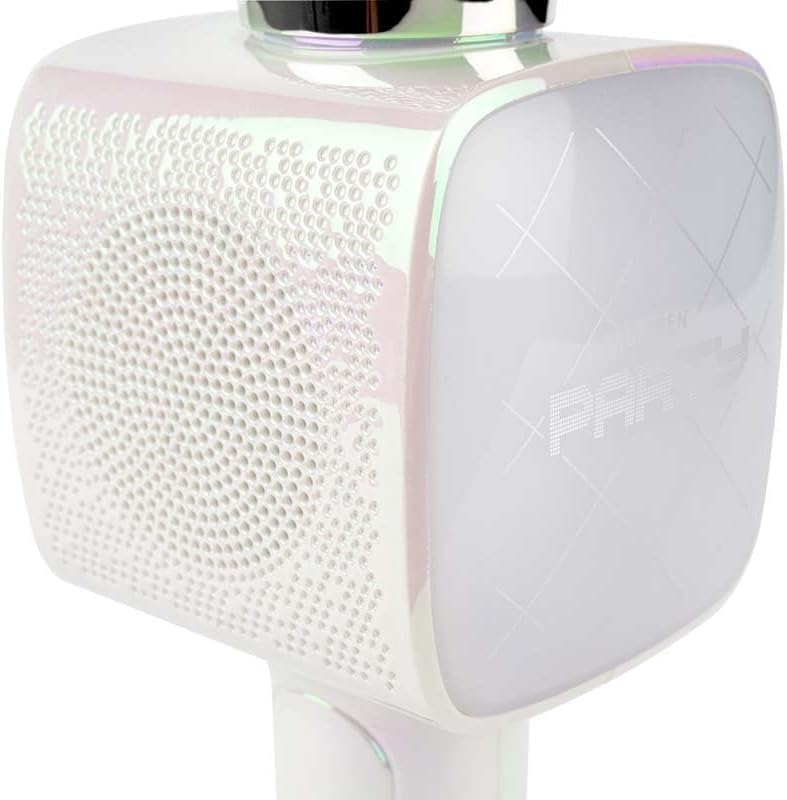
Зображення 2: Крупний план view of the Bigben Karaoke Microphone, focusing on the speaker grille and the light-up panel. The panel displays "PARTY" and shows dynamic light effects.
Ключові характеристики:
- Bluetooth 5.0: For stable wireless connection to your devices.
- Вбудований динамік: 15W output for clear and powerful sound.
- світлові ефекти: Dynamic lighting to enhance the karaoke experience.
- Звукові ефекти: 4 different vocal effects and an echo effect.
- Кілька входів: USB, Micro SD, and 3.5mm headphone jack.
Налаштування
1. Заряджання мікрофона
- Підключіть наданий USB-кабель для заряджання до порту заряджання мікрофона.
- Підключіть інший кінець USB-кабелю до сумісного USB-адаптера живлення (не входить до комплекту) або USB-порту комп’ютера.
- Індикатор заряджання засвітиться. Після повного заряджання індикатор може змінити колір або згаснути.
2. Увімкнення/вимкнення живлення
- To power on, press and hold the Power button for a few seconds until the indicator light illuminates and you hear an audible prompt.
- Щоб вимкнути живлення, знову натисніть і утримуйте кнопку живлення, доки індикатор не згасне.
3. Підключення Bluetooth
- Ensure the microphone is powered on and in Bluetooth pairing mode (usually indicated by a flashing light).
- На смартфоні, планшеті або іншому пристрої з підтримкою Bluetooth перейдіть до налаштувань Bluetooth.
- шукати available devices and select "Bigben Karaoke Mic" (or similar name) from the list.
- Після сполучення ви почуєте звуковий сигнал підтвердження, а індикатор перестане блимати.
Інструкція з експлуатації
1. Відтворення музики
- Через Bluetooth: After successful pairing, play music from your connected device. The sound will output through the microphone's speaker.
- Via USB/Micro SD: Insert a USB drive or Micro SD card (with music files) into the respective port. The microphone will automatically detect and play music.
- Через аудіокабель 3.5 мм: Connect an external audio source using a 3.5mm audio cable (not included) to the headphone input.
2. Використання мікрофона
- Speak or sing directly into the microphone grille.
- Adjust the microphone volume using the dedicated controls on the device.
3. Звукові ефекти
- Вокальні ефекти: The microphone offers 4 different vocal effects. Press the "Effect" button (or similar labeled button) to cycle through these effects.
- Ефект відлуння: Activate or adjust the echo effect using its dedicated control.
4. Світлові ефекти
The microphone features dynamic light effects. These lights typically activate automatically when the device is on and can often be toggled or changed using a dedicated light button, if available.
Технічне обслуговування
- Прибирання: Протріть мікрофон м’якою сухою тканиною. Не використовуйте абразивні засоби для чищення або розчинники.
- Зберігання: Зберігайте пристрій у прохолодному, сухому місці подалі від прямих сонячних променів, коли він не використовується.
- Догляд за акумулятором: For optimal battery life, charge the device regularly, even if not used frequently.
Усунення несправностей
| проблема | Можлива причина | Рішення |
|---|---|---|
| Немає живлення | Акумулятор розрядився. | Повністю зарядіть мікрофон. |
| Немає звуку з динаміка | Гучність занадто низька; пристрій не підключено; неправильний режим введення. | Increase volume; ensure Bluetooth is paired or cable is connected; check USB/Micro SD insertion. |
| Мікрофон не працює | Microphone volume is too low; microphone function is off. | Increase microphone volume; ensure microphone is active. |
| З’єднання Bluetooth нестабільне | Device is too far from the microphone; interference. | Move devices closer; avoid obstacles; disconnect and re-pair. |
Технічні характеристики
| Особливість | Деталь |
|---|---|
| Бренд | Бігбен |
| Номер моделі | PARTYBTMIC2WH |
| Підключення | Bluetooth 5.0, USB, Micro SD, 3.5mm Headphone Jack |
| Вихід на динамік | 15 Вт |
| звукові ефекти | 4 Vocal Effects, Echo Effect |
| Розміри продукту (ДxШxВ) | 20 х 15 х 10 см |
| Вага товару | 300 грами |
| Колір | Білий |
| Кількість каналів | 2 |
| Потрібні батареї | Yes (type unknown, likely integrated rechargeable) |
Гарантія та підтримка
For warranty information and customer support, please refer to the documentation provided with your purchase or visit the official Bigben webсайт. Зберігайте чек про покупку для гарантійних претензій.
For technical assistance or further inquiries, please contact Bigben customer service through their official channels.


