1. Вступ
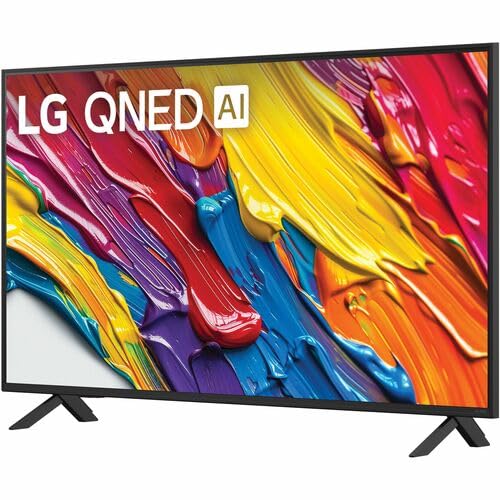
Дякуємо за покупкуasing the LG 43-Inch Class QNED AI 4K Smart TV. This manual provides essential information for the safe and efficient operation of your television. Please read it thoroughly before use and keep it for future reference.
The LG QNED AI 4K TV offers vivid, immersive color with its wide color gamut technology, enhanced by the α7 AI Processor Gen8. It intelligently optimizes picture and sound based on content. Powered by LG webOS 24, it provides a streamlined streaming experience with customizable Quick Cards and the Magic Remote. Enjoy virtual 5.1 surround sound, FILMMAKER MODE, and advanced gaming features like FreeSync, VRR, and GeForce NOW.
2. Інформація про безпеку
Завжди дотримуйтесь основних запобіжних заходів під час використання цього виробу, щоб зменшити ризик пожежі, ураження електричним струмом або травмування.
- Не піддавайте телевізор дії дощу або вологи.
- Не відкривайте телевізорasing; звертайтеся до кваліфікованого персоналу з усіма видами обслуговування.
- Ensure proper ventilation and do not block ventilation openings.
- Використовуйте лише шнур живлення, що постачається з телевізором.
- Тримайте телевізор подалі від джерел тепла та прямих сонячних променів.
- Avoid placing heavy objects on the power cord or TV.
3. Що в коробці
Перевірте наявність усіх компонентів:
- 43-дюймовий телевізор LG класу QNED AI 4K Smart TV
- Кабель живлення
- Пульт дистанційного керування (2 батарейки типу AAA в комплекті)
- Комплектуючі стенда
- Посібник користувача (цей документ)
4. Налаштування
4.1 Прикріплення підставки
Carefully place the TV screen-down on a soft, flat surface. Attach the stand components to the designated slots on the bottom of the TV using the provided screws. Ensure the stand is securely fastened before placing the TV upright.
Зображення: Задня частина view of the LG 43QNED82AUA TV with its stand.
4.2 Настінне кріплення (додатково)
This TV supports VESA mount standard 200 x 200 mm. For wall mounting, remove the stand and use a compatible wall mount bracket (sold separately). Follow the instructions provided with your wall mount.
4.3 Підключення пристроїв
Connect your external devices (cable box, Blu-ray player, gaming console, etc.) to the appropriate ports on the TV. The TV features 3 HDMI ports, 1 USB port, Ethernet, and S/PDIF (Optical) for audio output.

Image: Connectivity ports on the back of the LG 43QNED82AUA TV.
4.4 Увімкнення живлення
Plug the power cable into the TV and then into a wall outlet. Press the power button on the remote control or on the TV to turn it on. Follow the on-screen instructions for initial setup, including network connection and channel scanning.
5. Керування телевізором
5.1 Пульт дистанційного керування
The included Magic Remote allows for intuitive control with point-and-click functionality, voice commands, and a scroll wheel. Insert the two AAA batteries (included) into the remote control.
5.2 WebРозумна платформа OS 24
Ваш телевізор працює на процесорах LG. webOS 24 operating system. Navigate through apps, settings, and inputs using the customizable Quick Cards. Access popular streaming services like Netflix, Prime Video, Disney Plus, HBO Max, and Apple TV directly from the home screen.
5.3 Налаштування зображення та звуку
Access the settings menu to adjust picture modes (e.g., Standard, Vivid, Cinema, Filmmaker Mode) and sound modes (e.g., AI Sound Pro, Standard, Cinema). The α7 AI Processor Gen8 automatically optimizes these settings based on the content being viewвид.

Image: Dynamic QNED Color representation.
6. Розумні функції та штучний інтелект
6.1 AI Picture and Sound
The α7 AI Processor Gen8 enhances brightness, improves sound, and refines picture detail with 4K upscaling and Dynamic Tone Mapping. AI Sound Pro provides virtual 5.1 surround sound, and WOW Orchestra integrates TV speakers with compatible LG soundbars for an enhanced audio experience.
6.2 Voice Assistance and AI Search
Your TV has Alexa Built-in. Press the Alexa button on your remote to activate voice commands. Utilize AI шукати personalized recommendations and to find content quickly. The TV also supports Google Assistant, Apple AirPlay 2, and Google Cast for seamless integration with your smart home ecosystem.

Image: LG AI Search interface.
7. Ігрові функції
The LG QNED AI 4K TV is designed for an optimal gaming experience with a 60 Hz native refresh rate, which can be boosted up to 144 Hz with VRR (Variable Refresh Rate) enabled. It supports FreeSync and features LG Game Optimizer and Game Dashboard for quick access to gaming settings.
- FreeSync та VRR: Зменшує розриви та заїкання екрана для плавнішого ігрового процесу.
- Оптимізатор ігор та панель керування: Centralized hub for adjusting game settings, including genre-specific picture modes.
- Хмарні ігри: Access GeForce NOW and Xbox Cloud Gaming (subscriptions and compatible controllers required).
- ALLM (режим автоматичної низької затримки): Автоматично перемикається в режим низької затримки, коли виявляється ігрова консоль.

Image: Gaming experience on the LG 43QNED82AUA TV.
8. Підключення
Your LG QNED AI 4K Smart TV offers a variety of connectivity options:
- HDMI: 3 ports for connecting external devices.
- USB: 1 port for media playback or connecting USB devices.
- Ethernet: Для дротового підключення до Інтернету.
- Wi-Fi: Built-in for wireless internet access.
- Bluetooth 5.0: Для підключення бездротових навушників, саундбарів або інших пристроїв Bluetooth.
- Optical (S/PDIF): Для цифрового аудіовиходу на звукові системи.
- Відображення екрана: Supports AirPlay 2 and Google Cast for casting content from mobile devices.
9. Технічне обслуговування
9.1 Очищення телевізора
Unplug the TV before cleaning. Use a soft, dry cloth to wipe the screen and exterior. For stubborn marks, lightly dampПротріть тканину водою або спеціальним засобом для чищення екранів. Уникайте використання агресивних хімікатів або абразивних матеріалів.
9.2 Оновлення програмного забезпечення
Ensure your TV's software is up to date for optimal performance and new features. Software updates auto-download when connected to the internet. If "auto-update" is disabled, you will receive a prompt to update manually.
10. Вирішення проблем
Якщо у вас виникли проблеми з телевізором, зверніться до наступних поширених рішень:
| проблема | Рішення |
|---|---|
| Немає живлення | Check power cable connection, wall outlet, and remote batteries. |
| Немає зображення, але звук є | Verify input source, check cable connections, try a different HDMI port. |
| Звуку немає, але зображення є | Check volume, mute status, audio output settings, and external audio device connections. |
| Пульт не працює | Replace batteries, ensure no obstructions between remote and TV, re-pair Magic Remote if necessary. |
| Погана якість зображення | Adjust picture settings, check source resolution, ensure strong signal for broadcast channels. |
| Неможливо підключитися до Wi-Fi | Restart router, check Wi-Fi password, ensure TV is within range, try wired Ethernet connection. |
For further assistance, please refer to the full electronic manual available on the LG support webсайт або зверніться до служби підтримки клієнтів LG.
11. Технічні характеристики
| Особливість | Деталь |
|---|---|
| Розмір екрана | 43 дюймів |
| Технологія дисплея | Світлодіод (QNED) |
| роздільна здатність | 4K (3840 x 2160) |
| Частота оновлення | 60 Hz (Native), up to 144 Hz (VRR) |
| Процесор | Процесор α7 AI Gen8 |
| Підтримка HDR | HDR10, HLG |
| Операційна система | webOS 24 |
| Підключення | Wi-Fi, Bluetooth 5.0, Ethernet, 3x HDMI, 1x USB, Optical (S/PDIF) |
| Голосові помічники | Alexa Built-in, Google Assistant compatible |
| Розміри (з підставкою) | 10.1" Г x 38.1" Ш x 25" В |
| Вага (без підставки) | 20.7 фунта |
| Стандарт кріплення VESA | 200 х 200 мм |
| Споживана потужність | 82 Вт |
| Річне споживання енергії | 152 кіловат-годин на рік |

Image: LG 43QNED82AUA TV dimensions.
12. Гарантія та підтримка
12.1 Інформація про гарантію
This LG TV comes with a 1 Year Parts & Labor Limited Warranty. Please retain your proof of purchase for warranty claims. For full warranty terms and conditions, refer to the warranty card included with your product or visit the official LG webсайт.
12.2 Підтримка клієнтів
For technical support, product registration, or service inquiries, please visit the LG support website or contact their customer service hotline. Contact information can be found on the LG official webсайті або в документації, що додається до вашого телевізора.