вступ
This manual provides detailed instructions for the installation, operation, and maintenance of your Alpine ILX-W670-S 7-inch Double-DIN Digital Multimedia Receiver with Backup Bullet Camera. Please read this manual thoroughly before using the product to ensure proper operation and to prevent damage.
Інформація про безпеку
Always observe the following safety precautions to prevent injury or damage to the unit and vehicle:
- Не використовуйте пристрій таким чином, щоб це відволікало вас від керування автомобілем. Завжди ставте безпеку дорожнього руху на перше місце.
- Ensure all wiring is correctly connected to prevent short circuits or electrical hazards. Incorrect wiring can cause fire or damage.
- Якщо ви не впевнені щодо будь-яких кроків, зверніться до фахівця для встановлення.
- Підтримуйте гучність на рівні, який дозволить вам чути зовнішні звуки, такі як шум машин екстреної допомоги.
- Не розбирайте та не модифікуйте пристрій. Це може призвести до пошкодження та анулювання гарантії.
Вміст упаковки
Перевірте наявність усіх елементів в упаковці:
- Alpine ILX-W670-S Digital Multimedia Receiver
- BULCAMC-1 Backup Bullet Camera
- Джгути проводів та роз'єми
- Монтажне обладнання
- Посібник користувача (цей документ)

малюнок 1: Alpine ILX-W670-S Digital Multimedia Receiver with included Backup Bullet Camera. The image displays the 7-inch touchscreen receiver unit, the compact bullet-style backup camera, and a small key fob accessory.
Налаштування
Установка ресивера
The ILX-W670-S is designed for standard double-DIN vehicle openings. Its shallow-mount chassis is beneficial for vehicles with limited dash space. Professional installation is recommended for optimal performance and safety.
- Приготування: Перед початком будь-яких електромонтажних робіт від'єднайте негативну клему акумулятора автомобіля.
- Монтаж: Secure the receiver into the double-DIN opening using the provided mounting hardware. Ensure it is firmly seated.
- Підключення проводів:
- Connect the main power harness (constant 12V, accessory 12V, ground).
- Підключіть дроти динаміків до акустичної системи автомобіля.
- Connect the backup camera input cable.
- Connect the USB and AUX input cables as needed.
- For steering wheel control integration, connect the SWC adapter via the 3.5mm mini jack.
- Якщо використовується зовнішній amplifiers, connect the 4V pre-outs (front, rear, subwoofer).
- Тестування: Reconnect the battery and perform a basic function test before fully reassembling the dashboard.
Установка резервної камери
The BULCAMC-1 bullet camera provides a wide-angle view for enhanced safety when reversing.

малюнок 2: Крупним планом view of the BULCAMC-1 Backup Bullet Camera. This image highlights the compact design and mounting bracket of the camera, which is designed for discreet installation.
- Місце монтажу: Choose a central location at the rear of the vehicle, typically near the license plate, that offers a clear, unobstructed view.
- Надійне кріплення: Drill necessary holes (if required) and securely mount the camera using the provided hardware. Ensure the camera is aimed correctly.
- Електропроводка:
- Connect the camera's power wire to the vehicle's reverse light circuit (12V) so it activates when the vehicle is in reverse.
- Run the video signal cable from the camera to the camera input on the ILX-W670-S receiver.
- Гідроізоляція: Ensure all connections are properly sealed, as the camera is IP67-68 waterproof rated.
Інструкція з експлуатації
Увімкнення/вимкнення живлення
The unit will power on automatically when the vehicle's ignition is turned to the accessory or on position. To turn off the unit, turn off the vehicle's ignition.
Сенсорний інтерфейс
The ILX-W670-S features a responsive 6.75-inch touchscreen display with 800 x 480 resolution. The home screen is customizable, allowing you to arrange icons and even upload your own background image. The key illumination can be set to one of five colors (red, green, blue, amber, white).
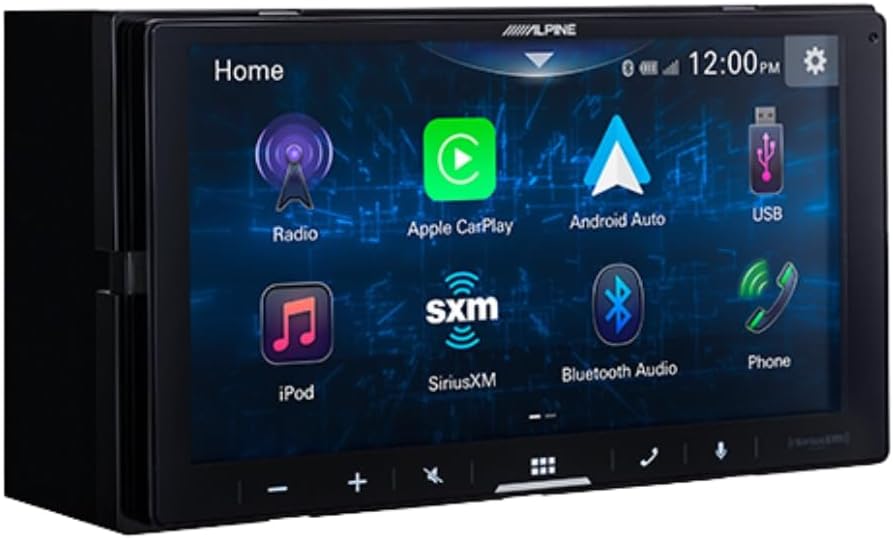
малюнок 3: Alpine ILX-W670-S home screen displaying various application icons. This image shows the customizable interface with options for Radio, Apple CarPlay, Android Auto, USB, iPod, SiriusXM, Bluetooth Audio, and Phone.
Функції аудіо
- Еквалайзер: Utilize the 13-band graphic EQ to fine-tune audio frequencies to your preference.
- Виправлення часу: The 6-channel time correction feature allows for precise adjustment of sound delivery to each speaker, optimizing the sound stage.
- Кросовери: Adjust front, rear, and subwoofer crossovers to manage frequency distribution to your speakers.
- Меню підсилення звуку: Access dedicated controls for bass, mid-bass, and subwoofer output.
- Підтримувані аудіоформати: The unit supports AAC, FLAC, MP3, and WMA audio playback.
Підключення
- Apple CarPlay та Android Auto: Connect your compatible smartphone via USB for wired access to navigation, music, messaging, and other apps directly on the receiver's screen.

малюнок 4: Alpine ILX-W670-S display showing the Apple CarPlay interface. This image illustrates the integration of smartphone applications like Phone, Music, Maps, Messages, and Podcasts onto the receiver's screen.
- Bluetooth: Pair your smartphone for hands-free calling and wireless audio streaming.
- Готовий до SiriusXM: The unit is compatible with SiriusXM satellite radio (requires a separate SiriusXM Connect Vehicle Tuner and subscription).
- Вхід AUX: Connect external audio devices using the 3.5mm auxiliary input.
- USB вхід: Use the USB port for media playback or smartphone connectivity.
- Керування на кермі (SWC): Integrate with your vehicle's factory steering wheel controls using a compatible adapter connected to the 3.5mm mini jack.
Відтворення відео
The receiver supports various video formats including MP4, MKV, MOV, H.264, FLV, MPEG-4, and AVC. Video playback is typically restricted while the vehicle is in motion for safety reasons.
Робота камери заднього виду
Коли автомобіль перемикається на задню передачу, дисплей автоматично перемикається на камеру view, providing a 155-degree wide-angle perspective. The camera has a low light sensitivity of 0.5 lux, ensuring visibility in various lighting conditions.
Технічне обслуговування
- Очищення екрану: Використовуйте м’яку тканину без ворсу, щоб обережно протерти сенсорний екран. Для стійких плям злегкаampПротріть тканину водою або засобом для чищення екранів. Уникайте абразивних матеріалів або агресивних хімікатів.
- Загальний догляд: Тримайте пристрій чистим від пилу та сміття. Переконайтеся, що всі з'єднання надійно закріплені.
- Чищення камери: Періодично протирайте об'єктив камери м'якою тканиною, щоб забезпечити чітке view.
Усунення несправностей
| проблема | Можлива причина | Рішення |
|---|---|---|
| Немає живлення пристрою | Перегорілий запобіжник; неправильна проводка; нещільне підключення живлення. | Check vehicle fuses and the unit's fuse. Verify power and ground connections. Ensure the ignition is on. |
| Немає звуку | Volume too low; mute activated; speaker wires disconnected; incorrect audio source selected. | Increase volume. Check if mute is active. Verify speaker wiring. Select the correct audio source. |
| Apple CarPlay/Android Auto не підключається | Faulty USB cable; phone not compatible; software issue; phone settings. | Use a high-quality, certified USB cable. Ensure your phone's OS is updated. Check phone settings for CarPlay/Android Auto permissions. Restart phone and receiver. |
| Не відображається зображення з камери заднього виду | Camera power issue; video cable disconnected; vehicle not in reverse. | Ensure vehicle is in reverse. Check camera power connection (to reverse lights). Verify video cable connection to the receiver. |
| Сенсорний екран не реагує | Тимчасовий збій програмного забезпечення; пошкодження екрана. | Restart the unit (turn vehicle off and on). If issue persists, contact support. |
Технічні характеристики
Alpine ILX-W670-S Digital Multimedia Receiver
- Дисплей: 6.75-inch capacitive touchscreen (800 x 480 resolution)
- Підсвічування клавіш: 5-color customizable (red, green, blue, amber, white)
- Ampліфтер: Built-in 16W RMS / 45W peak x 4 channels
- Обробка звуку: 13-band graphic EQ, 6-channel time correction, Sound Boost menu, Front/Rear/Subwoofer crossovers
- Передвиходи: 3 pairs (Front, Rear, Subwoofer) at 4V
- входи: 1x AUX (3.5mm), 1x USB, 1x Camera, SWC adapter via 3.5mm mini jack
- Підключення: Wired Apple CarPlay, Wired Android Auto, Bluetooth (hands-free calling & audio streaming), SiriusXM-ready
- Підтримувані аудіоформати: AAC, FLAC, MP3, WMA
- Підтримувані формати відео: MP4, MKV, MOV, H.264, FLV, MPEG-4, AVC
- Розміри: 8.75 x 6 x 7 дюймів (продукт)
- вага: 3.4 фунта
BULCAMC-1 Backup Bullet Camera
- датчик: CMOS
- роздільна здатність: 420 рядків
- Мінімальна освітленість: 0.5 XNUMX люкс
- View Кут: 155 градусів
- Рейтинг водонепроникності: IP67-68
- Робоча температура: від -30 до 70 ℃ (від -22 до 158 ℉)
Інформація про гарантію
Alpine products are manufactured to high-quality standards. For specific warranty terms and conditions, please refer to the warranty card included with your product or visit the official Alpine webсайт. Зберігайте чек про покупку для гарантійних претензій.
Підтримка
For further assistance, technical support, or to download the latest firmware updates, please visit the official Alpine webсайт за адресою www.alpine-usa.com. You may also contact Alpine customer service directly for personalized support.


