1. Вступ
This manual provides detailed instructions for the setup, operation, maintenance, and troubleshooting of your ATTACK SHARK X8 SE Wireless Gaming Mouse. Designed for performance and comfort, the X8 SE features tri-mode connectivity, a high-precision sensor, and a lightweight design for an optimal gaming experience.

Зображення: Верх view of the ATTACK SHARK X8 SE Wireless Gaming Mouse in Berry color.
2. Вміст упаковки
Будь ласка, переконайтеся, що всі предмети присутні у вашій упаковці:
- ATTACK SHARK X8 SE Wireless Gaming Mouse
- Зарядний кабель USB-C
- Бездротовий приймач 2.4 ГГц
- Посібник користувача (цей документ)
3. Налаштування та підключення
The X8 SE mouse offers three connectivity modes: Wired, 2.4GHz Wireless, and Bluetooth. Choose the mode that best suits your needs.
3.1. Заряджання миші
Before first use, it is recommended to fully charge the mouse. Connect the provided USB-C cable to the mouse's charging port and to a USB power source (e.g., computer USB port, USB wall adapter). The LED indicator will show charging status.

Image: The underside of the mouse, illustrating the USB-C charging port and the power/mode switch.
3.2. Дротовий режим
Connect the USB-C cable directly from the mouse to your computer's USB port. The mouse will function immediately and charge simultaneously.
3.3. Бездротовий режим 2.4 ГГц
- Locate the 2.4GHz wireless receiver, typically stored in a compartment on the underside of the mouse.
- Підключіть приймач до вільного порту USB на комп’ютері.
- Switch the mode selector on the bottom of the mouse to the 2.4GHz wireless icon.
- Миша має підключитися автоматично.

Image: Visual representation of the three connectivity modes: Wired, 2.4GHz Wireless, and Bluetooth.
3.4. Режим Bluetooth
- Switch the mode selector on the bottom of the mouse to the Bluetooth icon.
- The mouse will enter pairing mode (LED may flash).
- На комп’ютері перейдіть до налаштувань Bluetooth та знайдіть нові пристрої.
- Select "ATTACK SHARK X8 SE" from the list of available devices to pair.
4. Керування мишею
4.1. Налаштування роздільної здатності
The mouse features a PixArt PAW3311 gaming sensor with adjustable DPI from 50 to 25,000. Use the dedicated DPI button (usually on the underside or top of the mouse, depending on configuration) to cycle through preset DPI levels. The LED indicator may change color to signify the current DPI setting.
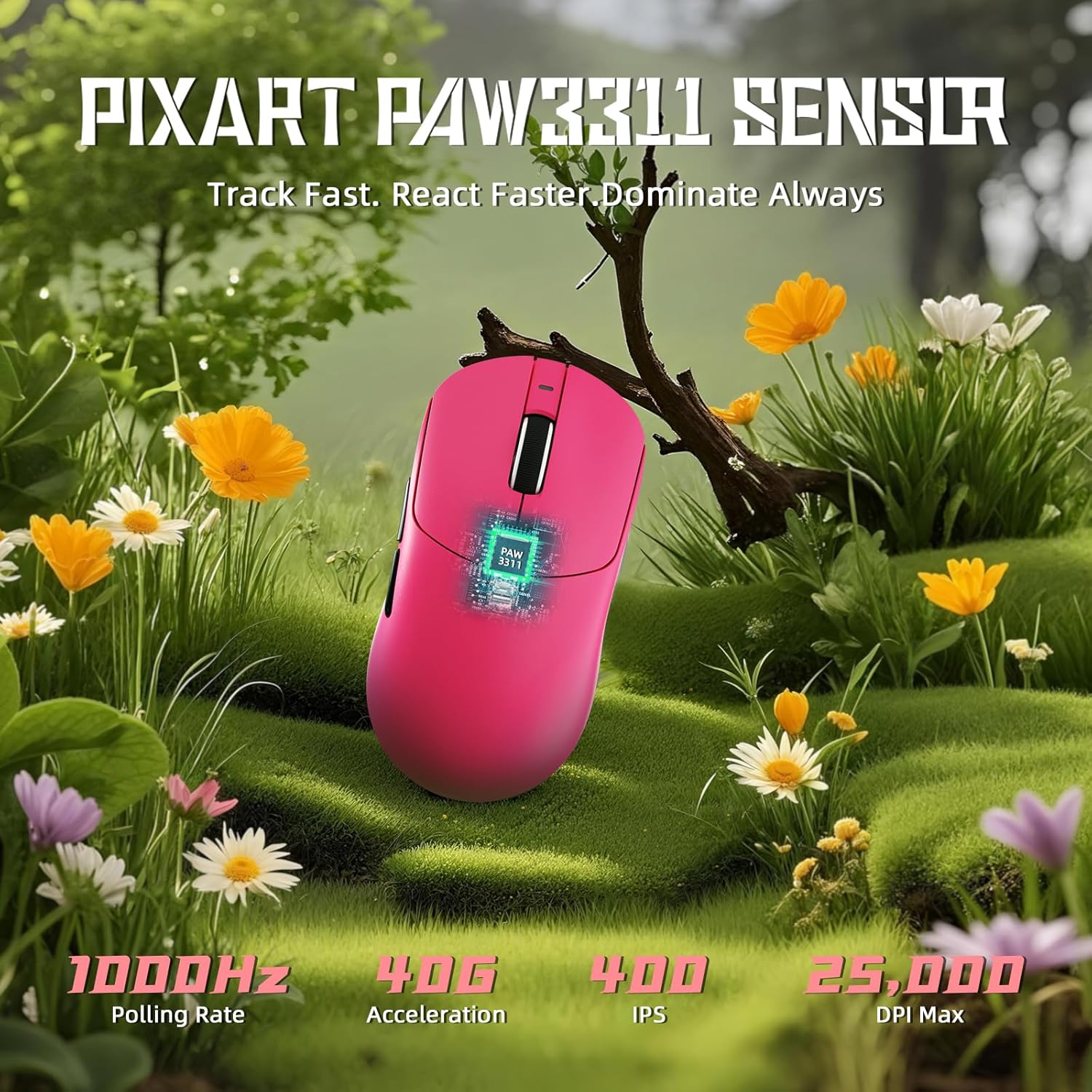
Image: Diagram illustrating the PixArt PAW3311 sensor and its performance metrics.
4.2. Опитування
The X8 SE supports a 1KHz (1000Hz) polling rate in both wired and 2.4GHz wireless modes, ensuring responsive and accurate cursor movements.
4.3. Customizable Buttons and Software
The mouse features programmable buttons. To customize button functions, DPI settings, polling rate, macro recording, and key mapping, utilize the cloud-driven web driver. Access the driver via the official ATTACK SHARK website. This eliminates the need for traditional software installation.
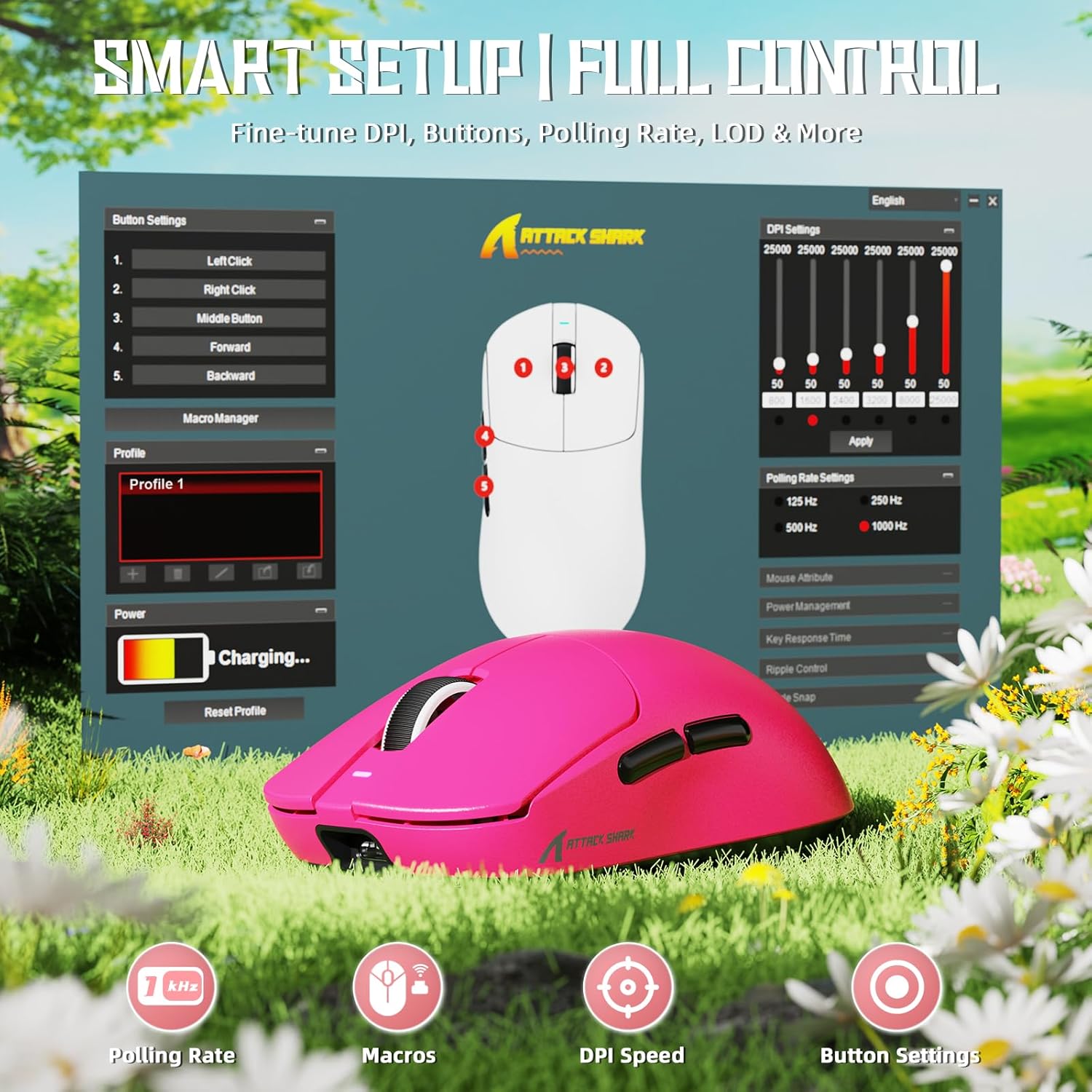
Image: Screenshot of the cloud-based driver interface for advanced customization.
4.4. Ергономіка та стилі захоплення
The X8 SE is designed for users with medium to large hands, offering a comfortable grip for various styles including palm, claw, and fingertip grips.

Image: Illustration demonstrating palm, claw, and fingertip grip styles on the mouse.
5. Технічне обслуговування
5.1. прибирання
Для очищення миші використовуйте м’яку суху тканину. Для стійкого бруду використовуйте злегкаamp cloth with mild soap can be used, ensuring no liquid enters the mouse. The Nano-ice coating is designed to resist sweat and maintain a clean feel.

Image: The mouse's Nano-ice coating helps maintain a clean surface.
5.2. Догляд за акумулятором
The X8 SE features a 500mAh large-capacity battery. For optimal battery life, avoid fully discharging the mouse frequently. Recharge when the battery indicator suggests low power. A single charge can last up to 300 hours of intermittent use.
5.3. Mouse Feet
The mouse is equipped with PTFE anti-slip footpads for smooth gliding. If the glide performance degrades over time, replacement mouse feet may be available from the manufacturer.
6. Вирішення проблем
6.1. Миша не реагує
- Провідний режим: Переконайтеся, що кабель USB-C надійно підключено як до миші, так і до комп’ютера. Спробуйте інший порт USB.
- Бездротовий режим 2.4 ГГц: Ensure the 2.4GHz receiver is plugged in and the mouse is switched to 2.4GHz mode. Try re-pairing by unplugging and re-plugging the receiver, then cycling the mouse power.
- Режим Bluetooth: Ensure Bluetooth is enabled on your computer and the mouse is in Bluetooth mode. Re-pair the device through your computer's Bluetooth settings.
- Батарея: Check if the mouse battery is charged. Connect the charging cable and observe the charging indicator.
6.2. Cursor Movement Issues
- Clean the mouse sensor area on the underside of the mouse.
- Переконайтеся, що ви використовуєте мишу на відповідній поверхні (наприклад, килимку для миші).
- Налаштуйте параметри роздільної здатності (DPI) до комфортного рівня.
- If using wireless modes, ensure there are no significant obstructions or sources of interference between the mouse and the receiver/computer.
6.3. Cloud Driver Not Accessible
- Переконайтеся, що ваш комп'ютер має активне підключення до Інтернету.
- Перевірте правильність URL for the ATTACK SHARK cloud driver.
- Спробуйте інше web браузер.
7. Технічні характеристики
| Особливість | Деталь |
|---|---|
| Модель | X8 SE |
| датчик | PixArt PAW3311 Gaming Sensor |
| Діапазон DPI | 50 - 25,000 точок на дюйм |
| Швидкість опитування | 1000 Гц (1 кГц) |
| Підключення | Wired (USB-C), 2.4GHz Wireless, Bluetooth |
| вага | Приблизно 55 г |
| Ємність акумулятора | 500 мАг |
| Термін служби батареї | Up to 300 hours (intermittent use) |
| Мікроперемикачі | HUANO (80 Million Clicks lifespan) |
| Прискорення | 40G |
| Швидкість відстеження | IPS 400 |
| Розміри | Приблизно 4.96 x 2.5 x 1.6 дюйма (125.5 x 63 x 40 мм) |

Image: Comparative technical specifications for the ATTACK SHARK X8 series, including the X8 SE model.
8. Гарантія та підтримка
ATTACK SHARK products are designed for reliability and performance. For warranty information, technical support, or to access the cloud driver, please visit the official ATTACK SHARK webсайту або зв’яжіться з їхньою службою обслуговування клієнтів.
Official ATTACK SHARK Store: ATTACK SHARK Store on Amazon


