1. Вступ
Дякуємо за покупкуasing the Moukey MAMP3 2.0 Channel Stereo Amplifier. This manual provides essential information for the safe and efficient operation of your device. Please read it thoroughly before use and retain it for future reference.
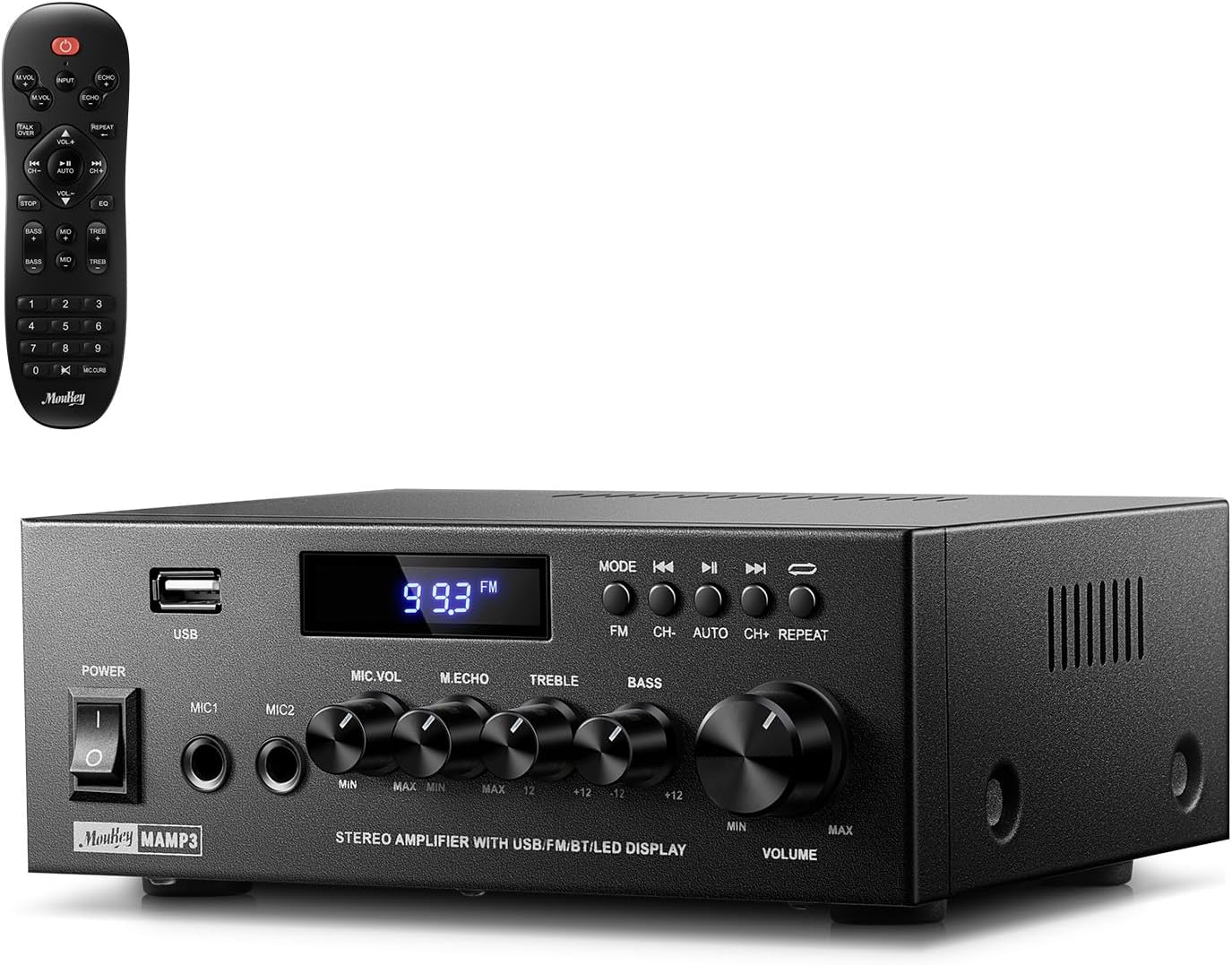
Image 1.1: The Moukey MAMP3 amplifier and its remote control.
2. Техніка безпеки
- Прочитайте всі вказівки перед використанням ampліфірник.
- Зберігайте amplifier away from water, moisture, and extreme temperatures.
- Do not block ventilation openings. Ensure proper airflow around the unit.
- Використовуйте лише адаптер живлення, що постачається разом із пристроєм.
- Не намагайтеся ремонтувати або модифікувати пристрій самостійно. Звертайтеся до кваліфікованого персоналу для проведення будь-яких технічних робіт.
- Disconnect the power cord from the outlet if the unit will be unused for extended periods.
3. Продукт закінчивсяview
3.1 Основні характеристики
- 2.0 Channel Stereo Audio Output
- Bluetooth 5.3 для стабільного бездротового з'єднання
- Multiple Audio Inputs: RCA, USB, FM Radio, 2 Microphone Inputs
- Full-function Remote Control with EQ adjustments
- Customizable Treble, Midrange, and Bass controls
- Memory function for mode, volume, and EQ settings
- Пікова вихідна потужність 300 Вт
3.2 Елементи керування та індикатори передньої панелі

Зображення 3.1: Розташування передньої панелі
- Вимикач живлення: Вмикає або вимикає пристрій.
- MIC1/2: 6.35 мм вхід для мікрофона.
- Регулятор гучності мікрофона: Регулює гучність підключених мікрофонів.
- Ручка відлуння: Налаштовує ефект луни для мікрофонів.
- Регулятор високих частот: Регулює високочастотний аудіовихід.
- Бас ручка: Регулює низькочастотний аудіовихід.
- Ручка гучності музики: Основний регулятор гучності для всіх аудіоджерел.
- USB слот: Для підключення USB-накопичувачів для відтворення аудіо.
- Світлодіодний дисплей: Відображає поточний режим, інформацію про трек або FM-частоту.
- Кнопка MODE: Switches between input sources (BT, Aux, CD, USB, FM).
- Попередня кнопка: Skips to the previous track (USB/BT) or FM station.
- Кнопка відтворення/паузи: Plays or pauses audio (USB/BT).
- Кнопка "Далі": Skips to the next track (USB/BT) or FM station.
- Кнопка повтору: Repeats current track or all tracks (USB).
3.3 Підключення задньої панелі

Зображення 3.2: Підключення на задній панелі
- Вхід FM-антени: Підключіть FM-антену, що входить до комплекту, для прийому радіо.
- АУДІОВХІД (RCA): Connect external audio sources like CD/DVD players using RCA cables.
- AUDIO OUTPUT (Speaker Terminals): Connect passive speakers. Ensure correct polarity (+ to + and - to -).
- POWER AC INPUT: Підключіть шнур живлення до розетки змінного струму.
4. Налаштування
4.1 Розпакування
Обережно вийміть amplifier and all accessories from the packaging. Verify that all items listed in the 'What's in the Box' section are present.
4.2 Підключення динаміків
МAMP3 amplifier supports two passive speakers. Connect your speakers to the АУДІО ВИХІД terminals on the rear panel. Ensure that the positive (+) terminal on the amplifier connects to the positive (+) terminal on your speaker, and the negative (-) terminal on the amplifier connects to the negative (-) terminal on your speaker. Incorrect polarity can affect sound quality.

Image 4.1: Speaker Connection Diagram
4.3 Підключення аудіоджерел
The amplifier пропонує кілька варіантів введення:
- Вхід RCA: Use RCA cables to connect devices such as CD players, DVD players, or other audio equipment to the АУДІО ВХОД роз'єми на задній панелі.
- USB вхід: Вставте USB флешку в USB-слот on the front panel for direct audio playback.
- Bluetooth: Pair your Bluetooth-enabled device (smartphone, tablet, laptop) wirelessly.
- FM-радіо: Підключіть FM-антену, що входить до комплекту, до Вхід FM-антени on the rear panel for radio reception. Extend the antenna for optimal signal.
- Мікрофонні входи: Connect up to two microphones to the MIC1/2 jacks on the front panel for karaoke or public address.

Image 4.2: Available Signal Inputs
4.4 Підключення живлення
Підключіть шнур живлення до POWER AC INPUT on the rear panel and then plug it into a standard AC power outlet.
5. Інструкція з експлуатації
5.1 Увімкнення/вимкнення живлення
Натисніть Вимикач живлення на передній панелі, щоб увімкнути amplifier on or off. The LED display will illuminate when the unit is powered on.
5.2 Вибір входу
Натисніть РЕЖИМ button on the front panel or the remote control to cycle through the available input sources: Bluetooth (BT), Auxiliary (Aux), CD, USB, and FM radio. The selected mode will be shown on the LED display.
5.3 Регулювання гучності
Поверніть великий Music Volume Knob on the front panel clockwise to increase volume and counter-clockwise to decrease it. Volume can also be adjusted using the remote control.
5.4 Equalizer (EQ) Adjustment
Adjust the sound characteristics using the Висока частота і Басова ручка on the front panel. The remote control also provides dedicated buttons for Treble, Midrange, and Bass adjustments. The amplifier will automatically save your preferred EQ settings.
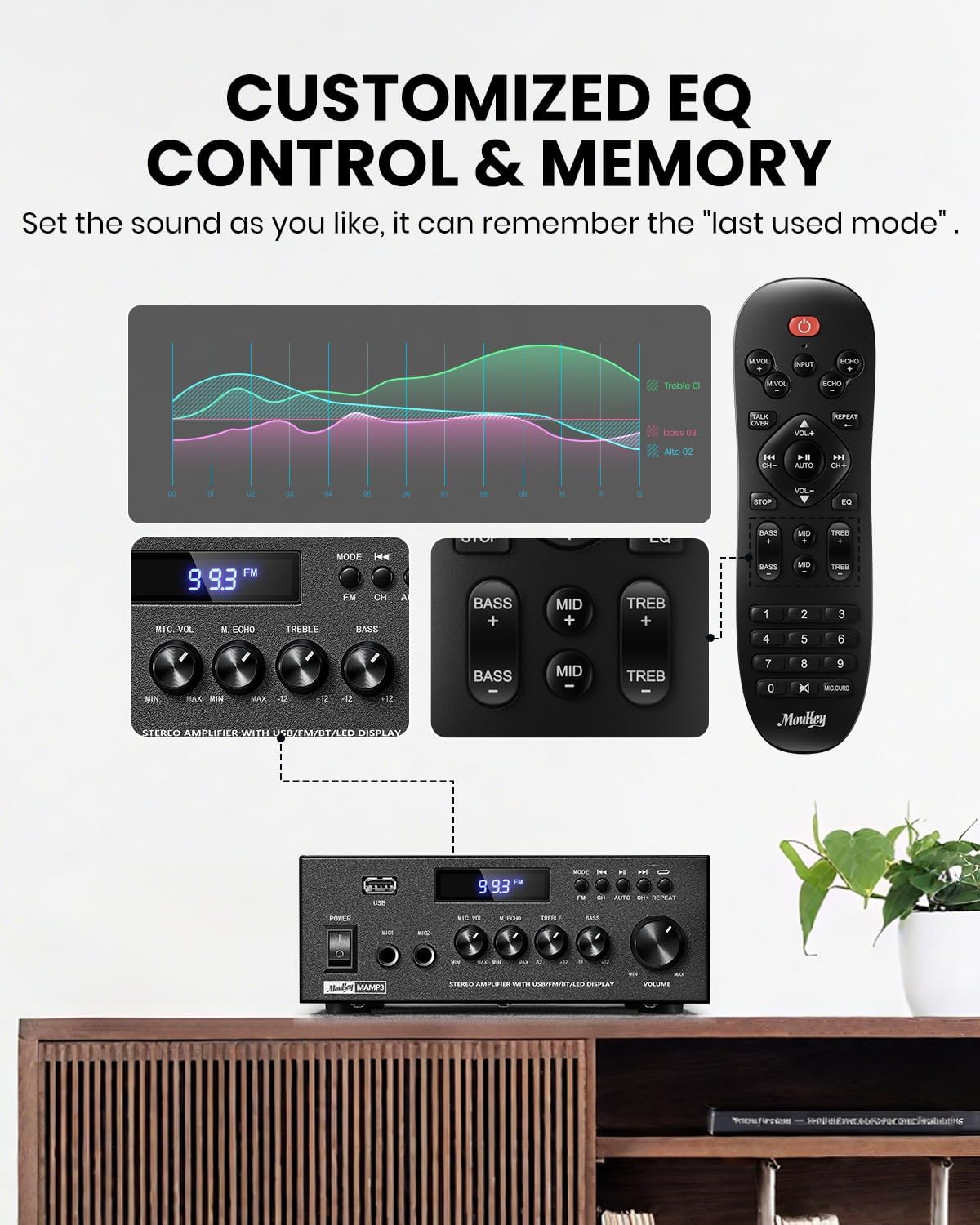
Image 5.1: Customizable EQ Control
5.5 Елементи керування мікрофоном
If microphones are connected, use the Ручка гучності мікрофона to adjust their output level and the Ручка відлуння to add an echo effect. The remote control also features a 'Talkover' function.
5.6 Робота Bluetooth
- Натисніть РЕЖИМ button until "BT" appears on the LED display. The ampLiferier тепер перебуває в режимі сполучення Bluetooth.
- On your mobile device, enable Bluetooth and search for "Moukey MAMP3 дюймів.
- Select "Moukey MAMP3" to pair. Once connected, you will hear a confirmation tone.
- Тепер ви можете відтворювати аудіо зі свого пристрою через ampліфірник.

Image 5.2: Bluetooth Pairing
5.7 Робота FM-радіо
- Натисніть РЕЖИМ кнопку, доки на світлодіодному дисплеї не з’явиться напис «FM».
- Авто сканування: Press the "AUTO" button on the remote to automatically scan and save available FM stations.
- Ручна настройка: Use the number pad on the remote control to directly enter the desired FM frequency (e.g., for 101.1 MHz, enter 1011).
- Використовуйте Попередній і Далі buttons to navigate between saved stations or fine-tune frequencies.
5.8 Відтворення з USB
Вставте флеш-накопичувач USB, що містить аудіофайли у форматі MP3 або WAV files в USB-слот. The amplifier will automatically switch to USB mode and begin playback. Use the Попередній, Відтворення/Пауза, і Далі buttons to control playback. The Повторіть button allows you to repeat the current track or all tracks.
5.9 Пульт дистанційного керування
The included full-function remote control allows for convenient operation from a distance. It provides control over input selection, volume, EQ settings (treble, midrange, bass), microphone echo, and talkover functions across all input modes.

Image 5.3: Upgraded Remote Control Functionality
6. Технічне обслуговування
- Прибирання: Використовуйте м’яку суху тканину для очищення зовнішньої частини ampНе використовуйте рідкі засоби для чищення або розчинники.
- Вентиляція: Ensure that the ventilation openings are free from dust and debris to prevent overheating.
- Зберігання: Якщо виріб не використовується протягом тривалого часу, зберігайте його ampЗберігайте охолоджувач у прохолодному, сухому місці, подалі від прямих сонячних променів та екстремальних температур.
7. Вирішення проблем
| проблема | Можлива причина | Рішення |
|---|---|---|
| Немає живлення | Шнур живлення не підключено; несправна розетка; живлення вимкнено. | Ensure power cord is securely connected; Test outlet with another device; Turn power switch on. |
| Немає звуку | Volume too low; Incorrect input selected; Speaker wires loose/incorrectly connected; Audio source issue. | Increase volume; Select correct input mode; Check speaker wire connections and polarity; Verify audio source is playing. |
| Bluetooth не підключається | Amplifier not in BT mode; Device too far; Device already connected to another unit; Interference. | Перемикач amplifier to BT mode; Move device closer; Disconnect from other devices; Reduce interference. |
| Поганий FM -прийом | Antenna not connected or poorly positioned; Weak signal. | Connect and adjust FM antenna position; Try auto-scan or manual tuning for stronger stations. |
| Проблеми з відтворенням USB | Не підтримується file format; USB drive not formatted correctly; USB drive capacity too large. | Забезпечити files are MP3/WAV; Format USB drive to FAT32; Use USB drives 32GB or less. |
8. Технічні характеристики
| Особливість | Специфікація |
|---|---|
| Номер моделі | MAMP3 |
| Вихідна потужність | 300 Вт (пікова) |
| Канали | 2.0 Стерео |
| Технологія підключення | Auxiliary, Bluetooth 5.3, FM, USB |
| Сумісні пристрої | Smartphone, Tablet, Laptop, Computer, Speakers, CD/DVD Player |
| Тип роз'єму | RCA, USB, 2 Mic input |
| Режим аудіовиходу | Стерео |
| Розміри продукту | 6.1 дюйма (Г) x 7.1 дюйма (Ш) x 2.8 дюйма (В) (15.5 x 18.0 x 7.1 см) |
| Вага товару | 2.14 фунта (0.97 кг) |
| Колір | чорний |
8.1 Що в коробці
- Мукі МAMP3 Ampлібератор
- Пульт дистанційного керування
- FM антена
- Посібник користувача
- Адаптер живлення
9. Гарантія та підтримка
9.1 Інформація про гарантію
Moukey products are designed and manufactured to the highest quality standards. This product is covered by a limited warranty against defects in materials and workmanship. Please refer to the warranty card included with your purchase for specific terms and conditions, or visit the official Moukey webдля отримання детальної інформації про гарантію.
9.2 Підтримка клієнтів
If you encounter any issues or have questions regarding your Moukey MAMP3 amplifier, please contact our customer support team. You can find contact information on the official Moukey webсайт або через вашу платформу для покупок.
Webсайт: www.moukey.com (Вихample link, please refer to actual product documentation)
Електронна пошта: support@moukey.com (Вихampелектронної пошти, будь ласка, зверніться до документації до продукту)


