вступ
The AC Infinity Outlet AI+ is a smart WiFi power strip designed to provide precise environmental control for various applications, including grow spaces, aquariums, terrariums, and home HVAC systems. This device features dual-zone temperature and humidity monitoring, individual control for up to eight outlets, and AI-powered climate targeting to maintain optimal conditions. This manual provides detailed instructions for setting up, operating, maintaining, and troubleshooting your Outlet AI+ controller.
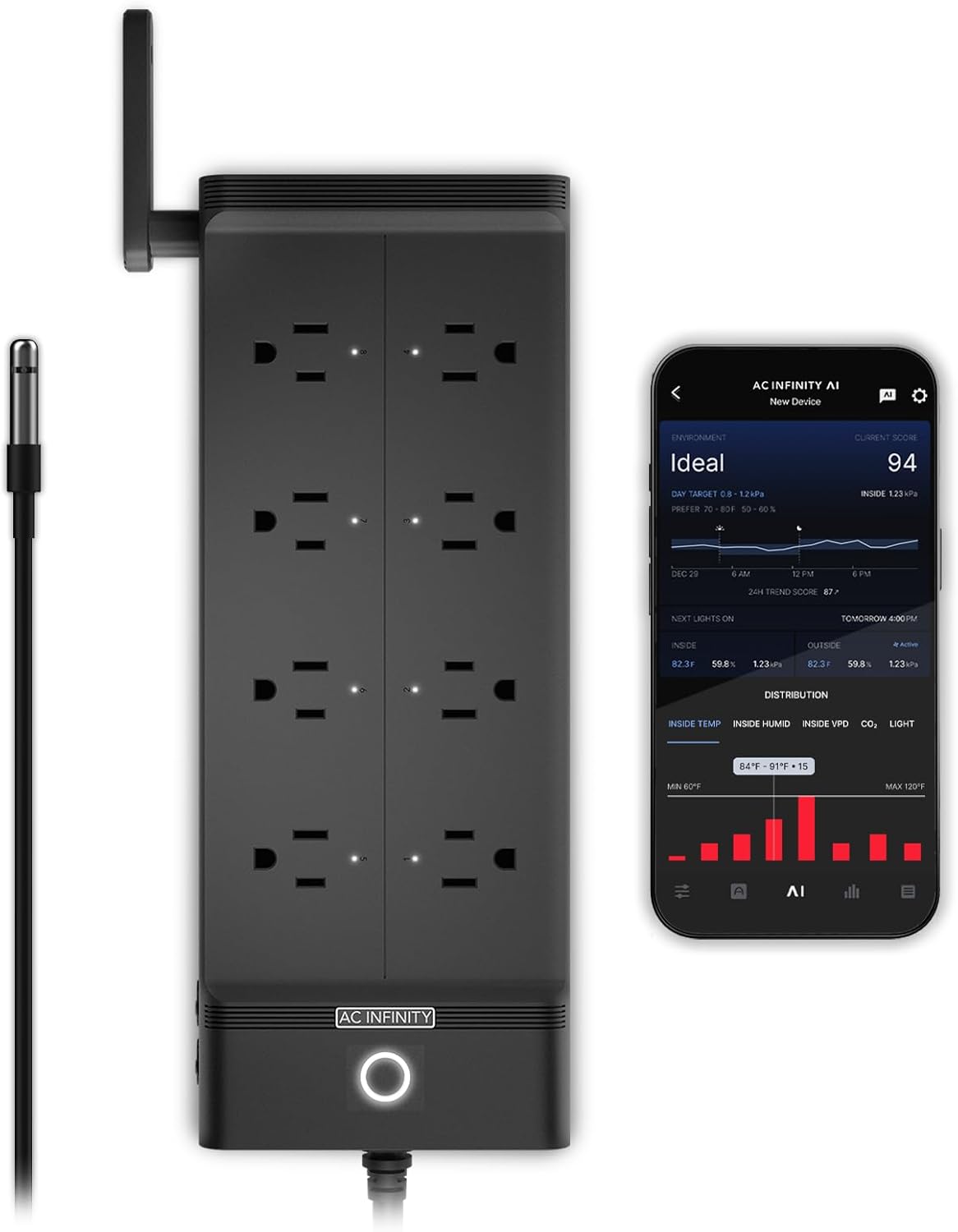
Image: The AC Infinity Outlet AI+ Smart WiFi Power Strip, showing its eight outlets, power button, and an attached temperature and humidity probe. A smartphone displaying the control app is also visible.
Продукт закінченийview
The Outlet AI+ offers advanced features for comprehensive environmental management:
- Independent Smart Outlets: Control up to eight devices individually with climate triggers, schedules, or timers.
- AI Climate Targeting: Leverage artificial intelligence to synchronize various equipment to achieve and maintain a desired environment.
- Дистанційне керування через Wi-Fi: Manage your setup from anywhere using the dedicated AC Infinity app, which provides real-time alerts, data charts, and AI-powered insights.
- Точний моніторинг: Features dual-zone temperature, humidity, and VPD (Vapor Pressure Deficit) tracking.
- Expandable Sensors: Supports optional CO₂, hydro, and soil sensors (sold separately) for advanced environmental monitoring.
- Широка сумісність: Works with various outlet devices such as heaters, lights, fans, CO₂ systems, and water pumps.
- Функції безпеки: 1800W maximum capacity and built-in surge protection.

Image: The AC Infinity Outlet AI+ connected to multiple devices, illustrating its role in AI-controlled climate management with icons for temperature, humidity, airflow, lighting, and expandable sensors.
Вміст упаковки
Перевірте наявність усіх компонентів у вашій упаковці:
- AC Infinity Outlet AI+ Environment Controller (Model AC-ADA8)
- Датчик температури та вологості
- Інструкція з експлуатації
Посібник із налаштування
1. Початкове підключення
- Unpack the Outlet AI+ controller and its components.
- Plug the temperature and humidity probe into the designated port on the controller.
- Position the probe in the area where you wish to monitor environmental conditions. Ensure it is not directly exposed to heat sources or airflow that could skew readings.
- Plug the Outlet AI+ power cord into a standard 120V AC electrical outlet. The power indicator light on the controller will illuminate.
2. Встановлення та сполучення програм
- Download the AC Infinity app from your smartphone's app store (available for iOS and Android).
- Відкрийте програму та створіть обліковий запис або увійдіть, якщо він у вас уже є.
- Follow the in-app instructions to add a new device. This typically involves selecting the Outlet AI+ from a list of devices and following prompts to connect it to your local WiFi network.
- Ensure your smartphone is connected to a 2.4GHz WiFi network during the pairing process, as the device may not support 5GHz networks.
- Once successfully paired, the app will display the current environmental readings and allow you to configure the outlets.
Операція
1. Individual Outlet Control
Each of the eight outlets can be controlled independently through the AC Infinity app.
- Ручне управління: Turn outlets on or off directly from the app interface.
- Запланована операція: Set specific times for outlets to turn on or off.
- Функції таймера: Configure outlets to run for a set duration.
- Climate Triggers: Program outlets to activate or deactivate based on temperature, humidity, or VPD readings from the connected probe. For example, turn on a fan if temperature exceeds a set threshold.
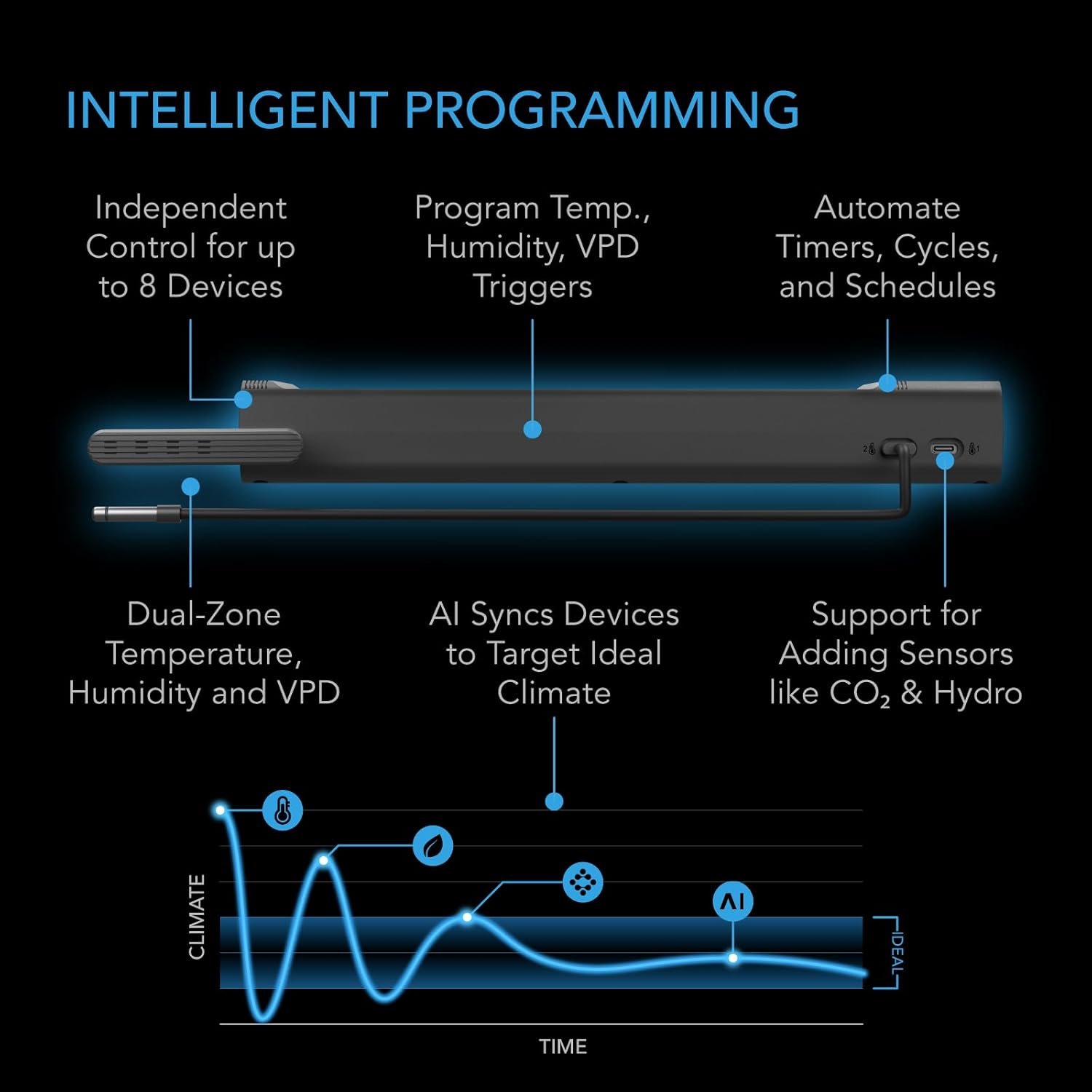
Image: A diagram illustrating the intelligent programming capabilities of the Outlet AI+, including independent control, temperature/humidity/VPD triggers, automated timers/cycles/schedules, dual-zone monitoring, AI synchronization, and support for additional sensors.
2. AI Climate Targeting
The AI functionality allows the controller to learn from your environment and automatically adjust connected devices to maintain an ideal climate. This feature optimizes conditions by preventing over- or undershooting output levels.
- Enable AI targeting within the app for specific zones or overall environment.
- Set your desired target climate parameters (e.g., ideal temperature range, humidity levels).
- The AI will then manage the connected devices to achieve and sustain these targets efficiently.
3. Monitoring and Data
The AC Infinity app provides comprehensive monitoring capabilities:
- Дані в реальному часі: View current temperature, humidity, and VPD readings.
- Data Charts: Access historical data and trends for environmental conditions.
- Сповіщення про сповіщення: Receive push notifications for critical events or when conditions deviate from set parameters.
- AI-Powered Insights: Gain recommendations and analysis based on your environmental data.

Image: Multiple screenshots of the AC Infinity mobile app, demonstrating remote monitoring of environmental data, outlet controls, and AI-driven insights.
4. Advanced Sensors
The Outlet AI+ supports additional sensors (sold separately) to expand its monitoring capabilities:
- CO₂ Sensors: Monitor carbon dioxide levels for optimized plant growth.
- Hydro Sensors: Track pH, TDS (Total Dissolved Solids), and EC (Electrical Conductivity) in hydroponic systems.
- Soil Sensors: Measure soil moisture and nutrient levels.
These sensors integrate with the controller and app to provide a more detailed understanding and control of your environment.

Image: An illustration showing the AC Infinity Outlet AI+ setup with various optional sensors, including hydro sensors and CO₂/light sensors, integrated into different environmental setups.
Технічне обслуговування
To ensure the longevity and optimal performance of your AC Infinity Outlet AI+ controller, follow these maintenance guidelines:
- Прибирання: Regularly wipe the exterior of the controller with a dry, soft cloth. Avoid using abrasive cleaners or solvents.
- Догляд за зондом: Keep the temperature and humidity probe clean and free from dust or debris. Do not immerse the probe in liquid unless specifically designed for such use.
- Оновлення прошивки: Periodically check the AC Infinity app for available firmware updates for your controller. Updates often include performance improvements and new features.
- Умови навколишнього середовища: Ensure the controller is operated within its specified temperature and humidity ranges. Avoid extreme conditions that could damage the device.
- Управління кабелем: Keep all cables neatly organized and free from kinks or damage to prevent electrical issues.
Усунення несправностей
If you encounter issues with your Outlet AI+ controller, refer to the following common problems and solutions:
| проблема | Можлива причина | Рішення |
|---|---|---|
| Контролер не вмикається. | Немає живлення з розетки; пошкоджений шнур живлення. | Check the power outlet with another device. Inspect the power cord for damage. |
| Не вдається підключитися до Wi-Fi. | Incorrect WiFi password; 5GHz network selected; controller too far from router. | Verify WiFi password. Ensure you are connecting to a 2.4GHz network. Move the controller closer to the router. Restart the controller and router. |
| Outlets not responding to commands. | No internet connection; app glitch; device not properly plugged in. | Check your internet connection. Restart the app. Unplug and re-plug the device into the outlet. Ensure the device is properly configured in the app. |
| Inaccurate sensor readings. | Probe is dirty or damaged; probe positioned incorrectly. | Clean the probe gently. Reposition the probe away from direct heat or airflow. If damaged, replace the probe. |
| AI targeting not working as expected. | Incorrect target settings; insufficient data for AI learning. | Review and adjust your AI target settings in the app. Allow time for the AI to gather data and learn your environment. |
For further assistance, please contact AC Infinity customer support.
Технічні характеристики
| Особливість | Деталь |
|---|---|
| Модель | AC-ADA8 |
| Бренд | AC Infinity |
| Макс Ватtage | 1800 Вт |
| томtage | 100-240V AC |
| Кількість розеток | 8 |
| Підключення | Wi-Fi + Bluetooth (App Control) |
| Вбудований датчик | Temperature & Humidity (Dual-Zone) |
| Підтримувані датчики | 3 (1 Built-in, supports additional CO₂, Hydro, Soil sensors sold separately) |
| матеріал | Акрилонітрилбутадієнстирол (АБС) |
| Вага товару | 2.51 фунта |
| Розміри упаковки | 13.66 x 6.3 x 4.37 дюймів |
| Довжина шнура | 6 футів (183 см) |
| Довжина зонда | 12 футів (366 см) |

Image: A detailed diagram showing the physical dimensions of the AC Infinity Outlet AI+ controller, including its length, width, height, cord length, and probe length.
Інформація про гарантію
AC Infinity products typically come with a manufacturer's warranty covering defects in materials and workmanship. Please refer to the warranty card included with your product or visit the official AC Infinity website for the most current and detailed warranty policy. Keep your proof of purchase for warranty claims.
Підтримка клієнтів
For technical assistance, troubleshooting not covered in this manual, or warranty inquiries, please contact AC Infinity customer support:
- Webсайт: Visit the official AC Infinity webсайт із поширеними запитаннями, статтями служби підтримки та контактною інформацією.
- Електронна пошта: Refer to your product packaging or the AC Infinity webсайт для адреси електронної пошти служби підтримки.
- телефон: Контактні номери можуть бути доступні на офіційному сайті webсайт.
When contacting support, please have your product model (AC-ADA8) and purchase information readily available.


