1. Вступ
This manual provides essential instructions for the safe and effective use, installation, and maintenance of your POWTREE 7000mAh 25.2V Li-ion replacement battery for Dyson V10 and SV12 series vacuum cleaners. Please read this manual thoroughly before installation and use.
2. Інформація про безпеку
- Не розбирайте, не ламайте та не проколюйте акумулятор.
- Avoid exposing the battery to high temperatures (above 60°C/140°F) or direct sunlight.
- Не замикайте клеми акумулятора.
- Тримайте батарею подалі від води та інших рідин.
- Зберігайте акумулятор у прохолодному сухому місці, коли він не використовується.
- Утилізуйте використані батарейки відповідно до місцевих правил. Не викидайте їх разом із побутовими відходами.
- Use only the original Dyson charger or a compatible charger designed for V10/SV12 batteries.
- If the battery shows signs of damage, overheating, or leakage, discontinue use immediately.
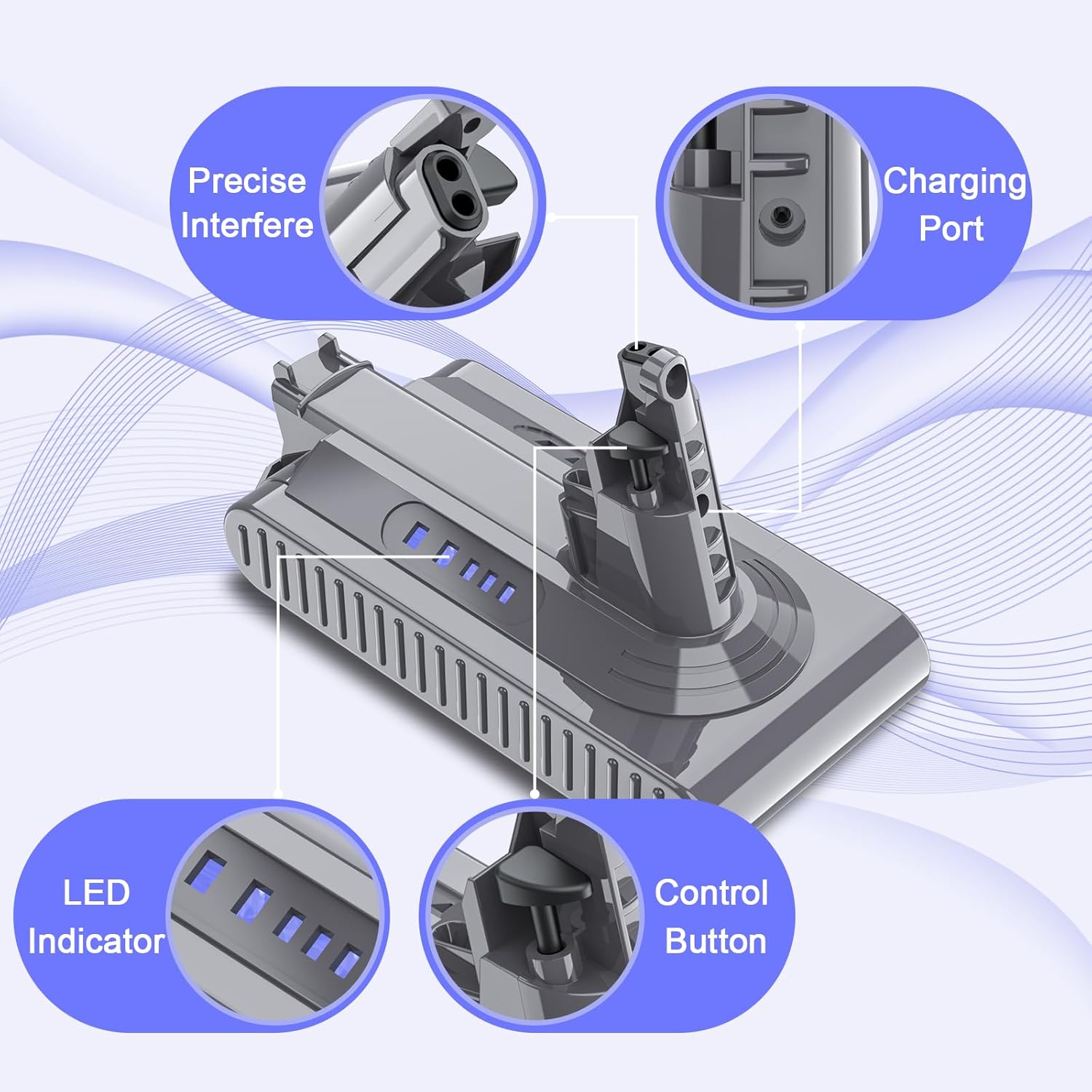
Image: The POWTREE V10 replacement battery features multiple safety protections, including overcharge, overvoltage, short circuit, and overcurrent protection, indicated by CE, FC, and RoHS certifications.
3. Вміст упаковки
Перевірте наявність усіх елементів в упаковці:
- 1 x POWTREE 7000mAh 25.2V Replacement Battery
- 1 х викрутка
- 3 х гвинти
- 1 x Post Filter
- 1 x Battery Protection Cap

Image: The complete package includes the replacement battery, a screwdriver, three screws, a post filter, and a battery protection cap for a comprehensive replacement solution.
4. Інструкції зі встановлення
Follow these steps to replace the battery in your Dyson V10 or SV12 series vacuum cleaner:
- Вимкнення живлення: Ensure your Dyson vacuum cleaner is turned off and unplugged from any charging source.
- Знайдіть акумулятор: The battery is typically located at the bottom of the main unit handle.
- Зніміть гвинти: Use the provided screwdriver to remove the screws securing the old battery. There are usually two screws: one near the charging port and another behind the pull-out washable filter.
- Detach Old Battery: Carefully slide the old battery out of its housing.
- Встановіть новий акумулятор: Align the POWTREE replacement battery with the vacuum cleaner's battery slot. Ensure the connectors are properly seated.
- Secure New Battery: Use the provided new screws to fasten the replacement battery securely into place. Do not overtighten.
- Install Post Filter: If replacing the post filter, remove the old filter by twisting it counter-clockwise and then insert the new filter, twisting clockwise to secure it.
- Початкова оплата: Рекомендується повністю зарядити новий акумулятор перед його першим використанням.

Image: This diagram illustrates the components included in the package, which are essential for the battery replacement process.

Image: Visual guide demonstrating the simple steps to install and clean the included post filter, ensuring optimal vacuum performance.
5. Інструкція з експлуатації
5.1 Заряджання батареї
- The POWTREE replacement battery is designed to be compatible with your original Dyson V10/SV12 charger and charging stand.
- Connect the vacuum cleaner to its charging station or directly to the charger.
- The LED indicators on the battery will illuminate to show the charging status. A full charge is indicated when all LEDs are solid.
- Avoid leaving the battery on the charger for extended periods after it is fully charged to prolong its lifespan.
5.2 Індикатори заряду батареї
The battery features LED indicators to display the remaining charge level and charging status. Refer to your Dyson vacuum cleaner's original manual for specific indicator patterns, as they typically reflect the battery status.

Зображення: Детальне view of the battery's design, highlighting the charging port, LED indicators for charge status, and the control button.
6. Технічне обслуговування
6.1 Догляд за акумулятором
- For optimal performance, fully charge the battery before each use.
- If the vacuum cleaner will not be used for an extended period, store the battery at approximately 50% charge in a cool, dry place.
- Уникайте частої повної розрядки акумулятора, оскільки це може скоротити його загальний термін служби.
6.2 Технічне обслуговування фільтра
The included post filter is washable and reusable. Regular cleaning of the filter is crucial for maintaining optimal suction power and battery efficiency.
- Видалити фільтр: Twist the post filter counter-clockwise to detach it from the vacuum cleaner.
- мити: Промийте фільтр під холодною проточною водою, доки вода не стане прозорою. Не використовуйте мийні засоби.
- Сухий: Allow the filter to air dry completely for at least 24 hours before reinserting it. Ensure it is thoroughly dry to prevent damage to the motor.
- Перевстановити: Once dry, reinsert the filter by twisting it clockwise until secure.
7. Вирішення проблем
| проблема | Можлива причина | Рішення |
|---|---|---|
| Акумулятор не заряджається | Charger not connected properly; Faulty charger; Battery issue | Ensure charger is securely connected. Try a different outlet. If problem persists, contact support. |
| Короткий час роботи | Filter clogged; Battery not fully charged; Battery degradation | Clean the filter. Ensure battery is fully charged. If battery is old, consider replacement. |
| Vacuum cleaner not turning on | Battery not installed correctly; Battery completely drained; Safety cutoff activated | Reinstall battery, ensuring secure connection. Charge battery. Check for obstructions in the vacuum. |
If you encounter issues not listed here or if the suggested solutions do not resolve the problem, please contact POWTREE customer support for assistance.
8. Технічні характеристики
| Особливість | Деталь |
|---|---|
| Модель | V10 |
| томtage | 25.2 В |
| Ємність | 7000 мАг |
| Тип батареї | Літій-іонний |
| Ватт-година | 1176.4 Вт-год |
| Сумісність | Dyson V10 Allergy, Cyclone V10 Animal, V10 Absolute, V10 Motorhead, V10 Motorhead Origin, V10 Total Clean+, SV12 Series |
| Сертифікати | CE, FCC, ROHS |
| Розміри упаковки | 7.56 x 5.67 x 3.9 дюймів |
| Вага товару | 1.43 фунта |

Image: Key product parameters are displayed, confirming the battery type as Li-ion, voltage at 25.2V, and a capacity of 7000mAh.

Image: This visual confirms the battery's compatibility with Dyson V10 and SV12 series vacuum cleaners, including models like V10 Animal, V10 Absolute, and V10 Motorhead.
9. Гарантія та підтримка
POWTREE provides a Гарантія 12 місяців for this V10 replacement battery. For any questions, concerns, or technical assistance, please contact our professional customer support team. We offer 24-hour online support to ensure your satisfaction.
For support, please refer to the contact information provided with your purchase or visit the official POWTREE store on Amazon.


