вступ
This manual provides detailed instructions for the setup, operation, and maintenance of your SPYPOINT FORCE-PRO 30 Megapixel 4K Trail Camera. Designed for outdoor monitoring, this camera captures high-resolution photos and videos, making it ideal for wildlife observation and security. Please read this manual thoroughly to ensure proper use and optimal performance of your device.
Вміст упаковки
Verify that all items listed below are present in your package. If any items are missing or damaged, please contact SPYPOINT customer support.
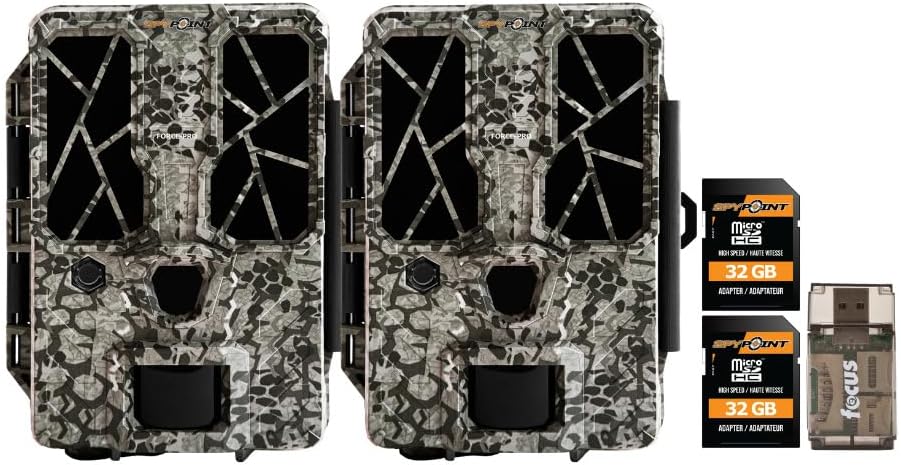
- 2 x SPYPOINT FORCE-PRO 30 Megapixel Trail Camera
- 2 x SPYPOINT MicroSD 32GB Ultra High Speed Class 10 Memory Card
- 1 x Focus All-In-One High Speed Card Reader

Продукт закінченийview
The SPYPOINT FORCE-PRO is a robust trail camera designed for reliable performance in outdoor environments. It features advanced imaging capabilities and user-friendly controls.
Ключові характеристики
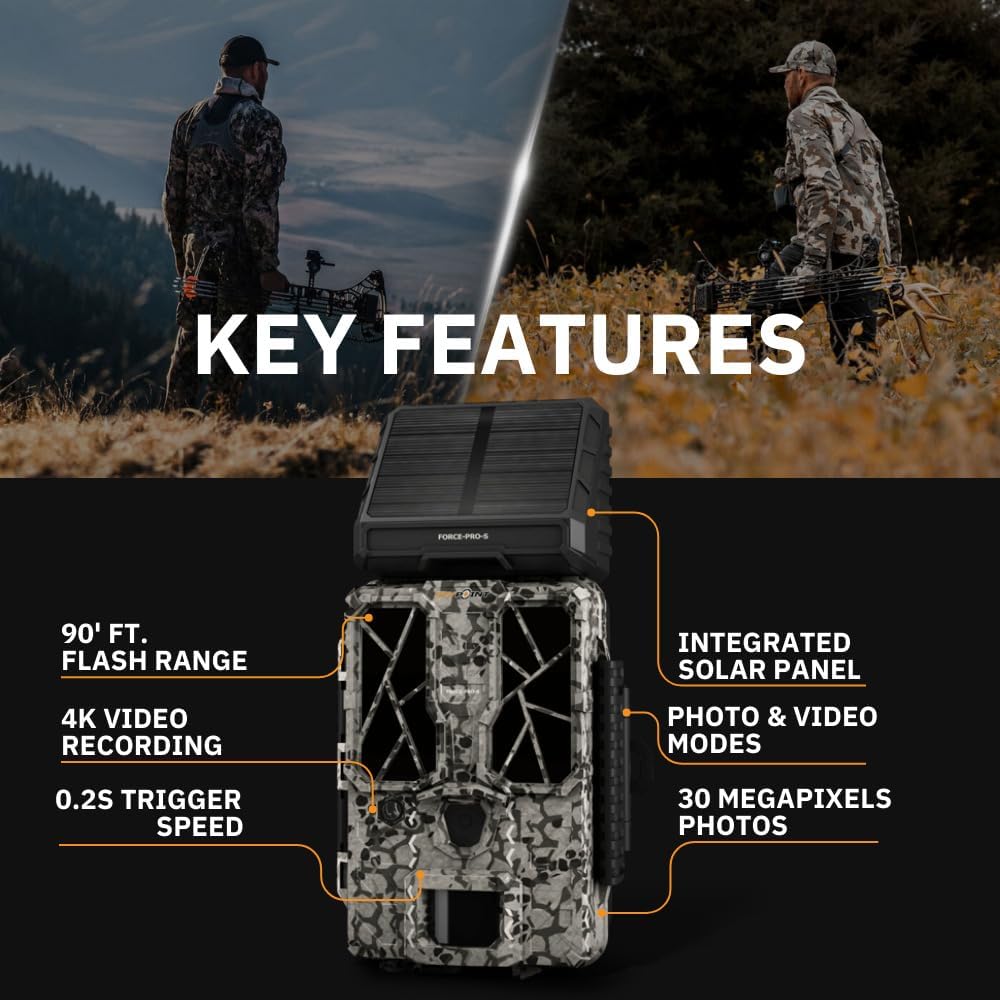
- Висока роздільна здатність: 30 Megapixel photos and 4K video recording with sound.
- Швидка швидкість запуску: Ultra-fast 0.2-second trigger speed to capture quick movements.
- Широкий діапазон виявлення: 110-foot detection range.
- Powerful Flash: 90-foot flash range with 54 LEDs for clear night images.
- Вбудована сонячна панель: For extended battery life and reduced maintenance.
- Dual-SIM Cellular: Automatically connects to the best available network for reliable transmission (if cellular model).



Налаштування
1. Встановлення джерела живлення
The FORCE-PRO camera is equipped with an integrated solar panel for charging its internal battery. For initial setup or extended use without sufficient sunlight, an external power source can be used.
- Внутрішня батарея: Ensure the camera's internal battery is charged. The integrated solar panel will charge it during daylight hours.
- Зовнішнє живлення (додатково): If using an external 12V power source (not included), connect it to the camera's 12V jack.
2. Встановлення картки MicroSD
A MicroSD card is required to store photos and videos. Two 32GB MicroSD cards are included in this bundle.
- Знайдіть слот для карти MicroSD на камері.
- Вставте карту MicroSD золотистими контактами до задньої частини камери, доки вона не зафіксується почутим клацання.
- Щоб вийняти, обережно натисніть на карту, доки вона не вискочить.
3. Початкове увімкнення та базова конфігурація
- Turn the camera ON using the power switch.
- Follow the on-screen prompts (if available) or refer to the camera's menu for initial settings such as date, time, and language.
- Format the MicroSD card through the camera's menu for optimal performance.
4. Монтаж камери
The camera can be mounted using a strap, tripod, or other compatible mounting accessories. While specifications mention 'Tabletop Mount', for outdoor use, secure mounting is crucial.
- Оберіть місце, яке забезпечує чіткий view бажаної зони моніторингу.
- Переконайтеся, що камера надійно закріплена, щоб запобігти її руху через вітер або тварини.
- Position the camera to avoid direct sunlight into the lens, which can cause overexposure.
Інструкція з експлуатації
Режими камери
- Режим фото: Captures still images when triggered.
- Режим відео: Records video clips when triggered.
- Режим фото + відео: Знімає фотографію, а потім відеокліп.
Налаштування параметрів
Access the camera's menu using the built-in screen and navigation buttons to customize settings:
- роздільна здатність: Select desired photo (up to 30MP) and video (up to 4K) resolution. Higher resolutions consume more storage.
- Затримка запуску: Встановіть затримку між послідовними спрацьовуваннями.
- Чутливість: Adjust the motion sensor sensitivity to suit the environment and avoid false triggers.
- Години роботи: Define specific times the camera should be active.
- Дата/час вулamp: Enable or disable the date and time overlay on images/videos.
Отримання даних
- Картка MicroSD: Remove the MicroSD card from the camera and insert it into the included Focus All-In-One High Speed Card Reader. Connect the card reader to a computer to access files.
- SPYPOINT App: For cellular models, use the SPYPOINT mobile application to view and manage captured media remotely. The app also allows for camera settings adjustments and firmware updates.
Технічне обслуговування
- Прибирання: Regularly clean the camera lens and housing with a soft, dry cloth. Avoid abrasive materials or harsh chemicals.
- Перевірка батареї: Monitor battery levels, especially during periods of low sunlight. The integrated solar panel helps maintain charge, but supplemental charging may be needed.
- Оновлення прошивки: Periodically check for and install firmware updates via the SPYPOINT app or webсайт, щоб забезпечити оптимальну продуктивність і доступ до нових функцій.
- Зберігання: When not in use, store the camera in a cool, dry place away from direct sunlight.
Усунення несправностей
- Камера не спрацьовує: Check motion sensor sensitivity, ensure no obstructions, and verify battery level.
- Погана якість зображення/відео: Clean the lens, check resolution settings, and ensure proper lighting conditions.
- Питання живлення: Ensure the internal battery is charged or an external power source is properly connected. Check for any damage to power cables.
- Помилки картки MicroSD: Reformat the MicroSD card (backing up data first) or try a different card. Ensure the card is properly inserted.
- Connectivity Problems (Cellular Models): Verify cellular signal strength in the camera's location. Check your SPYPOINT app for data plan status.
Технічні характеристики
| Особливість | Специфікація |
|---|---|
| Модель | СИЛА-ПРО |
| Роздільна здатність фото | 30 мегапікселів |
| Роздільна здатність відео | 4K |
| Швидкість спрацьовування | 0.2 секунди |
| Дальність виявлення | 110 футів |
| Діапазон спалаху | 90 футів |
| світлодіоди | 54 |
| Джерело живлення | Integrated Solar Panel, Corded Electric (external 12V option) |
| Підключення | USB, Wired (for data transfer), Cellular (for remote management) |
| матеріал | пластик |
| Водонепроникність | Водостійкий |
| Тип фокусування | Автофокус |
| UPC | 196271434986 |
Гарантія та підтримка
For warranty information, technical support, or service inquiries, please refer to the official SPYPOINT webсайт або зверніться безпосередньо до їхнього відділу обслуговування клієнтів. Зберігайте чек про покупку для гарантійних претензій.
СПІПОЙНТ Webсайт: www.spypoint.com


