1. Вступ
Thank you for choosing the TECKNET TK-KB005 Bluetooth Keyboard. This full-size wireless keyboard is designed for enhanced productivity and comfort across multiple devices. It features advanced connectivity options, a long-lasting rechargeable battery, and a quiet, ergonomic design for an optimal typing experience.
Ключові характеристики:
- 4-режимне підключення: Seamlessly switch between up to four devices (3 Bluetooth, 1 x 2.4G wireless).
- Акумуляторна батарея: Built-in 500mAh battery provides up to 180 days of use on a single 2-hour charge.
- Тихе та плавне введення тексту: 110 upgraded scissor-switch keys offer 90% noise reduction and comfortable 2mm key travel.
- Ергономічний дизайн: Crafted for all-day comfort with adjustable support buckles and anti-slip pads.
- Широка сумісність: Supports Windows, iOS, macOS, Android, Chrome OS, and Linux.
- Мультимедійні клавіші: 12 dedicated multimedia keys for enhanced productivity.
2. Вміст упаковки
Please check that all items are included and undamaged upon arrival:
- 1 x TECKNET Multi-Device Keyboard (TK-KB005)
- 1 x USB-C зарядний кабель
- 1 x USB-приймач 2.4G (зберігається в задньому відсіку клавіатури)
- 1 x Посібник користувача (цей документ)
3. Налаштування
3.1 Початкова плата
Before first use, ensure your keyboard is fully charged. Connect the provided USB-C cable to the charging port on the back of the keyboard and to a power source. The red indicator light will stay on during charging and turn green when fully charged.

Image: The TECKNET TK-KB005 keyboard connected to a USB-C charging cable, illustrating the charging port location.
3.2 Увімкнення/вимкнення живлення
Locate the power switch on the back of the keyboard. Slide it to the 'ON' position to power on the keyboard.
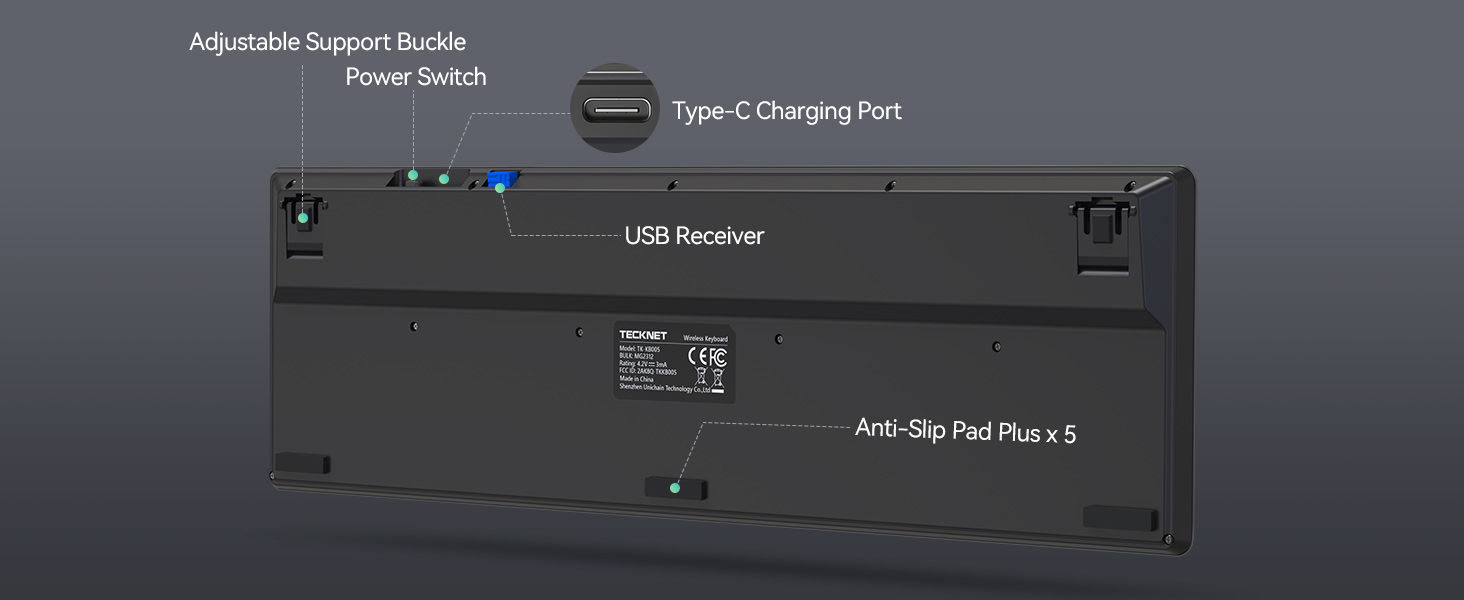
Image: The underside of the keyboard, highlighting the adjustable support buckle, power switch, USB-C charging port, USB receiver storage, and anti-slip pads.
3.3 Підключення через бездротове з’єднання 2.4G
- Remove the 2.4G USB receiver from its storage slot on the back of the keyboard.
- Insert the USB receiver into an available USB-A port on your computer or device.
- Short press the 2.4G channel button (labeled with a wireless icon or '0') on the keyboard. The indicator light will illuminate.
- The keyboard should automatically connect. If not, refer to the troubleshooting section for forced pairing.
3.4 Підключення через Bluetooth
The keyboard supports three Bluetooth channels (BT1, BT2, BT3).
- Turn on Bluetooth on your device (e.g., computer, tablet, smartphone).
- On the keyboard, press and hold one of the Bluetooth channel buttons (BT1, BT2, or BT3) for more than 3 seconds. The corresponding indicator light will flash quickly, indicating pairing mode.
- On your device, search for Bluetooth devices and select "TK-KB005" from the list.
- Once paired, the indicator light will stay on briefly, then turn off to indicate a successful connection.
Video: An unboxing video for the TECKNET TK-KB005 Bluetooth Keyboard, demonstrating the contents and initial setup steps.
4. Інструкція з експлуатації
4.1 Перемикання між підключеними пристроями
The TECKNET TK-KB005 keyboard allows you to connect to up to four devices simultaneously (three via Bluetooth and one via 2.4G wireless). To switch between these devices, simply short press the corresponding channel button (BT1, BT2, BT3, or 2.4G wireless icon) on the keyboard.

Image: The keyboard shown with four different devices (tablet, smartphone, laptop, desktop) connected, illustrating its multi-device switching capability.
Video: A demonstration of the 4-device connectivity feature of the TECKNET Bluetooth Keyboard, showing seamless switching between devices.
4.2 System Compatibility Switching
The keyboard automatically detects and adapts to different operating systems. However, for optimal key functionality, you may need to manually switch the system mode using the following key combinations:
- для Android пристрої: Натисніть Fn + Q
- для вікна пристрої: Натисніть Fn + W
- для iOS пристрої: Натисніть Fn + E
Note: These system switching shortcuts are primarily for 2.4G mode. In Bluetooth mode, the system is usually detected automatically. If certain keys do not function as expected, use these shortcuts.
4.3 мультимедійних клавіш
The keyboard features 12 multimedia keys (F1-F12) that provide quick access to various functions. These functions may vary slightly depending on your operating system.
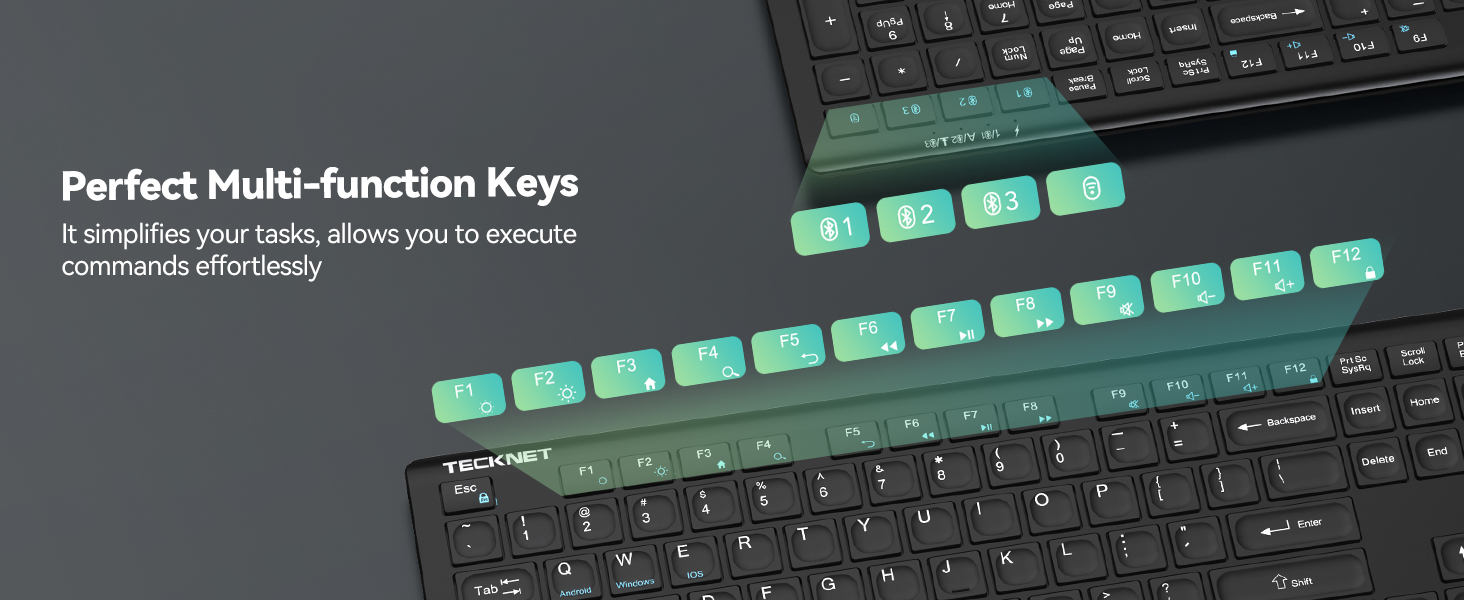
Зображення: Детальний view of the keyboard's multi-function keys, indicating their various shortcuts and commands.
5. Технічне обслуговування
5.1 Очищення
Щоб очистити клавіатуру, обережно протріть її поверхню м’якою губкоюamp cloth. Avoid using harsh chemicals or abrasive materials that could damage the finish or key legends.
5.2 Догляд за акумулятором
The keyboard has a built-in rechargeable 500mAh Lithium-Ion battery. To prolong battery life:
- Charge the keyboard fully before its first use.
- Уникайте регулярної повної розрядки акумулятора.
- The keyboard features an auto-sleep mode after 30 minutes of inactivity to conserve power. It wakes instantly with any key press.

Image: An illustration highlighting the keyboard's 500mAh rechargeable battery, along with its auto-sleep and power-saving features.
6. Вирішення проблем
6.1 Проблеми з підключенням
If you experience difficulty connecting your keyboard:
- Переконайтеся, що клавіатура повністю заряджена.
- Remove/delete all previous Bluetooth connection records for the keyboard on your device, then turn off and re-enable Bluetooth on your device. Try reconnecting.
- Ensure the keyboard is within the effective working distance of 49 ft (15M) from your device.
- Avoid metal obstacles or other radio signals that may interfere with the keyboard signal.
Forced Pairing Method (Bluetooth):
- Bring the keyboard close to the device and ensure the device's Bluetooth is on.
- Short press the desired Bluetooth channel button (BT1, BT2, or BT3). The light will illuminate.
- Long press the same channel button for more than 3 seconds until the green LED light flashes quickly.
- Complete the pairing on your device within 2 minutes. The channel LED will turn off after 2 seconds upon successful pairing.
Forced Pairing Method (2.4G Wireless):
- Bring the keyboard close to the device.
- Short press the 2.4G channel button (labeled with a wireless icon or '0'). The light will illuminate.
- Long press the 2.4G channel button for more than 3 seconds until the red LED flashes quickly.
- Insert the USB receiver into your device within 20 seconds. The 2.4G channel LED will turn off after 2 seconds upon successful pairing.
6.2 Keyboard Not Responding / Lag
- Check if the battery is low and charge the keyboard.
- If caused by computer lag, restart your computer and reconnect the keyboard.
- If using 2.4G, try unplugging and re-inserting the USB receiver into your device.
If none of the above solutions resolve your issue, please contact our professional customer service team for additional support.
7. Технічні характеристики
| Особливість | Деталь |
|---|---|
| Номер моделі | ТК-КВ005 |
| Технологія підключення | Bluetooth (3 channels), 2.4G Wireless (1 channel) |
| Сумісні пристрої | Laptop, PC, Smart TV, Smartphone, Tablet, iPad |
| Операційні системи | Windows, iOS, macOS, Android, Chrome OS, Linux |
| Акумулятор | Літій-іонний акумулятор 500 мАг (в комплекті) |
| Термін служби батареї | Up to 180 days (based on 2 hours daily use) |
| Час зарядки | прибл. 2 години |
| Дальність бездротового зв'язку | До 49 футів (15 м) |
| Тип ключа | Ножиці-перемикач |
| Зменшення шуму | 90% |
| Ключова міцність | До 10 мільйонів натискань клавіш |
| Особливості | 12 Multimedia Keys, Ergonomic, Low-Profile Key, Rechargeable, Auto-Sleep |
| Розміри продукту | 17.13 x 5.12 x 0.57 дюймів |
| Вага товару | 1.29 фунта |
| матеріал | пластик |
8. Гарантія та підтримка
TECKNET provides up to 3 years of support for this product (registration may be required). If you encounter any problems or have questions regarding your TK-KB005 keyboard, please do not hesitate to contact our professional customer service team. We are committed to assisting you every step of the way.
For customer service inquiries, please refer to the contact information provided on the TECKNET official webсайт або упаковку вашого продукту.


