1. Вступ
This manual provides detailed instructions for the Loutoc SRC4526 Universal Remote Control, designed for seamless compatibility with Philips Ambilight Smart TVs. Please read this guide thoroughly to ensure optimal use and longevity of your remote control.
1.1 продукт закінченоview
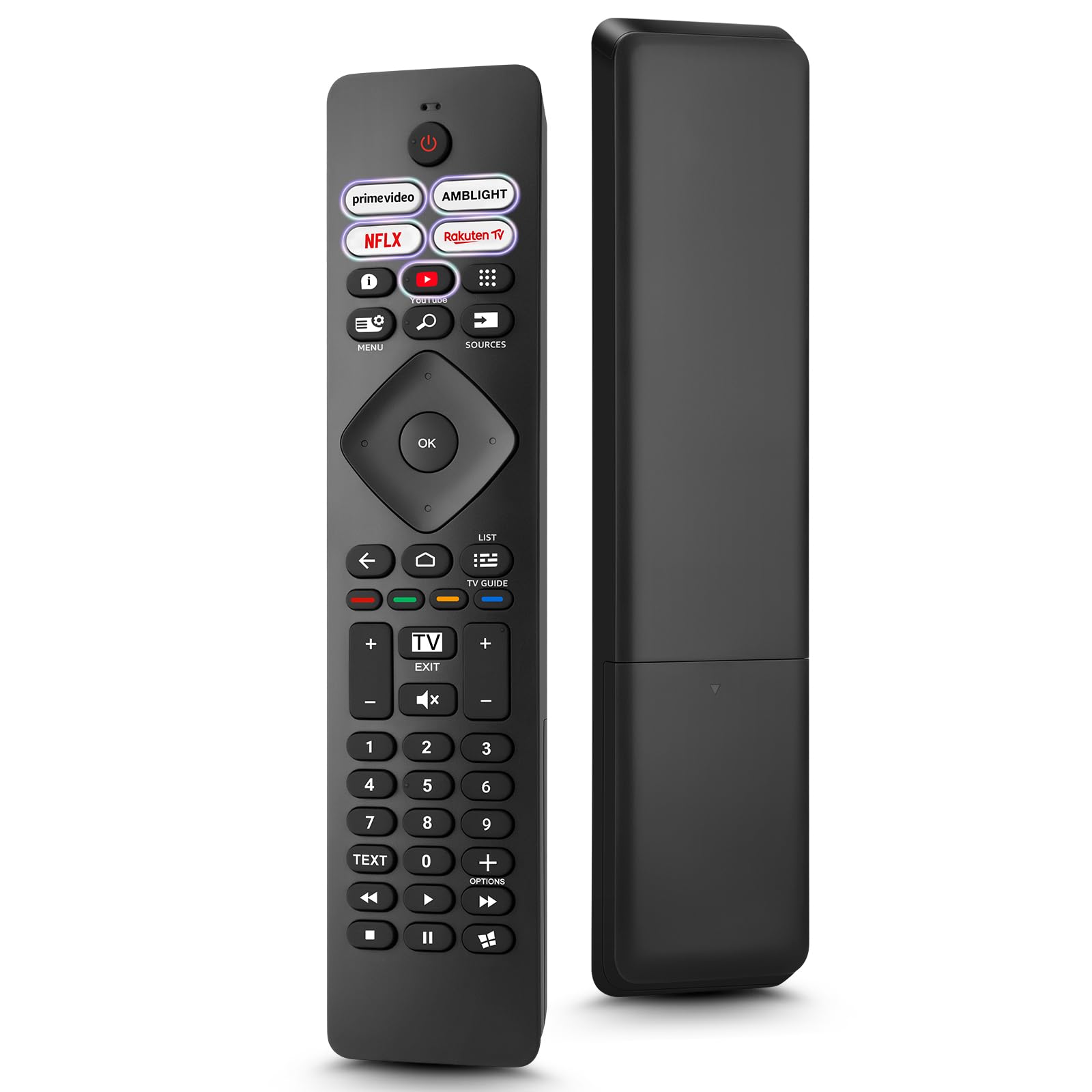
Image: The Loutoc SRC4526 Universal Remote Control, showcasinйого ергономічний дизайн та розташування кнопок.
1.2 Основні характеристики
- Convenient Plug-and-Play: No complex setup or programming required. Simply insert batteries and the remote is ready for use.
- Сумісність із широким спектром телевізорів: Fully compatible with Philips Ambilight TVs, including 4K Ambilight LED, OLED, FHD, and Full Ultra HD models.
- Спеціальні кнопки швидкого доступу: Features 5 direct access buttons for popular streaming platforms: Ambilight, Video, NFLX (Netflix), Rakuten TV, and YouTube.
- Надійна продуктивність: Offers an effective operating range of 8 meters (26 feet) and an ultra-fast response time of 0.2 seconds.
2. Налаштування
2.1 Встановлення батареї
The Loutoc SRC4526 remote control requires two AAA batteries (not included) for operation.
- Знайдіть батарейний відсік на задній панелі пульта дистанційного керування.
- Відкрийте кришку відсіку для батарей.
- Вставте дві батарейки типу AAA, переконавшись, що позитивна (+) та негативна (-) клеми правильно збігаються з індикаторами всередині відсіку.
- Надійно закрийте кришку батарейного відсіку.
2.2 Початкове використання
This remote control is designed for immediate use with compatible Philips Ambilight TVs. No programming or pairing is required. Once batteries are installed, point the remote at your TV and begin operation.
3. Інструкція з експлуатації
3.1 Функції кнопокview
Refer to the image below for a visual guide to the remote control's buttons and their corresponding functions.

Image: Detailed diagram of the Loutoc SRC4526 remote control, illustrating each button and its primary function.
| Кнопка | функція |
|---|---|
| потужність | Switches the TV on or off (Standby mode). |
| Prime Video, Ambilight, Netflix, Rakuten TV | Quickly launches the corresponding application. |
| Меню | Opens the Quick Menu with typical TV functions. Hold to show Gaming control bar. |
| Пошук | Opens the Search tab on the Home screen. |
| Джерела | Opens or closes the TV's input sources menu. |
| OK | Підтверджує вибір або налаштування. |
| Arrow/Navigation Keys | Navigates up, down, left, or right through menus and options. |
| Назад | Повернення до попереднього екрана або каналу. |
| додому | Opens the TV's Home menu. |
| Телегід | Opens or closes the TV Guide. Long press to open the channel list. |
| Color Keys (Red, Green, Yellow, Blue) | Provides direct selection of on-screen options. The blue key typically opens Help. |
| Гучність (+/-) | Регулює рівень гучності телевізора. |
| Канал (+/-) | Switches to the next or previous channel. |
| Вихід | Exits current menu/application or returns to live TV. From standby, goes to last viewed source. |
| Вимкнути звук | Вмикає або вимкнення звуку телевізора. |
| Цифрові клавіші (0-9) | Directly selects TV channels. |
| ТЕКСТ | Opens or closes Text/Teletext. |
| Елементи керування відтворенням | Controls media playback: Play, Pause, Stop, Rewind, Fast Forward. |
| програми | Opens the Apps tab on the Home screen. |
3.2 Ambilight Functionality
For Philips TVs equipped with Ambilight functionality, the dedicated Ambilight button on your remote allows you to control the lighting effects.
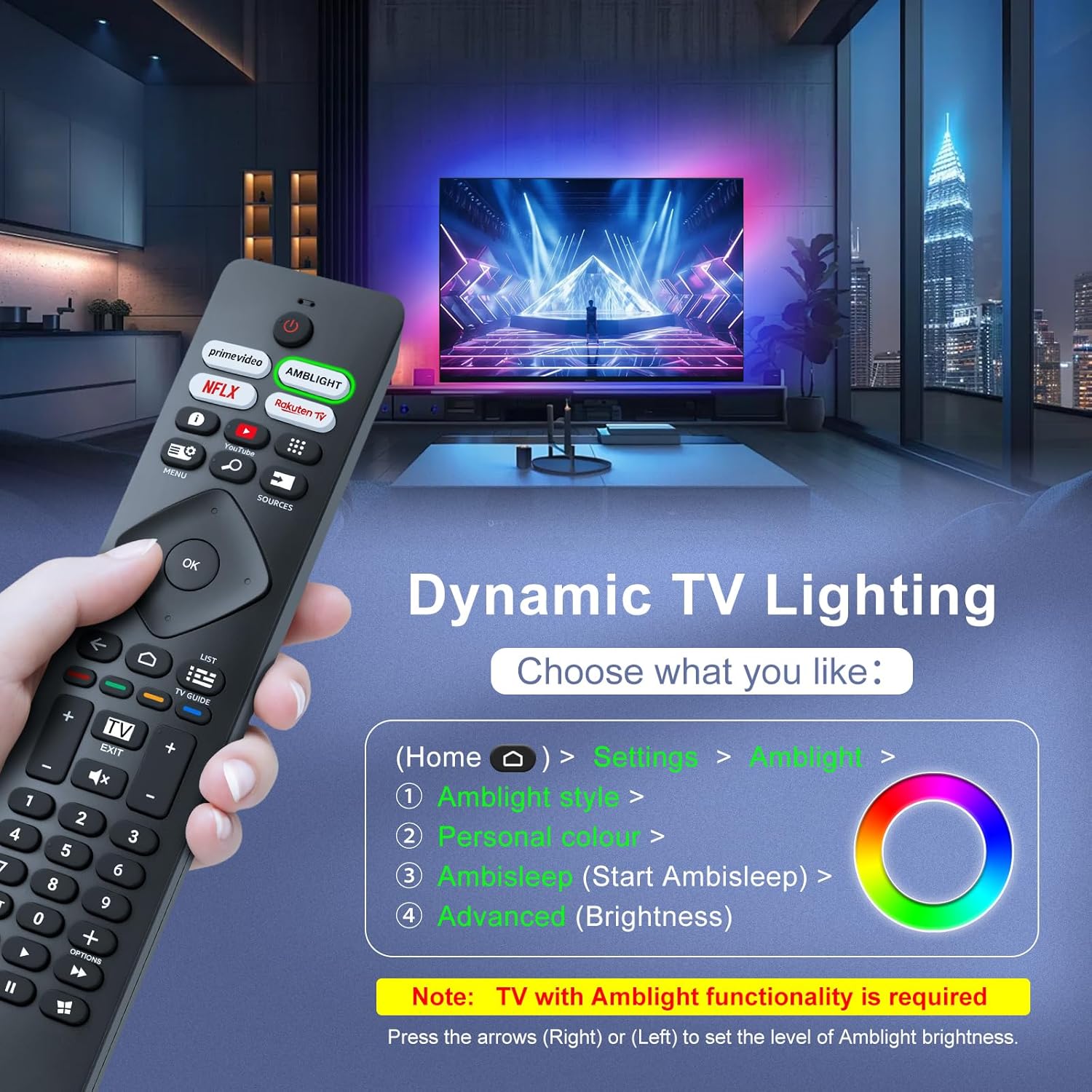
Image: A hand holding the remote control, with an overlay showing Ambilight settings on a TV screen.
After pressing the Ambilight button, you can navigate through the TV's menu to:
- Select different Ambilight display styles.
- Adjust personal color preferences.
- Initiate AmbiSleep mode.
- Adjust Ambilight brightness levels (using the right or left arrow keys).
Note: This feature requires a Philips TV with built-in Ambilight functionality.
4. Технічне обслуговування
4.1 Очищення
To clean your remote control, gently wipe it with a soft, dry cloth. Avoid using liquid cleaners, aerosols, or harsh chemicals, as these can damage the remote's surface or internal components.
4.2 Зберігання
Зберігайте пульт дистанційного керування в прохолодному, сухому місці, подалі від прямих сонячних променів та екстремальних температур. Якщо пульт дистанційного керування не використовуватиметься протягом тривалого часу, рекомендується вийняти батарейки, щоб запобігти витіканню.
4.3 Догляд за акумулятором
- Замініть усі батареї одночасно; не змішуйте старі та нові батареї.
- Не змішуйте різні типи батарейок (наприклад, лужні та акумуляторні).
- Утилізуйте використані батареї відповідально відповідно до місцевих правил.
5. Вирішення проблем
5.1 Поширені проблеми та рішення
- Пульт не відповідає:
- Перевірте, чи правильно вставлені батарейки з дотриманням полярності.
- Замініть батарейки новими батарейками типу AAA.
- Переконайтеся, що між пультом дистанційного керування та інфрачервоним приймачем телевізора немає перешкод.
- Переконайтеся, що ви перебуваєте в межах ефективного робочого діапазону (до 8 метрів).
- Певні кнопки не працюють:
- Очистіть пульт дистанційного керування, особливо навколо непрацюючих кнопок, щоб видалити бруд або сміття.
- If only Ambilight functions are not working, ensure your Philips TV model supports Ambilight.
5.2 Звернення до служби підтримки
If you encounter persistent issues that cannot be resolved with the troubleshooting steps above, please contact Loutoc customer support directly. We aim to respond to all inquiries within 12 working hours.
6. Технічні характеристики
| Особливість | Деталь |
|---|---|
| Бренд | Loutoc |
| Назва моделі | SRC4526-FBA |
| Номер моделі товару | SRC4526 |
| Колір | чорний |
| Технологія підключення | Інфрачервоний |
| Особливості | No programming required, Ergonomic, Lightweight |
| Сумісні пристрої | Television (Philips Ambilight TVs) |
| Maximum Number of Supported Devices | 1 |
| Тип контролера | Кнопкове керування |
| Максимальна дальність | 8 метрів (26 фут) |
| Опис батареї | AAA (2 required, not included) |
| Виробник | Loutoc |
| Країна походження | Китай |
| Дата першої доступності на Amazon.com.be | 31 серпня 2025 р |
7. Гарантія та підтримка
7.1 Інформація про гарантію
This Loutoc remote control comes with a manufacturer's warranty of 30 days from the date of purchase. Please retain your proof of purchase for any warranty claims.
7.2 Підтримка клієнтів
For any questions, technical assistance, or warranty inquiries, please contact Loutoc customer support. We are committed to providing timely assistance and will respond to your queries within 12 working hours.