1. Вступ
This manual provides essential information for the installation, operation, and maintenance of your GIGABYTE GeForce RTX 5060 WINDFORCE MAX OC 8G Graphics Card. This high-performance graphics card is powered by the NVIDIA Blackwell architecture and DLSS 4, featuring 8GB of 128-bit GDDR7 memory and a PCIe 5.0 interface. It incorporates the WINDFORCE cooling system, a Hawk fan, server-grade thermal conductive gel, and a reinforced structure for optimal performance and durability. Please read this manual thoroughly before installation and use.
2. Інформація про безпеку
- Завжди відключайте блок живлення від комп’ютера перед встановленням або видаленням будь-яких апаратних компонентів.
- Wear an anti-static wrist strap or frequently touch a grounded metal object to prevent electrostatic discharge (ESD) damage to the graphics card and other components.
- Тримайте відеокарту за краї, щоб не торкатися чутливих компонентів.
- Забезпечте належну вентиляцію всередині корпусу комп'ютера, щоб запобігти перегріву.
- Do not attempt to repair the graphics card yourself. Refer to qualified service personnel for assistance.
3. Вміст упаковки
Перевірте наявність усіх предметів у вашій упаковці:
- GIGABYTE GeForce RTX 5060 WINDFORCE MAX OC 8G Graphics Card
- Інструкція з експлуатації
Примітка: Додаткові аксесуари можуть відрізнятися залежно від регіону або продавця.
4. Налаштування (Встановлення)
4.1 Встановлення обладнання
Before proceeding, ensure your system meets the minimum requirements, including a 450W power supply and a compatible PCI Express graphics slot.
- Підготуйте свою систему: Turn off your computer and disconnect the power cable from the wall outlet. Open your computer case.
- Знайдіть слот PCI Express: Знайдіть вільний слот PCI Express 5.0 x8 на вашій материнській платі.
- Зніміть кришки слотів: Remove the metal slot covers from the back of your computer case corresponding to the graphics card's size.
- Встановити відеокарту: Обережно вирівняйте відеокарту зі слотом PCI Express і міцно натисніть на неї, доки вона надійно не закріпиться. Переконайтеся, що фіксатор на материнській платі клацає.
- Безпечна відеокарта: Прикріпіть відеокарту до корпусу комп'ютера гвинтами.
- Підключіть живлення: Connect the required 1x 8-pin PCIe power connector from your power supply to the graphics card.
- Закрити справу: Закрийте корпус комп'ютера та знову підключіть кабель живлення.

Малюнок 1: Спереду view of the GIGABYTE GeForce RTX 5060 WINDFORCE MAX OC 8G Graphics Card.

Малюнок 2: Сторона view of the GIGABYTE GeForce RTX 5060 WINDFORCE MAX OC 8G Graphics Card, showing the heatsink and power connector.
4.2 Встановлення драйвера
After hardware installation, you need to install the latest drivers for optimal performance.
- Увімкнення: Увімкніть комп'ютер.
- Завантажити драйвери: Відвідайте офіційний сайт GIGABYTE webсайт (www.gigabyte.com) або NVIDIA webсайт (www.nvidia.com), щоб завантажити найновіші драйвери для вашої відеокарти GeForce RTX 5060.
- Встановити драйвери: Follow the on-screen instructions to install the drivers. Restart your computer if prompted.
4.3 Візуальний оверлейview та розпакування
Watch this official GIGABYTE video for a visual overview of the RTX 50 Series graphics cards and an unboxing experience.
Video 1: GIGABYTE GeForce RTX 50 Series - Official Trailer. This video provides a general overview of the RTX 50 series, highlighting key features and design elements.
Video 2: Gigabyte RTX 5060 8gb OC unboxing review by 'Remember This Tech'. This video demonstrates the unboxing process and initial impressions of the Gigabyte RTX 5060 graphics card, including its physical appearance and included accessories.
5. Операційна
5.1 Підключення дисплеїв
The GIGABYTE GeForce RTX 5060 graphics card supports multiple display outputs for a versatile setup.
- DisplayPort: Connect up to three DisplayPort 2.1 compatible monitors using DisplayPort cables.
- HDMI: Connect one HDMI 2.1 compatible monitor or TV using an HDMI cable.
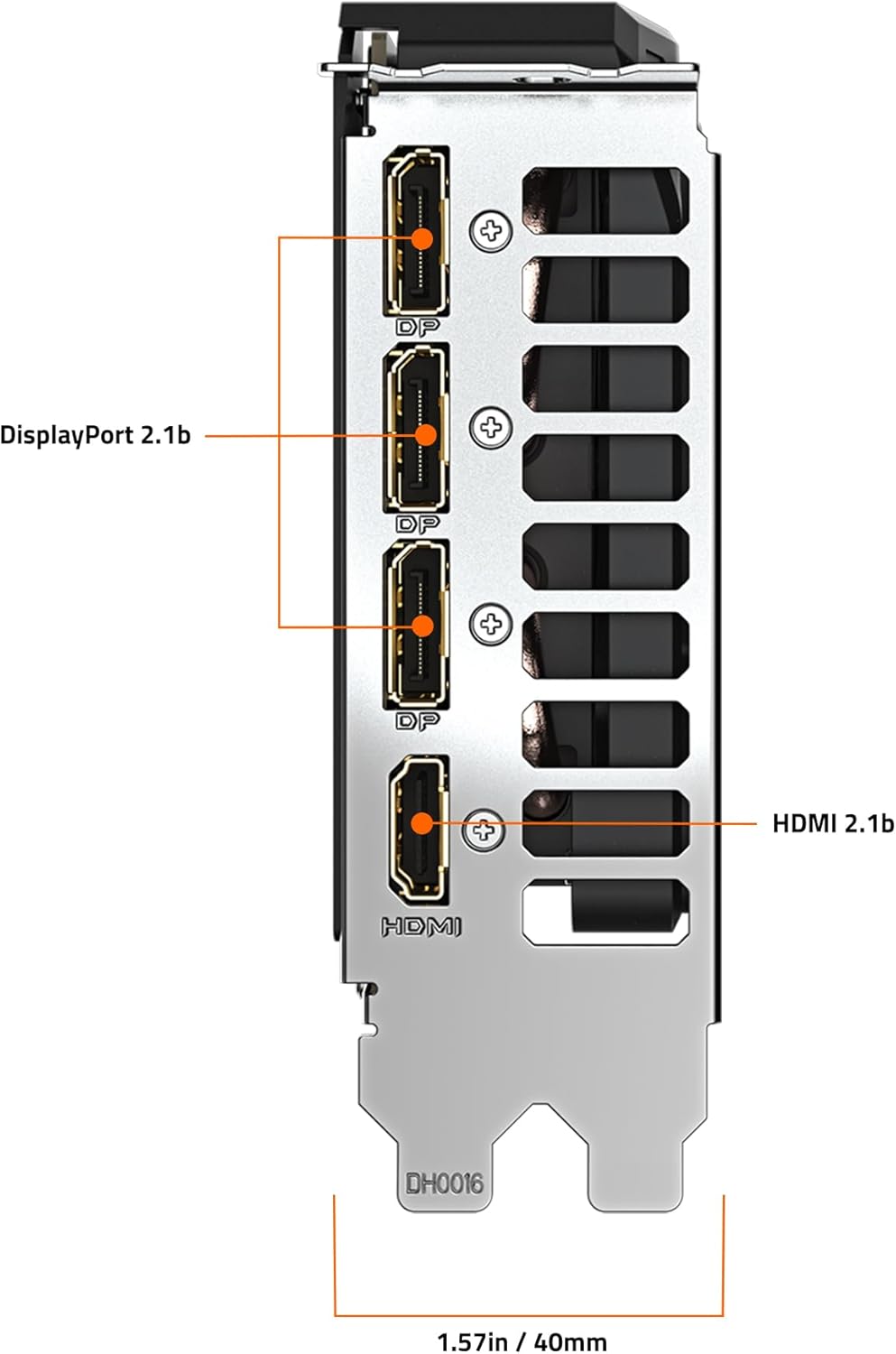
Малюнок 3: Задня частина view of the GIGABYTE GeForce RTX 5060 WINDFORCE MAX OC 8G Graphics Card, highlighting the DisplayPort and HDMI output connectors.
5.2 Програмні утиліти
Utilize GIGABYTE and NVIDIA software for enhanced control and customization:
- Центр керування GIGABYTE: Download from the GIGABYTE website to monitor GPU status, adjust fan speeds, and customize RGB lighting (if applicable).
- Панель керування NVIDIA: Access advanced display settings, manage 3D settings, and configure features like DLSS and Ray Tracing.
6. Технічне обслуговування
6.1 Очищення
Регулярне очищення допомагає підтримувати оптимальну продуктивність і подовжує термін служби вашої відеокарти.
- Вимкнення живлення: Always power off your computer and disconnect it from the power source before cleaning.
- Видалення пилу: Use compressed air to gently blow dust from the fans, heatsink fins, and other components. Hold the fans in place to prevent over-spinning.
- Очищення поверхні: Злегка протріть м’якою тканиною без ворсу dampened with isopropyl alcohol to clean the exterior surfaces of the card. Avoid harsh chemicals.
6.2 Оновлення драйверів
Keep your graphics drivers updated to ensure compatibility with the latest games and applications, and to benefit from performance improvements and bug fixes.
- Періодично перевіряйте GIGABYTE або NVIDIA website for new driver releases.
- Follow the provided instructions for driver installation.
7. Вирішення проблем
Якщо у вас виникли проблеми з відеокартою, зверніться до наступних поширених проблем та рішень:
| проблема | Можлива причина | Рішення |
|---|---|---|
| Немає зображення на моніторі | Incorrect cable connection, loose card, power issue, driver problem. | Ensure display cables are securely connected. Re-seat the graphics card. Verify power connectors are attached. Reinstall or update drivers. |
| Низька продуктивність в іграх/додатках | Outdated drivers, incorrect settings, insufficient power. | Update graphics drivers. Adjust in-game graphics settings. Ensure adequate power supply. Check for background applications consuming resources. |
| Перегрів або гучний шум вентилятора | Dust accumulation, poor case airflow, high load. | Clean fans and heatsink. Improve case airflow. Monitor temperatures with GIGABYTE Control Center. Adjust fan curves if necessary. |
| Нестабільність або збої системи | Driver conflicts, overheating, faulty hardware. | Perform a clean driver installation. Monitor temperatures. Check other system components. |
8. Технічні характеристики
| Особливість | Деталь |
|---|---|
| Графічний процесор | NVIDIA GeForce RTX 5060 (Blackwell architecture) |
| Відеопам'ять | 8 ГБ GDDR7 |
| Інтерфейс пам'яті | 128-бітний |
| Швидкість пам'яті | 28000 МГц |
| Тактова частота GPU | 2512 MHz (Boost Clock) |
| PCI Express | PCIe 5.0 x8 |
| Система охолодження | WINDFORCE cooling system with Hawk fan |
| Інтерфейс відеовиходу | 3x DisplayPort 2.1, 1x HDMI 2.1 |
| Максимальна роздільна здатність екрана | 3840x2160 |
| Роз'єм живлення | 1x 8-контактний |
| Рекомендований блок живлення | 450W or higher |
| Розміри (ДxШxВ) | 7.83 x 4.57 x 1.57 дюйма (199 x 116 x 40 мм) |
| Вага товару | 1.1 фунта |
| Ключові характеристики | DLSS 4, AI Cores, 4th Gen Ray Tracing Cores, Reinforced structure, Server-grade Thermal conductive gel |
9. Гарантія та підтримка
GIGABYTE products are covered by a limited warranty. For detailed warranty information, technical support, and service inquiries, please visit the official GIGABYTE support webсайт:
Підтримка GIGABYTE: https://www.gigabyte.com/Support
Зберігайте підтвердження покупки для гарантійних претензій.