1. Вступ
The Flashpoint Zoom Li-Ion V480C is a high-performance on-camera flash designed for Canon cameras, offering advanced features for professional and enthusiast photographers. This flash integrates with the Flashpoint R2 wireless system, providing versatile lighting control. Key features include a Guide Number of GN50, rapid 1.7-second recycle time, TTL auto flash, manual flash modes, and 2.4GHz wireless control.

Image 1.1: Flashpoint Zoom Li-Ion V480C with an overview of its main features.
2. Включені компоненти
Перевірте, чи всі наступні елементи входять до вашої упаковки:
- Flashpoint Zoom Li-on Compact V480 Flash
- VB22 7.2 V / 2200 mAh Rechargeable Li-ion Battery Pack
- Зарядний пристрій
- Міні-підставка
- Захисний футляр
3. Продукт закінчивсяview
Familiarize yourself with the various parts of your Flashpoint V480C flash unit.

Зображення 3.1: Передня та бічна частини view of the Flashpoint V480C with numbered components.
- Catchlight Panel (White)
- Built-in Wide Angle Diffuser
- Flash Head
- Світлодіодне моделювання Lamp
- Датчик фотоелементів
- Замкове кільце
- Гарячий черевик
- Гніздо для кабелю синхронізації
- Сенсорний екран
- Порт оновлення мікропрограми USB-C
- Кнопка вимикача живлення
- Встановити кнопку
- Виберіть Набір
- Кнопка перевірки / індикатор переробки
- Пряжка для фіксації гарячого башмака
4. Налаштування
4.1. Встановлення та зарядка акумулятора
The Flashpoint V480C uses a VB22 7.2V / 2200mAh rechargeable Li-ion battery pack. Ensure the battery is fully charged before first use.
- To install the battery, slide open the battery compartment cover located on the side of the flash unit.
- Insert the VB22 Li-ion battery pack, ensuring the contacts align correctly.
- Закривайте кришку батарейного відсіку, доки вона надійно не зафіксується.
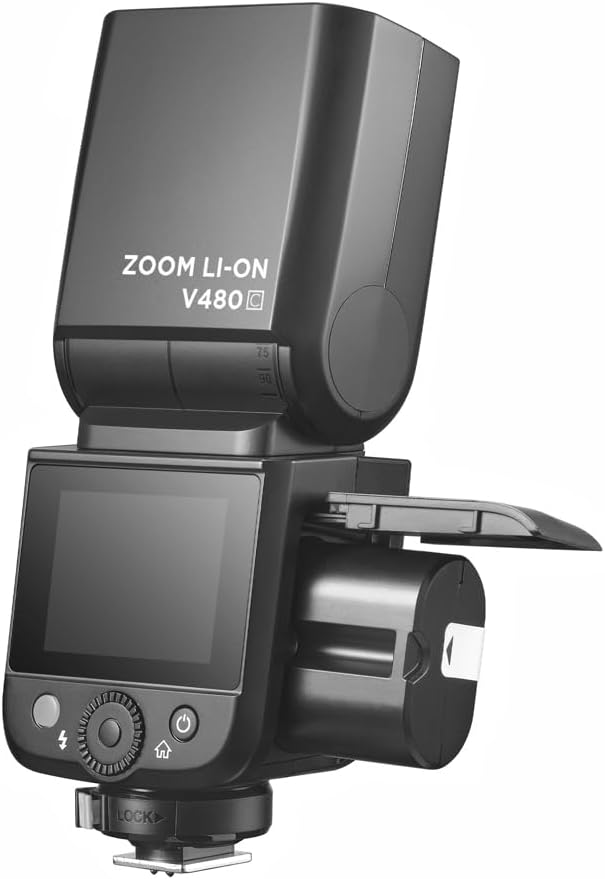
Image 4.1: Battery compartment open for installation.
To charge the battery, use the provided battery charger. Connect the battery to the charger and plug the charger into a power outlet. The indicator light on the charger will show the charging status.
4.2. Кріплення спалаху до камери
The V480C is designed to mount onto a camera's hot shoe.
- Переконайтеся, що ваша камера вимкнена.
- Slide the flash's hot shoe (7) into your camera's hot shoe mount.
- Rotate the Hot Shoe Fixing Buckle (15) clockwise to secure the flash firmly in place. Do not overtighten.
5. Використання спалаху
5.1. Powering On/Off and Basic Controls
To power on the flash, press and hold the Power Switch Button (11) until the screen illuminates. To power off, press and hold the same button.
The V480C features a crisp color touchscreen (9) and tactile buttons for intuitive control.

Image 5.1: Touchscreen and button interface for adjusting flash settings.
- Set Button (12): Used to confirm selections or enter menu options.
- Select Dial (13): Rotate to navigate menus and adjust values.
- Test Button / Recycle Indicator (14): Press to fire a test flash. The indicator light shows when the flash is ready to fire.
5.2. Режими спалаху
V480C підтримує різні режими спалаху:
- Автоматичний спалах TTL: Автоматично налаштовує потужність спалаху для правильної експозиції.
- Ручний спалах: Allows manual control over flash power output (1/1 to 1/256 in 1/3 stop increments).
- Мультиспалах (стробоскопічний): Спрацьовує серію швидких спалахів під час однієї експозиції для захоплення кількох рухів.
5.3. Wireless Operation (R2 System)
The V480C features built-in 2.4GHz R2 wireless functionality, allowing it to act as a master or slave unit within the Flashpoint R2 system. It supports 4 groups and 32 channels with a transmission range of up to 100m.

Зображення 5.2: Наприкладample of 2.4GHz R2 wireless integration in a studio environment.
Refer to the on-screen menu for setting master/slave modes, group assignments, and channel selection.
5.4. Високошвидкісна синхронізація (HSS)
High-Speed Sync allows the flash to synchronize with shutter speeds up to 1/8000s, enabling you to use flash with wide apertures in bright conditions or to freeze fast motion.

Image 5.3: Demonstration of High-Speed Sync (HSS) capability.
Activate HSS through the flash's menu or your camera's flash control settings.
5.5. Світлодіодне моделювання Lamp
The built-in LED Modeling Lamp (4) provides continuous light for focusing in low-light conditions or for previewing lighting effects. Adjust its brightness through the flash's menu.
5.6. Оновлення мікропрограми
The Flashpoint V480C supports firmware updates via its USB-C Firmware Upgrade Port (10). Visit the Flashpoint webсайт для отримання останньої версії прошивки та інструкцій.
6. Технічне обслуговування
6.1. прибирання
Для очищення спалаху використовуйте м’яку суху тканину. Для стійкого бруду використовуйте злегкаamp Можна використовувати тканину, а потім суху тканину. Не використовуйте сильні мийні засоби або розчинники.
6.2. Зберігання
When not in use for extended periods, remove the battery from the flash unit. Store the flash in a cool, dry place, away from direct sunlight and extreme temperatures. Use the provided protective case for storage and transport.
7. Вирішення проблем
If you encounter issues with your Flashpoint V480C, refer to the following common problems and solutions:
- Спалах не спрацьовує:
- Ensure the flash is powered on and securely mounted to the camera's hot shoe.
- Check battery level; recharge if necessary.
- Verify camera and flash settings are compatible (e.g., flash enabled in camera menu).
- If using wireless, ensure master and slave units are on the same channel and group.
- Incorrect exposure (too dark/too bright):
- In TTL mode, check for Flash Exposure Compensation (FEC) settings on both flash and camera.
- У ручному режимі налаштуйте потужність спалаху.
- Ensure flash head zoom matches lens focal length or is set to auto.
- Flash recycle time is slow:
- Battery may be low; recharge or replace.
- High power settings naturally result in longer recycle times.
- Проблеми з бездротовим підключенням:
- Ensure all units are within range (100m).
- Перевірте наявність перешкод від інших пристроїв з частотою 2.4 ГГц.
- Verify channel and group settings are identical on all units.
If problems persist, consult the Flashpoint support webсайту або зв’яжіться зі службою підтримки клієнтів.
8. Технічні характеристики
| Модель | V480C |
| Ведучий номер | GN50 (ISO 100, у метрах) |
| Час переробки | прибл. 1.7 секунд |
| Режими спалаху | TTL, ручний, мульти |
| Функція бездротового зв'язку | Господар, Раб, Вимк |
| Дальність бездротового зв'язку | Прибл. 100m |
| Канали | 32 (1-32) |
| Групи | 4 (A, B, C, D) |
| Високошвидкісна синхронізація | До 1/8000 с |
| Джерело живлення | VB22 Li-ion Battery (7.2V / 2200mAh) |
| Розміри | 6.54 дюйма x 2.8 дюйма x 1.93 дюйма (16.6 x 7.1 x 4.9 см) |
| Вага (з акумулятором) | 12.7 унцій (360g) |
| Сумісні кріплення | Canon |
9. Гарантія та підтримка
For warranty information, technical support, or service inquiries, please refer to the documentation provided with your purchase or visit the official Flashpoint webсайт. Зберігайте чек про покупку для гарантійних претензій.


