1. Продукт закінчивсяview
The GIGABYTE B840M Eagle WIFI6 is a Micro-ATX motherboard designed for AMD Socket AM5 processors, supporting AMD Ryzen 9000, 8000, and 7000 series. It features DDR5 memory support, dual M.2 slots, PCIe 4.0 connectivity, USB 3.2 Gen 1, WIFI6, and 2.5GbE LAN. This motherboard is engineered to provide a stable and high-performance foundation for your personal computer system.


2. Ключові характеристики
- Роз'єм AMD AM5: Підтримує процесори AMD Ryzen 9000 / Ryzen 8000 / Ryzen 7000 серії.
- Сумісність з DDR5: Features 2 DIMM slots for DDR5 memory.
- Проектування живлення: Robust 5+2+2 power phase design for stable performance.
- Терміки: Оснащений системою живлення (VRM) та термозахисними системами M.2 Thermal Guard для ефективного розсіювання тепла.
- Підключення: Includes PCIe 4.0, 2x M.2 Slots, and USB-C ports.
- Зручне для самостійного використання: Features M.2 EZ-Latch, PCIe EZ-Latch, and Wi-Fi EZ-Plug for simplified installation.
- Мережа: Integrated WIFI6 and 2.5GbE LAN for high-speed network connectivity, plus BT 5.3.
3. Посібник із налаштування
This section provides a general guide for installing your GIGABYTE B840M Eagle WIFI6 motherboard. Always refer to the detailed instructions provided with your CPU, RAM, and other components for specific installation procedures.
3.1. Підготовка
- Переконайтеся, що ваше робоче місце чисте та добре освітлене.
- Зніміть статичну електрику, доторкнувшись до заземленого металевого предмета, перш ніж торкатися компонентів.
- Gather all necessary components: CPU, CPU cooler, RAM, M.2 SSDs, graphics card, power supply, and PC case.
3.2. Встановлення процесора
- Locate the AMD Socket AM5 on the motherboard.
- Відкрийте важіль фіксації роз'єму процесора.
- Carefully align the CPU with the socket, ensuring the golden triangle on the CPU matches the triangle on the socket. Do not force the CPU into place.
- Закрийте важіль фіксації, щоб закріпити процесор.
3.3. Встановлення кулера процесора
Install your chosen CPU cooler according to its manufacturer's instructions. Ensure proper thermal paste application for optimal cooling.
3.4. Встановлення оперативної пам'яті
- Відкрийте затискачі з обох кінців слотів DDR5 DIMM.
- Зіставте модуль оперативної пам'яті зі слотом, переконавшись, що виїмка на модулі збігається з ключем у слоті.
- Міцно натисніть на обидва кінці модуля оперативної пам'яті, доки затискачі не зафіксуються на місці.
3.5. Встановлення твердотільного накопичувача M.2
The motherboard features 2 M.2 slots with EZ-Latch. Refer to the motherboard diagram for their locations.
- Locate an M.2 slot and remove the M.2 Thermal Guard if present.
- Вставте твердотільний накопичувач M.2 у слот під кутом.
- Gently push down the SSD and secure it using the M.2 EZ-Latch mechanism.
- Reinstall the M.2 Thermal Guard.
3.6. Монтаж материнської плати
- Install the I/O shield into your PC case (if not pre-attached).
- Вирівняйте материнську плату з виступами в корпусі вашого ПК.
- Закріпіть материнську плату гвинтами, не перетягуючи їх.
3.7. Підключення живлення
- Підключіть 24-контактний основний роз'єм живлення ATX від блока живлення до материнської плати.
- Connect the 8-pin (or 4+4-pin) ATX 12V CPU power connector.
3.8. Підключення передньої панелі та периферійних пристроїв
Connect the front panel headers (power button, reset button, USB ports, audio jacks) and other peripherals (SATA drives, case fans) to the appropriate headers on the motherboard. Refer to the labeled diagram below for assistance.
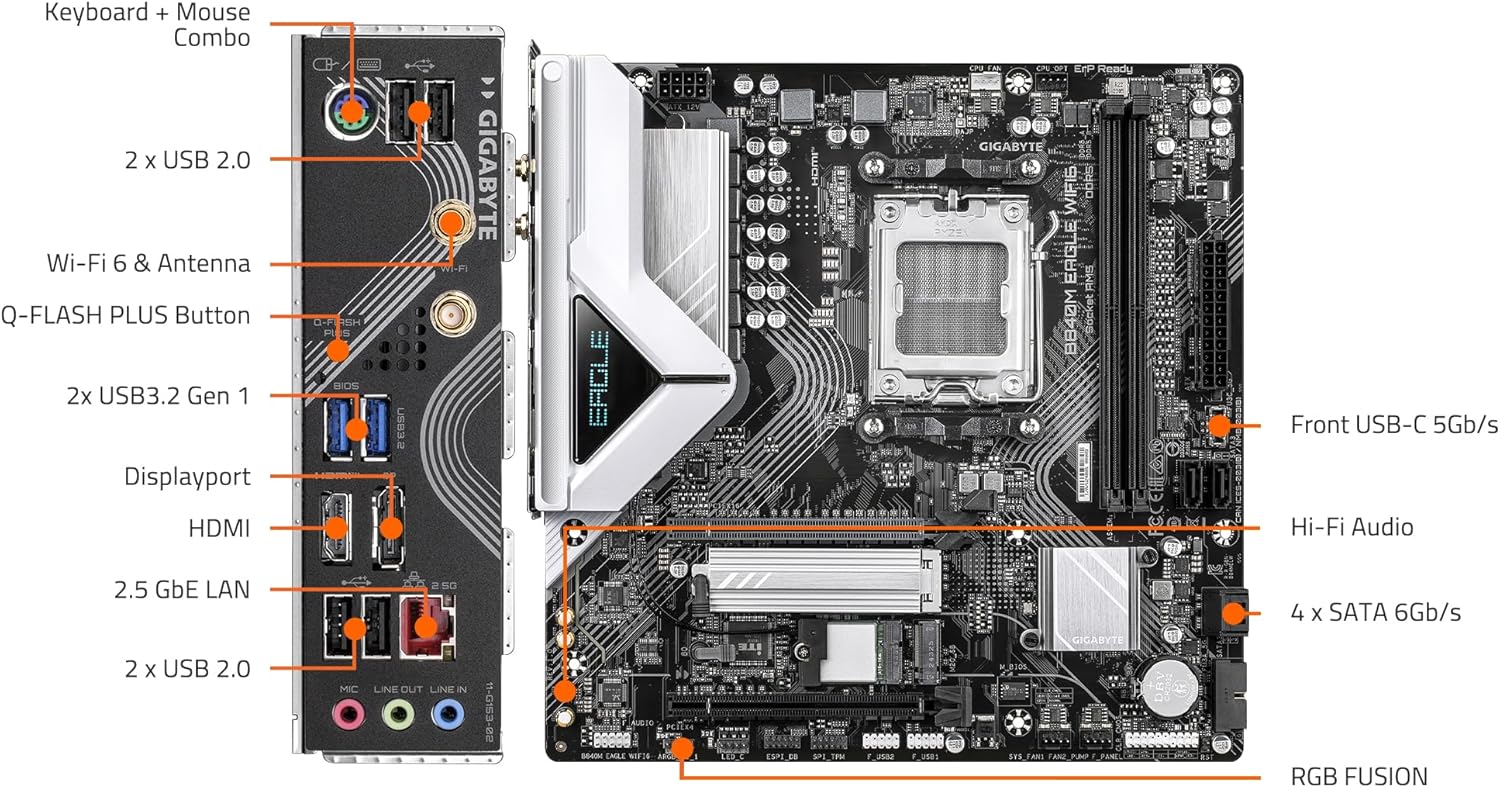

3.9. Встановлення графічної карти
- Open the PCIe EZ-Latch on the primary PCIe x16 slot.
- Insert your graphics card firmly into the slot until it clicks into place.
- Закріпіть відеокарту до корпусу ПК гвинтами.
- Підключіть усі необхідні кабелі живлення PCIe від блока живлення до відеокарти.
4. Інструкція з експлуатації
4.1. Перше завантаження та налаштування BIOS/UEFI
- Після підключення всіх компонентів та периферійних пристроїв увімкніть систему.
- Натисніть призначену клавішу (зазвичай DEL or F2) під час запуску, щоб увійти до утиліти налаштування BIOS/UEFI.
- Configure boot order, system time, and other essential settings as needed. Save changes and exit.
4.2. Встановлення операційної системи
Вставте інсталяційний носій операційної системи (USB-накопичувач або DVD-диск) і дотримуйтесь підказок на екрані, щоб встановити потрібну ОС.
4.3. Встановлення драйвера
After OS installation, install the latest drivers for your motherboard, graphics card, and other components. You can find the latest drivers on the GIGABYTE official website for your B840M Eagle WIFI6 motherboard.
4.4. Підключення до мережі
- Провідна локальна мережа: Connect an Ethernet cable to the 2.5GbE LAN port on the rear I/O panel.
- Wireless (WIFI6): Attach the included Wi-Fi antennas to the connectors on the rear I/O panel. Ensure Wi-Fi drivers are installed for wireless connectivity.
5. Технічне обслуговування
Регулярне технічне обслуговування допомагає забезпечити довговічність та оптимальну продуктивність вашої материнської плати та ПК.
- Очищення від пилу: Periodically clean dust from inside your PC case, especially from fans, heatsinks, and motherboard components, using compressed air. Ensure the system is powered off and unplugged before cleaning.
- Оновлення BIOS/UEFI: Перевірте GIGABYTE website for the latest BIOS/UEFI updates. Updates can improve compatibility, stability, and performance. Follow GIGABYTE's instructions carefully when updating the BIOS.
- Оновлення драйверів: Регулярно оновлюйте драйвери системи, щоб забезпечити сумісність та оптимальну продуктивність з новим програмним та апаратним забезпеченням.
- Перевірки компонентів: Occasionally check all cable connections (power, data, front panel) to ensure they are secure.
6. Вирішення проблем
У цьому розділі розглядаються поширені проблеми, з якими ви можете зіткнутися. Щодо складніших проблем зверніться до служби підтримки GIGABYTE. webсайт або зверніться до технічної підтримки.
6.1. Немає живлення / Немає POST (самотестування при ввімкненні)
- Ensure all power cables (24-pin ATX, 8-pin CPU, PCIe power) are securely connected.
- Перевірте, чи джерело живлення увімкнено та працює належним чином.
- Check front panel connections, especially the power button header.
- Перевстановіть модулі оперативної пам'яті та відеокарту.
- Try booting with minimal components (CPU, one RAM stick, graphics card) to isolate the issue.
- Clear CMOS by removing the CMOS battery for a few minutes or using the clear CMOS jumper (refer to motherboard manual for exact location).
6.2. Нестабільність системи / Збої
- Переконайтеся, що всі драйвери оновлені.
- Перевірте температуру процесора та графічного процесора, щоб виключити перегрів.
- Запустіть інструменти діагностики пам'яті, щоб перевірити наявність несправної оперативної пам'яті.
- Перевірте напругу живленняtage достатньо для всіх компонентів.
6.3. Проблеми з підключенням до мережі
- Провідний: Check Ethernet cable connection and router/modem status. Ensure LAN drivers are installed.
- Бездротовий: Ensure Wi-Fi antennas are properly attached and Wi-Fi drivers are installed. Check Wi-Fi network settings in your operating system.
6.4. Периферійний пристрій не виявлено
- Ensure the peripheral is correctly connected to the appropriate port.
- Install the latest drivers for the peripheral.
- Test the peripheral on another port or another system if possible.
7. Технічні характеристики
| Особливість | Специфікація |
|---|---|
| Гніздо ЦП | AMD Socket AM5 |
| Сумісні процесори | AMD Ryzen 9000 / Ryzen 8000 / Ryzen 7000 Series |
| Чіпсет | AMD B840 |
| Технологія оперативної пам'яті | DDR5 |
| слоти пам'яті | 2x DIMMs |
| Тактова частота пам'яті | Up to 5200 MHz (and higher via OC) |
| Зберігання | 2x M.2 Slots, 4x SATA 6Gb/s |
| PCIe слоти | PCIe 4.0 |
| USB порти | USB 3.2 Gen 1, USB-C |
| Мережа | WIFI6, 2.5GbE LAN, BT 5.3 |
| Форм-фактор | Micro-ATX |
| Розміри (ДxШxВ) | 8.82 x 8.82 x 1 дюймів |
| Вага товару | 4.4 фунта |
| Підтримка операційної системи | Windows 11 |
8. Гарантія та підтримка
For detailed warranty information, technical support, driver downloads, and BIOS updates, please visit the official GIGABYTE website. You can find product-specific support by navigating to the support section and searching for your model, B840M Eagle WIFI6.
Офіційний представник GIGABYTE Webсайт: https://www.gigabyte.com/
Завжди переконайтеся, що ви завантажуєте програмне забезпечення та драйвери з офіційного сайту виробника. website to prevent security risks.


