вступ
This manual provides detailed instructions for the assembly, operation, and maintenance of your HUANUO AI-Powered Electric Standing Desk. Please read this manual thoroughly before use to ensure proper function and safety.
Важлива інформація з безпеки
Always keep children away from the desk when it is in operation. Use the child lock feature to prevent accidental height adjustment. Be cautious when adjusting the desk's height to avoid injury. Ensure the desk is properly anchored to the floor to prevent tipping.
Вміст упаковки
Before beginning assembly, verify that all components are present and undamaged. Refer to the parts list included in your packaging.

Figure 1: All components of the HUANUO AI-Powered Electric Standing Desk laid out for assembly.
Налаштування та збірка
Assembly typically takes less than an hour for one person. While all necessary tools are provided, using a power drill with appropriate bits can expedite the process. The desktop is designed in two pieces for easier shipping and assembly.
- Розпакуйте компоненти: Обережно вийміть усі деталі з упаковки та розкладіть їх на чистій м’якій поверхні, щоб запобігти подряпинам.
- Збірка каркаса столу: Follow the included diagrams to connect the desk legs and crossbar. Ensure all screws are tightened securely.
- Прикріпити робочий стіл: Secure the two desktop pieces together using the provided connectors and then attach the assembled desktop to the frame.
- Встановлення панелі керування: Mount the control panel to the underside of the desktop in your preferred location.
- Підключіть кабелі: Connect the motor and control panel cables to the main control box. Ensure all connections are firm.
- Увімкнення: Plug the desk into a power outlet.
Video 1: ERGOMAKER Electric Standing Desk assembly guide. This video demonstrates the assembly process for a similar electric standing desk, providing a visual aid for users.
Video 2: Longke store sit stand desk assembly. This video provides a visual walkthrough of the assembly steps for a sit-stand desk, which can be helpful for understanding the process.
Video 3: Electric Standing Desk Height Adjustable assembly. This video illustrates the assembly of an electric standing desk, focusing on the height adjustment mechanism.
Інструкція з експлуатації
Your HUANUO AI-Powered Electric Standing Desk offers multiple ways to adjust its height and manage your ergonomic settings.
Ручне регулювання висоти
- Використовуйте Вгору (▲) і Вниз (▼) arrow buttons on the control panel to manually adjust the desk to your desired height. The current height will be displayed on the panel.

Figure 2: The smart control panel with height display, memory presets, and adjustment buttons.
Memory Settings (Up to 6 Presets with App)
- Щоб зберегти висоту: Adjust the desk to your desired height. Press the «М» button, then press one of the numbered preset buttons (1-6) within 3 seconds. The height is now saved to that preset.
- Щоб використати збережену висоту: Simply press the corresponding numbered preset button (1-6). The desk will automatically move to the saved height.
Smart APP Control (Ergo BQ)
- Завантажити Ergo BQ додаток з магазину додатків вашого пристрою.
- Follow the in-app instructions to pair your desk via Bluetooth or Wi-Fi.
- The app allows for precise height adjustments, setting up to 6 memory presets, and accessing AI-recommended ergonomic seat height adjustments based on your height and weight.

Figure 3: The HUANUO AI-Powered Electric Standing Desk with its accompanying smartphone application for smart control.
Voice Control (Alexa, Google, Siri)
- Once connected to the Ergo BQ app, integrate your desk with Alexa, Google Assistant, or Siri for hands-free voice commands.
- Use commands like "Alexa, set the desk height to sit" or "Hey Google, set the desk height to stand."
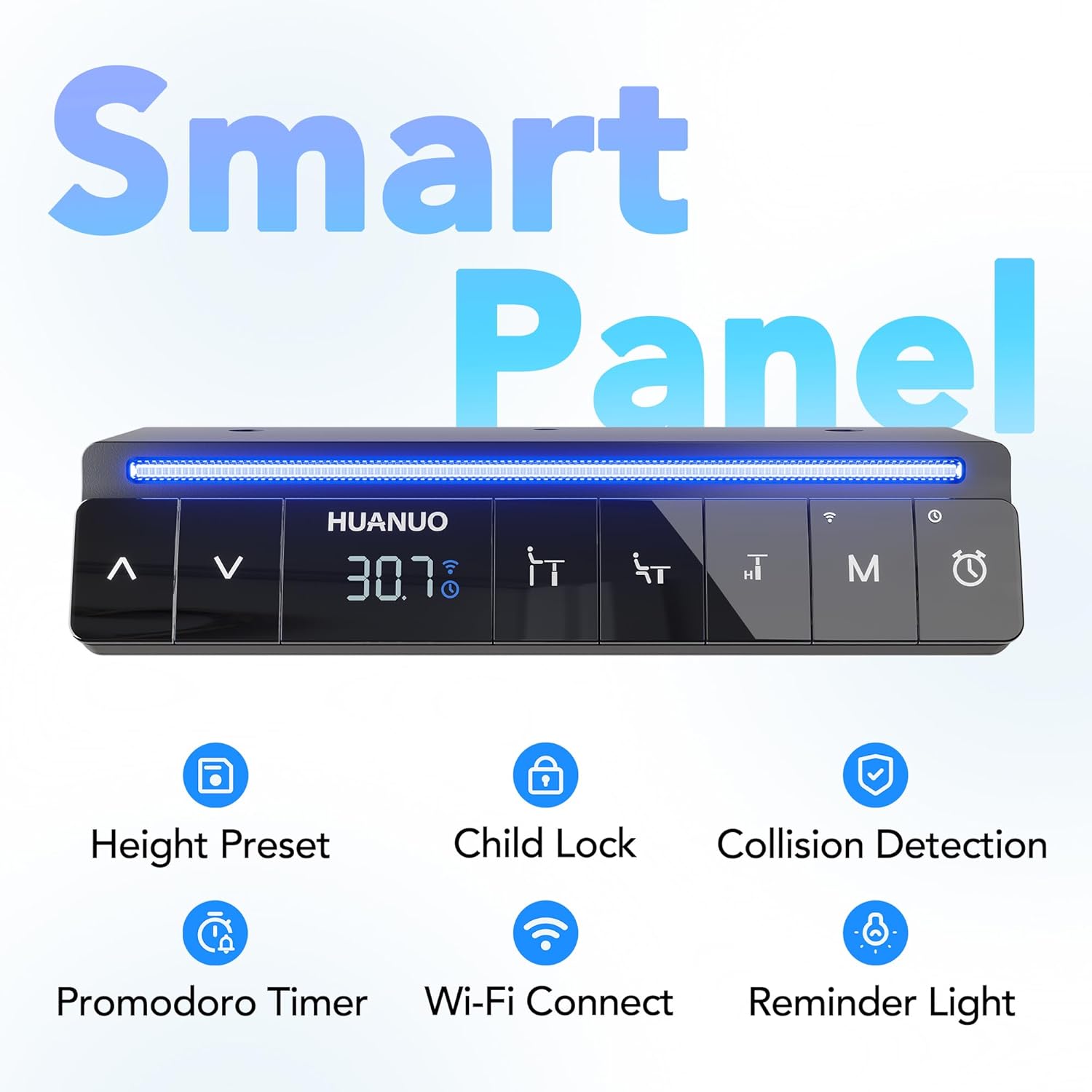
Figure 4: Voice control functionality of the desk, compatible with Alexa, Google, and Siri.
Pomodoro Sit-Stand Cycle & Sedentary Reminder
- Activate the Pomodoro cycle and sedentary reminders through the Ergo BQ app.
- The desk will prompt you to switch between sitting and standing positions at customizable intervals to promote healthier work habits.
Figure 5: The smart control panel highlighting the Pomodoro Timer and Reminder Light features.
Блокування від дітей
- Engage the child lock feature via the control panel or Ergo BQ app to prevent unintended operation by children or pets.
Технічне обслуговування
- Прибирання: Протріть робочий стіл і рамку м’якою серветкоюamp тканиною. Уникайте агресивних хімікатів або абразивних засобів для чищення.
- Управління кабелем: Регулярно перевіряйте та упорядковуйте кабелі, щоб запобігти сплутуванню та пошкодженню.
- Огляд: Періодично перевіряйте всі гвинти та з'єднання, щоб переконатися, що вони міцно затягнуті.
Усунення несправностей
If you encounter any issues with your desk, please refer to the following common troubleshooting steps:
- Стіл не рухається: Check all cable connections to ensure they are securely plugged in. Verify the power outlet is functioning.
- Відображений код помилки: Consult the Ergo BQ app or the full product manual for specific error code meanings and solutions.
- Нерівномірний рух: Ensure the desk is placed on a level surface. If necessary, adjust the leveling feet on the desk's base.
- Шум під час роботи: A slight motor sound is normal. If the noise is excessive or unusual, check for any obstructions or loose components.
Технічні характеристики
| Особливість | Деталь |
|---|---|
| Бренд | ХУАНУО |
| Номер моделі | ESD04B-80A-I-US |
| Назва моделі | ESD04-I |
| Розміри продукту | 18.9" Г x 31.5" Ш x 28.3" В |
| Розмір | AI-32" x 19" |
| Колір | чорний |
| Мінімальна висота | 72 Сантиметри |
| Максимальна висота | 118 Сантиметри |
| Тип верхнього матеріалу | Інженерна деревина |
| Основний матеріал | легована сталь |
| Вага товару | 23.6 фунта |
| Особливості | Adjustable Height, Electric, Ergonomic, Lightweight, Rust Resistant |
| UPC | 840478827248 |
Гарантія та підтримка
Your HUANUO AI-Powered Electric Standing Desk comes with a Обмежена гарантія. For specific details regarding the warranty period and coverage, please refer to the documentation included with your product.
For technical assistance or customer support, please contact HUANUO customer service. US-Based Technical Support is available to assist you with any product-related inquiries.


