вступ
This manual provides instructions for the MangoKit CD-X Portable CD Player. This device allows you to enjoy your favorite audio CDs, MP3, and WMA files on the go, with versatile connectivity options including Bluetooth 5.3, wired headphones, and AUX output. It features a rechargeable battery and anti-skip protection for uninterrupted listening.
Інформація про безпеку
- Не піддавайте пристрій впливу екстремальних температур, прямих сонячних променів або високої вологості.
- Уникайте падіння та сильних ударів пристрою.
- Не намагайтеся самостійно розібрати або відремонтувати пристрій. Зверніться по допомогу до служби підтримки клієнтів.
- Use only the provided charging cable and a compatible power adapter (5V/1A recommended, not included) to charge the device.
- Тримайте пристрій подалі від води та інших рідин.
- When using headphones, adjust the volume to a moderate level to prevent hearing damage.
Вміст упаковки
Перевірте наявність усіх елементів в упаковці:
- 1 x MangoKit CD-X Portable CD Player
- 1 дротові навушники
- 1 x USB кабель зарядки типу C
- 1 кабель AUX від 3.5 мм до 3.5 мм
- 1 х посібник користувача

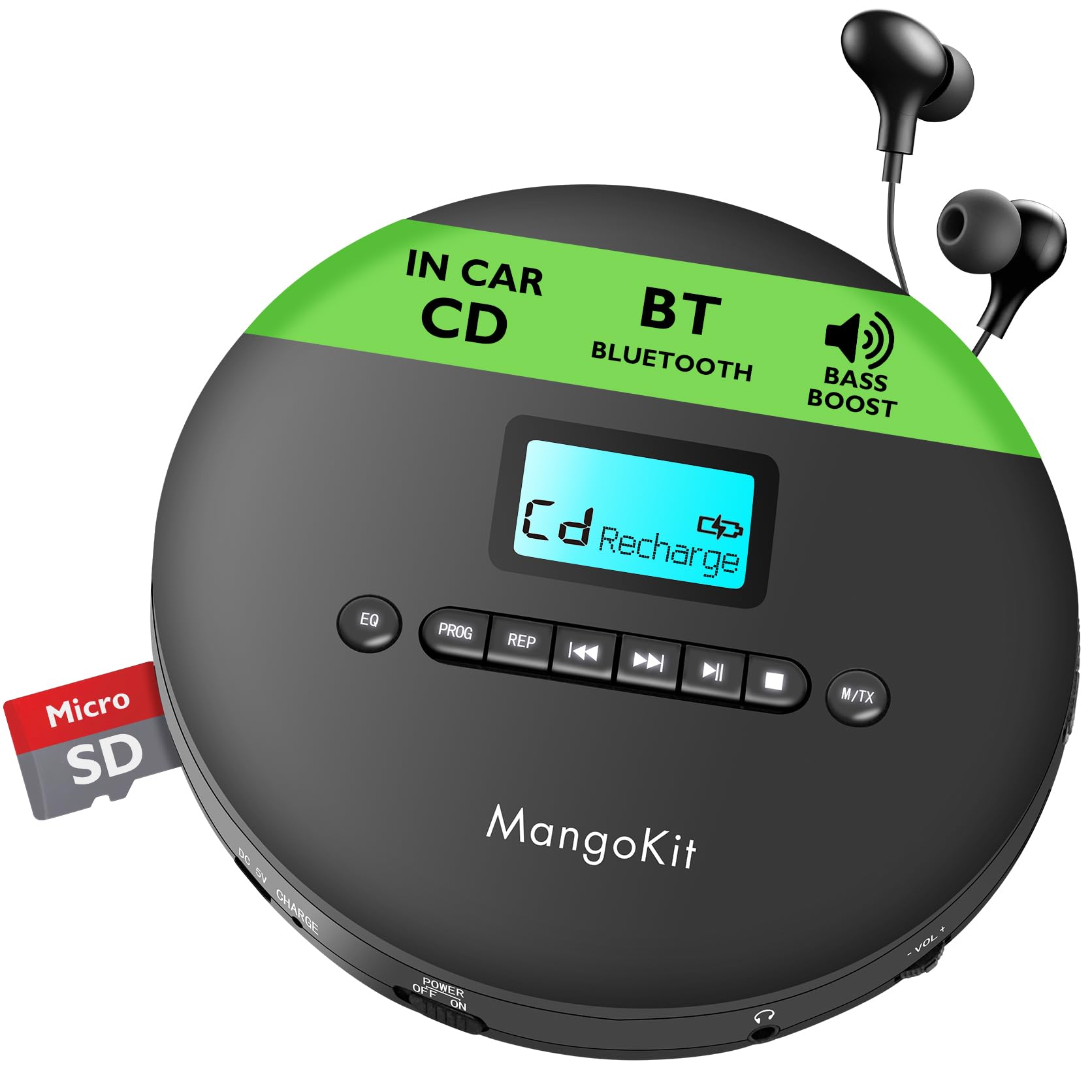
The MangoKit CD-X Portable CD Player and its included accessories, ready for use.
Продукт закінченийview
The MangoKit CD-X features an intuitive layout for easy operation.
Елементи керування передньої панелі:
- Кнопка EQ: Press to cycle through equalizer sound modes.
- Кнопка PROG: Used for programming track playback order.
- REP Button: Cycles through repeat modes (repeat one, repeat all, random).
- Кнопка «Попередній/Перемотування назад»: Short press for previous track, long press to rewind.
- Кнопка відтворення/паузи: Запуск або призупинення відтворення.
- Кнопка «Далі/Перемотування вперед»: Short press for next track, long press to fast forward.
- Кнопка зупинки: Зупинка відтворення.
- M/TX Button: Mode/Bluetooth Transmit button.
- РК-дисплей: Shows track number, time, battery status, and mode.
Side Panel Ports and Switches:
- DC 5V CHARGE Port: USB Type-C input for charging.
- POWER OFF/ON Switch: Вмикає або вимикає пристрій.
- Гніздо для навушників (3.5 мм): Connect wired headphones or AUX cable.
- ГУЧНІСТЬ- / ГУЧНІСТЬ+: Кнопки регулювання гучності.
- TF CARD Slot: For playing MP3/WMA files з карти TF.

Детальний view of the MangoKit CD-X Portable CD Player's controls and ports.
Налаштування
1. Charging the Player
Перед першим використанням повністю зарядіть пристрій.
- Connect the USB Type-C charging cable to the DC 5V CHARGE port on the player.
- Connect the other end of the USB cable to a compatible USB power adapter (5V/1A recommended, not included) or a computer's USB port.
- The battery indicator on the LCD display will show charging status. It will indicate full when charging is complete.
Повного заряду вистачає на 12 годин відтворення.
The CD player's compact design and long battery life for portable use.
2. Вставлення компакт-диска
- Gently slide the "OPEN" switch to open the CD compartment lid.
- Place the CD with the label side facing up onto the center spindle.
- Press the CD gently until it clicks into place.
- Щільно закрийте кришку відсіку для компакт-дисків, доки вона не зафіксується.
3. Connecting Headphones or AUX Cable
- For wired listening, plug the included earphones or your own 3.5mm headphones into the headphone jack.
- To connect to an external speaker or car audio system, use the included 3.5mm AUX cable. Plug one end into the player's headphone jack and the other end into the AUX input of your external device.

Connecting the CD player to a car audio system using the AUX cable.
4. Bluetooth Pairing (for Headphones/Earphones)
The CD-X player supports Bluetooth 5.3 for wireless audio transmission to Bluetooth headphones or earphones.
- Ensure the CD player is powered on and a CD is inserted.
- Turn on your Bluetooth headphones/earphones and put them into pairing mode (refer to your headphone's manual for specific instructions).
- On the CD player, long press the M/TX button. The Bluetooth icon on the LCD display will flash, indicating it's searching for devices.
- Once paired, the Bluetooth icon will stop flashing and remain solid. You can now play audio wirelessly.
Note: Bluetooth is for connecting to headphones/earphones only and does not support car audio systems directly via Bluetooth. Use the AUX cable for car audio.

The CD player's Bluetooth feature for wireless headphone connection.
Інструкція з експлуатації
Увімкнення/вимкнення живлення
Посуньте POWER OFF / ON switch to "ON" to turn on the player. Slide to "OFF" to turn it off.
Базове відтворення
- After inserting a CD and powering on, the player will automatically start reading the disc.
- Натисніть Відтворення/Пауза щоб почати або призупинити відтворення.
- Натисніть Далі кнопку, щоб перейти до наступної композиції.
- Натисніть Попередній button to go back to the beginning of the current track or to the previous track.
- Тривале натискання Далі button for fast forward.
- Тривале натискання Попередній button for rewind.
- Натисніть СТІЙ , щоб зупинити відтворення.
Регулювання гучності
Використовуйте ГУЧНІСТЬ+ і VOL- buttons on the side of the player to adjust the volume level.
EQ (Equalizer) Settings
Натисніть EQ button repeatedly to cycle through different sound modes (e.g., Bass, Pop, Jazz, Rock, Classic).
Repeat and Program Modes
Натисніть REP button repeatedly to select playback modes:
- REP 1: Повторює поточний трек.
- ВСІ: Повторює всі треки на диску.
- РЕНД: Відтворення треків у довільному порядку.
- ВСТУП: Plays the first 10 seconds of each track (if available).
Відтворення програми
- У режимі зупинки натисніть кнопку ПРОГ button. The display will show "PROG" and "01".
- Використовуйте Попередній or Далі кнопки для вибору потрібного номера доріжки.
- Прес ПРОГ again to confirm the track and move to the next program slot.
- Повторіть кроки 2-3, щоб запрограмувати до 20 треків.
- Натисніть Відтворення/Пауза кнопку, щоб розпочати запрограмоване відтворення.
Захист від пропуску
The player features electronic skip protection: 100 seconds for standard CDs and 180 seconds for MP3 CDs. This function helps maintain continuous playback during movement or minor shocks.
Playing MP3/WMA CDs or TF Card
When an MP3/WMA CD is inserted or a TF card with MP3/WMA files is inserted into the TF CARD slot, the player will automatically detect the file type. Use the navigation buttons to browse folders and tracks.

The CD player is ideal for language learning and listening to audiobooks.
Технічне обслуговування
Очищення пристрою
Wipe the player with a soft, dry cloth. Do not use abrasive cleaners or solvents.
Очищення лінзи
If the player experiences reading errors, use a specialized CD lens cleaning disc (not included) to clean the laser lens.
Догляд за акумулятором
- Щоб продовжити термін служби акумулятора, уникайте частого повного розряджання акумулятора.
- If the device will not be used for an extended period, charge it at least once every three months.
Усунення несправностей
| проблема | Рішення |
|---|---|
| Плеєр не вмикається. | Ensure the POWER switch is in the "ON" position. Check if the battery is charged; connect to power if necessary. |
| Ні звуку. | Check headphone connection. Adjust volume. Ensure headphones are properly paired if using Bluetooth. |
| Disc skipping or not playing. | Ensure the CD is clean and free of scratches. Make sure the CD is inserted correctly. Try a different CD. Clean the laser lens. |
| Не вдається з'єднати Bluetooth. | Ensure your Bluetooth headphones are in pairing mode and close to the player. Turn off and on both devices and try again. |
Технічні характеристики
| Особливість | Деталь |
|---|---|
| Номер моделі | CD-X |
| Бренд | MangoKit |
| Розміри | 14 х 14 х 2.8 см |
| вага | 400 г |
| Акумулятор | 2000 mAh Rechargeable (up to 12 hours playback) |
| Підключення | Bluetooth 5.3, AUX (3.5mm Jack) |
| Підтримувані аудіоформати | CD, CD-R, CD-RW, MP3, WMA |
| Захист від пропуску | 100 секунд (CD), 180 секунд (MP3) |
| Компоненти в комплекті | CD Player, Earphones, USB Type-C Cable, AUX Cable, User Manual |
Гарантія та підтримка
MangoKit products come with a standard manufacturer's warranty. For detailed warranty information, technical support, or any questions regarding your CD player, please refer to the contact information provided on the product packaging or visit the official MangoKit webсайт.
Відео про продукт
Це відео надає візуальне уявлення проview of the MangoKit CD-X Portable CD Player, showcasing its design, features, and various usage scenarios.