1. Вступ
This manual provides essential information for the safe and efficient operation of your VAR TECH Programmable DC Power Supply, model PPS-3020 S. Please read this manual thoroughly before using the device to ensure proper functionality and to prevent damage or injury.
1.1 Заходи безпеки
- Завжди підключайте блок живлення до заземленої розетки.
- Не використовуйте пристрій у вологих або damp умови.
- Забезпечте належну вентиляцію, щоб запобігти перегріву.
- Не відкривайте casinг; зверніться до кваліфікованого персоналу для обслуговування.
- Перевірте правильний томtage and current settings before connecting to a load.
2. Продукт закінчивсяview
The VAR TECH PPS-3020 S is a programmable DC power supply offering 0-30V and 0-20A output with a USB interface for remote control. It features high precision, stability, and multiple protection functions.
2.1 Основні характеристики
- 0-30 V, 0-20 A Programmable output with USB Interface.
- 5 L.E.D. Multicolour meters of 4 Digits for CV (Constant Voltage) and CC (Constant Current) indication.
- 6 Sets of Memory for storing and recalling settings.
- Output On/Off Facility for safe load connection/disconnection.
- Supports MODBUS-RTU Commands for remote control.
- Над випtagЗахист від електромережі (OVP), захист від перевантаження по струму (OCP) та захист від перегріву (OTP).
2.2 Елементи керування та індикатори передньої панелі

Малюнок 1: Макет передньої панелі
- Цифрові дисплеї: Multi-color LED displays for Voltage (V), Current (A), Power (W), and Set Values (V-SET, I-SET).
- Індикатори CV/CC: Світлодіоди, що індикують постійну гучністьtage or Constant Current mode.
- Кнопка V-SET: Press to adjust voltage налаштування.
- Кнопка I-SET: Press to adjust current setting.
- ADJUST Knob: Rotary encoder for fine adjustment of voltage та поточні значення.
- Кнопка ПАМ'ЯТІ: Access memory functions.
- Кнопка СПИСКУ: Navigate through memory slots.
- Кнопка ON / OFF: Перемикає вихідну потужність.
- LEFT / RIGHT Buttons: Used for digit selection during setting adjustments.
- Порт USB: For PC connection and remote control.
- Вимикач живлення: Main power ON/OFF button.
- Вихідні клеми: Positive (+), Negative (-), and Ground (GND) terminals for load connection.
2.3 Бічна та задня панелі
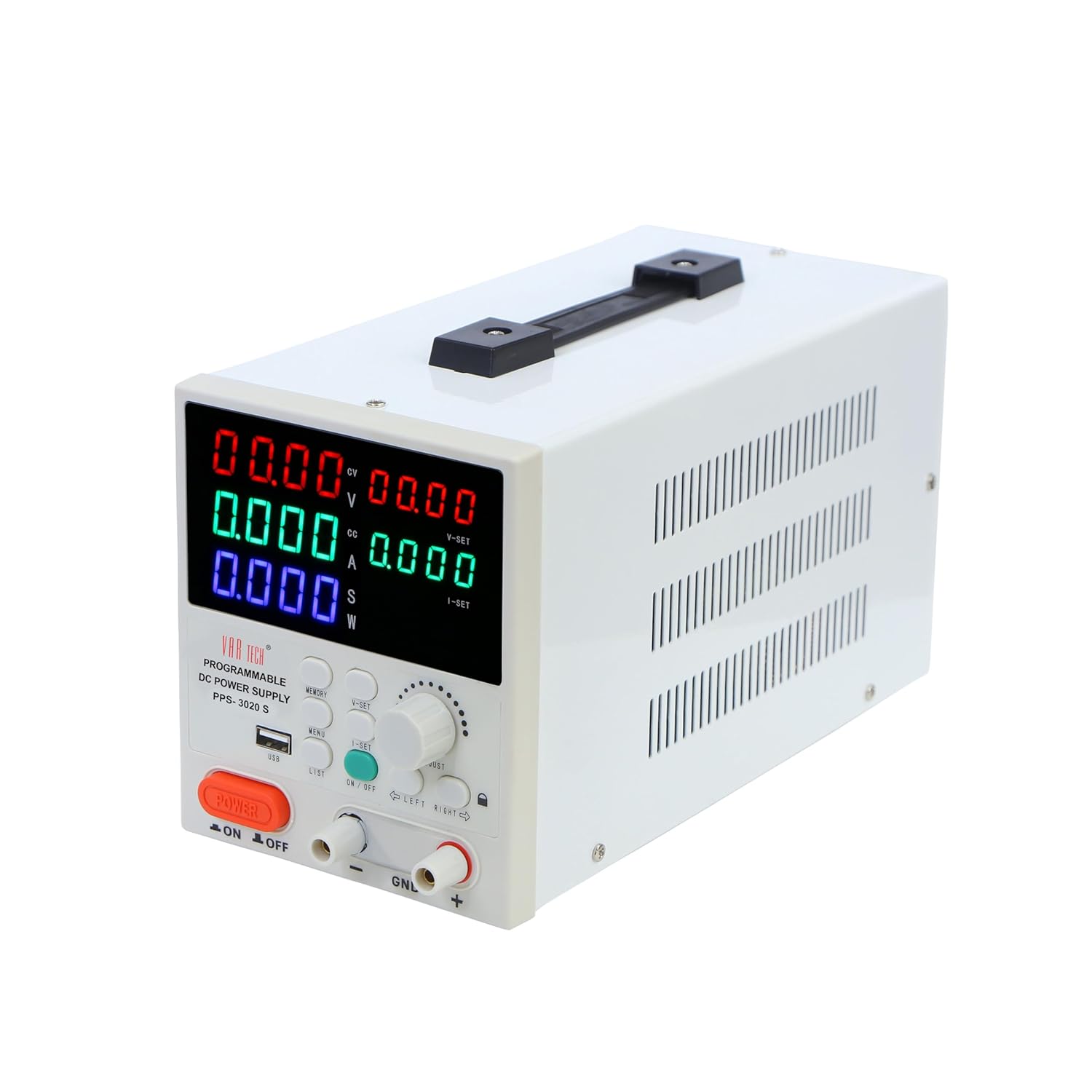
Рисунок 2: Кутовий View with Side Vents
The side panels feature ventilation grilles for heat dissipation. The rear panel typically includes the AC power input socket, a cooling fan, and potentially additional communication ports (not explicitly shown in provided images but common for such devices).
3. Налаштування
3.1 Розпакування та перевірка
Carefully remove the power supply from its packaging. Inspect the unit for any signs of physical damage. Retain the packaging for future transport or storage.
3.2 Підключення живлення
- Ensure the main power switch on the front panel is in the OFF position.
- Connect the provided AC power cord to the power input socket on the rear panel of the power supply.
- Plug the other end of the AC power cord into a suitable grounded electrical outlet.
3.3 Output Terminal Connection
Connect your load to the output terminals using appropriate test leads. Ensure correct polarity:
- Connect the positive (+) terminal of the power supply to the positive input of your load.
- Connect the negative (-) terminal of the power supply to the negative input of your load.
- The GND terminal is for chassis ground and should be connected to the load's ground if required for safety or noise reduction.
Caution: Do not short-circuit the output terminals for extended periods, even with protection enabled.
4. Інструкція з експлуатації
4.1 Увімкнення/вимкнення живлення
- Натисніть основну УВІМКНЕННЯ/ВИМКНЕННЯ ЖИВЛЕННЯ switch on the front panel to turn the unit on. The displays will illuminate.
- Щоб вимкнути, натисніть УВІМКНЕННЯ/ВИМКНЕННЯ ЖИВЛЕННЯ перемкніть знову.
4.2 Налаштування Voltagе і Струм
- Натисніть V-SET кнопка для введення обtage setting mode. The voltage display will flash.
- Використовуйте РЕГУЛЮВАТИ knob to change the voltage value. Turn clockwise to increase, counter-clockwise to decrease.
- Використовуйте ВЛІВО і ПРАВИЛЬНО buttons to select the digit you wish to adjust for finer control.
- Прес V-SET again to confirm the setting or wait a few seconds for it to auto-confirm.
- Repeat steps 1-4 for current setting using the Я ВСТАНОВИВ кнопку.
4.3 Вихідний контроль
Після встановлення потрібної гучностіtagе та струм, натисніть кнопку УВІМК./ВИМК button (typically green) to enable or disable the output. When the output is ON, the corresponding indicator will light up, and power will be supplied to the load. When OFF, no power is supplied.
4.4 Функції пам'яті
The PPS-3020 S allows you to store and recall up to 6 sets of voltage і поточні налаштування.
- Зберегти: Встановіть потрібну гучністьtage and current. Press and hold the ПАМ'ЯТЬ button until a memory slot number (e.g., 'M1') flashes on the display. Use the РЕГУЛЮВАТИ ручка або СПИСОК button to select a memory slot (M1-M6), then press ПАМ'ЯТЬ знову, щоб зберегти.
- Щоб згадати: Натисніть ПАМ'ЯТЬ button briefly. The current memory slot will be displayed. Use the РЕГУЛЮВАТИ ручка або СПИСОК button to select the desired memory slot. Press ПАМ'ЯТЬ again to load the stored settings.
4.5 USB Interface and MODBUS-RTU
The USB port on the front panel allows connection to a computer for remote control and monitoring. The device supports MODBUS-RTU commands, enabling integration into automated test systems or custom software applications. Refer to the separate software manual or communication protocol guide for detailed instructions on using the USB interface and MODBUS-RTU commands.
5. Технічне обслуговування
5.1 Очищення
To clean the unit, disconnect it from the power source. Use a soft, dry cloth to wipe the exterior. Do not use abrasive cleaners or solvents. Ensure no liquids enter the device.
5.2 Зберігання
When not in use for extended periods, store the power supply in a cool, dry environment, away from direct sunlight and excessive dust. It is recommended to use the original packaging for storage.
6. Вирішення проблем
| проблема | Можлива причина | Рішення |
|---|---|---|
| Немає живлення при включенні | Шнур живлення не підключено; несправна розетка; перегорів внутрішній запобіжник. | Check power cord connection; Test outlet; Contact service for fuse replacement. |
| Вихідний об'єм відсутнійtagе/струм | Output is OFF; Voltage/current set to zero; Overload/protection activated. | Press Output ON/OFF button; Adjust V/I settings; Check load for short-circuit or excessive current draw. |
| Пристрій перегрівається | Blocked ventilation; Excessive ambient temperature; Continuous high load. | Ensure clear airflow around vents; Operate in a cooler environment; Reduce load or operating time. |
| Неточні показання | Poor connection; External interference; Unit requires calibration. | Check all connections; Isolate from strong electromagnetic fields; Contact service for calibration. |
7. Технічні характеристики
| Параметр | Значення |
|---|---|
| Бренд | VAR TECH |
| Модель | PPS-3020 S |
| Вихідний випtage | 0-30 В постійного струму |
| Вихідний струм | 0-20 |
| Вихідна ватtage | 600 Вт |
| Дисплей | 5 L.E.D. Multicolour meters, 4 Digits |
| Інтерфейс | USB (MODBUS-RTU support) |
| захист | Над випtage, перевищення струму, перевищення температури |
| Набори пам'яті | 6 |
| Розміри продукту | 26 х 16 х 12.5 см |
| Вага товару | 2.5 кг |
| Спосіб охолодження | повітря |
| Країна походження | Китай |
8. Гарантія та підтримка
VAR TECH products are designed for reliability and performance. This product comes with a standard manufacturer's warranty against defects in materials and workmanship. For warranty claims, technical support, or service inquiries, please contact VAR TECH customer service. Please have your model number (PPS-3020 S) and purchase information ready when contacting support.
Контактна інформація:
Email: info@var-tech.com


