1. Вступ
This instruction manual provides essential information for the safe and efficient operation, maintenance, and troubleshooting of your 3i P10 Ultra Robot Vacuum and Mop Combo. Please read this manual thoroughly before using the product and retain it for future reference.
2. Інформація про безпеку
Завжди дотримуйтесь основних запобіжних заходів під час використання електроприладів, щоб зменшити ризик пожежі, ураження електричним струмом або травмування. Цей прилад призначений лише для побутового використання.
- Не дозволяйте дітям керувати роботом. Слідкуйте за дітьми та домашніми тваринами під час роботи робота.
- Переконайтесь, що об'єм живленняtage відповідає етикетці з характеристиками на зарядній док-станції.
- Не використовуйте робота на вологих поверхнях або в місцях зі стоячою водою.
- Remove loose cables, small objects, and fragile items from the cleaning path before operation.
- Do not use the robot to pick up large or sharp objects, flammable materials, or liquids.
- Only use manufacturer-specified accessories and replacement parts.
- Якщо шнур живлення пошкоджено, його має замінити виробник або кваліфікований сервісний агент, щоб уникнути небезпеки.
3. Продукт закінчивсяview
3.1 Включені компоненти
Пакет включає наступні предмети:
- 1 х робот-пилосос
- 1 x Базова станція
- 2 х накладки для швабри
- 2 x щітки сторони
- 1 x 800ml Cleaning Solution
- 1 x знімна основа
- 1 x шнур живлення
- 1 х посібник користувача
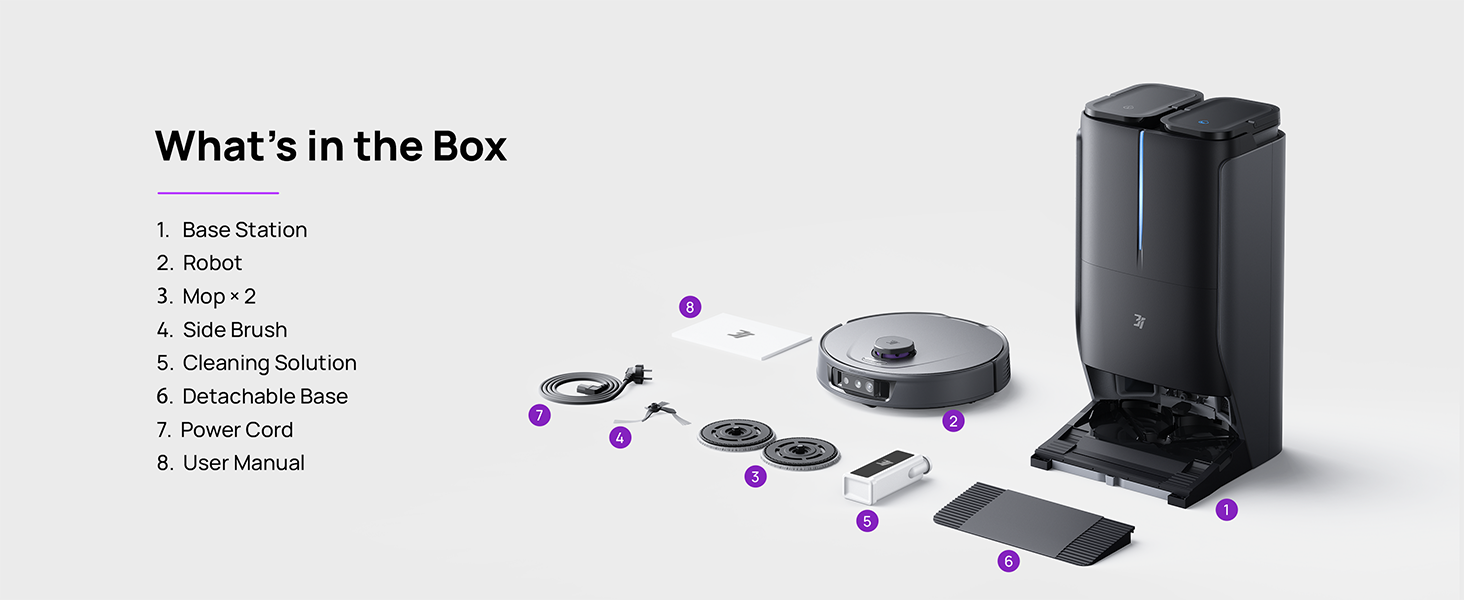
Figure 3.1: Contents of the 3i P10 Ultra package.
3.2 Robot Vacuum Features
- Швабра UltraReach: The auto-extending mop system cleans edges and corners thoroughly. Dual mops spin at 220 RPM for effective stain removal.
- 18,000 Pa Suction: Provides powerful suction for deep cleaning on various floor types, including carpets and hard floors. Features smart carpet detection to boost suction and lift mops.
- Універсальна автоматизована станція: Offers automatic hot-water mop washing, hot air drying, solution adding, and hands-free dust collection for up to 70 days.
- Розширена навігація: Utilizes LiDAR for 3D mapping, dual 3D structured light, and an AI camera for obstacle avoidance, threshold crossing, and collision resistance.
- DirtScan на базі штучного інтелекту: Identifies over 100 household objects and messes, adapting cleaning methods for optimal results, even in low light conditions.
- Догляд за волоссям: Equipped with anti-tangle brushes and a TangleCut blade to prevent hair from wrapping around components.
- Smart Route Planning: Learns home layouts for efficient cleaning routes. Supports scheduled cleaning, no-go zones, and app control. Compatible with Alexa and Google Assistant.
- З'єднання Wi-Fi: Supports both 2.4G and 5G Wi-Fi networks.

Малюнок 3.2: Верх view of the 3i P10 Ultra Robot Vacuum.

Figure 3.3: The 3i P10 Ultra Base Station.
4. Налаштування
4.1 Розпакування та розміщення
- Акуратно вийміть усі компоненти з упаковки.
- Choose a suitable location for the base station. Ensure it is placed against a wall, on a hard, level surface, with at least 0.5 meters (1.6 feet) of clear space on both sides and 1.5 meters (4.9 feet) in front. Avoid areas with direct sunlight or strong Wi-Fi interference.
- Connect the power cord to the base station and plug it into a power outlet.
4.2 Підготовка робота
- Install the side brushes by pressing them into their slots until they click.
- Attach the mop pads to the mop holders on the robot.
- Place the robot onto the base station to charge. Ensure the charging contacts align. The robot will announce its charging status.
4.3 Встановлення та підключення програми
- Download the 3i app from your mobile device's app store (iOS or Android).
- Open the app and follow the on-screen instructions to create an account and add your 3i P10 Ultra robot.
- Ensure your phone is connected to a 2.4GHz or 5GHz Wi-Fi network during the pairing process.
5. Інструкція з експлуатації
5.1 Початкове очищення та картографування
For the first use, allow the robot to complete a full cleaning cycle to create a map of your home. This map is crucial for advanced features.

Figure 5.1: Precision 3D Mapping in the 3i App.
5.2 Запуск циклу очищення
- Через робота: Натисніть кнопку живлення на роботу один раз, щоб розпочати або призупинити прибирання.
- Через додаток: Open the 3i app, select the desired cleaning mode (Vacuum, Mop, Vac & Mop, AI Auto, Custom), and tap 'Start'.
- За допомогою голосового керування: Use compatible voice assistants (Alexa, Google Assistant) with commands like "Hey Google, start vacuuming."

Figure 5.2: Using voice control to operate the 3i P10 Ultra.
5.3 Функції програми
The 3i app provides extensive control and customization options:
- Налаштування очищення: Schedule cleaning, select rooms, set no-go zones, customize carpet cleaning.
- Налаштування карти: View 3D maps, quick mapping, multi-floor maps, edit rooms and furniture.
- Station Settings: Customize dust collection, mop washing, auto-drying, and TangleCut.
- Інші налаштування: Do Not Disturb mode, Smart Route Planning, Pet Recognition, Child Lock.
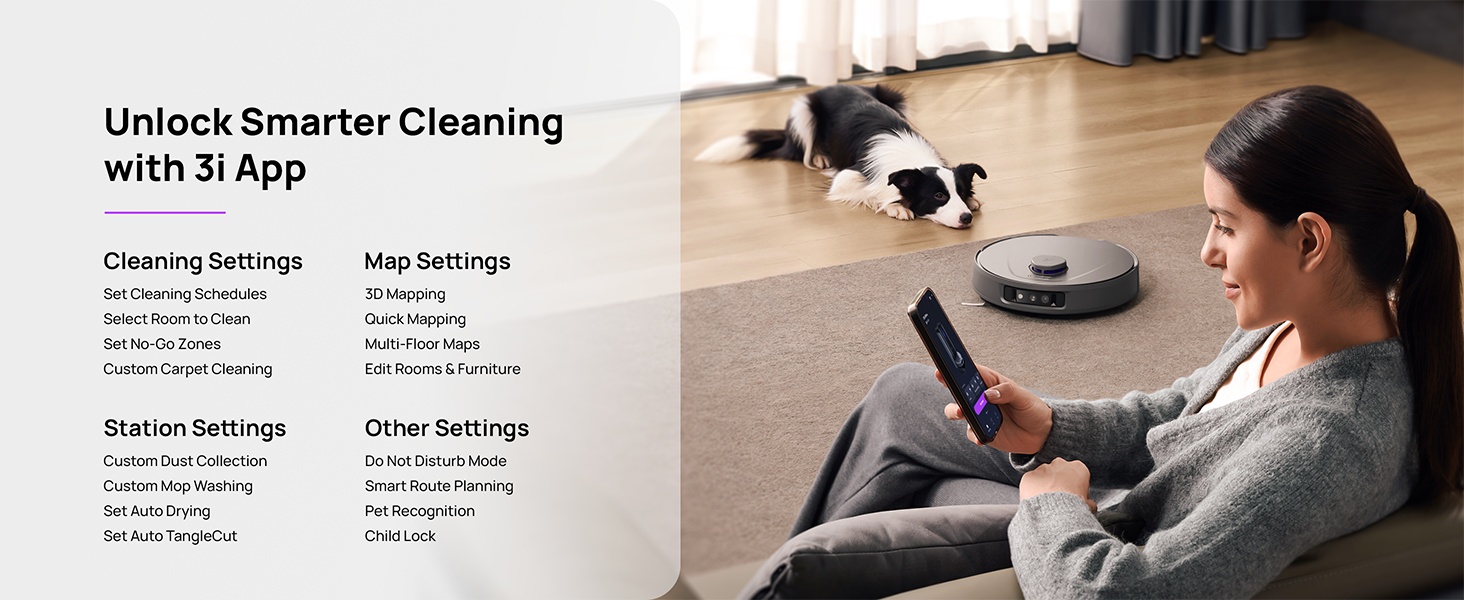
Figure 5.3: The 3i App interface for smart cleaning.
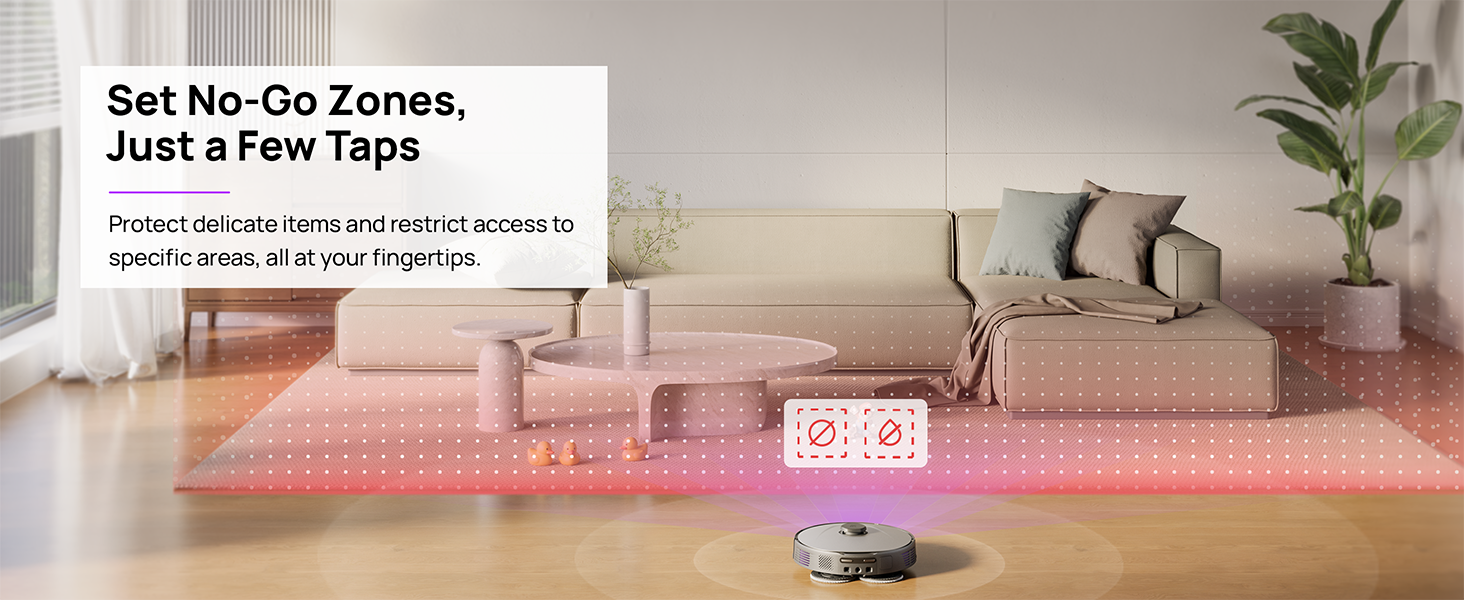
Figure 5.4: Setting No-Go Zones in the 3i App.
6. Технічне обслуговування
Regular maintenance ensures optimal performance and extends the lifespan of your 3i P10 Ultra.
6.1 Технічне обслуговування базової станції
- Спорожнення сміттєвого бака: The base station automatically empties the robot's dustbin into a 3L bag. Replace the dust bag approximately every 70 days, or as indicated by the app.
- Миття та сушіння шваброю: The base station automatically washes mop pads with 140°F / 60°C hot water and dries them with hot air (131°F / 55°C) after each cleaning cycle. Ensure the clean and dirty water tanks are properly installed.
- Water Tank Refilling: The extra-large 4L clean water tank automatically refills the robot. Refill the clean water tank as needed. The base station also collects dirty water into a separate wastewater tank. Empty the wastewater tank regularly.
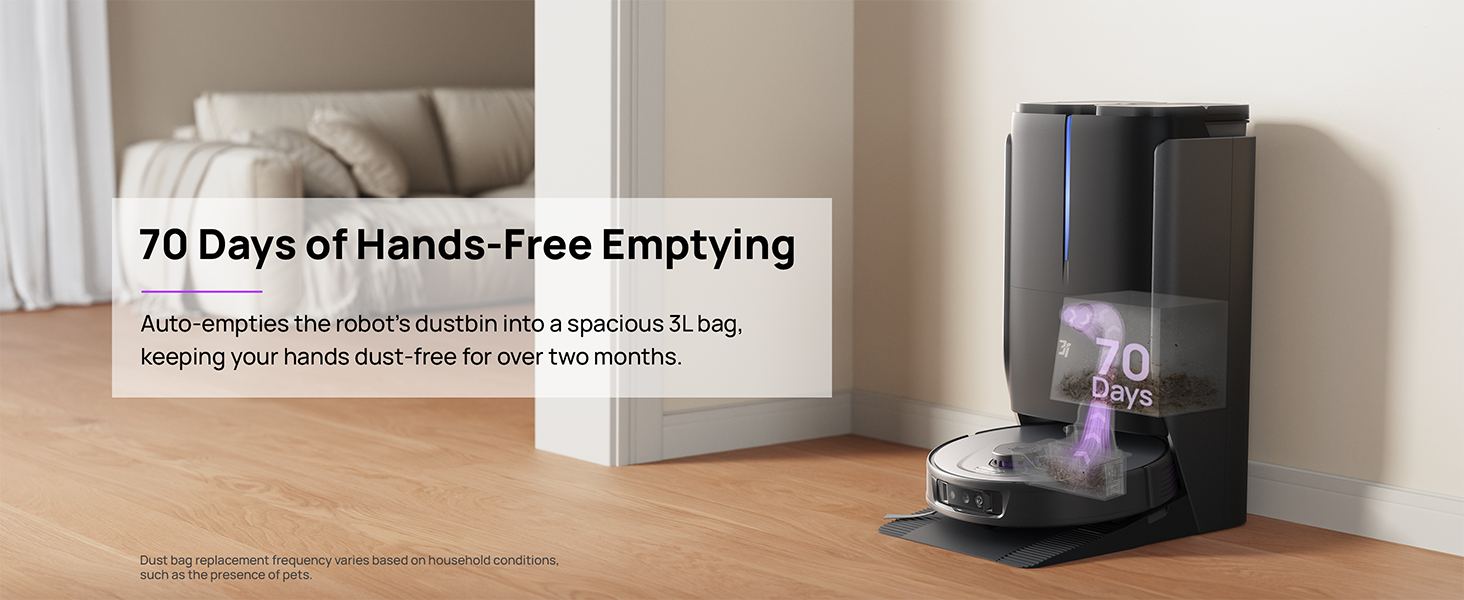
Figure 6.1: Automatic dustbin emptying at the base station.
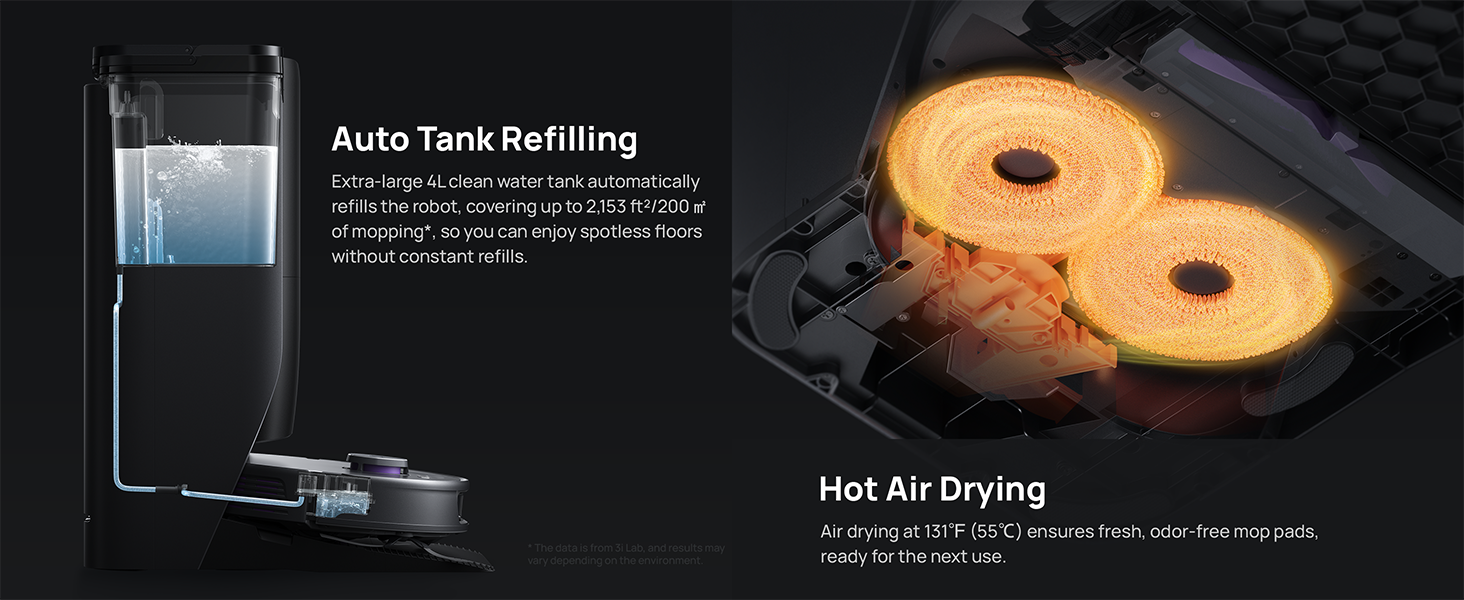
Figure 6.2: Auto tank refilling and hot air drying process.
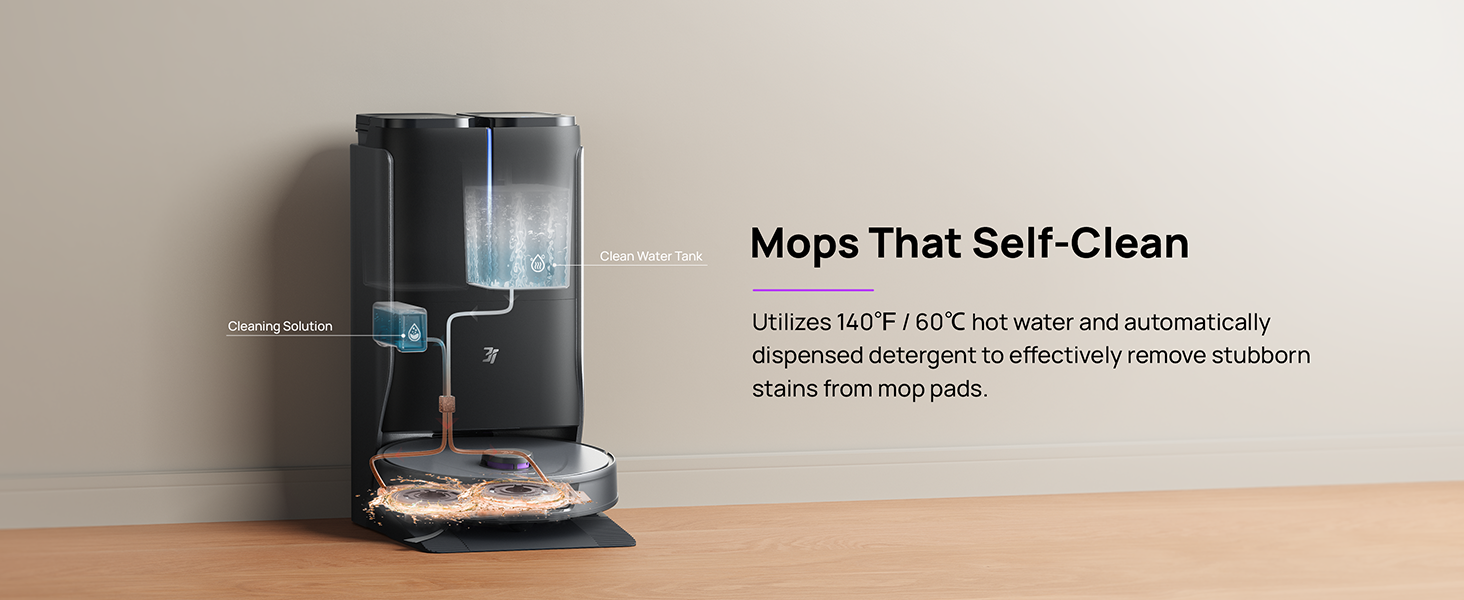
Figure 6.3: Mop self-cleaning function.
6.2 Технічне обслуговування компонентів робота
- Основна щітка: Regularly check the main brush for tangled hair or debris. Use the cleaning tool provided to remove any obstructions. The TangleCut blade helps prevent excessive tangling.
- Бічні щітки: Inspect side brushes for wear or damage. Clean them periodically and replace if necessary.
- Килимки для швабри: Although self-cleaned, inspect mop pads for excessive wear or stubborn stains. Replace them when their cleaning effectiveness diminishes.
- Фільтр: The filter is washable. Remove and rinse it under running water. Allow it to air dry completely before reinstalling.
- Датчики: Wipe all sensors (LDS, anti-drop, wall-following, charging contacts) with a clean, dry cloth to ensure proper function.
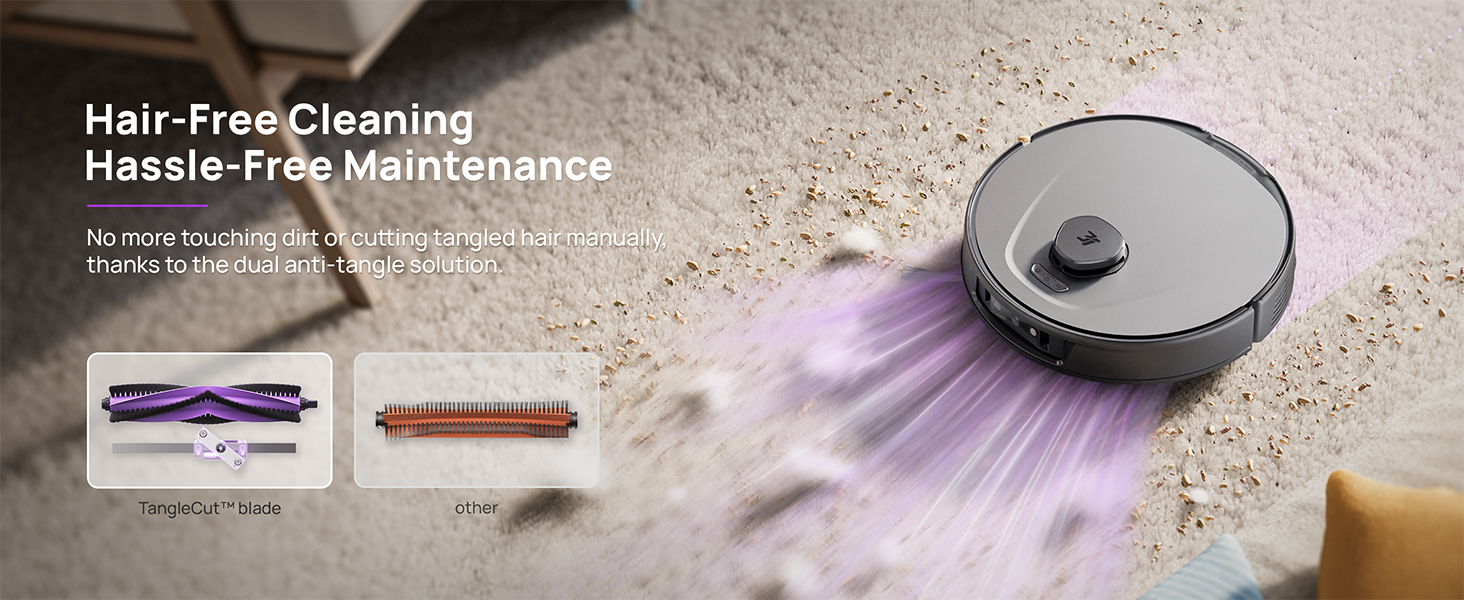
Figure 6.4: Hair-free cleaning with anti-tangle design.
7. Вирішення проблем
If you encounter issues with your 3i P10 Ultra, refer to the following common problems and solutions:
| проблема | Можлива причина | Рішення |
|---|---|---|
| Робот не вмикається. | Низький заряд батареї; кнопка живлення натиснута неправильно. | Помістіть робота на зарядну док-станцію; натисніть і утримуйте кнопку живлення протягом 3 секунд. |
| Робот не може знайти зарядну док-станцію. | Dock is obstructed or too far; Poor Wi-Fi signal. | Ensure dock is in an open area; Check Wi-Fi connection. |
| Ефективність очищення низька. | Dustbin full; Brushes tangled; Filter clogged; Mop pads dirty. | Empty dustbin; Clean brushes; Clean/replace filter; Clean/replace mop pads. |
| Робот часто застрягає. | Obstacles on floor; Sensors dirty. | Clear floor of obstacles; Clean all sensors. |
| Проблеми з підключенням до програми. | Неправильний пароль Wi-Fi; проблеми з маршрутизатором; робот не в мережі. | Verify Wi-Fi password; Restart router; Restart robot; Re-pair device in app. |
For further assistance, please refer to the 3i app's help section or contact customer support.
8. Технічні характеристики
| Особливість | Деталь |
|---|---|
| Бренд | 3i |
| Назва моделі | 3i P10 Ультра робот-пилосос |
| Розміри виробу (робот) | 13.78 см (Д) x 13.78 см (Ш) x 3.94 см (В) |
| Product Dimensions (Station) | 12.2 см (Д) x 18.43 см (Ш) x 23.39 см (В) |
| Вага товару | 37.3 фунта |
| Термін служби батареї | 180 хвилин |
| Тип фільтра | Можна мити |
| Рекомендація щодо поверхні | Килим, мармур, дерево, плитка |
| Потужність всмоктування | 18,000 Па |
| Навігаційна система | LDS LiDAR, Dual 3D Structured Light, AI Camera |
| Підтримка Wi-Fi | 2.4G і 5G |

Figure 8.1: Dimensions of the 3i P10 Ultra Robot and Base Station.
9. Гарантія та підтримка
For warranty information, please refer to the warranty card included with your product or visit the official 3i website. For technical support, troubleshooting beyond this manual, or to inquire about replacement parts, please contact 3i customer service through the contact information provided on their official website or within the 3i app.