1. Вступ
The Hama WM-450 Multi-Device Wireless Mouse is an optical mouse designed for versatile use across multiple devices. It features 7 buttons, a scroll wheel, and supports wireless connectivity via Bluetooth (two channels) and a 2.4 GHz radio frequency (one channel) using a USB-A receiver. This allows simultaneous connection to up to three devices, with quick switching between them. An integrated AI Assist button enhances productivity by activating an inter-program AI assistant. The mouse is designed for comfortable and silent operation.

Зображення 1.1: закінченоview of the Hama WM-450 mouse highlighting its key features: Bluetooth connectivity, 10-meter wireless range, USB-A receiver, and battery power.
2. Налаштування
2.1 Встановлення батареї
- Знайдіть батарейний відсік на нижній стороні миші.
- Відкрийте кришку батарейного відсіку.
- Insert the two AAA batteries (included) according to the polarity markings (+/-) inside the compartment.
- Надійно закрийте кришку батарейного відсіку.
2.2 Увімкнення/вимкнення
Slide the ON/OFF switch, located on the underside of the mouse, to the 'ON' position to power on the mouse. Slide it to 'OFF' when not in use to conserve battery life.
2.3 Connecting via USB-A Receiver (2.4 GHz Radio)
- Remove the USB-A receiver from its storage slot on the underside of the mouse.
- Підключіть приймач USB-A до вільного порту USB-A на вашому комп’ютері, ноутбуці або сумісному пристрої.
- The mouse should be automatically recognized and ready for use. This connection uses the 2.4 GHz radio channel.
2.4 Підключення через Bluetooth
The mouse supports two Bluetooth channels for connecting to different devices.
- Переконайтеся, що миша увімкнена.
- Press the channel switch button (usually on the underside or top of the mouse) to select either Bluetooth Channel 1 or Bluetooth Channel 2. The corresponding indicator light will flash.
- On your device (PC, tablet, smartphone), go to Bluetooth settings and enable Bluetooth.
- шукати new devices. The mouse should appear as 'Hama WM-450' or similar.
- Виберіть мишу для сполучення. Дотримуйтесь будь-яких підказок на екрані.
- Once paired, the indicator light will stop flashing and remain solid for a few seconds, indicating a successful connection.

Image 2.1: The underside of the Hama WM-450 mouse, illustrating the battery compartment, the ON/OFF switch, and the integrated storage for the USB-A receiver.
3. Операційна
3.1 Основні функції
- Клацніть лівою кнопкою миші: Первинний відбір та активація.
- Клацніть правою кнопкою миші: Доступ до контекстних меню.
- Колесо прокрутки: Прокручує документи та web pages. The high-quality aluminum scroll wheel provides precise control.
- Кнопки безшумного натискання: Ліва та права кнопки керування призначені для безшумної роботи, що зменшує шум у тихому середовищі.
3.2 Комутація кількох пристроїв
To switch between connected devices (USB-A, Bluetooth 1, Bluetooth 2), press the dedicated channel switch button on the mouse. The mouse will instantly connect to the selected device.
3.3 Side Navigation Buttons
The mouse features two practical side buttons. These buttons typically function as 'Back' and 'Forward' for easier navigation in web браузери, file explorers, and applications like Outlook.

Зображення 3.1: Крупний план view of the two side navigation buttons on the Hama WM-450 mouse, used for 'Back' and 'Forward' functions.
3.4 Налаштування DPI
The mouse includes a DPI switch button, usually located near the scroll wheel. Press this button to cycle through different sensitivity settings: 800, 1200, and 1600 DPI (Dots Per Inch). Choose the DPI setting that best suits your preference and task.
3.5 AI Assist Button
The dedicated AI Assist button activates an inter-program AI assistant, designed to enhance productivity. Refer to your device's software documentation for specific functionalities enabled by this feature.
4. Технічне обслуговування
4.1 Очищення
Для очищення миші використовуйте м’яку, суху тканину без ворсу. Для стійкого бруду злегкаampen the cloth with water or a mild cleaning solution. Avoid using harsh chemicals, abrasive cleaners, or excessive moisture, as these can damage the mouse.
4.2 Заміна батареї
When the mouse performance degrades or the indicator light signals low battery, replace the two AAA batteries. Always use fresh batteries of the same type.
4.3 Зберігання даних на USB-приймачі
When transporting the mouse or not using the 2.4 GHz radio connection, store the USB-A receiver in its dedicated slot on the underside of the mouse to prevent loss.
5. Вирішення проблем
- Миша не реагує:
- Переконайтеся, що миша увімкнена.
- Перевірте рівень батареї та замініть її, якщо необхідно.
- For USB-A connection, ensure the receiver is securely plugged into a working USB port. Try a different USB port.
- Для підключення Bluetooth переконайтеся, що Bluetooth увімкнено на вашому пристрої, а миша сполучена. Спробуйте повторно сполучити мишу.
- Ensure the correct channel (USB-A, BT1, BT2) is selected on the mouse.
- Періодичне з'єднання:
- Move the mouse closer to the receiver/device. The effective range is up to 10 meters, but obstacles can reduce this.
- Avoid using the mouse near other wireless devices that might cause interference.
- Рух курсора нерівномірний або повільний:
- Очистіть оптичний датчик на нижній стороні миші.
- Ensure you are using the mouse on a suitable surface. Highly reflective or transparent surfaces may affect performance.
- Adjust the DPI setting to a higher value if the cursor is too slow.
- Side buttons or AI Assist button not working:
- Ensure your operating system or application supports these functions.
- Check for any specific software or driver requirements for your device.
6. Технічні характеристики
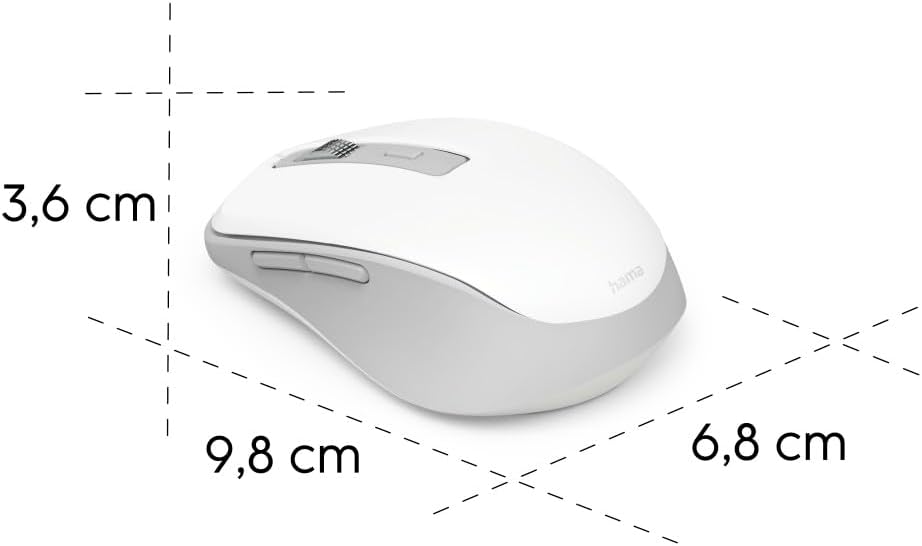
Image 6.1: Dimensional diagram of the Hama WM-450 mouse, indicating its length, width, and height.
| Бренд | Хама |
| Назва моделі | WM-450 |
| Номер моделі | 00173080 |
| Технологія підключення | Bluetooth, 2.4 GHz Radio (USB-A) |
| Дальність бездротового зв'язку | До 10 метрів |
| Сенсорні технології | Оптичний |
| Налаштування DPI | 800, 1200, 1600 |
| Кількість кнопок | 7 (including scroll wheel click) |
| Джерело живлення | 2 батареї AAA (у комплекті) |
| Розміри (Д x Ш x В) | 9.8 x 6.8 x 3.6 см (приблизно) |
| вага | 140 грами |
| Сумісні пристрої | PC, Tablet, Laptop, Smartphone, iPad |
| Особливості | Multi-device connectivity (3 devices), AI Assist button, Silent click buttons, Side navigation buttons, Retractable USB receiver, Polymer-coated mouse feet, High-quality aluminum scroll wheel. |
| Склад матеріалу | At least 20% recycled materials |
| Упаковка | 100% plastic-free |
7. Гарантія та підтримка
For warranty information, technical support, or service inquiries, please refer to the warranty card included with your product or visit the official Hama webсайт. Контактна інформація служби підтримки клієнтів зазвичай доступна на сайті виробника webсайт.


